Why AI Sauce-Pour Videos Look Fake—and How to Fix the Motion
AI sauce-pour videos often fail when the stream changes shape, the serving utensil drifts, or the food deforms on contact. This guide shows food marketers how to design a stable source image, prompt believable liquid motion in Hailuo, and troubleshoot common physics errors.
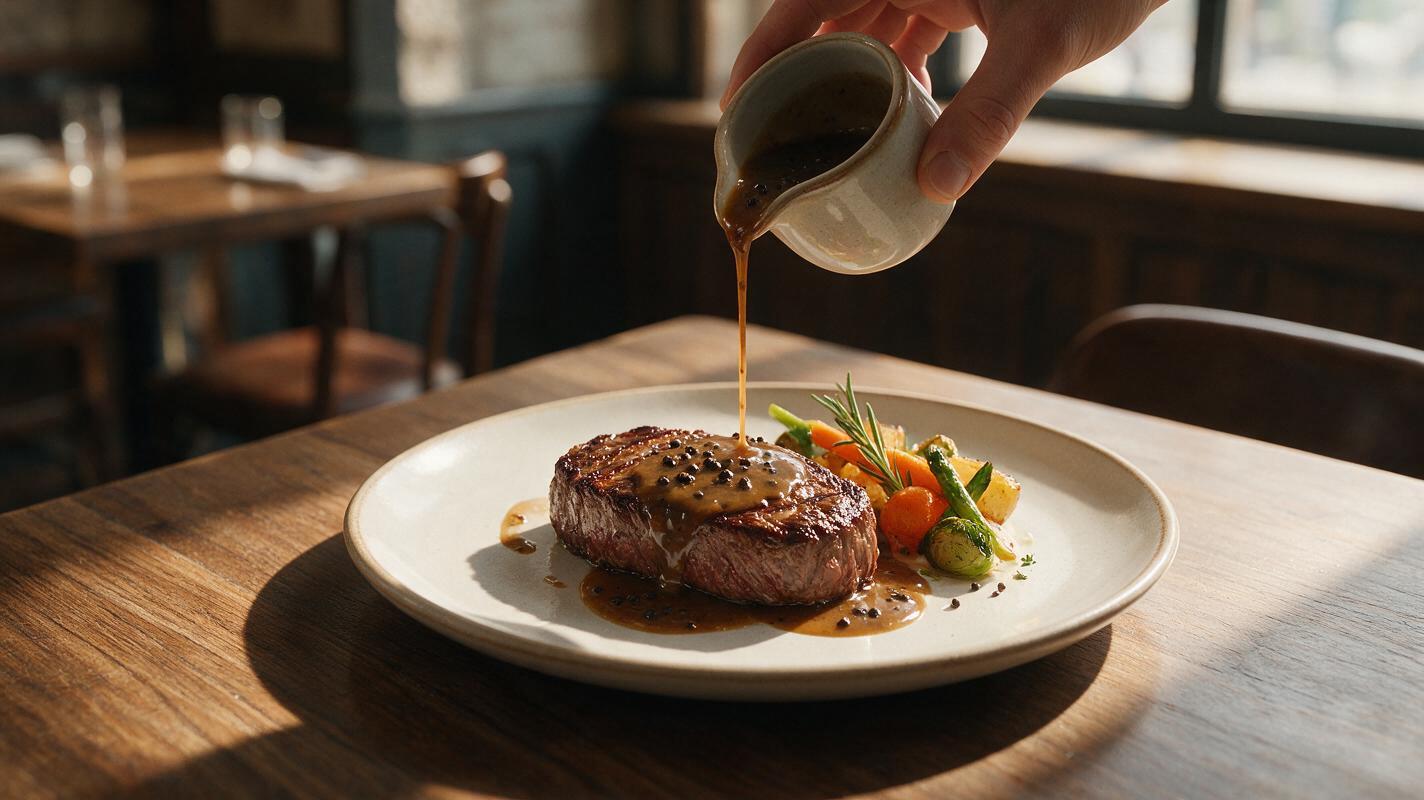
Table of contents
Make the pour look appetizing, not physically impossible
A convincing sauce-pour shot needs one stable utensil, one continuous stream, a visible landing point, and food that stays recognizably unchanged.
Sauce pours are effective in food advertising because they communicate heat, richness, texture, and freshness in seconds. Yet AI-generated versions frequently produce a spoon that melts into the frame, a stream that splits into ribbons, or a dish that swells as soon as the sauce lands.
The solution is not simply adding “realistic liquid physics” to a long prompt. A reliable clip begins with a source image designed for motion, followed by a restrained animation prompt that defines where the sauce starts, where it lands, and what must remain still. Hailuo is a practical model to test for this controlled image to video task because the starting frame can establish the dish, utensil, lighting, and composition before motion is introduced.
Why sauce-pour generations break
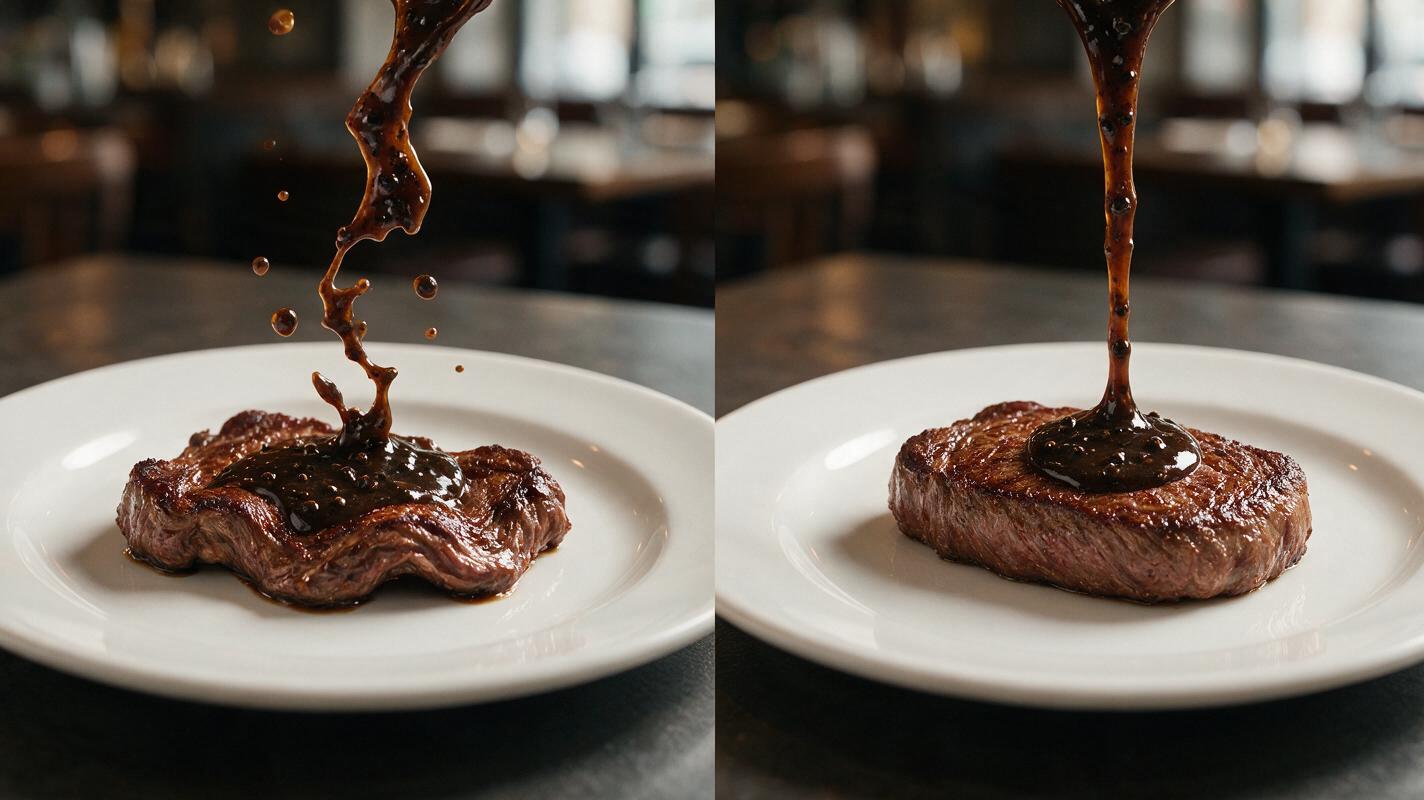
A sauce pour contains several connected events. The utensil tilts, gravity pulls the liquid downward, the stream narrows, the sauce contacts the food, and a small amount spreads across the surface. If the prompt describes only the overall mood, the model must invent every physical relationship.
| Visible failure | Likely cause | Best correction |
|---|---|---|
| Stream appears from empty space | The source vessel or spoon is cropped, hidden, or poorly aligned | Show the complete pouring edge and clear liquid origin |
| Sauce becomes a wide sheet | The prompt asks for dramatic or abundant motion | Request one narrow, continuous stream |
| Food changes shape | The dish is treated as part of the moving action | Explicitly lock plating, ingredients, and portion size |
| Spoon or bottle warps | Too much hand, utensil, and camera movement occurs at once | Use a fixed vessel and minimal tilt |
| Sauce passes through the food | The landing point is ambiguous | Name a precise contact area on the dish |
| Clip feels frantic | Fast pour, camera push, steam, and garnish movement compete | Keep one primary action and a locked camera |
The most useful rule is simple: one clip should feature one dominant movement. If the sauce is pouring, avoid simultaneously requesting a rotating plate, flying herbs, aggressive steam, and a sweeping camera move.
Build a source frame with a readable liquid path
Start with a finished food photograph or generated still that already looks usable as an advertisement. The animation model should not be expected to repair plating, invent a hand, redesign the serving vessel, and simulate liquid at the same time.
A motion-ready source frame should contain:
- A visible origin: the lip of a jug, spoon, ladle, squeeze bottle, or piping bag.
- A short travel distance: keep the utensil reasonably close to the food so the stream has less room to drift.
- A clear landing area: leave visible space on the steak, pancake, dessert, pasta, or plated garnish where the sauce will arrive.
- Simple separation: use tonal contrast between the sauce, food, utensil, and background.
- Stable framing: avoid cutting through the pouring edge or placing it against a visually busy prop.
For a vertical social post, place the food in the lower two-thirds and reserve the upper area for the utensil and short liquid path. For a horizontal banner, let the pour enter from one upper corner while preserving clean negative space for approved campaign copy added later in a design tool.
Preservation note: if the shot contains branded packaging, printed labels, or exact menu claims, keep those elements outside the generative motion area whenever possible. Verify all visible text against the approved artwork before publishing.
Prompt the physical event, not just the visual style
A useful Hailuo motion prompt follows a compact structure: source action + stream behavior + contact behavior + locked elements + camera instruction. This gives the model a physical sequence without overloading it with decorative language.
A ceramic sauce jug tilts slightly and pours one narrow continuous stream of glossy peppercorn sauce onto the center of the plated steak. The sauce makes contact with the steak and spreads subtly across the top surface without splashing. The steak, fries, garnish, plate, jug, and background keep their original shape and position. Locked camera, realistic gravity, natural commercial food motion.Keep the action modest. “Tilts slightly” is easier to preserve than “swings dramatically into frame.” “Spreads subtly” is more controlled than “explodes across the plate.” Words such as continuous, narrow, single, and subtle help constrain the event.
When using an ai video generator, generate several restrained variations before increasing motion. A nearly correct clip with a slow pour is usually easier to use than a spectacular clip containing warped food or a disappearing utensil.
Prompt for chocolate sauce over a dessert
A small metal spoon remains above the plated vanilla cheesecake and releases one smooth ribbon of warm dark chocolate sauce onto the top center. The chocolate follows gravity, lands cleanly, and forms a small glossy pool. The cheesecake slice, crumb texture, berries, plate, spoon, and background remain unchanged. No camera movement, no splashing, no object deformation.Prompt for tomato sauce over pasta
A stainless-steel ladle tilts gently and pours one cohesive stream of thick tomato sauce onto the center of the pasta. The sauce lands on the noodles and settles naturally without changing the pasta shape or portion. The ladle stays rigid, the plate remains fixed, and the garnish does not move. Static close-up camera, realistic weight and viscosity.Prompt for syrup over pancakes
A glass syrup pitcher tilts minimally and pours one thin amber stream onto the top pancake. The syrup lands beside the butter and flows slowly along the existing pancake surface. Preserve the pancake stack, butter cube, berries, plate, pitcher, and lighting exactly. Locked camera, gentle natural motion, no extra syrup streams.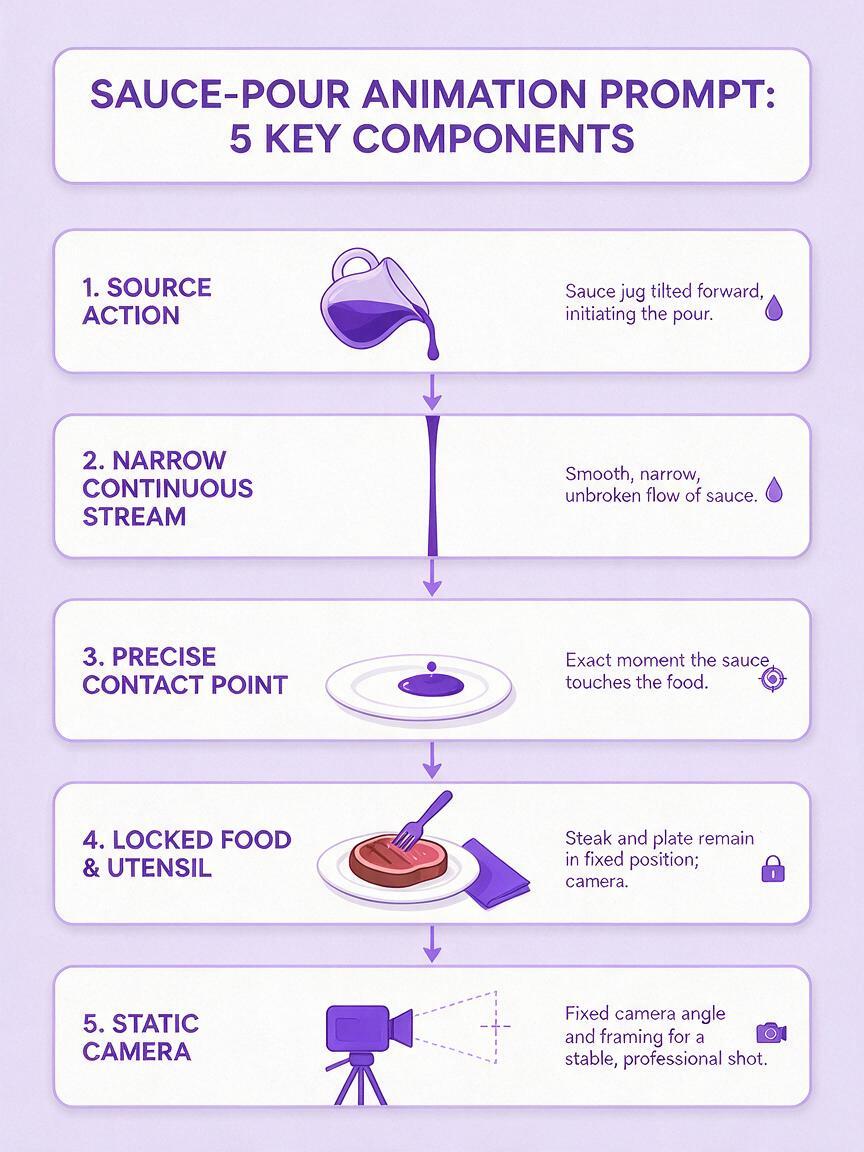
Match the prompt to the sauce texture
Not every sauce should move in the same way. The language used for maple syrup can make cheese sauce look watery, while a “thick ribbon” may make broth resemble melted plastic.
| Liquid type | Useful motion language | Language to avoid |
|---|---|---|
| Thin glaze or dressing | thin stream, light flow, small droplets at contact | heavy ribbon, dense fold |
| Cream sauce | smooth cohesive stream, gentle spread, soft sheen | watery splash, rapid cascade |
| Chocolate or caramel | slow glossy ribbon, controlled pool, viscous flow | mist, spray, turbulent splash |
| Tomato sauce | thick continuous pour, natural weight, subtle settling | transparent stream, perfectly smooth plastic surface |
| Clear syrup | thin amber strand, reflective highlights, slow surface flow | opaque cream, foamy liquid |
Texture terms should describe visible behavior rather than make unsupported technical claims. If a generated stream is too elastic, replace “ribbon” with “continuous stream.” If it looks watery, add “cohesive” and “slow” while removing words such as “splashing” or “cascading.”
Control the camera before adding secondary motion
A locked camera is the safest starting point because it gives the model more capacity to preserve the plate and simulate the pour. Once a stable result exists, test a separate variation with a very gentle push-in. Do not request a push-in, orbit, rack focus, utensil entrance, steam plume, and garnish movement in the first generation.
For short restaurant social clips, the pour should begin early enough to establish the action quickly, but the final frame also needs a brief moment of visual rest. If the generation ends while the sauce is still expanding, trim the clip before the unstable section or choose a variation where the stream stops cleanly.
- Use locked camera for menu boards, product pages, and compositing.
- Use a gentle push-in only after the food remains stable.
- Avoid an orbiting camera when the starting image does not reveal the hidden sides of the dish.
- Keep steam subtle so it does not merge with pale sauce or utensils.
Diagnose the first bad frame instead of judging only the ending
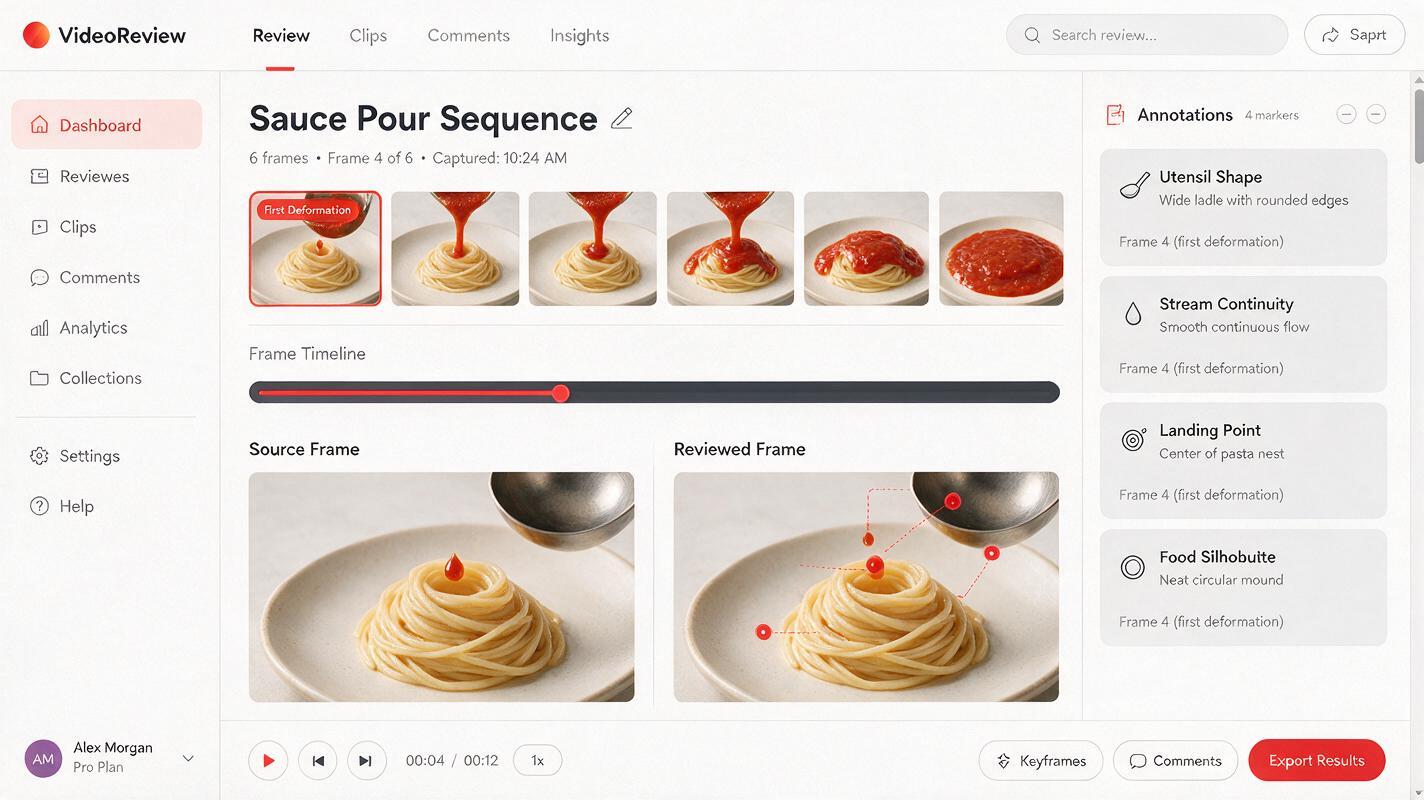
Review the clip frame by frame and find the earliest visible error. That moment usually reveals which part of the prompt or source image needs correction.
If the utensil changes before the liquid appears, simplify its motion or regenerate the starting image with a clearer silhouette. If the stream is stable until contact, specify the exact landing point and reduce spreading. If the plate changes only during a camera move, return to a static camera. If the entire dish pulses from the beginning, the generation is too unconstrained; shorten the motion description and repeat the preservation language.
- Check the pouring edge and utensil shape.
- Follow the stream from origin to contact.
- Compare the food silhouette with the source frame.
- Inspect garnish count, plate rim, and portion size.
- Watch the final frames for spreading, duplication, or sudden collapse.
Do not try to repair every problem with more adjectives. Change one variable at a time: source composition, utensil movement, stream width, landing behavior, or camera motion. Controlled testing makes it clear which instruction improved the result.
Prepare the final clip for restaurant marketing
A technically smooth pour can still be unsuitable for commercial use. Compare the animated dish with the real product or approved menu photograph. The clip should not imply a larger portion, extra toppings, a different sauce quantity, or ingredients that customers will not receive.
Before export, crop for the intended placement and leave text insertion to a design or editing tool rather than asking the video model to render prices and promotional copy. Add sound separately if needed: a subtle pour, quiet plate ambience, or restrained music will usually support the food better than an exaggerated splash effect.
Once your source image and motion prompt are ready, try these models for free and compare several low-motion variations before selecting the final advertisement.
Final checklist
- The pouring edge is fully visible and keeps its original shape.
- Only one continuous sauce stream appears.
- The stream has a precise, believable landing point.
- The food, portion, garnish, and plate do not morph.
- The sauce behavior matches its expected thickness.
- The camera remains locked until the core motion is stable.
- The clip does not add ingredients or misrepresent the served dish.
- Prices, logos, and campaign copy are added from approved assets.
Keywords
AI food video, sauce pour video, Hailuo prompts, food advertising, restaurant social media, food animation, image to video