How to Block Two Characters in an AI Short Drama Without Face Blending
Two-character AI scenes often fail when bodies overlap, faces occupy similar screen space, or both performers move at once. This tutorial presents a reference-first blocking workflow that separates identity, movement, and screen direction before video generation begins.
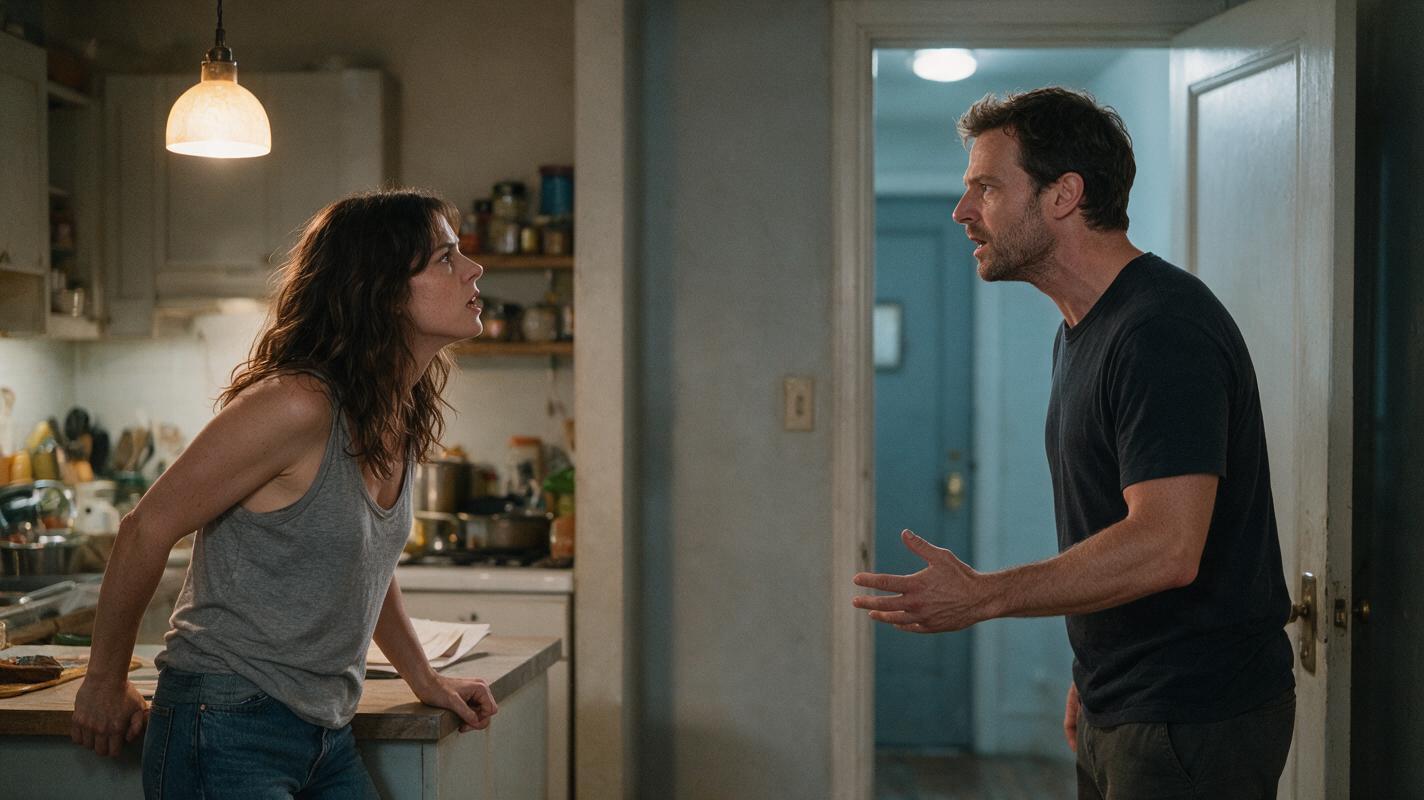
Table of contents
Build the separation before you generate the performance
The safest way to stage two characters in an AI short drama is to treat blocking as an identity-control system. Give each character a fixed screen zone, distinct silhouette, separate movement window, and unambiguous foreground or background position before asking a video model to animate the scene.
This matters because a prompt such as two people argue in a kitchen leaves too many decisions unresolved. The model must invent who stands where, who moves first, which face remains visible, and how overlapping bodies separate again. A stronger workflow resolves those choices in reference images and boundary frames.
Core rule: generate stable spatial relationships first. Add acting only after each character can be identified from position, costume, silhouette, and screen direction.
Step 1 — Convert the dialogue into a blocking contract
Start with the dramatic exchange, but remove performance adjectives temporarily. Write down only the physical facts that must remain stable throughout the scene.
| Blocking variable | Character A | Character B |
|---|---|---|
| Screen zone | Left third | Right third |
| Depth | Foreground | Midground |
| Primary movement | Turns away | Advances one pace |
| Costume silhouette | Light fitted jacket | Dark loose overshirt |
| Hands | Visible near counter | Below chest |
| Exit direction | Frame left | Remains frame right |
The contract should describe one dominant action per shot. If both characters cross the frame, gesture, turn, and exchange an object simultaneously, split the action into separate shots. A cut is usually more controllable than a continuous generation containing several intersections.
For a short drama from script, mark each line as one of four shot functions: speaker, listener, shared spatial fact, or movement consequence. The labels reveal whether a two-shot is actually necessary. Many exchanges need only one establishing two-shot followed by singles and reaction inserts.
Step 2 — Lock one reference sheet for each character
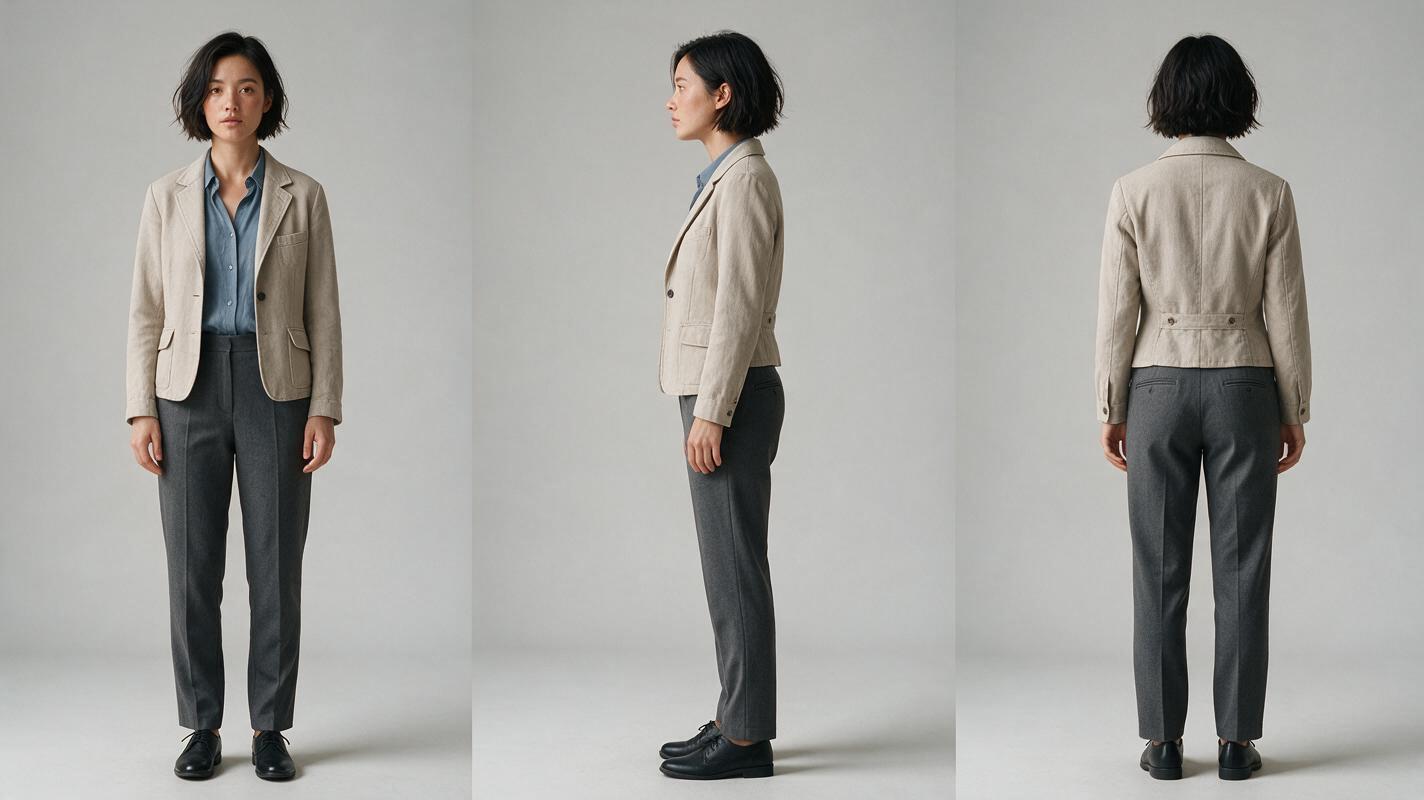
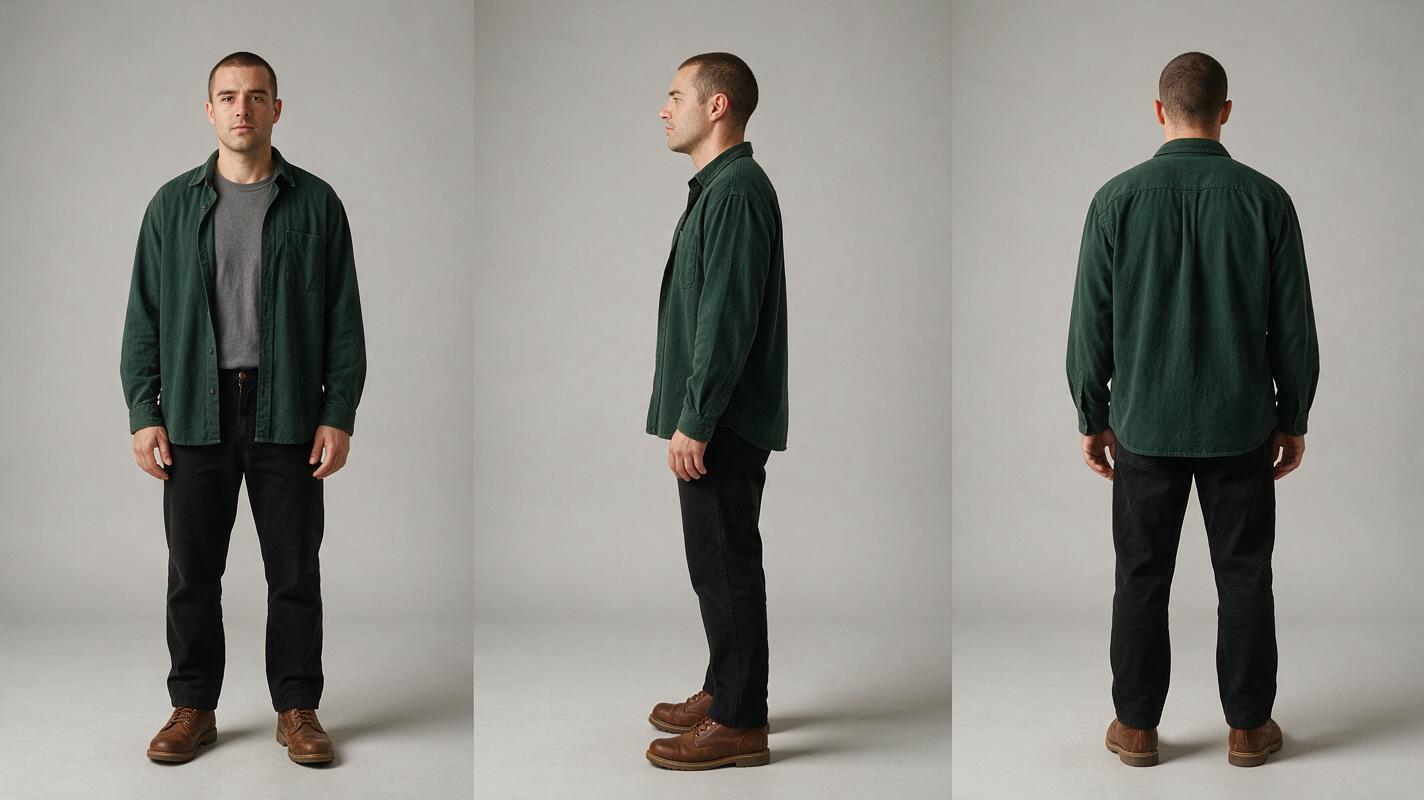
Build separate identity references before placing both people in the same scene. Use an ai image generator to create a front, side, and back view for each character against the same neutral background.
Keep hairstyle, age range, facial structure, costume layers, footwear, and accessories visible. Avoid dramatic lighting, cropped limbs, crossed arms, or props that hide the silhouette. Character A and Character B should also have clearly different values and shapes. A pale fitted jacket beside a dark loose overshirt is easier to track than two nearly identical black coats.
Character A reference sheet prompt
Photorealistic three-panel character reference sheet of the same fictional woman in every panel, early thirties, oval face, short textured black bob, light beige fitted work jacket over a muted blue shirt, charcoal trousers, plain dark shoes. Panel one front view, panel two exact left-side profile, panel three exact back view. Arms relaxed beside the body, neutral expression, full body visible, identical clothing and proportions in all panels. MANDATORY CAMERA: eye-level 85mm studio perspective with no wide-angle distortion. MANDATORY LAYOUT: three equal vertical panels arranged left to right inside one landscape 16:9 image. Neutral light-gray seamless background, soft even studio lighting, no props, no text, no logos, no interface elements.Character B reference sheet prompt
Photorealistic three-panel character reference sheet of the same fictional man in every panel, late thirties, rectangular face, close-cropped dark hair, dark forest-green loose overshirt over a gray crew-neck shirt, black straight-leg trousers, brown work boots. Panel one front view, panel two exact right-side profile, panel three exact back view. Arms relaxed beside the body, neutral expression, full body visible, identical clothing and proportions in all panels. MANDATORY CAMERA: eye-level 85mm studio perspective with no wide-angle distortion. MANDATORY LAYOUT: three equal vertical panels arranged left to right inside one landscape 16:9 image. Neutral light-gray seamless background, soft even studio lighting, no props, no text, no logos, no interface elements.Save the approved references and reuse them without rewriting identity details from memory. Prompt changes should describe the current shot, not redesign the cast.
Step 3 — Draw the scene as zones, lanes, and occlusion limits
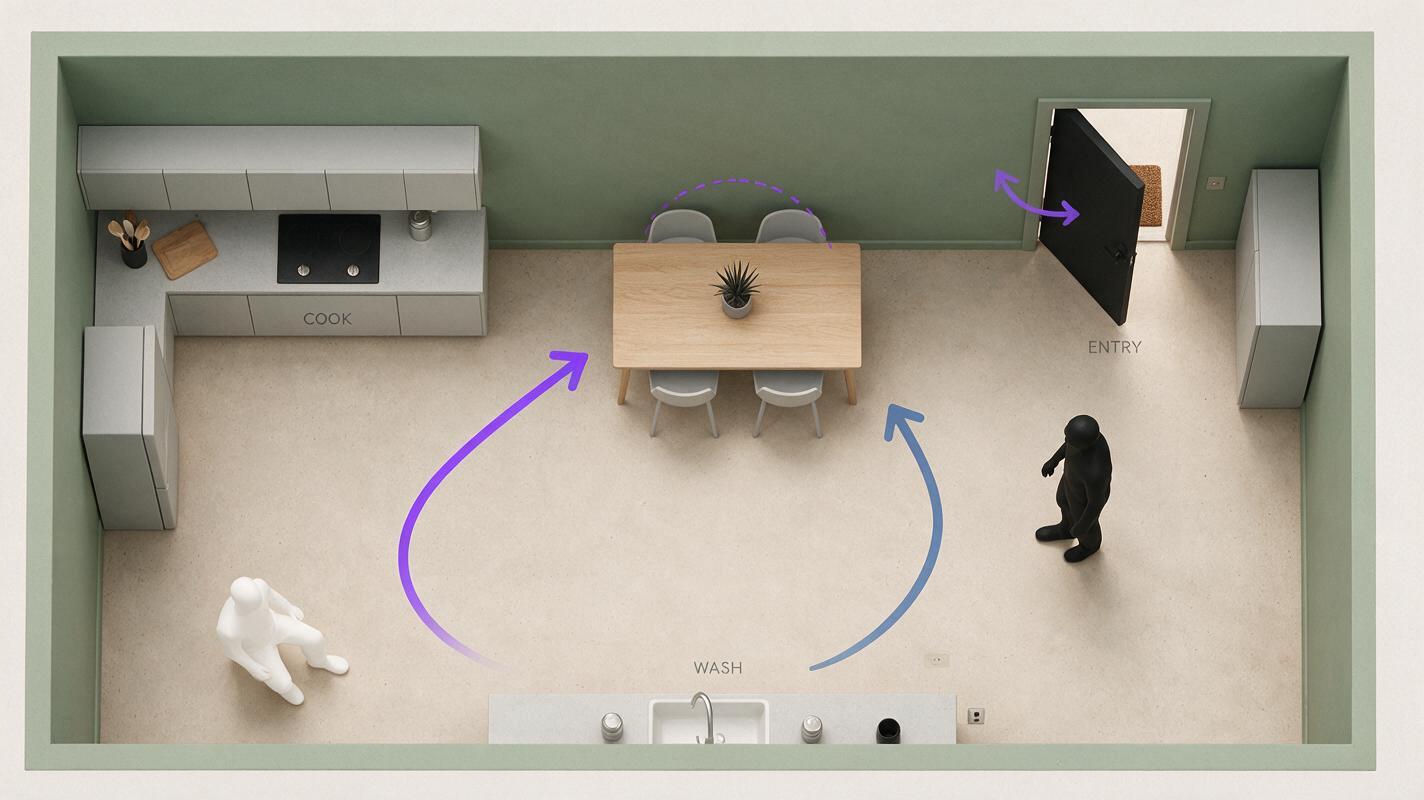
Before generating a cinematic frame, reduce the set to an overhead blocking map. Divide the composition into left, center, and right zones. Add a movement lane for each character and mark the point beyond which their silhouettes would overlap.
In a vertical drama video, the usable horizontal separation is limited. Create distance through depth instead: place one character closer to the camera on the left edge and the other deeper on the right. Avoid positioning one face directly above the other because vertical alignment can still make ownership ambiguous during motion.
Neutral blocking-map visual prompt
Clean overhead cinematic blocking diagram of a small lived-in apartment kitchen represented as realistic miniature set geometry, with counters, table, doorway, and two simple human-shaped markers in contrasting neutral clothing colors. One marker occupies the left foreground beside the counter; the other occupies the right midground near the doorway. Two separate curved movement paths stop before intersecting, with clear open space between the figures. MANDATORY CAMERA: exact top-down orthographic view, no perspective tilt. MANDATORY LAYOUT: landscape 16:9 with the complete room visible and generous margins. Soft neutral lighting, restrained editorial colors, no words, no labels, no logos, no arrows containing text, no software interface.The map is not an art frame. It is a constraint document. If two planned paths cross, decide where the edit will hide that crossing. Good options include a reaction close-up, a hand insert, a door detail, or a cut to the destination position.
Step 4 — Generate an empty location and a stable two-shot
Create the location without actors first. The empty plate establishes camera height, lens feel, practical lighting, furniture placement, doors, and safe standing zones. Once approved, use it as the environmental reference for the establishing frame.
The first two-shot should be physically quiet. Both faces need not look directly at the camera, but their profiles and silhouettes must remain readable. Ask for a clear depth offset and visible negative space between shoulders.
Cinematic editorial-realism frame inside a modest apartment kitchen at night, Character A fixed in the left foreground beside the counter and Character B fixed in the right midground near the doorway, both based on their approved reference sheets. Character A faces three-quarters toward frame right; Character B faces three-quarters toward frame left. Strong empty space separates their heads, shoulders, arms, and hands. Warm pendant light over the counter, cooler hallway light behind Character B, believable lived-in surfaces. MANDATORY CAMERA: locked eye-level medium-wide shot, 50mm lens appearance, no camera movement. MANDATORY COMPOSITION: landscape 16:9 master with both full torsos visible and no body overlap. No duplicated people, no merged faces, no extra limbs, no text, no logos.For 9:16 delivery, generate or recompose a dedicated vertical master rather than blindly cropping the horizontal image. Preserve the same left-right ownership while using foreground depth to keep both faces large enough to read.
Step 5 — Assign motion ownership one shot at a time
A two-person shot becomes unstable when both performers receive equally complex motion. Assign one character as the motion owner and the other as the stability anchor.
- Shot A: Character A turns away; Character B remains still.
- Shot B: Character B advances one pace; Character A is off-screen.
- Shot C: Character A reacts in close-up; movement is limited to breath and eyes.
- Shot D: Return to a static two-shot after the new positions are established.
When using image to video, begin from the approved boundary frame and describe only the movement that changes. Do not repeat a long biography for both characters inside every motion prompt.
Locked camera. Character A slowly turns her head and shoulders toward frame left, then stops with both hands still near the counter. Character B remains planted in the right midground with unchanged face, clothing, posture, and screen position. Preserve the empty gap between both silhouettes. No crossing, no touching, no camera movement, no new people, no costume change, no face replacement.If the model repeatedly blends an interaction, do not increase prompt complexity. Replace the continuous action with edit points: pre-contact, obscured transition, and post-contact. The audience reads the action from causality even when the risky intersection is not shown.
Step 6 — Use singles to protect identity during emotional peaks
Reserve close-ups for the strongest emotional change. Singles eliminate competition between two faces and make it easier to preserve performance ownership. Match the character's screen direction to the master: the person on frame left should generally look toward frame right, while the person on frame right looks toward frame left.
Keep the unseen partner's influence through sound, eyeline, and foreground shape. A soft shoulder edge can imply proximity, but it should not cover the speaking character's mouth, eyes, or defining facial landmarks.
Repair rule: if identity drifts only during one reaction, replace that reaction shot. Do not regenerate the entire dialogue sequence.
For an AI microdrama, this modular coverage is especially useful because rapid editing can turn controlled singles into an intense exchange without demanding a long, technically fragile two-person performance.
Step 7 — Audit faces, bodies, and screen geography separately
Review the scene in three passes instead of asking whether it simply looks good.
- Identity pass: compare hairline, face shape, costume openings, and accessories with the approved reference sheets.
- anatomy pass: inspect hands, shoulder intersections, feet, and any frame where one body passes near another.
- geography pass: confirm that left-right ownership, depth, eyelines, entrances, and exits still match the blocking contract.
Pause on the first and final frame of every generated clip. These boundary frames determine whether adjacent shots can cut together. A clip with a strong middle but an unusable final pose should be trimmed early or regenerated with a clearer stopping position.
At the high-intent testing stage, use the same references and motion prompt across several available models rather than rebuilding the scene for each test. You can try these models for free in one workspace, compare how they handle separation and motion ownership, and keep the version with the cleanest editable boundaries.
Final checklist
- Each character has a separate three-view reference sheet.
- Costumes and silhouettes are visually distinct.
- The blocking contract fixes screen zone, depth, movement, and exit direction.
- The empty location plate is approved before actors are added.
- The establishing frame contains visible negative space between bodies.
- Only one character owns complex movement in each generated shot.
- Crossings and contact actions are divided around edit points.
- Singles preserve screen direction established by the master shot.
- First and final frames pass identity, anatomy, and geography checks.
FAQ
Why do faces blend when two AI characters stand close together?
Close faces, similar clothing, intersecting silhouettes, and simultaneous movement can leave identity ownership ambiguous. Increase spatial separation, vary depth and costume value, and animate one performer at a time.
Should every dialogue scene begin with a two-shot?
No. Use a two-shot when the audience needs spatial information or a relationship change. If the location is already understood, singles and reaction shots may communicate the exchange more reliably.
Can this workflow handle hugging or fighting?
Yes, but physical contact should be divided into pre-contact, concealed contact, and post-contact shots. Use a close detail, camera occlusion, or reaction cut to bridge the most collision-prone moment.
Does the workflow change for vertical video?
The principles remain the same, but horizontal separation becomes tighter. Use foreground and background depth, staggered head heights, and dedicated 9:16 compositions instead of relying on a center crop.
Sources
Keywords
ai short drama, ai microdrama, ai short film generator, ai drama generator, short drama from script, vertical drama video