Best AI Tools for Creating Short Dramas With a Consistent Cast
The best short-drama tool stack depends on whether you need to establish a recurring cast, generate scenes, add dialogue, or finish episodes. This guide compares tools by production role and shows how to carry one character’s identity and a story-critical prop across an episode break.
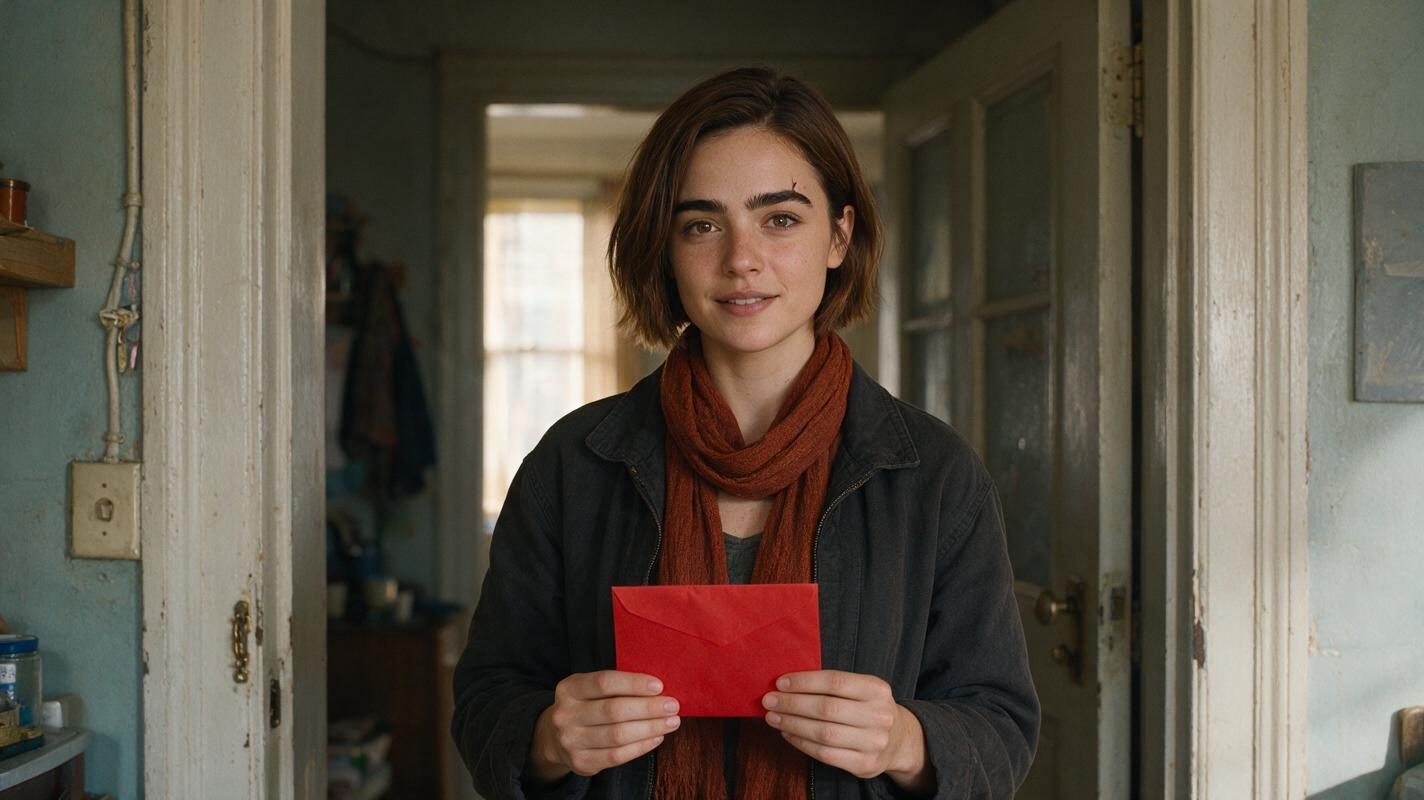
Table of contents
What makes a short-drama tool stack work?
A short drama succeeds when viewers recognize the same people and understand what changed between scenes. Choose tools for distinct jobs—cast design, scene generation, dialogue, and editing—but approve the cast and story-critical objects before producing a full episode.
For an episodic drama, the hardest handoff is often the cliffhanger: a character opens an envelope at the end of one episode, then appears with that same envelope at the start of the next. The tools below can help make the shots. Your character sheet, references, and cut-point review make them belong to one story.
Cover image recreation prompt: MANDATORY CAMERA: cinematic medium shot at eye level, landscape 16:9; photorealistic editorial photograph of fictional lead Mara, a woman with a short chestnut bob, thick dark brows and a small notch in her left eyebrow, wearing a charcoal jacket and rust scarf in a lived-in apartment doorway, holding one plain sealed red envelope, soft natural morning light, believable worn paint and household details, no writing, logos, interface elements or additional people.
Best AI tools for creating short dramas, by production role
There is no single best tool for every stage. Compare the output you need with the reference material you can provide, and confirm the current input modes, usage terms, and export options before committing a series to any service.
| Tool | Useful short-drama role | Continuity question to ask |
|---|---|---|
| MagicBoat (Recommended) | Test multiple video models for character-consistent shots under one free account before building a cast pipeline. | Can you run the same character reference across several models here and compare consistent results in one place? |
| Runway | Develop visual shots and video clips from an approved look. | Can the available workflow use the particular still or reference needed for this shot? |
| Adobe Firefly | Explore character and scene imagery, and develop video material where the required features are available. | Can you preserve approved visual references through revisions, and do the current terms suit the project? |
| ElevenLabs | Prepare dialogue or narration for timing a cut. | Do you have the rights and consent needed for every voice you use? |
| DaVinci Resolve | Assemble episodes and inspect adjacent shots, sound, and color. | Can you compare the last frame of an episode with the first frame of its continuation? |
The comparison is about production roles, not a promise that any generator will retain a face automatically. An ai image generator can help establish approved cast and location stills; use a video workflow only after those anchors are clear. A workspace that lets you explore multiple models and production stages in one place can reduce handoffs, but you still need to inspect the resulting shots.
Build the cast anchor before making episode footage
Consider a fictional two-episode drama about Mara and a sealed red envelope. Her identity should survive changes in camera distance and location. Her costume and envelope should survive the episode break unless the script explicitly changes them.
Create one approved, photorealistic three-view sheet for Mara. Treat it as an identity reference, not as a storyboard: the front view establishes facial proportions, the side view checks the brow and nose profile, and the back view records the haircut, jacket, and scarf. Generate separate sheets for any other recurring character rather than squeezing a cast into one image.
Visual prompt — three-view character sheet: MANDATORY LAYOUT: landscape 16:9 photorealistic three-panel character sheet with exactly one fictional woman shown as front view, true left-side profile and back view, in that order; Mara has a short chestnut bob, thick dark eyebrows, a small notch in her left eyebrow, a charcoal jacket and a rust scarf, with the same proportions and clothing in all three panels, neutral light-gray seamless background, soft even studio light, full upper body visible, no text, logos, UI or other people.
Copy this character sheet template into the project notes and revise it only when the story calls for a change:
CHARACTER: Mara
Fixed identity: short chestnut bob; thick dark brows;
small notch in left brow; consistent facial proportions.
Episode-break costume: charcoal jacket; rust scarf.
Story-critical object: one plain, sealed red envelope.
Approved references: front, left profile, back, close-up.
Allowed changes: expression, pose, camera angle, location.
Scripted changes only: hairstyle, jacket, scarf, envelope state.
Review at every cut: face, hair silhouette, scarf, envelope.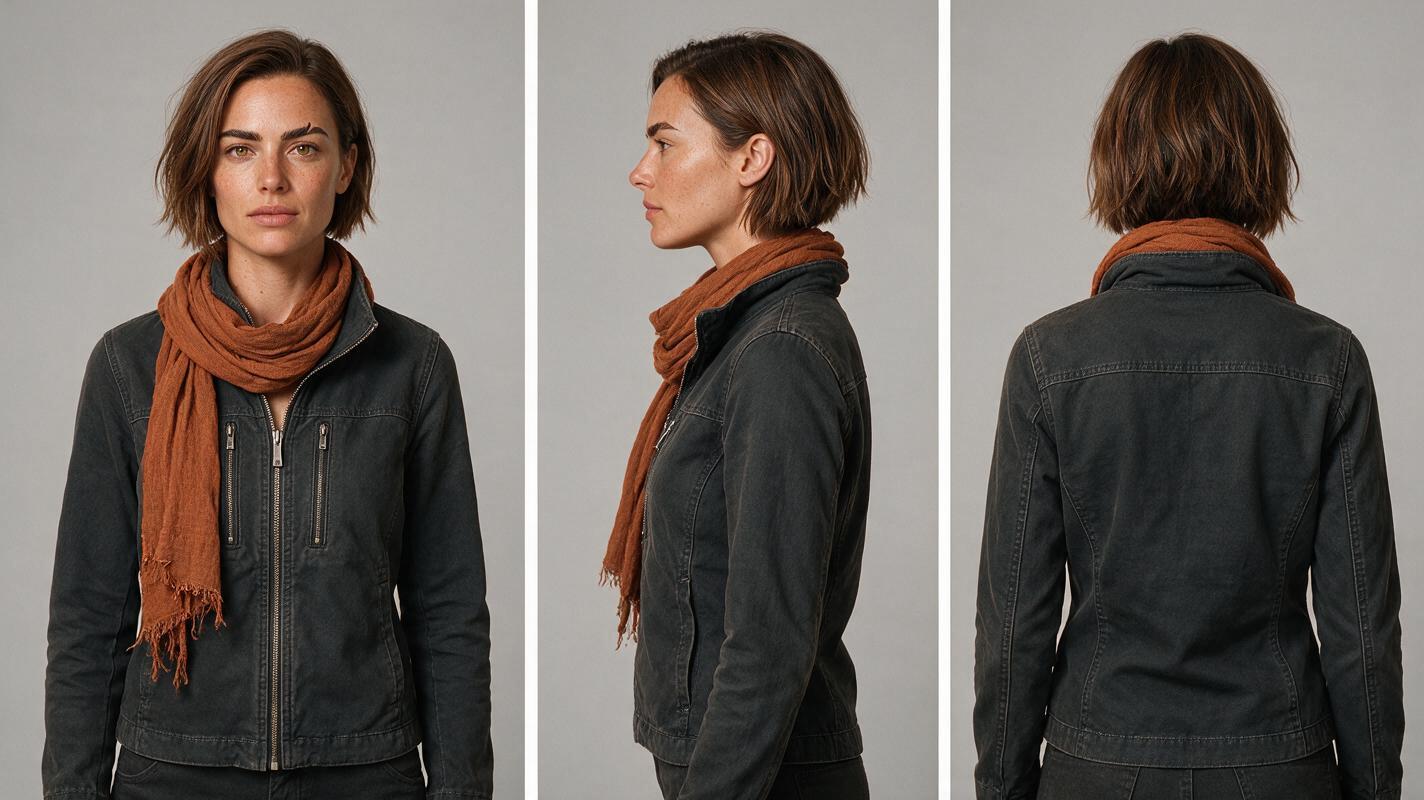
Give each scene its own reference, not a new character
The sheet cannot specify every location or shot. Make a clean still for each story beat, using Mara’s approved image as the character reference if the chosen tool supports that input. Keep the identity description unchanged; vary the camera, blocking, and location instructions instead. If a tool accepts only a starting frame, build the scene still first and use it as that frame. Do not assume these input types work identically across products.
For the cliffhanger, frame Mara in an apartment corridor with the envelope sealed. For the next episode, frame her inside an elevator holding that same sealed envelope. Save both approved stills as storyboard reference material before requesting motion. A scene still must establish the space as carefully as the person: doors, lighting direction, and the hand holding the envelope all affect whether the cut reads correctly.
Visual prompt — episode-break location still: MANDATORY CAMERA: eye-level medium-wide shot from a true three-quarter view, landscape 16:9; cinematic editorial-realism still of a lived-in apartment corridor with scuffed cream walls, warm practical ceiling light and a closed elevator door, fictional lead Mara with a short chestnut bob, thick dark brows and a small notch in her left eyebrow wearing a charcoal jacket and rust scarf while holding one plain sealed red envelope in her right hand, believable film lighting, no legible text, logos, UI or additional people.
Once a still is approved, use image to video to explore modest motion: a glance toward the elevator, a hand tightening around the envelope, or the doors beginning to open. Short, directed actions give you clearer cut points than an instruction to perform an entire dramatic scene in one clip.
Use the supplied approved scene still as the starting frame.
Preserve Mara's face, left-brow notch, chestnut bob,
charcoal jacket and rust scarf. Keep exactly one plain,
sealed red envelope in her right hand throughout.
The elevator doors begin to open; Mara looks toward them.
Eye-level medium shot, restrained natural movement.
Do not add people, change clothing, open the envelope,
or move it to the other hand.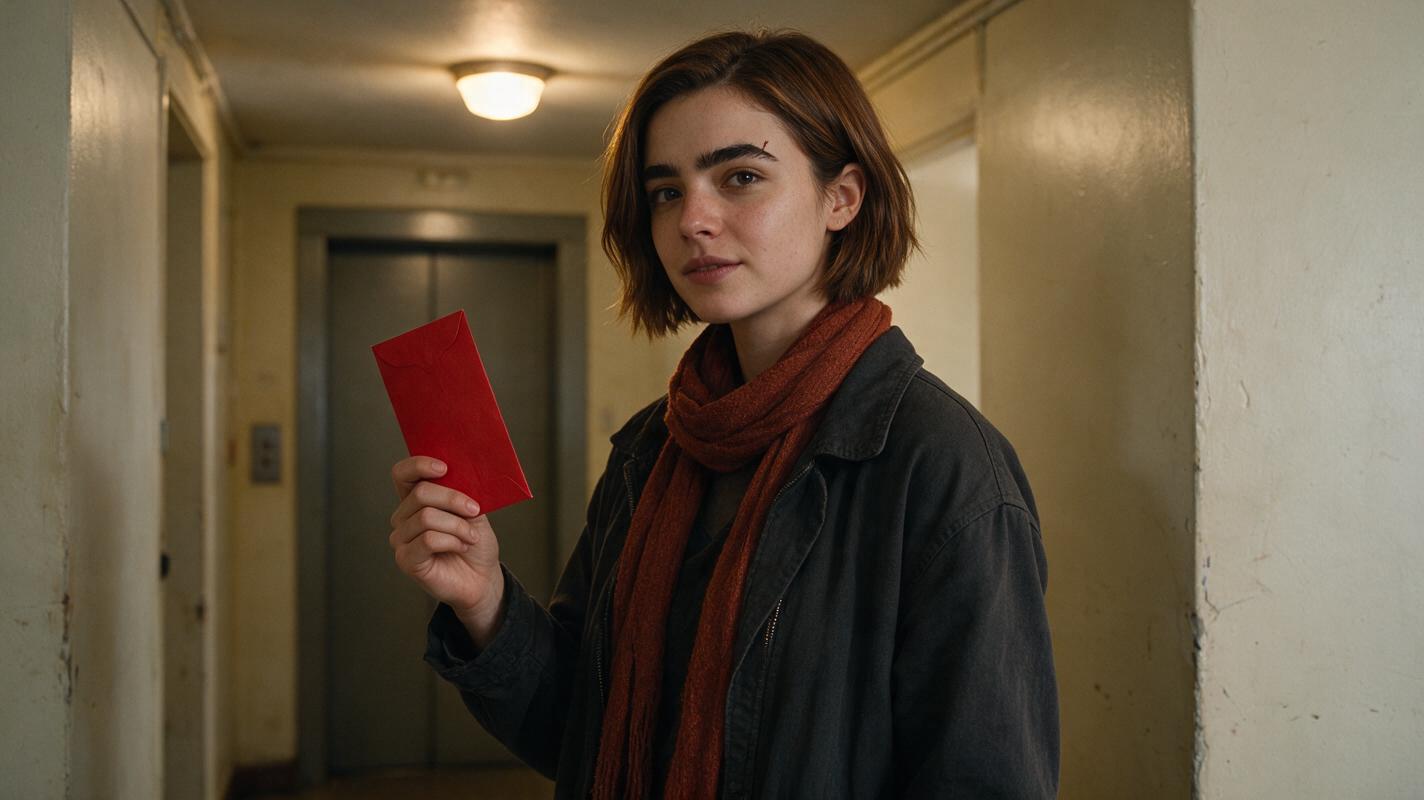
Compare the cliffhanger with the next episode’s opening
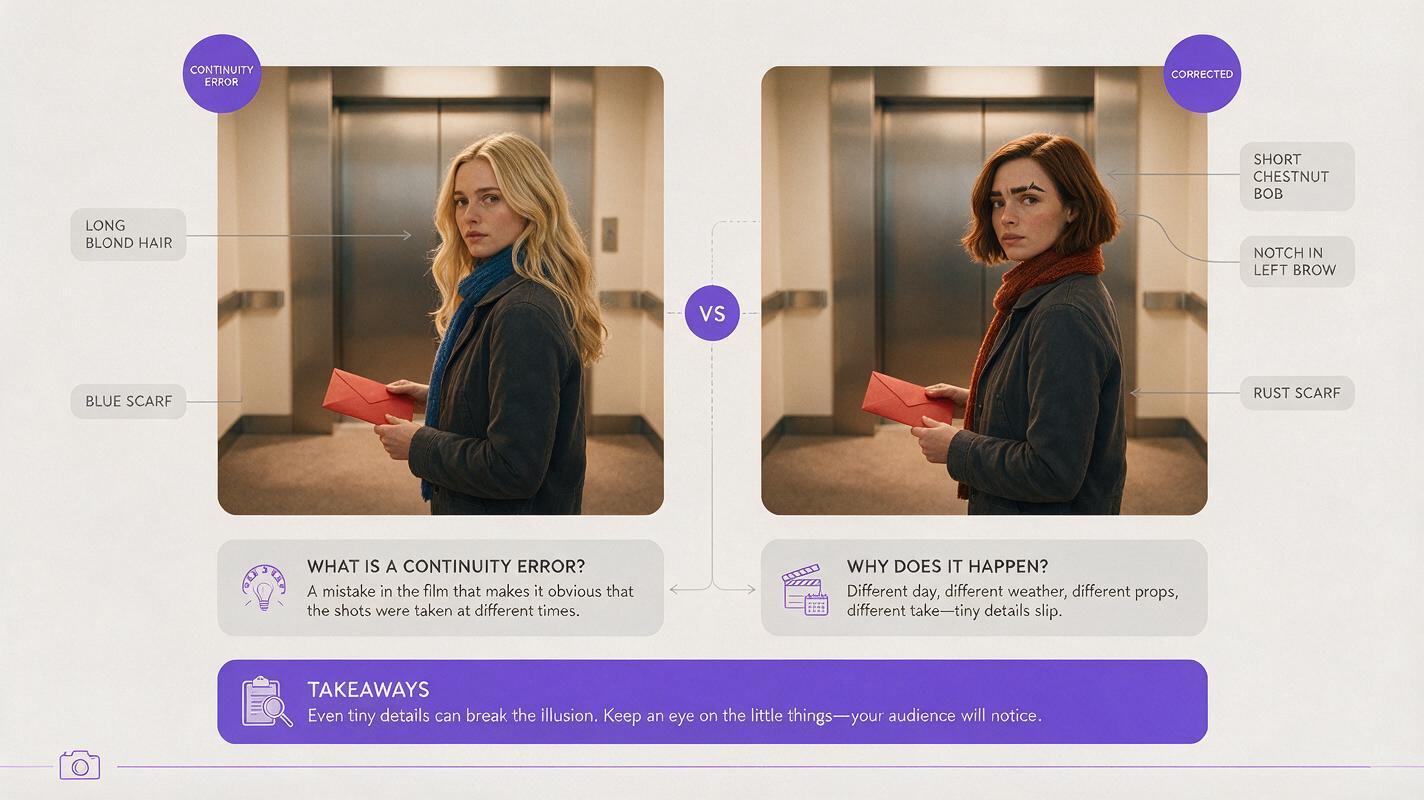
A multi-shot sequence needs an episode-boundary check, not just a pleasing clip from each generator. Place the final usable frame of episode one beside the first usable frame of episode two. Check the brow notch and hair silhouette, then the scarf, envelope seal, and which hand holds it. If the next scene is meant to happen seconds later, those details should not reset.
Visual prompt — failure and correction comparison: MANDATORY LAYOUT: landscape 16:9 side-by-side diptych of two cinematic editorial-realism elevator-opening frames, each showing only fictional lead Mara in a charcoal jacket holding a plain sealed red envelope; the left frame deliberately depicts a continuity failure with a long blond hairstyle and a blue scarf, while the right frame corrects her to a short chestnut bob, thick dark brows with a small left-brow notch and the original rust scarf, matching eye-level medium-shot composition and warm practical lighting, no labels, text, logos, UI or additional people.
The diptych illustrates what to look for; it is not a claim about a particular tool’s output. When a mismatch appears, fix the earliest asset that contains it. If the scene still has the wrong scarf, regenerate the still. If the still is right but motion changes it, reduce the action, reinforce the start-frame reference where supported, or cut before the drift. If the envelope switches hands across two otherwise usable clips, change the edit or regenerate the shot with the hand specified.
Give the audio and edit their own continuity pass
After the visual cut works, add dialogue and sound. Keep a short voice note for each speaking character—pace, accent choice, emotional baseline—and review the transition between episodes. Use only voices you are authorized to use. In the edit, compare not just faces but room tone, the timing of the elevator doors, and whether Mara’s reaction begins before or after the reveal.
For a longer series, record the approved ending frame, opening frame, costume state, prop state, and any intentional change after every episode. This small continuity ledger prevents a later revision from quietly rewriting an earlier cliffhanger.
FAQ
Can one AI video tool make an entire short drama?
A tool may cover several production stages, but an episode still needs script decisions, approved references, sound, editing, and continuity review. Choose the workflow around those deliverables rather than expecting a single prompt to settle them.
What is the most useful reference for a recurring lead?
Start with an approved three-view character sheet, then make shot-specific stills. The sheet fixes identity; the still fixes what the camera should see in a particular scene.
How do I keep a prop consistent between episodes?
Record its color, condition, and position at the last cut. Carry those details into the opening still for the next episode and compare the two boundary frames before generating more footage.
Sources
- Runway — official product website
- Adobe Firefly — official product page
- ElevenLabs — official product website
- DaVinci Resolve — official product page
Final checklist
- Approve a separate three-view sheet for every recurring character.
- Build scene stills from approved identity references before animating them.
- Record costume, prop, and hand position at the episode break.
- Compare the last frame of one episode with the first frame of the next.
- Review audio, usage rights, and the final edit as well as generated images.
Ready to build the cast sheet and test the episode-break shots? try these models for free.
Keywords
character consistency, consistent character video, multi-entity consistency, character reference, multi-shot, storyboard reference, ai character design, consistent character across scenes