How to Build AI Short Drama Crowd Scenes Without Duplicate Extras
Crowd scenes often fail when a generator must invent too many complete people and movements at once. This tutorial shows how to build an AI short drama crowd from controlled layers, preserve the lead character, prevent duplicate extras, and compose the result for vertical video.
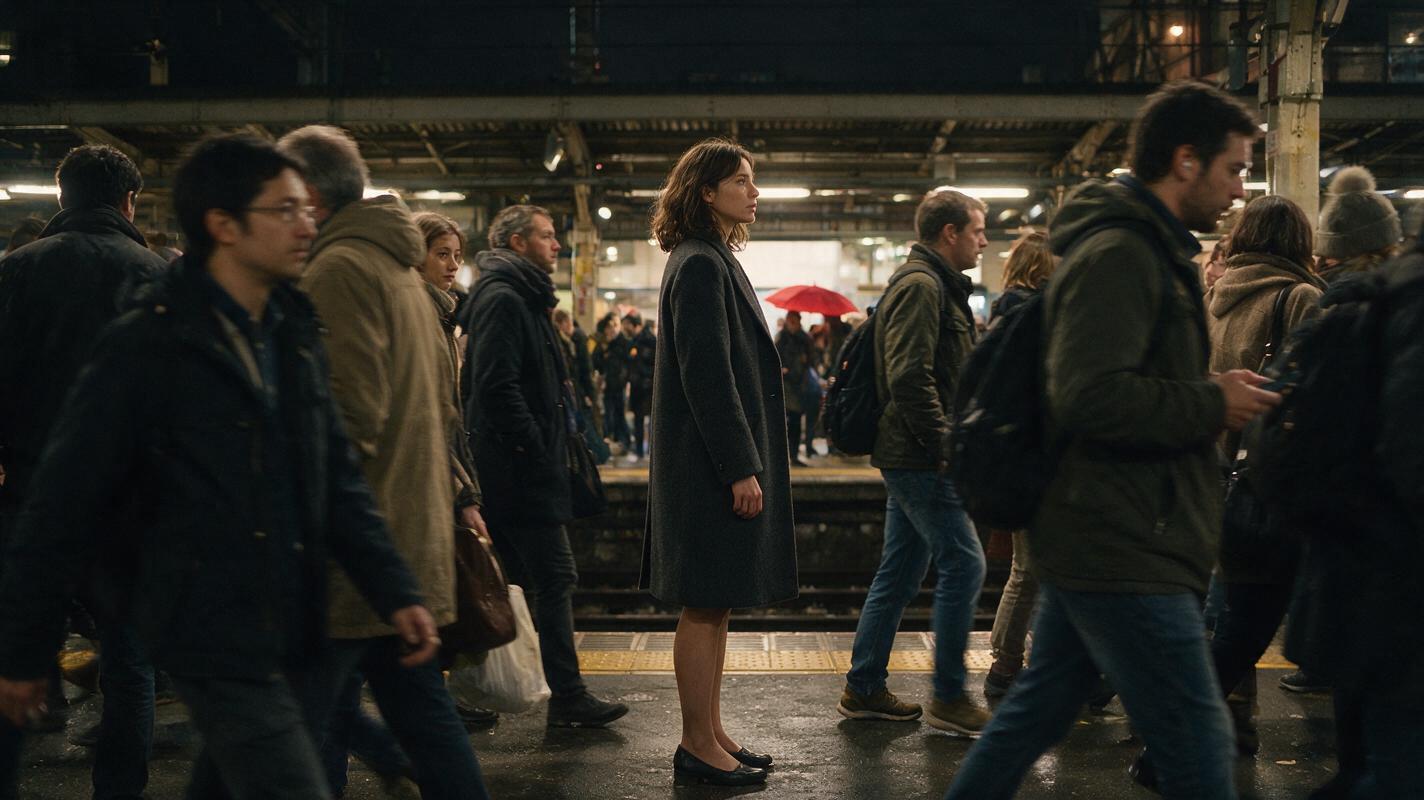
Table of contents
Crowds Fail Differently From Two-Character Scenes
A reliable crowd scene is not generated as one giant group performance; it is assembled from a stable location, a visually locked hero, controlled population zones, and a few readable motion events.
When an ai short drama prompt simply asks for “a busy station full of people,” the model must decide every face, body, path, gesture, and overlap simultaneously. That can produce cloned extras, fused limbs, changing crowd density, or a lead character who disappears into the background.
The safer approach is to treat the crowd as production design. Decide what the group contributes to the story, place people by depth, limit visible identities, and animate only the motion the audience needs to read.
Step 1 — Give the Crowd One Dramatic Job
Begin with the story function rather than a population count. A crowd can obstruct an escape, conceal a witness, isolate the hero, celebrate an event, or create social pressure. Choose one dominant function for the shot.
Convert that function into a compact crowd brief:
SCENE: Last train platform at night
HERO ACTION: Mara searches for the courier
CROWD FUNCTION: Repeatedly blocks her view
READABLE EVENT: A red umbrella appears across the tracks
NEAR ZONE: Two partial foreground commuters
MID ZONE: Mara plus three crossing figures
FAR ZONE: Soft clusters waiting near the train
MOTION FAMILY: Slow lateral walking only
FORBIDDEN: Identical faces, synchronized gestures, people crossing through Mara
This packet gives the scene a hierarchy. The audience should notice Mara first, the obstruction second, and the red umbrella third. Individual background faces are not story information, so they do not need equal visual detail.
Production rule: If an extra does not perform a specific story action, treat that person as shape, rhythm, or atmosphere rather than a supporting character.
Step 2 — Lock the Hero Before Building the Crowd
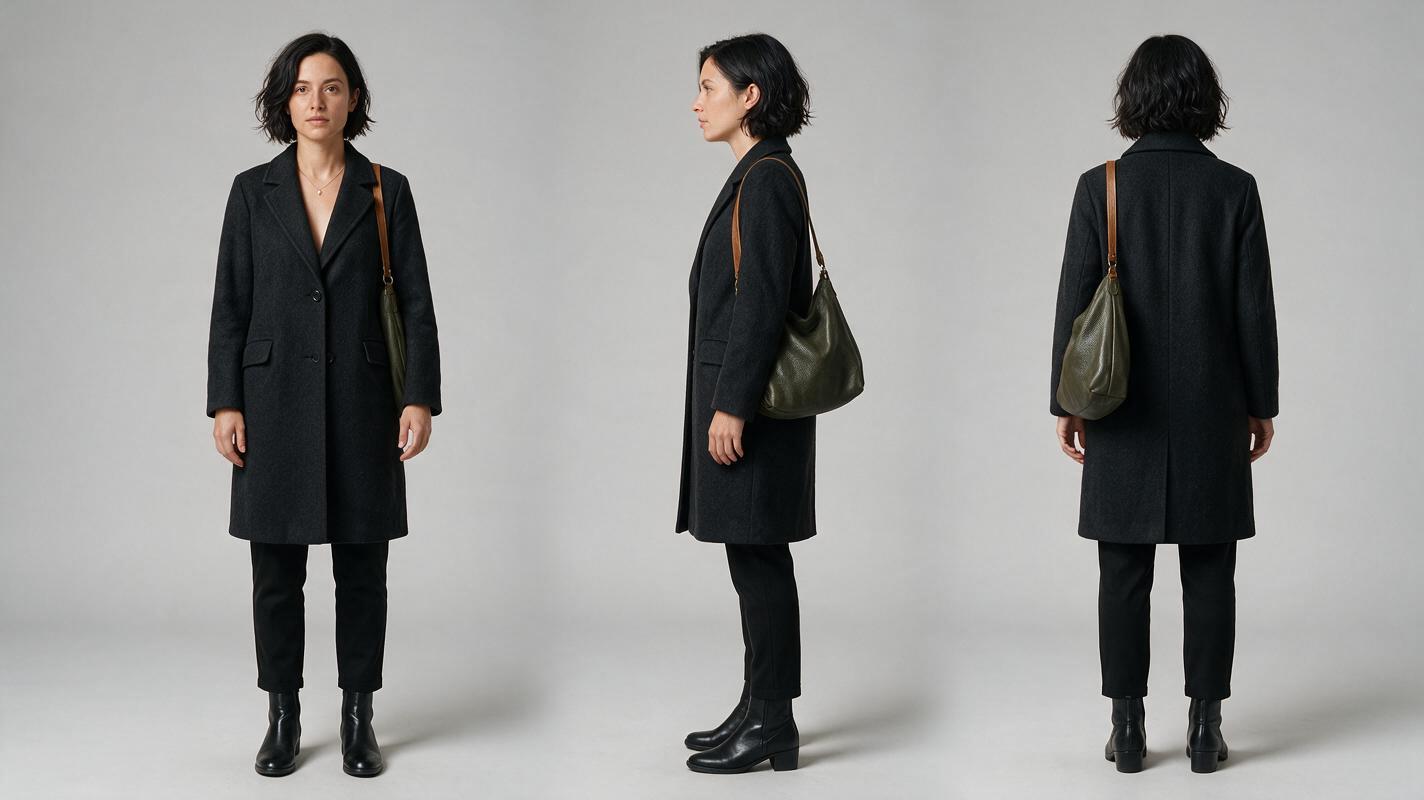
Create the lead character independently from the crowd scene. Record stable traits such as face shape, hairstyle, outerwear, footwear, age range, and one unmistakable silhouette feature. Generate a front, side, and back reference sheet so the character remains identifiable when partially obscured.
A crowd shot needs a stronger silhouette than a close-up. A distinctive coat length, shoulder shape, bag, or color block can preserve recognition even when the face occupies little of the frame. Avoid relying on tiny jewelry or subtle makeup.
Visual recreation prompt:
Photorealistic three-panel character reference sheet of the same fictional woman, Mara, age 31, short wavy black hair, oval face, charcoal knee-length coat, muted green shoulder bag, black ankle boots; left panel front view, center panel exact side profile, right panel back view; identical wardrobe, proportions, hairstyle, and lighting in every panel; full body visible with hands relaxed and separated from the torso; neutral light-gray seamless studio background; landscape 16:9 composition; MANDATORY CAMERA: eye-level orthographic-style full-body framing with an 85mm lens look; even soft studio illumination; no text, no labels, no logos, no interface elements.Approve this sheet before generating locations or extras. If the lead is unstable in isolation, adding more people will make diagnosis harder.
Step 3 — Design Crowd Geometry, Not Extra Identities
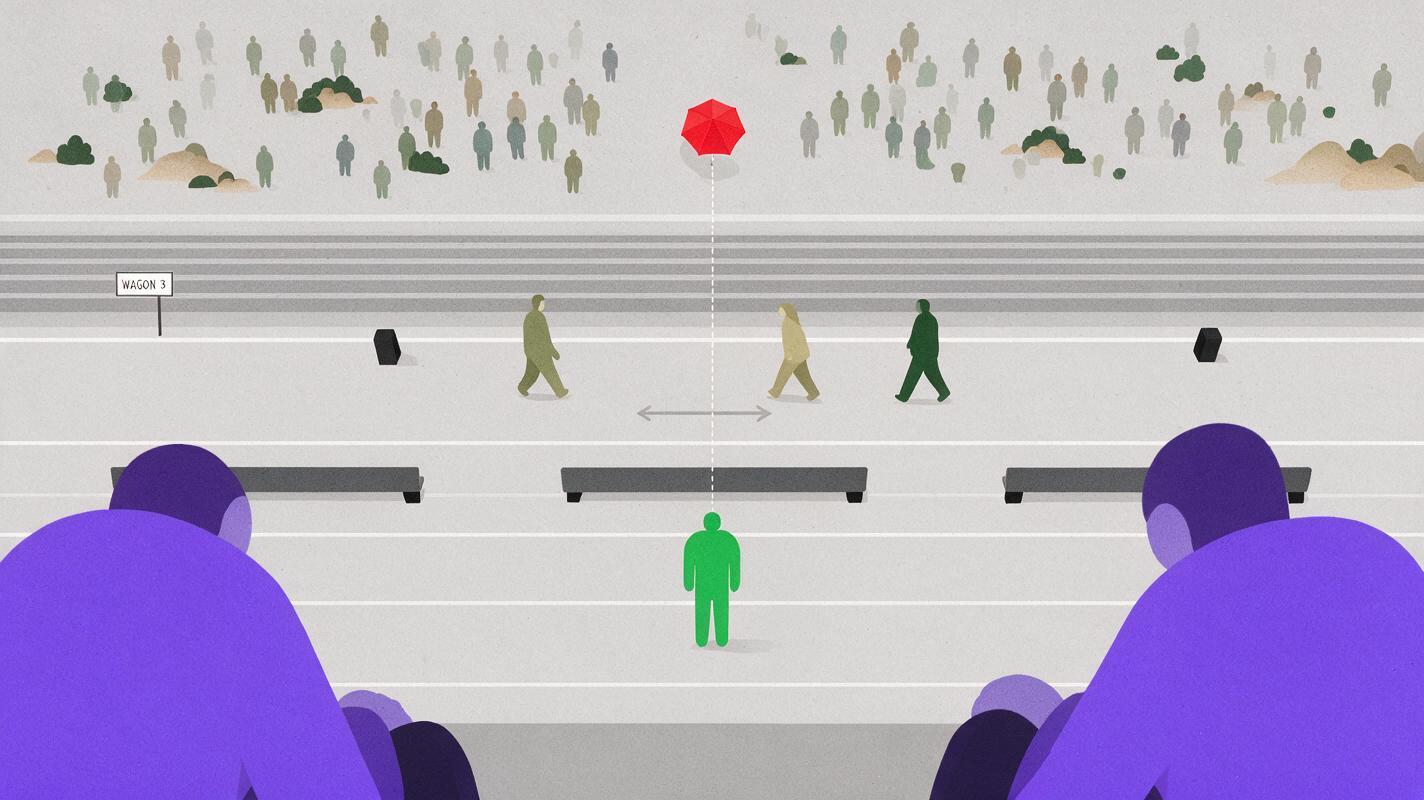
Divide the frame into near, middle, and far population zones. Each zone should have a different visual responsibility:
- Near zone: cropped shoulders, coats, or bags that create foreground movement and temporary occlusion.
- Middle zone: the hero, the story clue, and only the extras who perform readable actions.
- Far zone: small clusters that establish scale without demanding facial accuracy.
Do not distribute people evenly. Artificially regular spacing makes duplicates easier to notice and weakens the shot’s focal path. Use asymmetrical clusters, empty corridors, overlapping silhouettes, and architectural dividers.
Visual recreation prompt:
Neutral overhead blocking diagram of a long railway platform represented as a realistic miniature set, one green-coated hero figure in the middle lane, two large cropped foreground figures near the lower frame edge, three separated midground walkers crossing laterally, several small irregular clusters in the far zone, and one clear empty sightline toward a red umbrella across the tracks; landscape 16:9; MANDATORY CAMERA: exact ninety-degree top-down view with no perspective tilt; soft neutral lighting; simple colored human forms without faces; no words, arrows, labels, logos, screens, or software interface.The empty sightline is as important as the crowd. It gives the editor a clean moment in which the clue can become visible.
Step 4 — Generate a Clean Location Before Adding People
Build the station, market, lobby, or street as an empty plate first. Lock architecture, practical lights, weather, lens height, and the hero’s intended position. A clean plate becomes the continuity reference for every crowd variation and a repair asset when a generated person damages the background.
Keep entrances, columns, benches, doors, and signage areas spatially consistent. These landmarks help the audience understand movement even when extras interrupt the view.
Cinematic empty commuter rail platform at night, damp concrete floor, warm overhead practical lights, dark tracks, weathered columns, bench on frame right, open walking corridor through the center, opposite platform visible in the distance, believable lived-in public space, restrained editorial realism, landscape 16:9, MANDATORY CAMERA: eye-level true three-quarter view from the platform entrance, 35mm lens look, locked camera, no people, no readable text, no logos.For a vertical drama video, also test a 9:16 crop now. Confirm that the hero lane, clue lane, and at least one environmental landmark fit inside the narrow frame.
Step 5 — Build the Crowd From Back to Front
Add the least important population layer first. Far-background groups should remain small, partially overlapped, and visually subordinate. Add the midground performers next, then use foreground bodies as separate occlusion elements.
This order prevents a foreground failure from forcing regeneration of the entire environment. It also makes crowd density adjustable during editing: remove a foreground pass for a clearer view, or add one to intensify pressure.
| Layer | Detail level | Allowed action | Main risk |
|---|---|---|---|
| Far crowd | Low | Waiting, slow drifting | Repeated silhouettes |
| Midground extras | Medium | One directional crossing | Collision with the hero |
| Hero | High | Search, stop, react | Identity or wardrobe drift |
| Foreground pass | Partial body only | Brief lateral occlusion | Unwanted face or fused edge |
Keep each layer as a separate shot or reusable plate whenever the workflow allows. A modular crowd is easier to repair than a single clip containing every action.
Step 6 — Animate One Motion Family at a Time
Begin with a stable crowd frame, then use image to video for bounded movement. Ask for one motion family per generation: lateral walking, slow waiting gestures, or a foreground pass. Do not combine running, waving, turning, talking, and camera movement in the same prompt.
Locked cinematic camera. Mara remains stationary in the center-middle zone, scanning across the tracks with one controlled head turn. Three midground commuters walk slowly from left to right without touching or crossing through her body. Far-background groups make minimal natural weight shifts. One dark foreground coat briefly enters and exits along the lower-left edge. Preserve every face, body count, wardrobe color, platform landmark, and lighting condition. No new people, no duplicated characters, no synchronized movement, no camera movement, no morphing.If the hero must move, freeze the crowd’s role. For example, let Mara walk through a mostly static waiting group. Competing movement systems make path collisions and duplicated bodies more likely.
Step 7 — Compose the Crowd for a Vertical Frame
A 9:16 composition cannot display crowd scale in the same way as a wide establishing shot. Show pressure through depth and occlusion instead of filling the entire width with people.
- Place the hero near the central vertical story column.
- Use cropped foreground bodies to imply population beyond the frame.
- Stack far-background heads at different heights rather than in a straight row.
- Reserve clean space around the clue at its reveal moment.
- Keep important hands and faces away from the extreme edges.
Use a wide shot only when geography matters. For emotional pressure, a medium vertical shot with passing shoulders may communicate a larger crowd more effectively than a full platform view.
Step 8 — Diagnose Duplication at the Edit
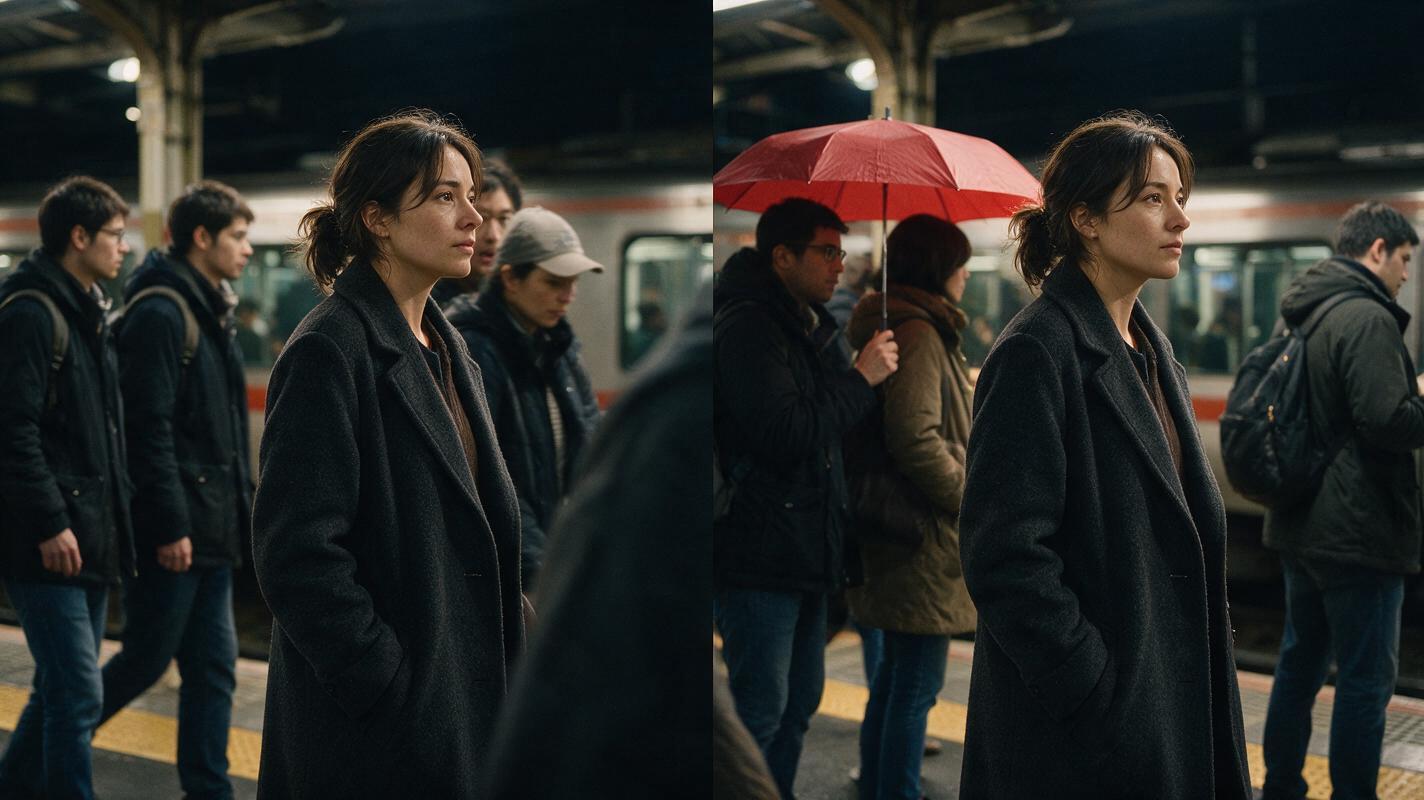
Review the clip frame by frame at moments of overlap. Duplication often appears when a background figure emerges from behind the hero, when two walkers cross, or when the camera reveals a previously hidden area.
Visual recreation prompt:
Photorealistic side-by-side cinematic comparison in one landscape 16:9 frame, both halves showing the same night railway platform and the same woman in a charcoal coat; left half intentionally shows a failed crowd generation with two identical background commuters, one merged shoulder, and an extra figure appearing behind the hero; right half shows the corrected scene with irregular spacing, distinct silhouettes, clean body separation, and one unobstructed sightline to a red umbrella; MANDATORY CAMERA: identical locked eye-level three-quarter view on both halves with a 35mm lens look; realistic editorial lighting; no text, divider labels, logos, or interface elements.Classify the failure before repairing it:
- Duplicate identity: replace or obscure only the repeated extra.
- Body fusion: shorten the overlap or regenerate that movement layer.
- Population popping: cut before the appearance or cover it with a foreground pass.
- Hero drift: restore the approved hero frame and regenerate only the performance.
- Density mismatch: use a neutral cutaway while changing crowd plates.
A reaction close-up, shoe-level crossing shot, train-door insert, or clue detail can bridge two crowd states without requiring a perfect continuous master. The goal is narrative continuity, not an uninterrupted simulation.
Step 9 — Run a Short Crowd Stress Test
Before producing the full AI microdrama, test one difficult shot containing the hero, one midground crossing, one foreground occlusion, and the key clue. Render several short motion units instead of one long performance.
Compare results for identity stability, body separation, background continuity, and editability. A one-stop multi-model workflow is useful here because the same approved references can be tested across image and video options without redesigning the scene packet. Once the packet is ready, try these models for free and keep the version that preserves the story hierarchy—not merely the version with the most movement.
Final Checklist
- The crowd has one clear dramatic function.
- The hero has an approved three-view character sheet.
- Near, middle, and far population zones have different jobs.
- An empty location plate exists for continuity and repairs.
- Only story-relevant extras receive readable identities.
- Each generated clip uses one dominant motion family.
- The 9:16 crop preserves the hero, clue, and sightline.
- Duplicate bodies and population changes are checked frame by frame.
- Cutaways are available to bridge incompatible crowd states.
FAQ
How many extras should appear in an AI short drama crowd scene?
Use only enough visible figures to communicate the location and dramatic pressure. Partial foreground bodies, overlapping silhouettes, and distant clusters can imply a larger population without requiring every person to be generated in full detail.
Why does an AI drama generator duplicate background people?
Duplication becomes more likely when a prompt demands many complete identities, overlapping paths, and simultaneous gestures. Reduce the burden by separating depth layers, limiting motion, and obscuring nonessential faces.
Should the hero and crowd be generated together?
Lock the hero independently first. The final shot may be generated or composited in layers, but the hero’s approved appearance should remain the highest-priority reference throughout the process.
How can a crowd feel large in a vertical drama video?
Use depth, cropped foreground traffic, off-screen sound, staggered head heights, and temporary occlusion. These cues imply activity beyond the narrow frame while preserving a readable central performance.
What is the fastest repair for one duplicated extra?
If the duplicate is not interacting with the hero, cover it with a foreground pass, replace the affected region, shorten the shot, or cut to a story-relevant insert. Regenerating the complete scene should be the last option.
Keywords
ai short drama, ai microdrama, ai short film generator, ai drama generator, ai series video, batch short drama production, vertical drama video