How to Make Flashbacks Clear in an AI Short Drama
A flashback becomes confusing when the audience cannot immediately identify where the memory begins, what information it reveals, or when the story returns to the present. This tutorial shows how to design paired timeline states, generate reliable transition frames, and edit readable flashbacks for a vertical AI short drama.
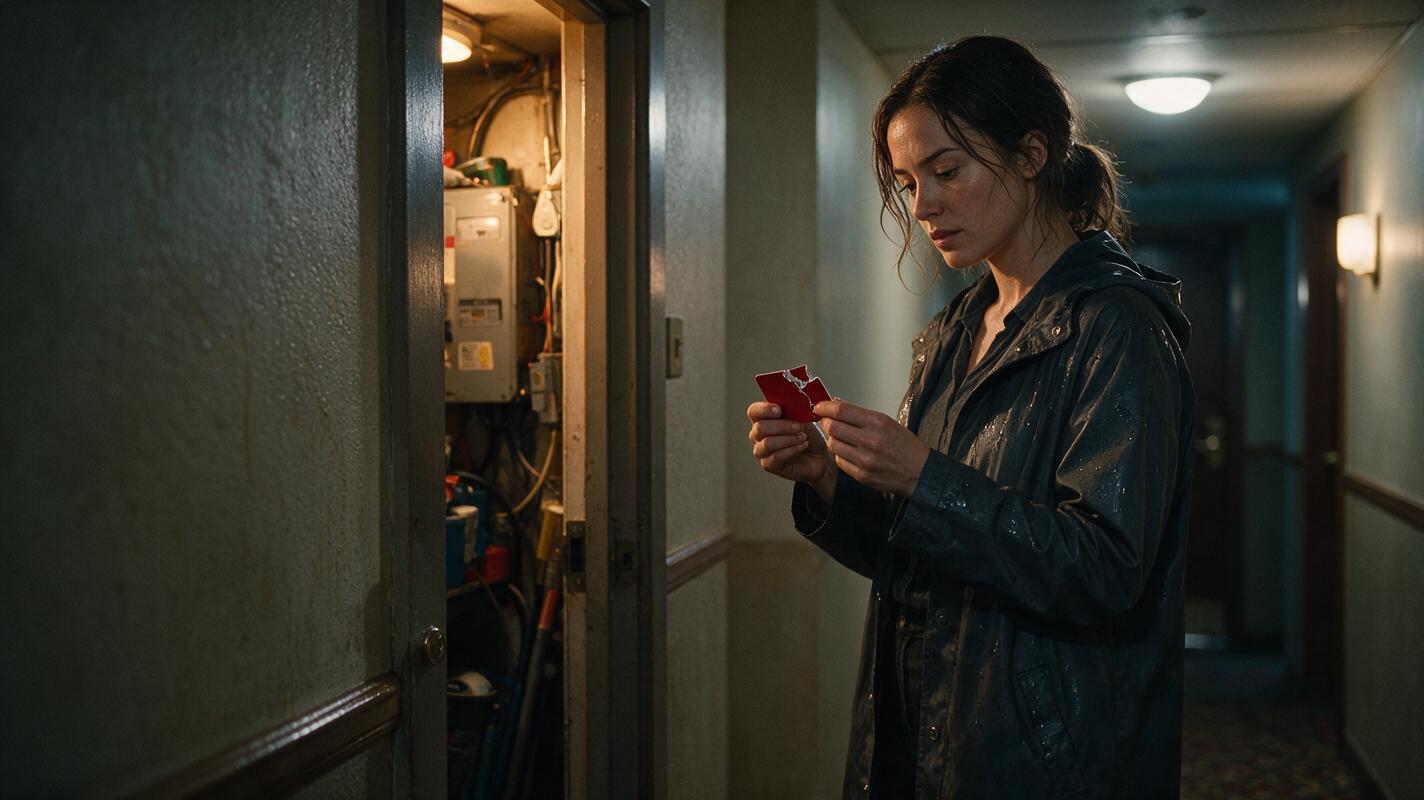
Table of contents
Make the Timeline Change Visible Before You Generate Motion
The safest way to build a flashback in an ai short drama is to treat the present and the memory as two controlled production states. Give each state a distinct wardrobe detail, lighting direction, location condition, and camera behavior, then connect them with dedicated entry and exit shots.
This tutorial uses a simple scene: Elena finds a broken red keycard in a hotel corridor, remembers hiding the intact card inside a service closet earlier that night, and returns to the present when an elevator bell rings. The flashback reveals one fact without introducing another character or changing Elena's identity.
The core rule: a flashback should change the audience's knowledge, not merely repeat an earlier event with a different color grade.
Step 1 — Define the Present, Memory, and Return States
Write the flashback as three separate story states before creating an ai storyboard. Each state needs a visible condition and a specific narrative job.
| State | Visible condition | Story function | Required final frame |
|---|---|---|---|
| Present | Cool corridor light, damp coat, broken keycard | Raises the question: who removed the hidden card? | Elena studies the broken edge |
| Memory | Warm service light, dry coat, intact keycard | Shows where Elena concealed the card | Closet door closes over the hiding place |
| Return | Cool light, damp coat, broken keycard | Introduces immediate danger | Elena turns toward the opening elevator |
Keep the memory focused on one answer. If it must explain the card, a betrayal, and an earlier chase, divide those revelations across separate episodes. A short flashback is easiest to read when every shot supports one piece of evidence.
Use the following planning prompt to convert a scene into bounded timeline states:
You are planning a vertical AI microdrama flashback.

Present event: A woman finds a broken red keycard in a hotel corridor.
Memory revelation: Earlier, she hid the intact card behind a loose vent cover inside a service closet.
Return trigger: An elevator bell rings and the doors begin to open.

Create three production states: PRESENT, MEMORY, and RETURN.
For each state, specify:
- character wardrobe and physical condition
- hero prop condition
- location lighting and practical light source
- camera behavior
- first and final visible action
- exact information delivered to the audience

Keep one recurring character, one hero prop, and one revelation. Do not add dialogue or new characters.
Step 2 — Lock One Character Across Both Timelines
Create Elena's identity reference before designing the timeline variations. Her facial structure, hair length, coat shape, and body proportions should remain stable. Distinguish time through reversible details: dry versus damp fabric, open versus fastened collar, and intact versus broken prop.
Avoid using a dramatic age change unless the plot requires it. Asking one generation to preserve identity while changing age, hairstyle, wardrobe, lighting, and emotion creates unnecessary variables.
Reusable character-sheet prompt
Photorealistic three-panel character reference sheet of the same fictional woman named Elena, age 32, oval face, dark brown almond-shaped eyes, straight shoulder-length black hair tucked behind the left ear, small scar through the right eyebrow, charcoal knee-length raincoat over a burgundy shirt, black trousers, practical dark boots, calm neutral expression, natural skin texture, realistic anatomy. Show exactly three full-body views: front, left side profile, and back. Preserve identical face, hairstyle, body proportions, wardrobe, and footwear across all panels. Neutral light-gray seamless studio background, soft even studio illumination, no props, no text, no logos, no interface elements. MANDATORY CAMERA: eye-level orthographic reference view with minimal perspective distortion. MANDATORY LAYOUT: landscape 16:9, three evenly spaced panels, complete figure visible from head to boots, no cropped limbs.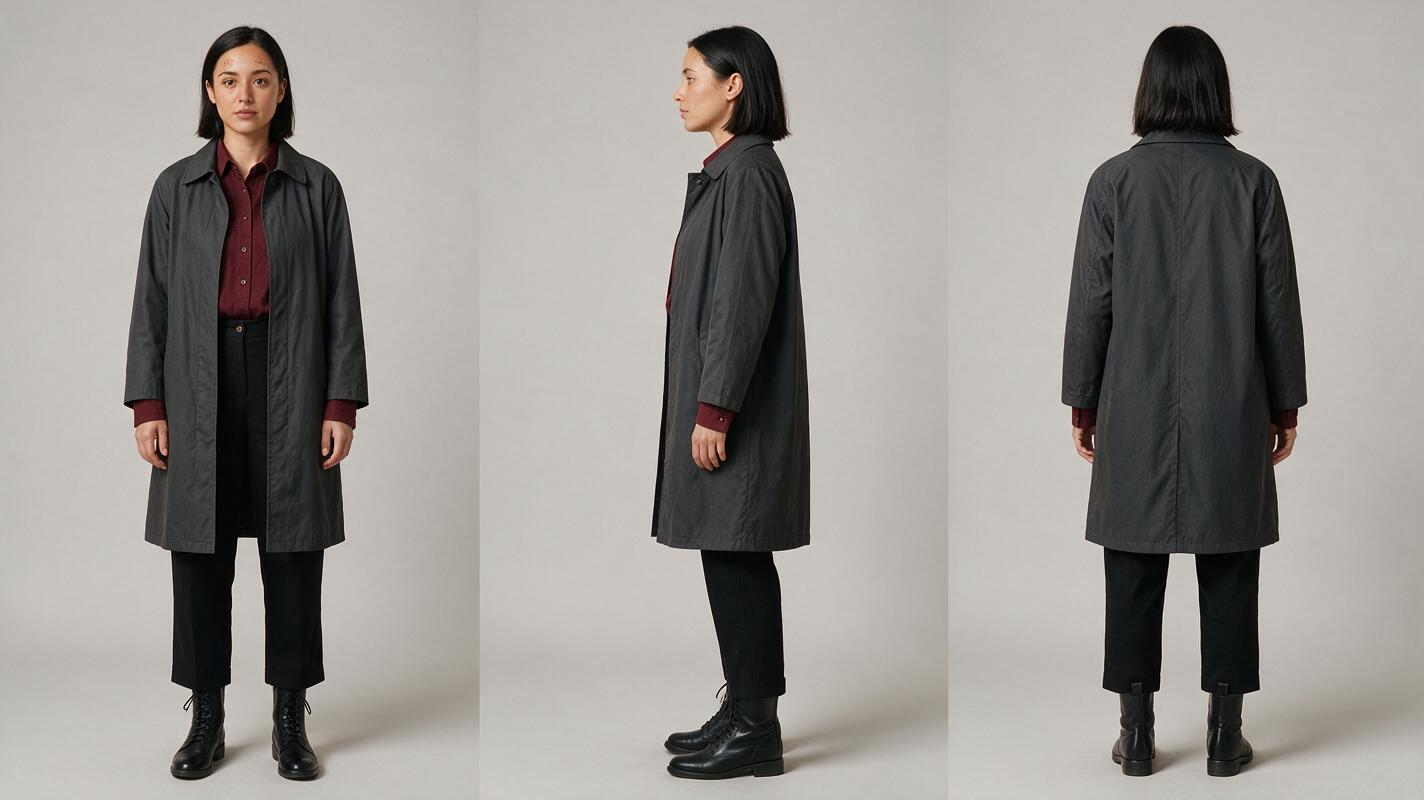
Step 3 — Build Paired Location Anchors
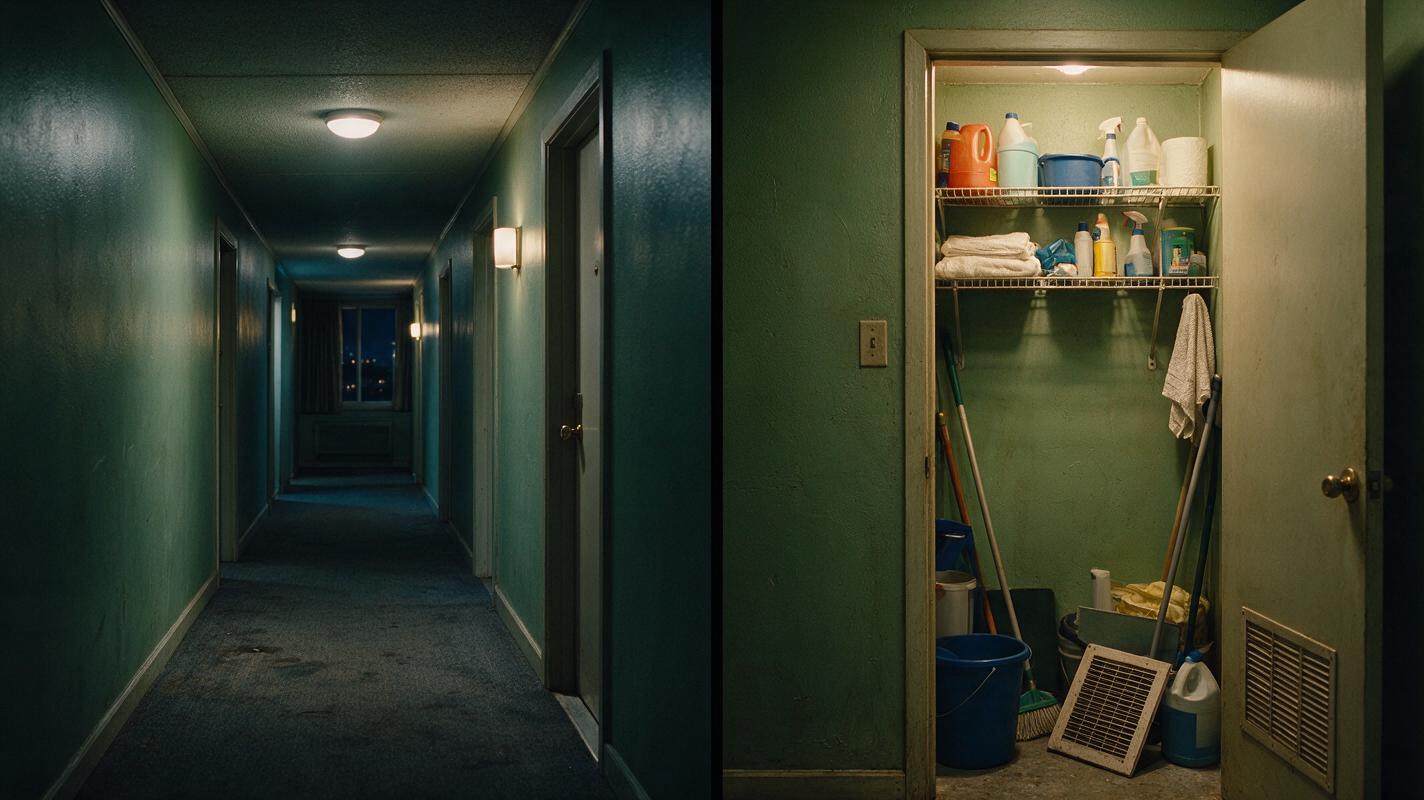
Generate one anchor image for the present corridor and another for the service closet memory. They should belong to the same hotel but must not look interchangeable.
- Preserve shared architecture: painted service doors, worn carpet, brass room-number mounts, and similar wall proportions.
- Change motivated light: cool overhead corridor fixtures in the present; a warm exposed utility lamp in the memory.
- Reserve one visual landmark: the red keycard appears near the center of attention in both timelines.
- Keep the frame usable: leave negative space for Elena to enter, turn, or reach without colliding with the frame edge.
Reusable paired-location prompt
Create a photorealistic cinematic two-panel location comparison inside the same modest urban hotel. Left panel: a narrow guest-floor corridor at night with worn charcoal carpet, muted green walls, cool fluorescent ceiling fixtures, faint rain reflections near a fire door, and an empty foreground where a woman can stand. Right panel: a cramped service closet from the same hotel with matching muted green paint, metal shelving, cleaning supplies, a loose rectangular vent cover at waist height, and one warm exposed utility lamp. Lived-in editorial realism, restrained production design, believable wear, natural material texture, no people, no readable text, no logos, no interface elements. MANDATORY CAMERA: eye-level 35mm lens, straight architectural perspective, camera height 1.55 meters. MANDATORY LAYOUT: landscape 16:9 with two equal cinematic panels and a clean visual division, consistent scale across both locations.Approve these anchors before generating action. If the two locations accidentally differ in architectural era or visual genre, fix the still images rather than trying to disguise the mismatch during editing.
Step 4 — Generate the Boundary Frames Before the Memory
The entry and exit are more important than decorative flashback effects. Generate them first because they determine whether the audience understands the timeline change.
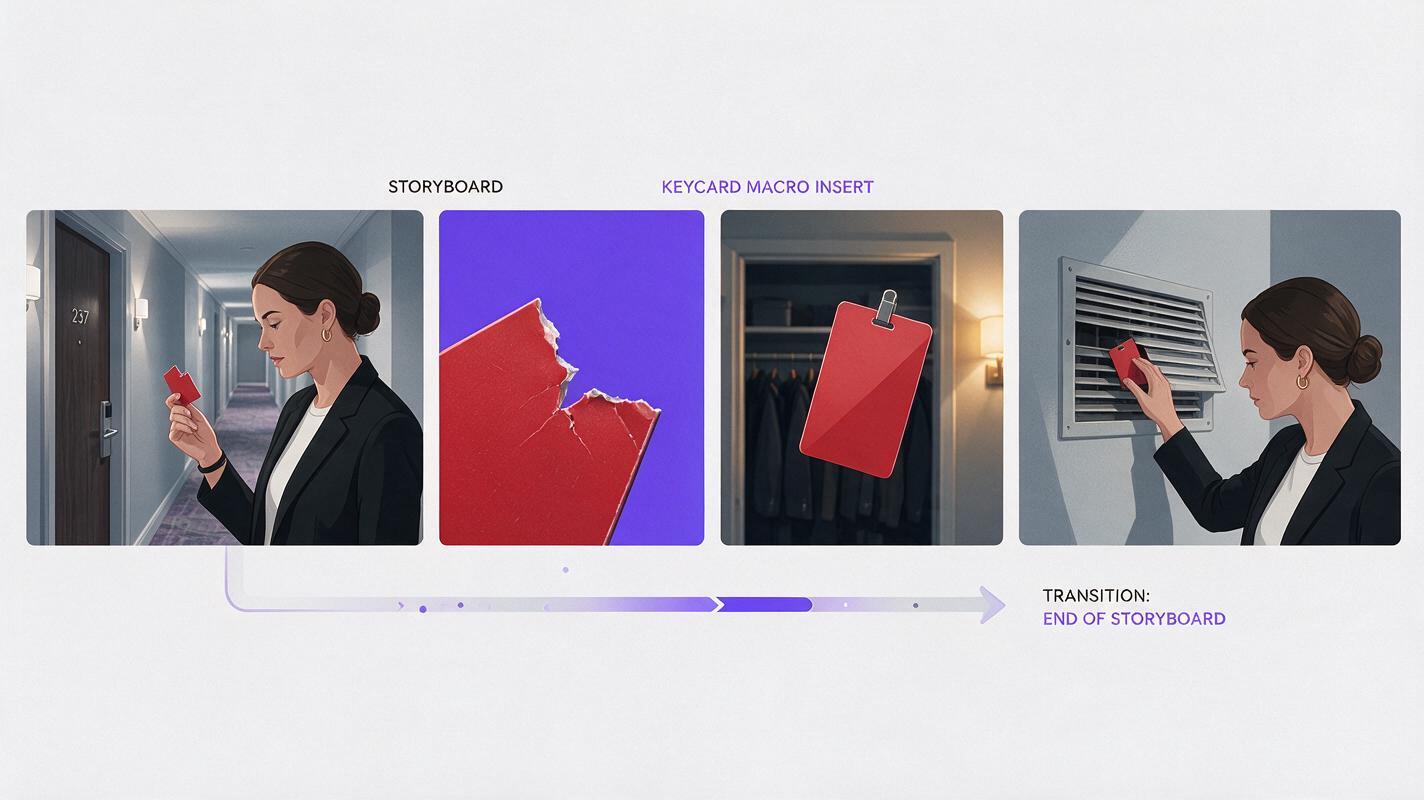
For the entry, connect the broken present-day keycard to the intact memory card through shape or hand position. Cut before prolonged finger contact if the hand begins to deform. The editor can bridge the transition with a sound cue or a brief insert of the red card.
For the exit, use an external trigger from the present: the elevator bell, changing light under the doors, or Elena's sudden head turn. Do not simply fade out of the memory. A concrete trigger gives the return dramatic force.
Boundary-frame prompt
Create a neutral cinematic transition diagram with four realistic storyboard frames arranged left to right: a woman in a cool hotel corridor holding a broken red keycard near her face; a tight insert of the broken red edge aligned with the same card shape; the intact red keycard entering a warm service-closet frame; the woman hiding it behind a loose vent cover. Maintain the same fictional woman, coat, keycard dimensions, and screen direction across every frame. Use realistic film still rendering, clear silhouettes, restrained cool-to-warm color progression, no arrows, no labels, no captions, no logos, and no interface elements. MANDATORY CAMERA: consistent eye-level viewpoint for character frames and true 85mm macro close-up for the keycard insert. MANDATORY LAYOUT: landscape 16:9, four evenly spaced frames with narrow neutral gutters, chronological left-to-right visual flow.When animating the transition, constrain the motion to one readable action:
Vertical cinematic shot, Elena raises the broken red keycard from chest height to eye level and stops. Her eyes focus on the broken edge; her breathing becomes still. The camera makes a slow five-centimeter push toward the card. Preserve her face, shoulder-length hair, charcoal raincoat, hand anatomy, and the exact red keycard shape. Cool overhead hotel lighting, shallow depth of field, realistic restrained performance. No speaking, no extra people, no duplicated fingers, no card transformation, no camera orbit. End on a stable close view of the broken edge with a brief motionless hold.Step 5 — Generate the Memory Interior as Controlled Coverage
Once both boundary shots work, generate the interior of the memory as short coverage units rather than one continuous performance. A practical sequence is an establishing view of the closet, a medium shot of Elena checking behind her, an insert of the intact card, and a close shot of the vent cover returning to place.
Give the memory a consistent camera grammar. For example, use mostly locked or gently drifting frames in the memory while the present uses subtle handheld tension. Camera behavior should support the distinction without becoming a visual gimmick.
Preserve causal order:
- Elena enters with the intact card.
- She checks that the corridor is empty.
- She places the card behind the vent cover.
- She closes the cover and leaves.
Generate the hand interaction as separate states if continuous placement causes distorted fingers: card approaching vent, card partly concealed, hand withdrawn, and cover closed. The cut supplies continuity while each generated frame solves a simpler task.
Step 6 — Edit for Recognition, Revelation, and Return
Assemble the present until Elena examines the broken card, enter the memory on the matched red shape, reveal the hiding place, and return on the elevator bell. Let audio cross the visual boundary when useful. The present-day bell can begin over the final memory frame, pulling Elena and the audience back at the same moment.
Check the sequence once without dialogue or captions. You should still be able to answer:
- Which images belong to the present?
- Where does the memory begin?
- What new fact does the memory reveal?
- What causes the return?
- What danger exists after the return?
If the silent edit remains unclear, do not add explanatory dialogue first. Strengthen the prop state, lighting contrast, boundary match, or return trigger. Those visual corrections survive localization and small-screen viewing better than an extra line of exposition.
When the anchor frames and boundary prompts are ready, try this prompt for free and generate the transition before spending time on the full memory sequence.
FAQ
Should every AI microdrama flashback use a warm color grade?
No. Warm-versus-cool separation is useful only when motivated by the locations. Wardrobe condition, prop state, practical lighting, camera movement, and sound can identify the timelines without applying a generic memory filter.
How long should the flashback be?
It should last only as long as needed to deliver the missing fact and make its meaning clear. Build it around a revelation rather than a predetermined duration.
Can I use a flashback inside a vertical drama video?
Yes. Favor close evidence, readable silhouettes, and limited lateral staging. A key prop and a clear facial reaction usually survive the narrow frame better than a wide scene containing several simultaneous actions.
What if Elena's face changes in the memory?
Return to the approved character sheet and reduce simultaneous changes. Preserve the same identity description and reference while varying only the timeline-specific wardrobe condition, prop state, lighting, and expression.
Should I generate the complete episode before testing the transition?
No. Test the present-to-memory entry and memory-to-present return first. If those boundaries fail, additional memory coverage will not make the timeline easier to understand.
Final Checklist
- The present, memory, and return each have a distinct visible state.
- The recurring character uses one approved identity reference.
- The hero prop has clearly defined intact and broken conditions.
- The flashback answers one story question.
- The entry uses a matched object, gesture, or composition.
- The return is triggered by a concrete present-day event.
- The sequence remains understandable without dialogue.
- The final return creates a new decision, threat, or question.
Keywords
ai short drama, ai microdrama, ai short film generator, ai drama generator, ai series video, vertical drama video