Keep the Same Character From Wide Shot to Close-Up in AI Video
A character can look right in a close-up yet become unrecognizable in a crowded wide shot. This tutorial shows how to connect those camera distances with a character sheet, a matched reference-image workflow, and a cut-point check.
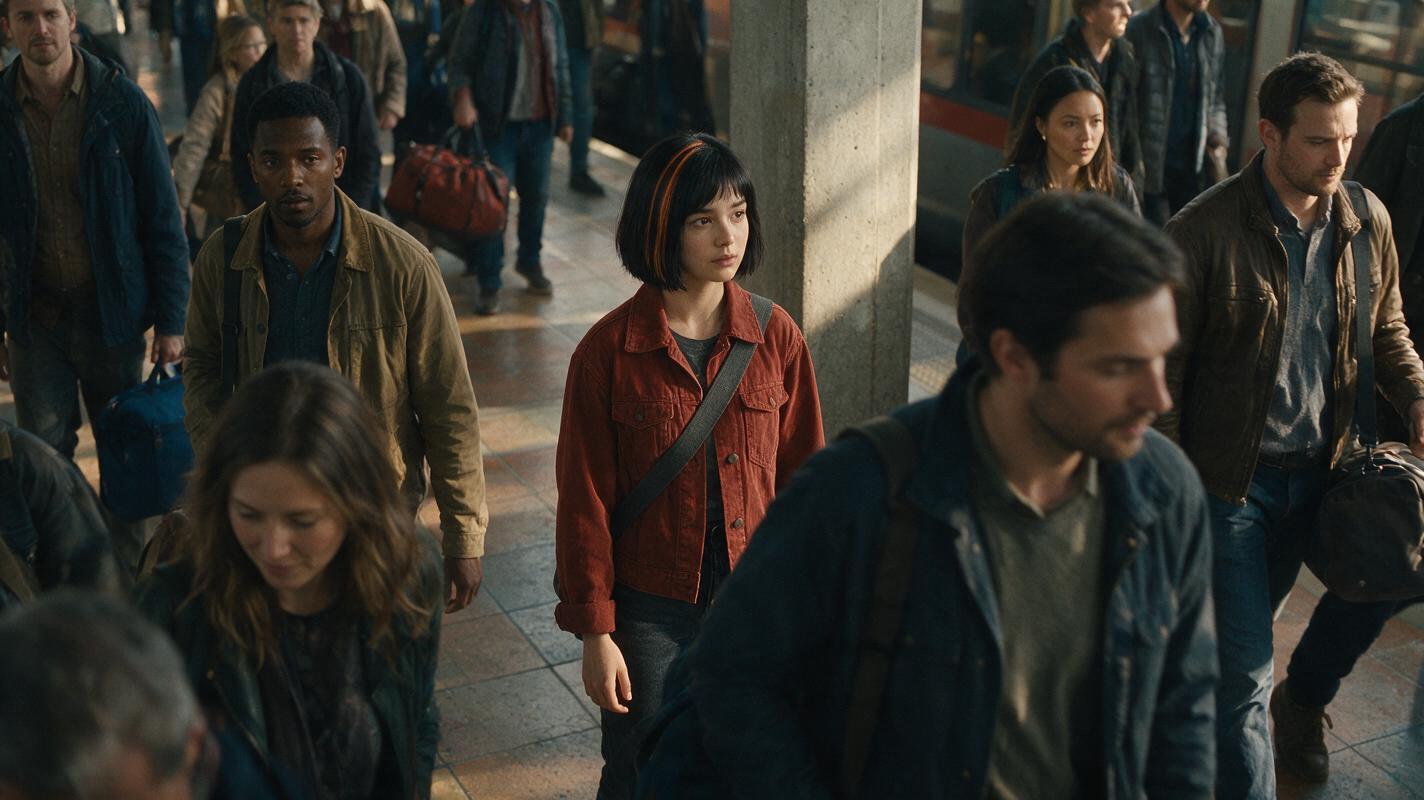
Table of contents
Why the wide shot needs its own identity reference
A close-up cannot carry a character’s identity through a wide shot by itself. When the face becomes too small to read, preserve the features the camera can still see: silhouette, hair shape, clothing, and the character’s position among other people.
This tutorial follows one fictional commuter, Mara, through a crowded station: a wide establishing shot, a medium shot as she leaves the crowd, and a close-up at the platform edge. The continuity problem is the change in camera distance—not a change of outfit, location, or character. Make still frames first with an ai image generator, approve the identity at each distance, and only then use those frames as references for motion if your chosen workflow supports reference images.
Cover visual prompt — neutral illustrative image:
Photorealistic editorial photograph, landscape 16:9. MANDATORY CAMERA: elevated three-quarter view into a believable, lived-in city train station during late-afternoon natural light. Mara, a fictional 32-year-old woman with a chin-length black bob and a narrow copper streak at her anatomical left temple, stands in the middle distance wearing a distinctive rust-red canvas jacket and a charcoal crossbody strap running from her left shoulder to her right hip. Commuters wear varied muted clothing; none repeats Mara's jacket or hair. Scuffed tile, departure-hall windows, and ordinary travel bags establish scale. Mara is identifiable by silhouette and placement rather than a readable face. Cinematic editorial realism; no text, signage lettering, logos, brands, screens, interface elements, or watermarks.Working rule: Judge the wide shot by visible identity cues. Judge the close-up by facial structure. Require both to agree with the same approved character sheet.
Step 1 — Build a character sheet that survives distance
Keep the identity description short enough to repeat without changing it. Mara’s copper hair streak and jacket distinguish her at a distance; her eyebrow notch and facial proportions help identify her nearby. The sheet is the master reference, not a frame to paste unchanged into every scene.
| Character-sheet field | Approved detail | Where to check it |
|---|---|---|
| Face | Long oval face, straight narrow nose, small notch in anatomical left eyebrow | Medium shot and close-up |
| Hair | Chin-length black bob, narrow copper streak at anatomical left temple | All three distances when visible |
| Silhouette | Rust-red hip-length canvas jacket; charcoal crossbody strap from left shoulder to right hip | Wide and medium shots |
| Allowed changes | Camera distance, pose, expression, and scene lighting | Every shot |
| Not allowed | New face, reversed strap, missing streak, or matching jacket on an extra | Every shot |
Visual brief — photorealistic three-view character sheet. The front, side, and back views belong to one person, not three similar people. Keep the sheet free of labels so its views can also serve as clean reference images.
Photorealistic three-panel character reference sheet, landscape 16:9, neutral light-gray seamless studio background. MANDATORY LAYOUT: three equal panels showing the SAME fictional 32-year-old woman full length: front view on the left, true anatomical left-side profile in the center, back view on the right. MANDATORY CAMERA: level camera, consistent full-body scale, 50mm-equivalent perspective, soft even studio light. Mara has a long oval face, straight narrow nose, a small notch in her anatomical left eyebrow, and a chin-length black bob with one narrow copper streak at her anatomical left temple. She wears the same rust-red hip-length canvas jacket, dark trousers, plain dark shoes, and a charcoal crossbody strap running from her left shoulder to her right hip in every view. Relaxed neutral pose; anatomically coherent views; one person per panel. No text, labels, logos, brand marks, UI, borders, or watermarks.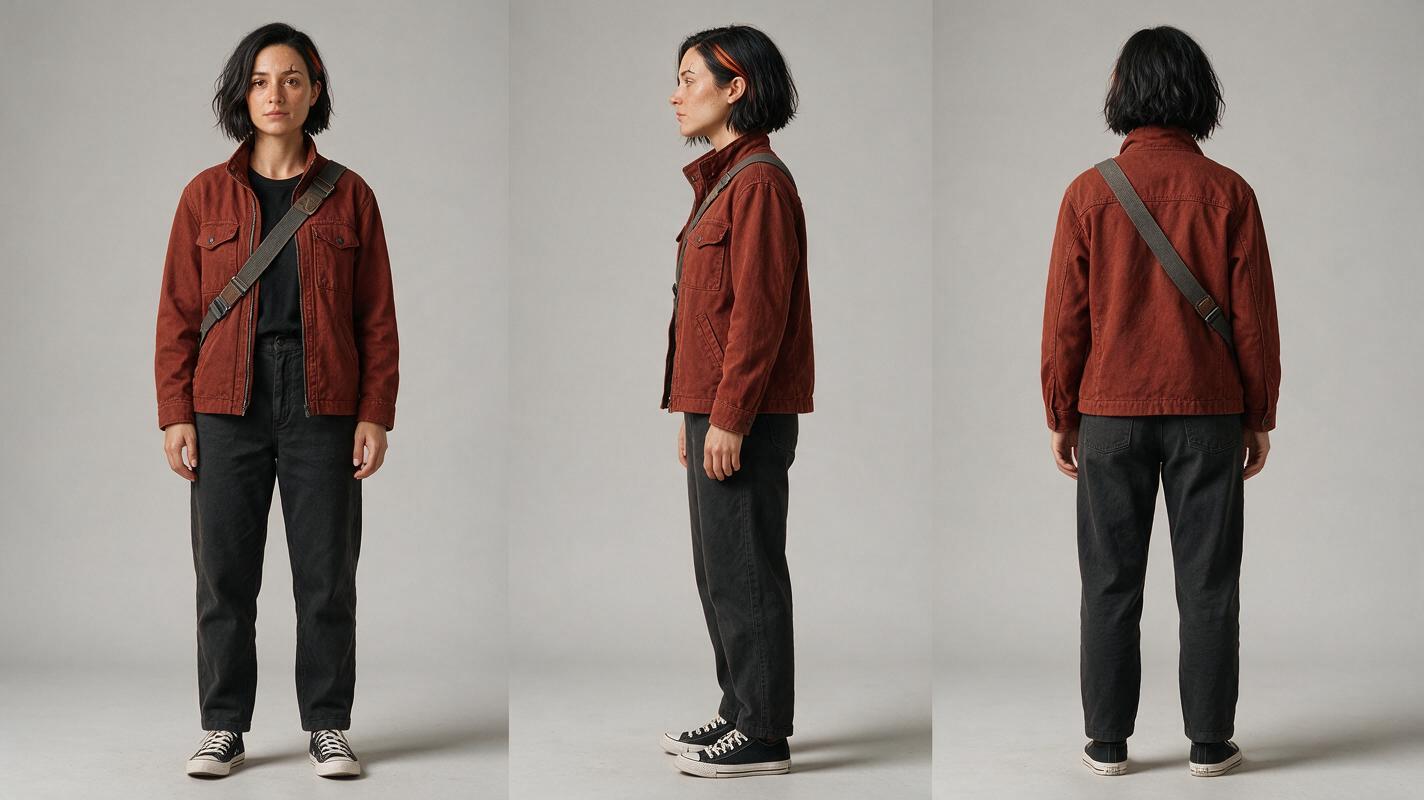
Step 2 — Approve the wide frame before generating the close-up
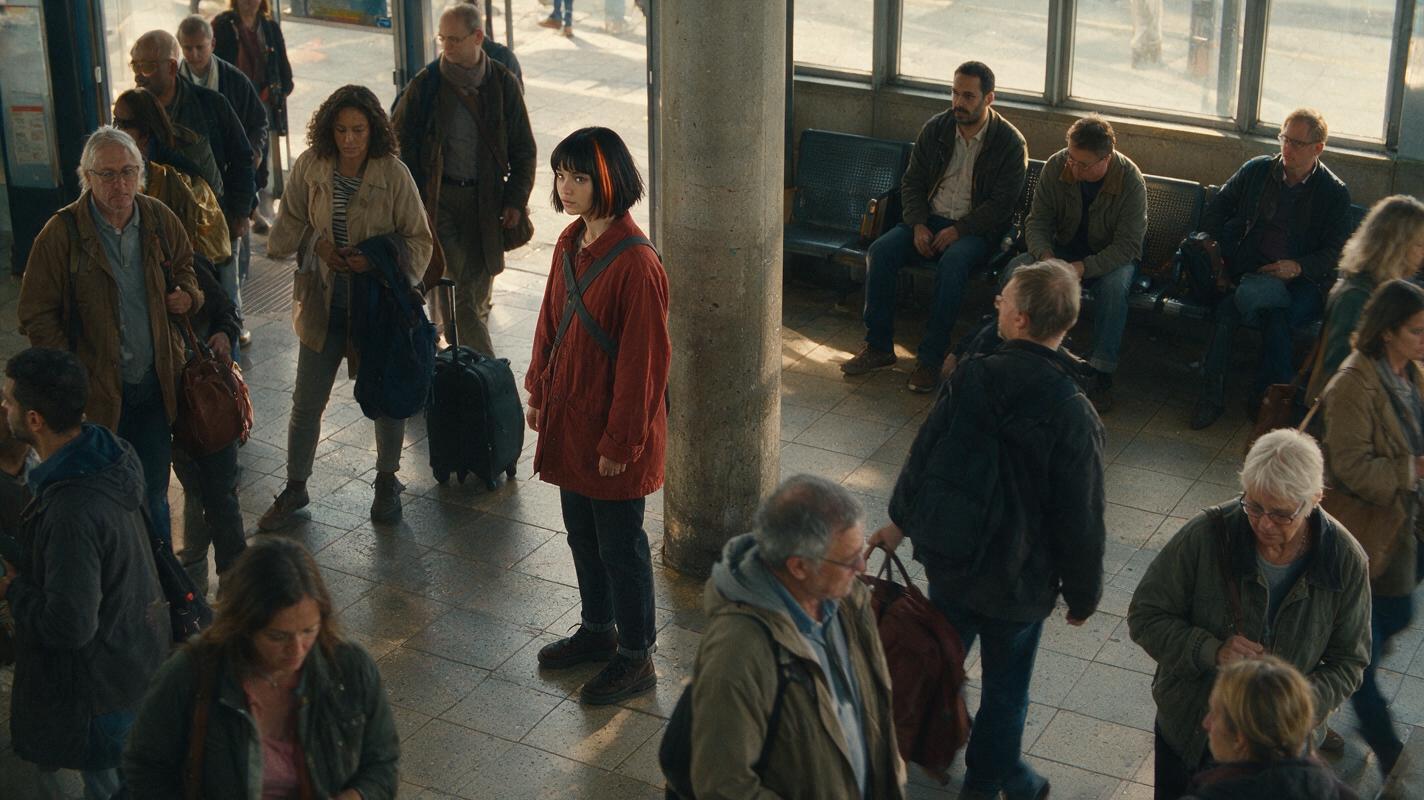
Use the sheet as the identity reference for a wide station frame. Describe Mara’s location precisely—for example, just left of the central column—and give nearby extras different silhouettes and colors. At this scale, do not demand visible eyebrow detail that the camera could not resolve. Check the jacket length, hair outline, strap direction, and position instead.
Visual brief — wide establishing frame. This frame establishes both the location and the character’s screen position for the next shot.
Photorealistic cinematic editorial-realism still, landscape 16:9. MANDATORY CAMERA: elevated wide shot from the entrance of a lived-in city train station, level horizon, Mara full body and occupying roughly one eighth of frame height, positioned just left of a central concrete column. Use the approved three-view sheet as Mara's identity reference. Preserve her chin-length black bob with a narrow copper streak at the anatomical left temple, rust-red hip-length canvas jacket, and charcoal strap from left shoulder to right hip. Late-afternoon window light, scuffed tile, benches, travel bags, believable commuters in varied muted clothing. Keep every extra visually distinct from Mara; no second rust-red jacket, no duplicate Mara. Do not enlarge or artificially sharpen her distant face. No text, readable signage, logos, brands, screens, UI, or watermarks.Save the approved wide frame alongside the sheet. For the medium shot, reference the sheet for identity and the wide frame for jacket, strap, lighting, and spatial direction. Mara should remain on the same side of the column as the camera moves closer. For the close-up, continue referencing the sheet for her face and the approved medium frame for the immediately preceding appearance. If your tool accepts only one image, choose the approved frame closest to the new camera angle and restate the sheet’s fixed details in the prompt.
Step 3 — Bridge the face into the close-up
The medium shot is the bridge. It must show enough face to compare with the sheet and enough outfit to compare with the wide frame. Approve it before creating the close-up; otherwise, an unnoticed identity change can become the next shot’s reference.
Copyable medium-to-close-up prompt:
Create a photorealistic cinematic station frame of Mara, the SAME fictional woman shown in the supplied approved character sheet and preceding frame. MANDATORY CAMERA: eye-level medium shot, true three-quarter view from Mara's anatomical right side, framing from mid-thigh upward; Mara continues walking left to right past the same concrete column. Preserve her long oval face, straight narrow nose, notch in anatomical left eyebrow when visible, chin-length black bob, narrow copper streak at anatomical left temple, rust-red hip-length canvas jacket, and charcoal strap from left shoulder to right hip. Keep late-afternoon window lighting and the station's lived-in details. Background commuters remain distinct and out of focus. Change only camera distance and Mara's position in the action; do not change her identity or wardrobe. Landscape 16:9. No text, logos, brands, UI, or watermarks.Create the next photorealistic cinematic frame of the SAME Mara from the approved medium frame and character sheet. MANDATORY CAMERA: eye-level close-up, true three-quarter view from Mara's anatomical right side, shoulders and head in frame, with her gaze directed toward the arriving train. Preserve the sheet's long oval facial proportions, straight narrow nose, small notch in anatomical left eyebrow, chin-length black bob, and narrow copper streak at anatomical left temple. The rust-red jacket collar and charcoal strap edge remain visible. Keep the same late-afternoon station light; softly blurred platform background. No extra face, face blending, changed age, new hairstyle, text, logos, brands, UI, or watermarks. Landscape 16:9.Once the still frames agree, an image to video workflow can use approved frames as shot references where that option is available. Keep motion instructions modest: Mara walks out of the crowd, slows, and looks toward the platform. Review the last frame before each cut and the first frame after it; a convincing still does not guarantee that every generated motion frame will preserve her features.
Step 4 — Diagnose the distance-change failure
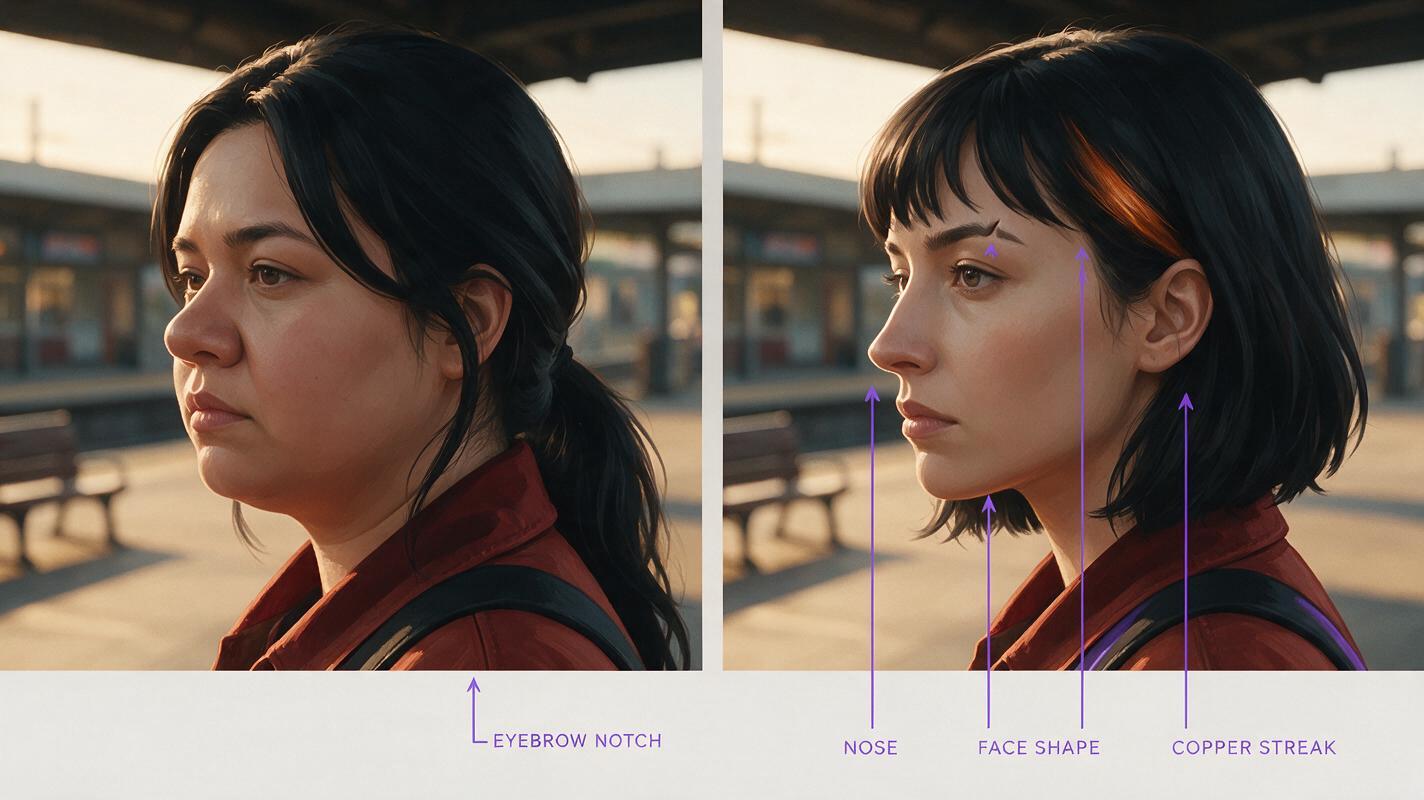
Compare the approved sheet, wide frame, medium frame, and close-up side by side. A cut can feel continuous even when the close-up quietly introduces a different nose, hairline, or face shape. The comparison visual below deliberately depicts that error as an illustration, not as a claimed tool result.
Visual brief — illustrative failure and correction. The left half shows the wrong close-up; the right half shows a corrected one matching the sheet. No labels are needed because the difference should be visible in the face and hair.
Neutral illustrative before-and-after comparison assembled as two adjacent photorealistic cinematic stills, landscape 16:9 overall, no text or graphic labels. MANDATORY LAYOUT: equal left and right image areas separated only by a clean narrow gutter; both depict one woman at the same train-platform position and under matching late-afternoon window light. MANDATORY CAMERA: eye-level head-and-shoulders close-up, true three-quarter view from the woman's anatomical right side, identical framing in both halves. LEFT, intentional continuity failure: a different oval-to-round face, broader nose, missing anatomical-left eyebrow notch, and no copper hair streak, although the rust-red jacket remains. RIGHT, corrected Mara: long oval face, straight narrow nose, small notch in anatomical left eyebrow, chin-length black bob with narrow copper streak at anatomical left temple, rust-red jacket collar and charcoal strap edge, matching the approved character sheet. Lived-in station softly blurred behind both. Exactly one person in each half; no words, logos, brands, UI, arrows, or watermarks.| What went wrong | What to change |
|---|---|
| The wide shot contains two plausible Maras. | Give extras different hair and outerwear; specify Mara’s exact position before regenerating the wide frame. |
| The medium shot keeps the jacket but changes the face. | Reference the character sheet again and compare facial proportions before approving the medium frame. |
| The close-up matches the face but reverses the strap or hair streak. | State anatomical left and right explicitly; compare with the sheet rather than trusting screen-left placement. |
| The stills match, but identity changes during motion. | Inspect frames throughout the clip, shorten or simplify the motion, and restart from an approved frame near the failure. |
When a shot fails, repair that shot and any later frame derived from it. Do not let a flawed intermediate image become the new identity reference.
Final checklist
- One approved front, side, and back character sheet defines Mara.
- The wide shot identifies her by silhouette, clothing, and position without inventing facial detail.
- The medium shot matches both the sheet and the wide shot.
- The close-up matches the sheet’s face and the preceding frame’s visible outfit.
- Cut boundaries and motion frames are checked before the sequence is finished.
Have a sheet and a station shot ready? test this prompt yourself with your own character’s fixed details.
FAQ
Should I use the wide shot as the only reference for the close-up?
No. A distant face may contain too little information to anchor a close-up. Use the character sheet for facial identity and an approved nearer frame for immediate shot continuity.
What if the wide shot cannot show the character’s face?
That is normal. Check the cues the camera can resolve—hair silhouette, distinctive clothing, strap direction, and position—then confirm facial identity in the medium shot.
Can I change the jacket between shots?
Yes, if the story shows or establishes the change. Create an approved reference for the new outfit; otherwise, a sudden wardrobe change makes it harder to recognize the character across the cut.
Keywords
character consistency, consistent character video, consistent character across scenes, character reference, multi-shot, storyboard reference, keep the same face across video