How to Keep the Same AI Video Character From Daylight to Night
A day-to-night lighting change can make an AI video character look like a different person. This tutorial uses a three-view character sheet, matched scene references, and cut-point checks to preserve facial identity while changing the light.
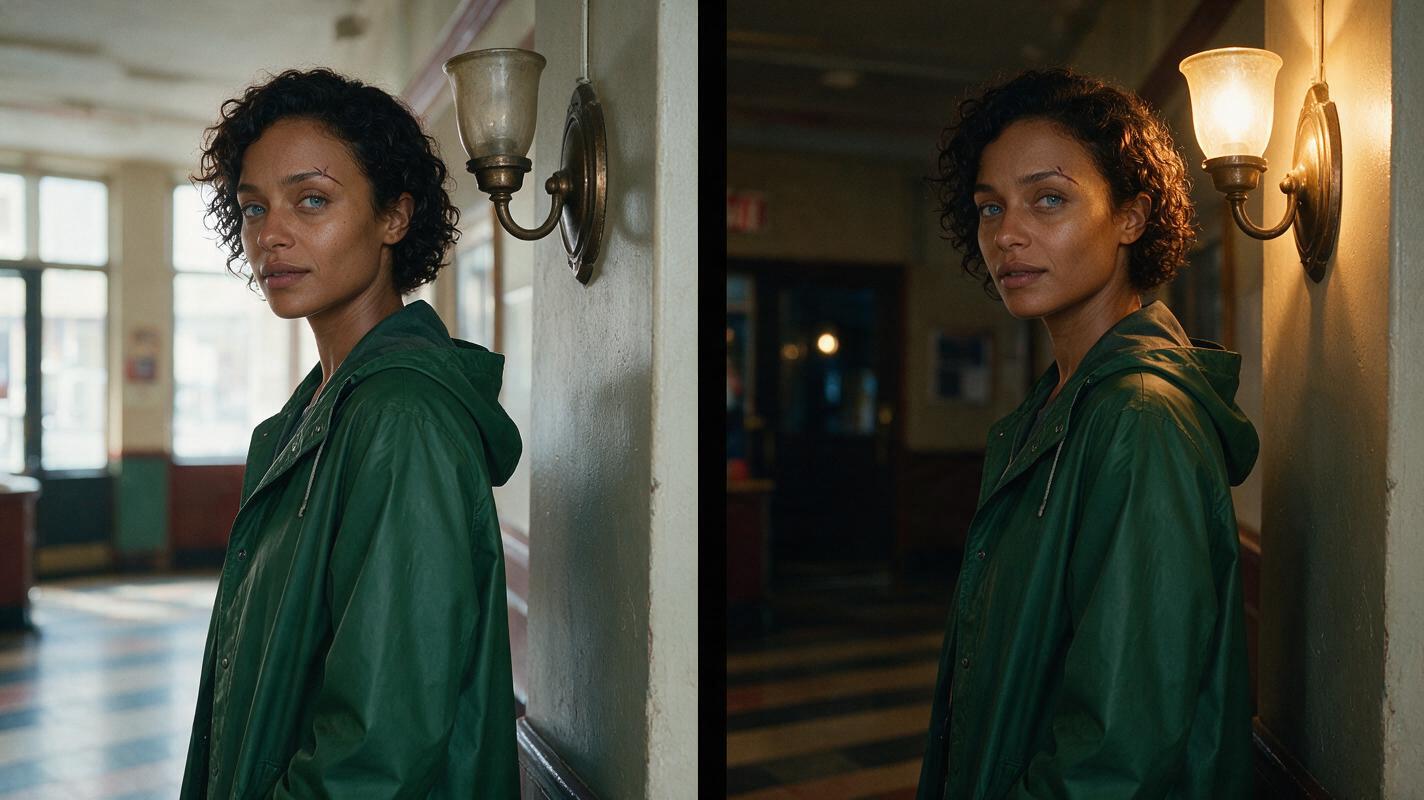
Table of contents
Keep the face fixed; change the light
A character can look right in a daylight shot and unfamiliar in the next shot simply because a night prompt changes more than the lighting.
The solution is to approve the character separately from the scene, then make daylight and night references with the same face, wardrobe, camera angle, and location. Only the illumination should change. This tutorial follows one fictional character, Mara, through a cut from afternoon to evening in a community-theater lobby.
Cover recreation prompt:
MANDATORY CAMERA/LAYOUT: landscape 16:9 cinematic editorial-photography diptych, two equal panels with matching eye-level medium shots and identical framing. Show the same fictional woman, Mara, in the same lived-in community-theater lobby in both panels. She has deep brown skin, short dark curls, blue-gray eyes, a small scar through her left eyebrow, and a plain forest-green raincoat. Left panel: cool afternoon daylight enters through high windows. Right panel: the windows are dark and warm wall sconces illuminate the lobby. Keep her facial structure, hair, coat, pose, striped tile floor, and bronze sconce positions unchanged. Photorealistic, natural skin texture, no text, logos, interface, or graphic labels.You can build the still references with an ai image generator, then use the approved frames as inputs for motion. Treat every generated image as a candidate, not as evidence that the identity has been preserved.
Step 1 — Approve a lighting-neutral character sheet
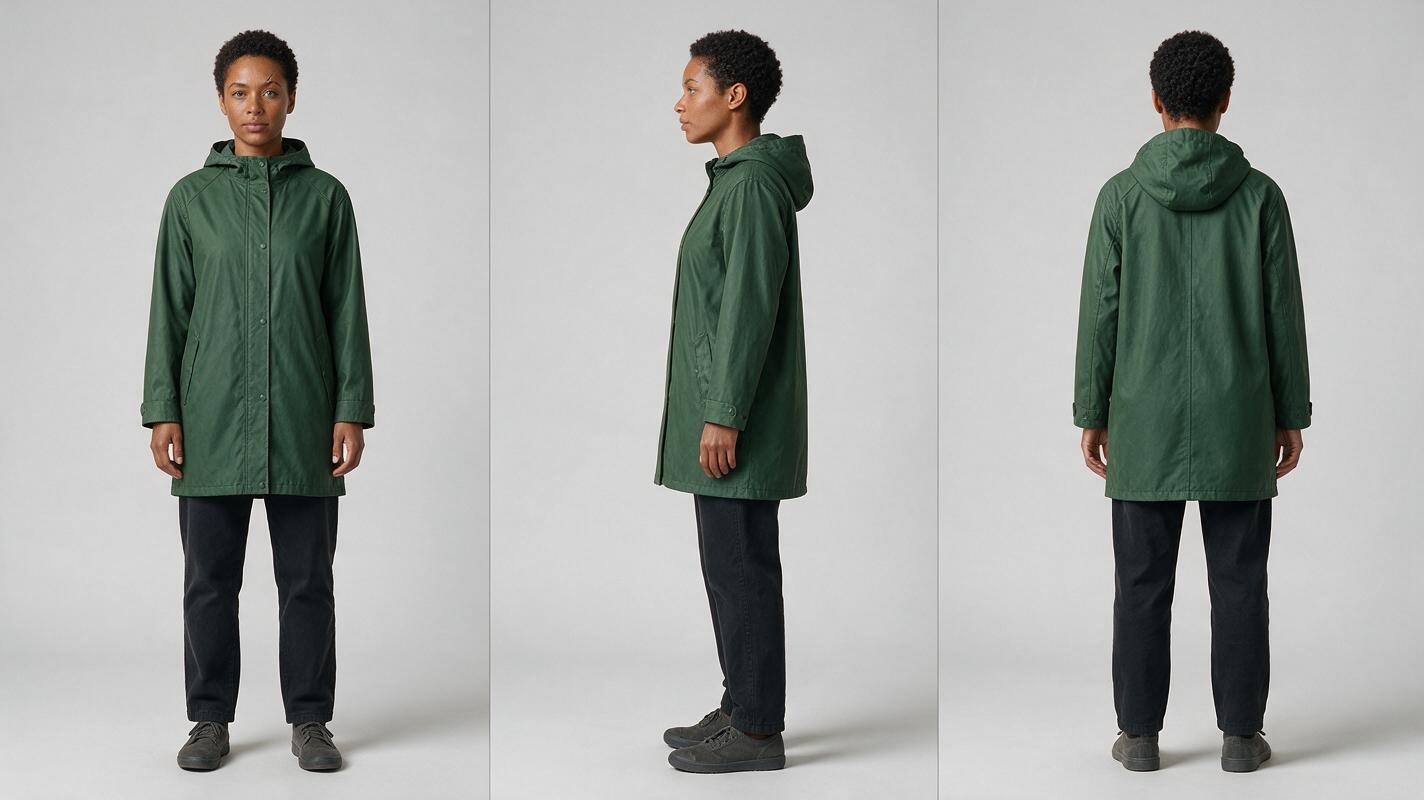
Write down the features that must survive every shot before choosing a dramatic location or color grade. Mara’s eyebrow scar and curl shape are useful checks; her skin must remain recognizably the same under both cool and warm light. A neutral sheet makes those judgments easier than a heavily shadowed portrait.
| Character-sheet field | Approved detail | Allowed to change? |
|---|---|---|
| Face | Oval face, blue-gray eyes, small scar through left eyebrow | No |
| Hair | Short, tightly curled dark hair; consistent hairline | Only natural movement |
| Skin | Deep brown skin with natural texture | Apparent color may shift with light; underlying complexion does not |
| Wardrobe | Plain forest-green raincoat | No, for this continuous scene |
| Scene | Community-theater lobby with striped tile and bronze sconces | Lighting changes; architecture does not |
Visual: three-view character sheet
Copyable generation prompt:
MANDATORY CAMERA/LAYOUT: landscape 16:9 photorealistic three-panel character sheet on a neutral light-gray seamless background; equal panels show the SAME adult fictional woman in front view, true side profile, and full back view, respectively; eye-level camera, consistent full-body scale, soft even studio illumination. Mara has deep brown skin, short tightly curled dark hair, blue-gray eyes, an oval face, and a small scar through her left eyebrow; the scar should be visible where the camera angle permits. She wears the same plain forest-green raincoat, dark trousers, and unbranded shoes in all three views. Neutral expression and relaxed standing pose. Keep proportions, hairline, clothing seams, and complexion consistent. No text, labels, logos, UI, extra people, or decorative props.If one panel depicts a noticeably different face, discard the sheet rather than using it as a reference. Save the approved image unchanged; later scene prompts should refer back to it instead of rebuilding Mara from a brief description alone.
Step 2 — Pair daylight and night storyboard references
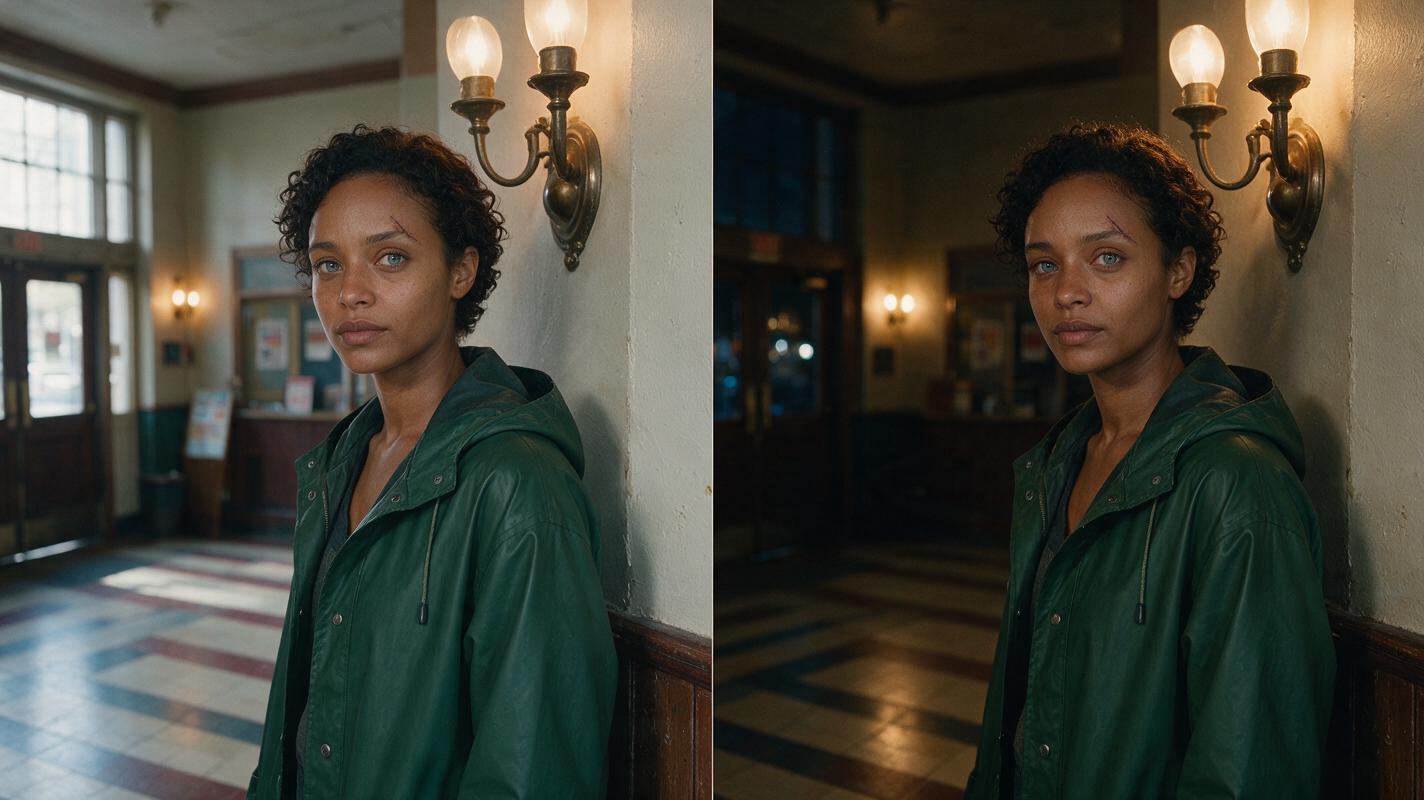
Choose one camera position for the transition: an eye-level medium shot from the lobby entrance, with Mara standing beside a bronze sconce. Generate a daylight still using the approved sheet as the character reference. For the night still, use both the sheet and the accepted daylight frame where the tool supports reference inputs. If it does not, retain the exact character and composition instructions in the second prompt and compare the outputs manually.
The night image is not a new character-design request. Keep Mara’s position, camera distance, coat, and background landmarks fixed. Change the window light to darkness outside and illuminate the room with the existing sconces. A storyboard reference for each shot gives the video stage a concrete start image rather than asking it to resolve identity and lighting simultaneously.
Visual: matched lobby frames
Copyable generation prompt:
MANDATORY CAMERA/LAYOUT: landscape 16:9 cinematic editorial-realism diptych; two equal eye-level medium-shot frames from the exact same camera position, 50mm-lens look, Mara standing on the same striped lobby tile beside the same bronze wall sconce. Use the approved three-view sheet as Mara's identity reference. Preserve her oval face, deep brown skin, blue-gray eyes, small left-eyebrow scar, short dark curls, and plain forest-green raincoat. In the LEFT frame, cool afternoon window light fills the lived-in community-theater lobby. In the RIGHT frame, it is night outside and the existing sconces cast warm, believable light. Preserve facial geometry, pose, framing, architecture, tile pattern, and coat construction across frames. Natural skin texture; no text, labels, logos, interface, or extra people.Approval test: Cover the background of each frame and compare the eyes, eyebrow scar, nose, jaw, and hairline. If those change, revise the night still before making video. A matching coat alone does not establish a matching person.
Step 3 — Animate each approved frame, then inspect the cut
Feed the approved daylight and night stills into an image to video workflow as separate shots. Ask for restrained movement—a breath, a glance toward the lobby doors, or a small turn of the shoulders. Avoid a large face rotation until the basic daylight-to-night cut holds together.
Use the same motion direction on both sides of the cut. If Mara turns slightly toward camera at the end of the daylight clip, the night clip should begin at a compatible angle. Check the last clear daylight face, the first clear night face, and a later night frame. A consistent starting still does not guarantee that every generated video frame stays consistent.
Copyable motion prompt for each approved still:
MANDATORY CAMERA: locked eye-level medium shot; no zoom, orbit, or reframing. Animate only the supplied approved scene frame. Mara takes one quiet breath and turns her head slightly toward the lobby doors. Maintain her exact facial identity, eyebrow scar, hairline, raincoat, body proportions, and the established lighting of this frame. Keep the striped tile and bronze sconce fixed. One character only; natural restrained motion; no face morphing, duplication, costume change, or new objects.Keep the accepted sheet, both stills, and both clips together as you compare model outputs. Change one variable at a time when revising: first the still reference if identity is wrong, then the motion request if drift appears only during animation.
Step 4 — Fix lighting drift without redesigning the character
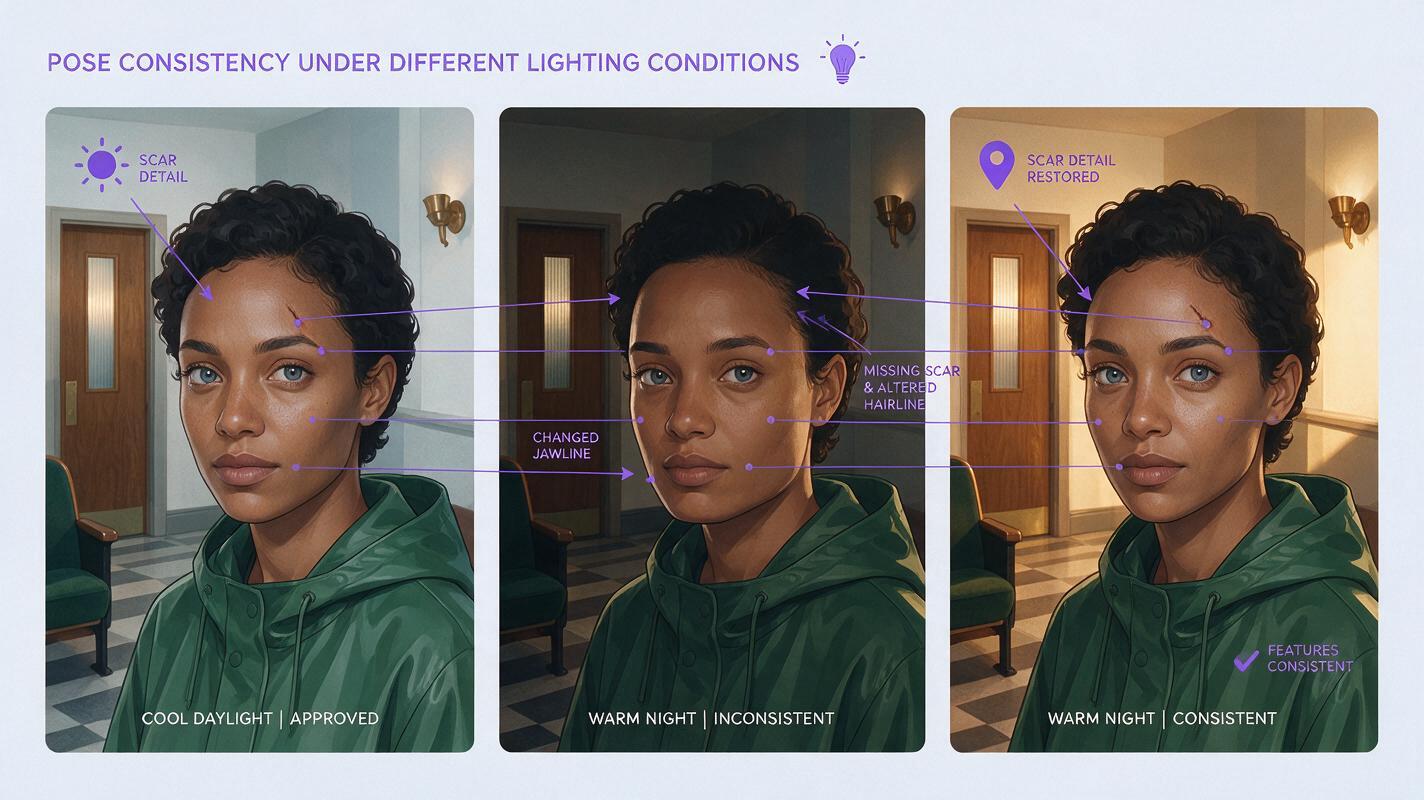
Warm light can make a face appear different even when its structure is intact. Look for structural changes before rejecting a shot solely because its color differs. The most useful comparison is the same facial angle in both scenes, viewed without the distracting backgrounds.
Visual: identity drift and corrected night frame
Copyable generation prompt:
MANDATORY CAMERA/LAYOUT: landscape 16:9 neutral illustrative comparison made from three adjacent photorealistic cinematic portrait frames, with identical eye-level medium-close framing and no text or graphic labels. LEFT: approved Mara in cool daylight inside a believable community-theater lobby, with deep brown skin, blue-gray eyes, short dark curls, an oval face, a small left-eyebrow scar, and a plain forest-green raincoat. CENTER: an intentionally flawed warm-night version in the same location, visibly showing identity drift through a different jaw shape, missing scar, and altered hairline. RIGHT: corrected warm-night version with Mara's original jaw, scar, hairline, eye spacing, and coat restored; only illumination differs from the left frame. Keep the striped tile and bronze sconce recognizable. No text, logos, dashboards, UI, borders resembling software, or additional people.| What goes wrong | Likely cause | Practical fix |
|---|---|---|
| Eyebrow scar vanishes at night | Shadow hides the feature, or the face has drifted | Move the existing sconce light enough to reveal the brow; compare facial geometry before regenerating |
| Jaw or eye spacing changes | The night still was treated as a new portrait | Return to the approved sheet and daylight frame; regenerate the night reference before animating |
| Coat and face both shift during motion | The motion request leaves too much visual freedom | Use a shorter, smaller movement from the approved still and review intermediate frames |
| A second Mara appears in the lobby | Reflections or background figures are interpreted as another subject | Remove ambiguous reflections from the still and specify one character only |
FAQ
Should the night shot use exactly the same color values as the daylight shot?
No. Warm and cool light change apparent color. Preserve facial structure, underlying complexion, distinctive features, and wardrobe; allow the lighting to behave naturally.
Is a written character description enough?
It helps, but an approved visual reference is more useful for checking eye spacing, hairline, and the scar across shots. If a tool cannot accept reference images, compare its still outputs carefully before generating clips.
What if the face matches in the stills but changes halfway through a clip?
Treat that as a motion-stage problem. Reduce the requested movement, start again from the approved frame, and inspect the frames where the change begins.
Final checklist
- Approve one neutral front/side/back sheet before creating dramatic lighting.
- Match the daylight and night camera position, location, wardrobe, and facial angle.
- Change illumination—not Mara’s facial design—in the night reference.
- Check the final daylight frame, first night frame, and later night frames.
- Regenerate a drifting still before trying to repair it through a motion prompt.
When the stills pass those checks, try these models for free with your approved references and compare which clip holds the face through the cut.
Keywords
character consistency, consistent character video, consistent character across scenes, character reference, multi-shot, storyboard reference, keep the same face across video