How to Keep the Same AI Video Character Across Fisheye and Normal Shots
A doorbell-style fisheye shot can make a familiar face look like a different character when the next shot uses a normal lens. This tutorial shows how to anchor identity to a three-view character sheet, build lens-specific references, and check the cut without trying to erase intentional perspective distortion.
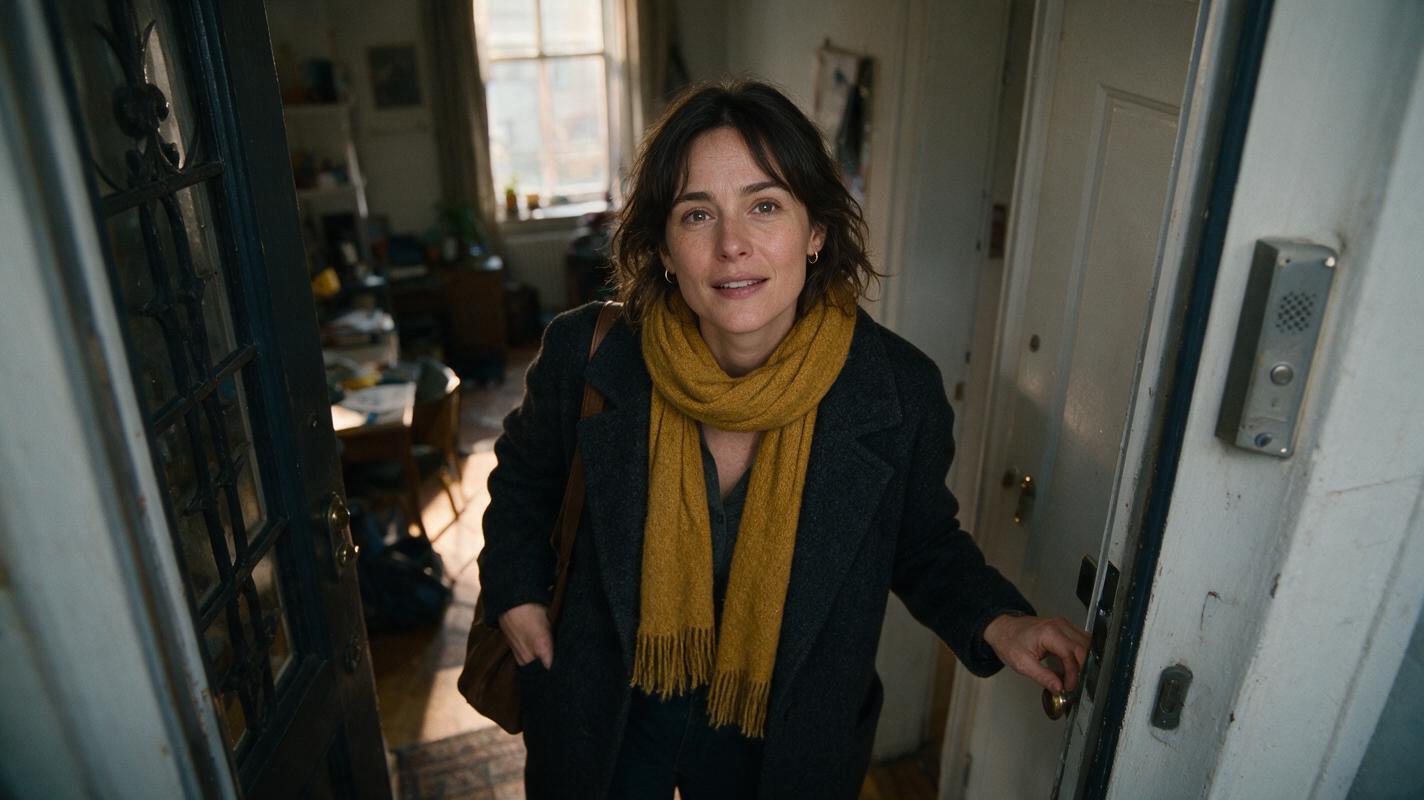
Table of contents
One face, two very different lenses
A character who looks right in a hallway close-up can appear unfamiliar in a doorbell-style fisheye shot—even when the character design has not changed.
The solution is to keep one approved identity reference while giving each shot its own camera-specific reference. Do not ask the fisheye image to preserve normal-lens proportions: a face close to a wide-angle camera should look distorted. Instead, check stable features that remain identifiable across both views, then approve the cut where the character enters the hallway.
We will use a fictional character, Mara, approaching an apartment door. The first shot looks down through a wide-angle door camera; the next shows her inside the hallway through a normal-looking lens. The prompts below create neutral visual examples, not screenshots of a product.
Cover image prompt — copy and recreate: Photorealistic editorial film still, landscape 16:9, a lived-in apartment entrance in soft late-afternoon light, a woman in a charcoal coat and mustard scarf standing close to the door as seen from a high-mounted wide-angle camera, the curved edges of the doorway showing natural lens distortion, no visible camera interface, text, logos, or brand marks; MANDATORY CAMERA: high three-quarter angle from above the door, close wide-angle perspective, face readable near the center of the frame.
Step 1 — Approve an identity sheet before choosing a lens
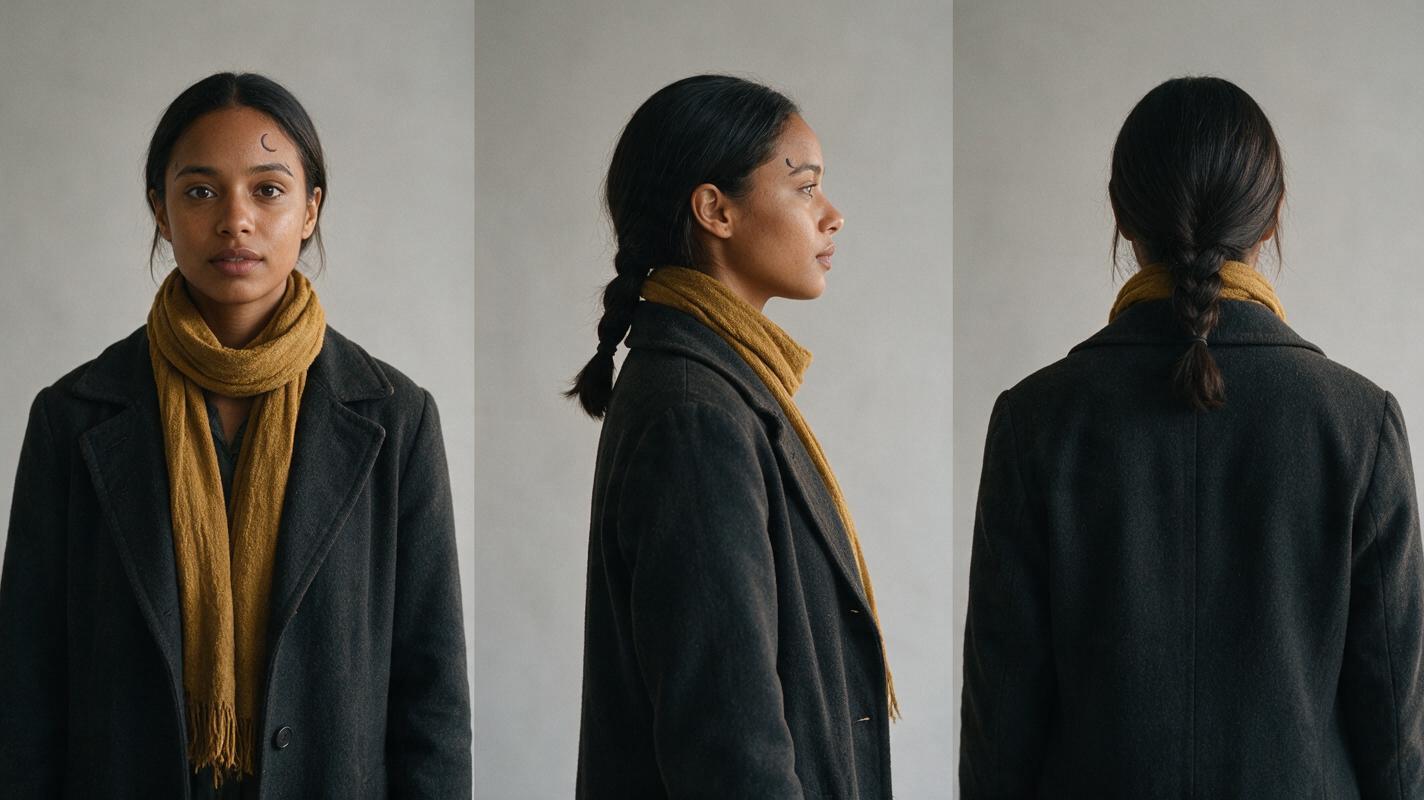
Write down what makes the character recognizable independently of wardrobe, lighting, or perspective. For Mara, use an oval face, warm brown skin, dark eyes, a short crescent-shaped mark above her left eyebrow, and straight dark hair gathered into a low braid. Treat the mark as a supporting cue, not a requirement in every frame: a high camera angle or movement may hide it.
Create a photorealistic three-view sheet against a plain background. A sheet is more useful than a single flattering portrait because the door camera may see the top and side of the head while the hallway shot sees the face more directly. Approve one sheet and retain the exact file for both shots; do not regenerate a new character from a text description halfway through.
Character-sheet image prompt — copy and recreate: Photorealistic three-panel character reference sheet of the same fictional woman, Mara, age approximately 38, warm brown skin, oval face, dark eyes, short crescent-shaped mark above her left eyebrow, straight dark hair in a low braid, wearing a plain charcoal coat and mustard scarf; front view in the left panel, true side profile in the center panel, back view in the right panel; consistent facial structure, hair, clothing, and scale across all panels; neutral light-gray seamless background, soft even studio light, landscape 16:9; MANDATORY CAMERA AND LAYOUT: eye-level camera, three equal vertical panels, full head and upper body visible in each, no text, labels, UI, logos, or brand marks.
Character sheet template
| Record | What to lock | What may change |
|---|---|---|
| Face | Underlying face shape, eye spacing, eyebrow shape, nose, mouth | Apparent proportions caused by camera distance and lens |
| Hair | Color, hairline, low braid | Stray strands and how much of the braid is visible |
| Identifiers | Small mark above left eyebrow | Whether the angle makes the mark visible |
| Wardrobe | Charcoal coat and mustard scarf for this sequence | Folds, shadows, and partial occlusion |
| Scene | Same apartment entrance and direction of travel | Door-camera perspective versus hallway framing |
An ai image generator can be used to make the sheet, but approve it by inspecting the three views yourself. If the profile has a different nose or the back view changes the braid, correct the sheet before using it downstream.
Step 2 — Build a door-camera reference without redesigning the face
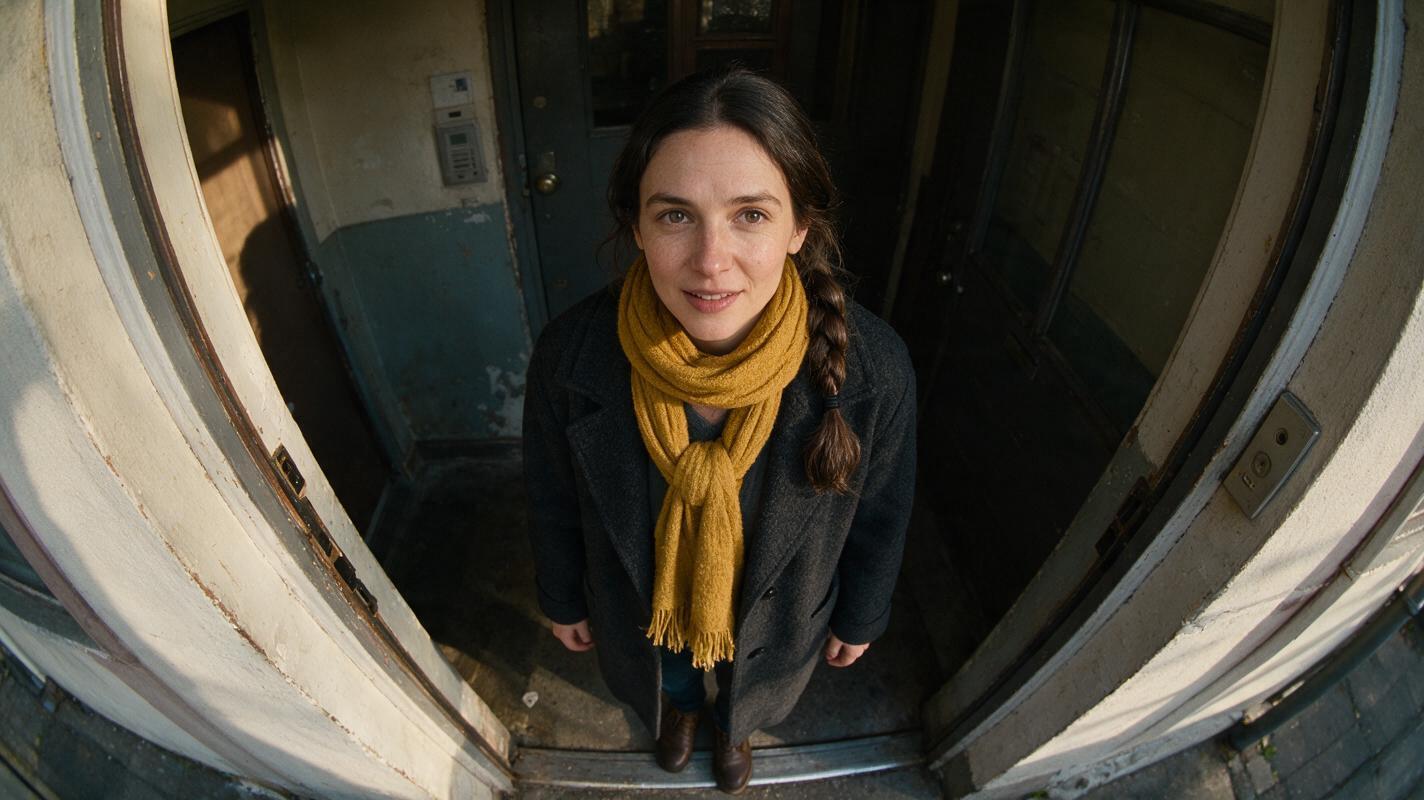
Use the approved sheet as the character reference and describe the camera separately. Keep Mara near the center of the wide-angle frame, where the face is easier to compare; let the doorway and walls show more obvious edge distortion. Preserve the coat, scarf, hairline, and direction of travel. Generate a still first so an identity mistake does not become an entire moving shot.
Door-camera scene image prompt — copy and recreate: Cinematic editorial-realism still of the fictional woman Mara from the supplied approved three-panel character reference, approaching a lived-in apartment door from outside; same warm brown skin, oval face, dark eyes, left-eyebrow mark when visible, low dark braid, charcoal coat, and mustard scarf; believable entryway with worn paint, a doormat, and natural late-afternoon light; landscape 16:9; MANDATORY CAMERA: high-mounted door-camera viewpoint with a close wide-angle fisheye perspective, Mara centered beneath the lens, forehead and nose allowed to appear naturally larger because of proximity, curved doorframe visible near the edges; no second person, text, UI, logos, or brand marks.
Copyable motion prompt:
Use the approved door-camera still as the starting reference. Mara walks toward the apartment door and looks up briefly. Keep the shot from the same fixed, high, wide-angle viewpoint. Preserve her identity, low braid, charcoal coat, and mustard scarf. Allow natural perspective distortion as she approaches. Do not add another person, change her outfit, or cut to a different camera.If the available video tool accepts a starting image, pass the approved still into image to video. Otherwise, use the same character description and compare generated frames against the sheet. Either way, inspect an early frame, the moment she is closest to the lens, and the last usable frame.
Step 3 — Give the hallway shot its own approved reference
The hallway shot should not inherit fisheye face proportions. Return to the original character sheet, not a distorted door-camera frame, when generating its still. Keep the apartment entrance recognizable and Mara's position plausible: she was outside the door, then appears just inside it. Match the coat, scarf, braid, and movement direction so the viewer reads a camera change rather than a character change.
Continuity rule: Carry identity forward from the approved sheet; carry staging forward from the previous shot. Do not use lens distortion as the identity master.
Hallway reference prompt:
Cinematic editorial-realism frame of Mara, the same fictional woman in the supplied approved three-panel character reference, just inside the apartment doorway. Preserve her underlying facial structure, warm brown skin, dark eyes, left-eyebrow mark when visible, low dark braid, charcoal coat, and mustard scarf. The lived-in hallway contains worn paint and soft late-afternoon window light. Landscape 16:9. MANDATORY CAMERA: eye-level medium shot from inside the hallway, natural-looking perspective, Mara in a true three-quarter view with the entrance behind her. No fisheye distortion, second person, text, UI, logos, or brand marks.Approve this still on its own merits. Then animate the smallest useful action—Mara finishing her entrance or turning toward someone off-screen. A brief movement is easier to review than a long shot that also changes angle, expression, and lighting.
Step 4 — Check the cut, not just two favorite frames
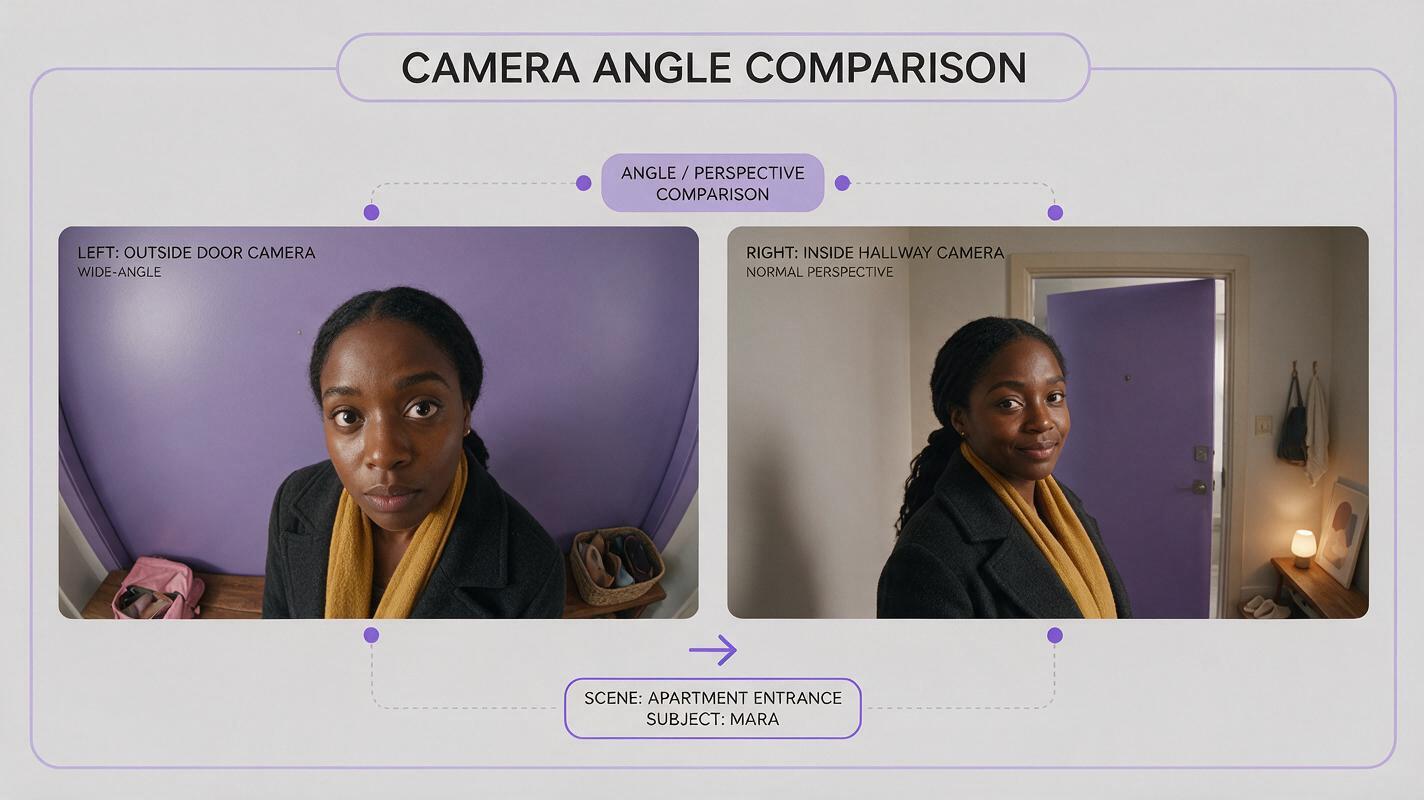
Put the last clear door-camera frame beside the first clear hallway frame. The fisheye image may have a larger-looking forehead or nose; that alone is not identity drift. Look instead for a different hairline, eye spacing, eyebrow shape, skin tone, braid placement, or coat and scarf. Also check whether she enters from a plausible direction. If those cues agree, the lens change can feel intentional.
Comparison image prompt — copy and recreate: Neutral pictorial comparison made from two photorealistic cinematic frames of the same fictional woman Mara at one apartment entrance, landscape 16:9 overall, clean side-by-side layout with no dividing text or graphic labels; left frame shows her close beneath a high-mounted wide-angle door camera outside, with natural central-face perspective distortion and curved doorway edges; right frame shows her just inside the hallway at eye level with natural-looking perspective; identical warm brown skin, underlying facial structure, low dark braid, charcoal coat, and mustard scarf; soft late-afternoon light and believable lived-in surroundings in both frames; MANDATORY CAMERA AND LAYOUT: equal-size left and right frames, face readable in both, no arrows, UI, logos, captions, or brand marks.
| If the cut looks wrong | Likely cause | Practical fix |
|---|---|---|
| Hallway Mara has fisheye-shaped features | The distorted frame became the identity reference | Regenerate the hallway still from the original three-view sheet |
| Door-camera face looks like a stranger | The model redesigned features while changing perspective | Rebuild that still with the approved sheet attached and Mara closer to frame center |
| Braid or scarf changes at the cut | Wardrobe and hair were described inconsistently | Lock their placement in both still prompts and approve both before animation |
| Mara seems to change direction | Entrance staging was not carried into the hallway | Match doorway position and screen direction in the two references |
For a particularly difficult cut, add a third, less-distorted view of Mara at the threshold. Use it as an editorial bridge only if it improves the sequence; it should not replace the approved identity sheet. A storyboard reference showing the door, threshold, and hallway can keep that spatial relationship clear.
FAQ
Should I remove fisheye distortion to improve character consistency?
No. If the story calls for a door-camera view, distortion is part of the shot. Keep the face relatively central and judge the underlying character cues rather than demanding identical facial proportions across lenses.
Can I use the final door-camera frame as the next shot's character reference?
Use it for staging—where Mara stands and which way she moves—but use the approved three-view sheet for facial identity. A heavily distorted frame is a poor master for a normal-lens face.
What if the left-eyebrow mark disappears in the high-angle shot?
First check whether the angle naturally hides it. If so, rely on several other cues. If the mark is clearly visible in that view but changes sides or shape, revise the still before generating motion.
Final checklist
- Approve one front, side, and back character sheet before generating either scene.
- Create separate still references for the fisheye and normal-lens shots.
- Use the sheet for identity and the preceding shot for staging.
- Compare clear frames on both sides of the cut; allow perspective to change, not the underlying character.
- Fix mismatched references before spending time on longer animations.
When your sheet and two shot prompts are ready, try these models for free and review the cut before building the rest of the sequence.
Keywords
consistent character video, character consistency, consistent character across scenes, character reference, multi-shot, storyboard reference