How to Keep One AI Video Character Consistent in Split-Screen Scenes
A split screen can show two moments in one character’s story, but independently generated shots may give that person two different faces. This guide uses a three-view character sheet, separate scene references, and cut-point checks to keep both halves consistent.
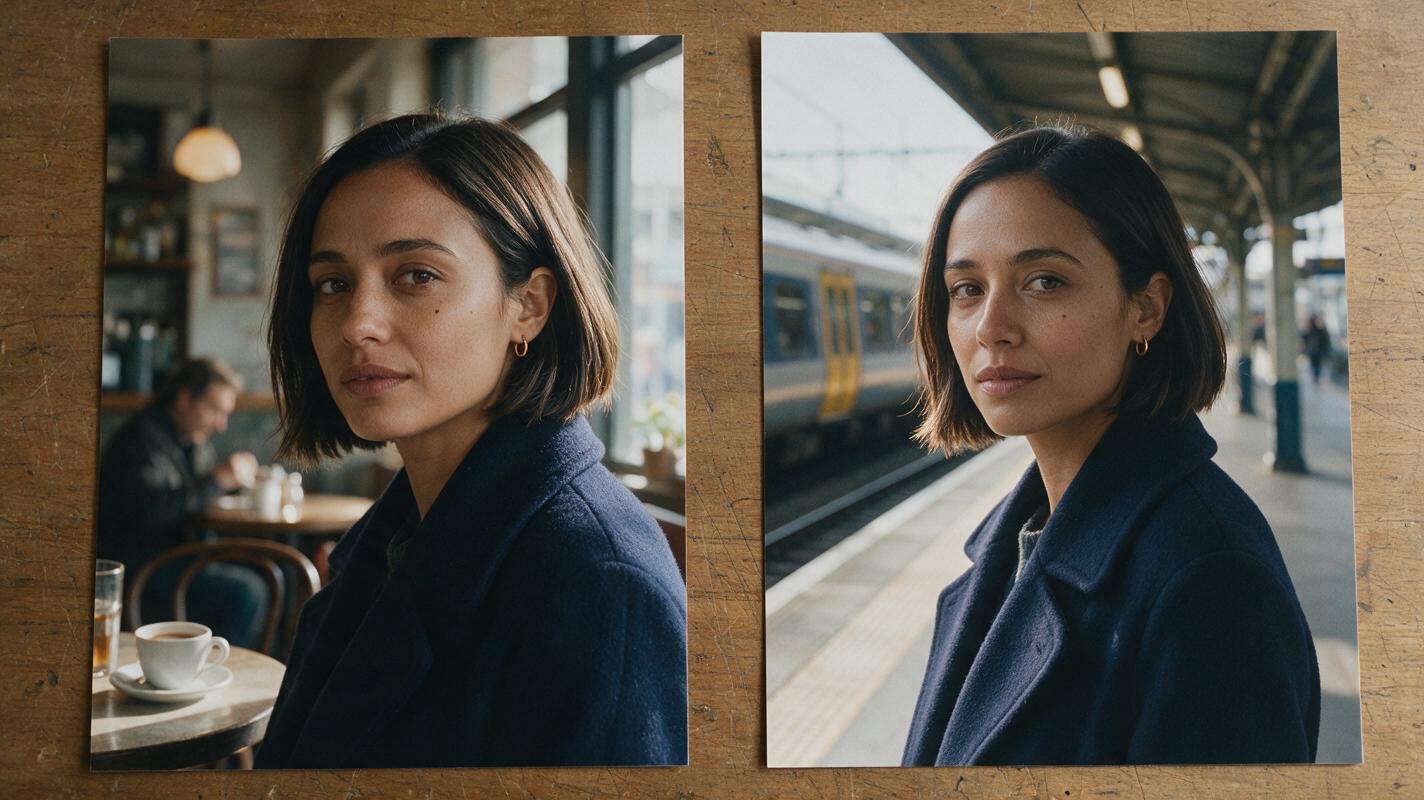
Table of contents
One character, two frames, one identity
A split screen makes facial drift unusually easy to spot: the audience can compare both versions of a character at the same instant.
The reliable approach is to establish one approved identity, make each location as a separate shot, and combine the shots only after both faces pass a side-by-side check. This example follows Mara through two moments of the same day: a morning café visit on the left and an afternoon train-platform wait on the right. Her location and lighting change; her face, haircut, and navy coat do not.
Use an ai image generator to establish the sheet and scene stills before making either moving shot. Do not ask a video model to invent two versions of Mara in one generation.
Cover visual prompt — copy and recreate:
Photorealistic editorial photograph, landscape 16:9. On a worn wooden editing table, two unmarked photographic prints sit side by side: the left shows fictional Mara, a 34-year-old woman with olive skin, an oval face, a small mole below her left eye, a straight dark-brown chin-length bob, one small copper hoop in her left ear, and a navy wool coat, seated in a lived-in morning café; the right shows the unmistakably same woman in the same coat on a believable afternoon train platform. MANDATORY CAMERA: true overhead view of the physical prints, with both faces large enough to compare. Natural window light, realistic paper texture, restrained cinematic color. No writing, logos, screens, interface elements, or extra people.Step 1 — Approve a character sheet before designing either scene
Give Mara a compact identity specification. Include features that remain recognizable at different angles, not just a vague description such as “woman with dark hair.” Approve the sheet by checking its front and profile against each other; regenerate it if the profile changes her nose or jaw.
| Keep fixed | May change by scene |
|---|---|
| Oval face, nose shape, jaw, mole position, bob length, left-ear hoop | Expression, gaze, pose, background, camera position |
| Navy coat and its collar for this sequence | How the existing coat folds as Mara moves |
Save the approved sheet as the master character reference. A newly generated café frame must not quietly replace it as the authority for Mara’s identity.
Character-sheet image prompt — copy and recreate:
Photorealistic three-panel character sheet of the same fictional woman, Mara, age 34, olive skin, oval face, straight dark-brown chin-length bob, small mole below the left eye, small copper hoop in the left ear, navy wool coat over a plain cream shirt. Landscape 16:9; neutral light-gray seamless background; even soft studio lighting. MANDATORY LAYOUT: three distinct, evenly sized full-body panels showing front, true left-side profile, and back, in that order; consistent height, proportions, haircut, coat, and shoes in every panel. Neutral expression and relaxed arms. No labels, lettering, logos, borders resembling software, or other people.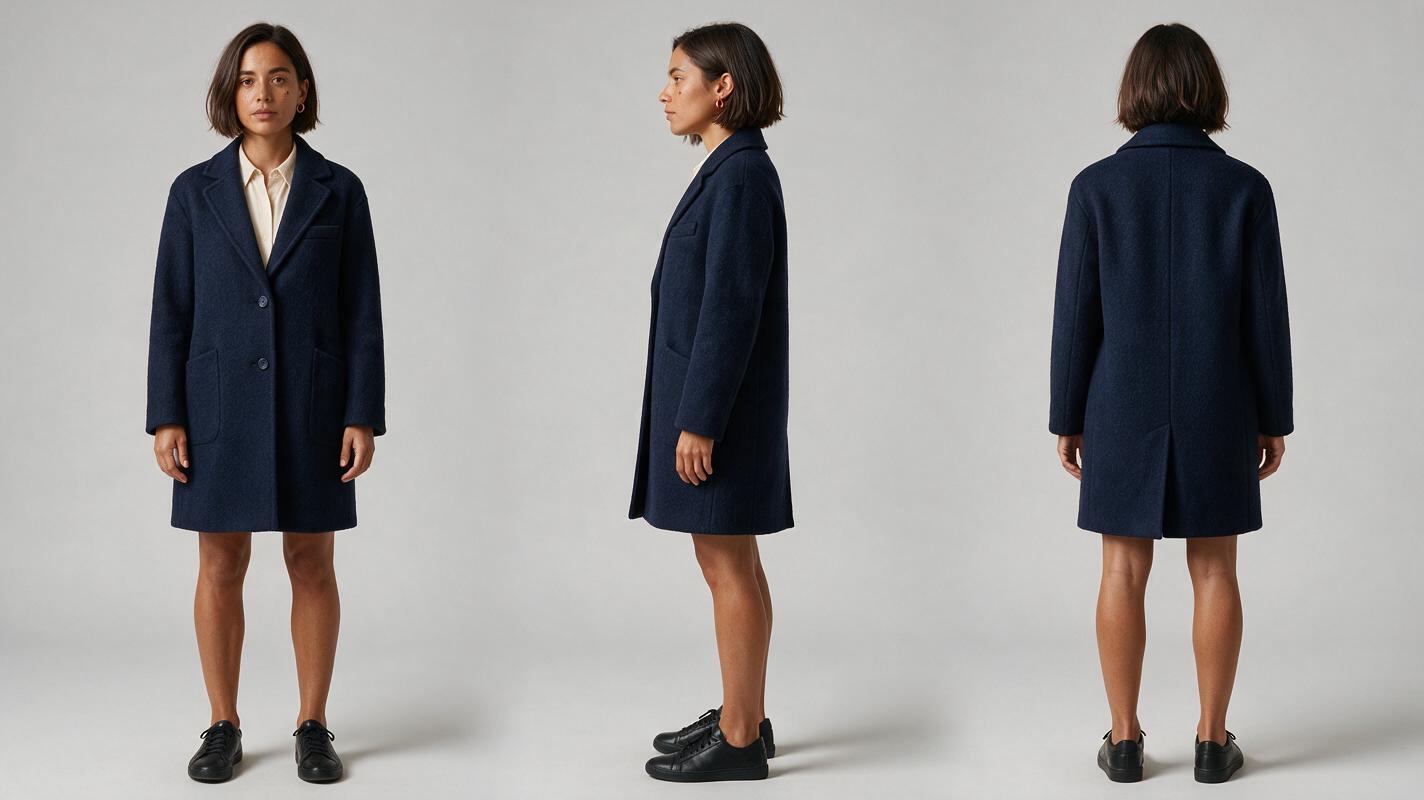
Step 2 — Build two scene references from the same sheet
Make the café and platform stills separately. Supply the approved sheet as the identity reference wherever your chosen image tool supports reference inputs, then describe only what belongs to the current location. If that tool cannot accept an image reference, repeat the fixed identity specification verbatim and inspect the result before proceeding.
The storyboard reference for each half should establish Mara’s screen position as well as her face. Place her toward the outer edge of each frame and leave space near the future center seam. This prevents the final split from cutting through an eye or obscuring the action.
Left reference prompt:
Use the approved three-view sheet as the sole identity reference for Mara. Photorealistic cinematic editorial still, landscape 16:9. Morning in a lived-in neighborhood café with worn wood, ordinary cups, and soft window light. Mara wears her unchanged navy wool coat over a cream shirt and sits at a table, looking at a folded paper receipt. MANDATORY CAMERA: eye-level medium close-up, three-quarter view of her face; position Mara in the left third and leave the right third visually quiet for a later crop. Preserve her oval face, nose, jaw, dark-brown chin-length bob, mole below the left eye, and left-ear copper hoop. No other faces, text, logos, or interface elements.Right reference prompt:
Use the same approved three-view sheet as the sole identity reference for Mara. Photorealistic cinematic editorial still, landscape 16:9. Afternoon on a believable, lightly used train platform with scuffed tiles and natural daylight. Mara wears the same navy wool coat and cream shirt and holds the same folded paper receipt. MANDATORY CAMERA: eye-level medium close-up, opposite three-quarter composition; position Mara in the right third and leave the left third visually quiet for a later crop. Preserve exactly the facial structure, bob length, mole position, and left-ear copper hoop of the approved sheet. No other faces, readable signs, logos, or interface elements.Paired-scene image prompt — copy and recreate:
Neutral visual comparison assembled from two photorealistic cinematic editorial frames, landscape 16:9 overall, with a simple straight vertical division and no decorative border. On the left, fictional Mara sits in a lived-in morning café holding a folded receipt; on the right, the unmistakably same Mara waits on an afternoon train platform holding that receipt. She has olive skin, an oval face, straight dark-brown chin-length bob, a small mole below her left eye, a copper hoop in her left ear, and the same navy wool coat over a cream shirt. MANDATORY LAYOUT: equal-width halves; eye-level medium close-up in each half; Mara positioned away from the central seam; both faces similar in apparent size. Natural location-specific light, believable film color. No labels, lettering, logos, screens, or interface elements.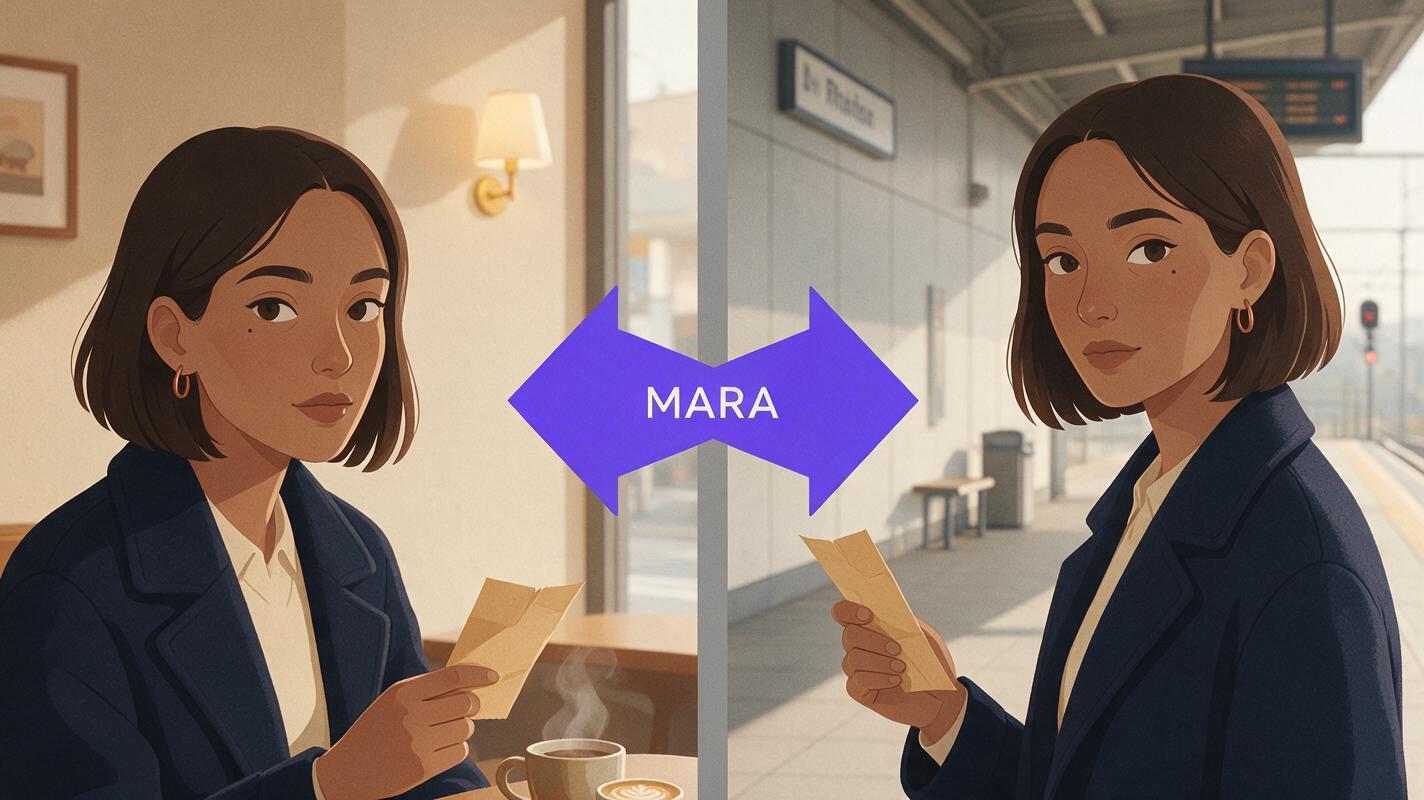
Step 3 — Animate independently, then assemble the split screen
Once both stills match the sheet, use image to video for each shot independently. Ask for modest movements that leave the face visible: Mara glances down at the receipt in the café; on the platform, she looks up toward an arriving train. Start from the approved still for its respective shot rather than feeding the other location’s frame into the animation.
Café motion prompt:
Animate this approved café still. Mara lowers her gaze to the folded receipt, then looks forward. Keep the camera at eye level in a steady medium close-up. Preserve the starting frame's face, mole position, bob, left-ear hoop, navy coat, café layout, and morning light. One Mara only; no face replacement, wardrobe change, or camera orbit.Platform motion prompt:
Animate this approved platform still. Mara briefly checks the receipt, then looks toward the tracks. Keep the camera at eye level in a steady medium close-up. Preserve the starting frame's face, mole position, bob, left-ear hoop, navy coat, platform layout, and afternoon light. One Mara only; no face replacement, wardrobe change, or camera orbit.Crop and position the resulting clips in an editor. Compare frames at the opening, the largest head turn, and the final beat. Pause with both faces visible: a discrepancy that passed unnoticed in a single clip may stand out immediately beside the other shot. A multi-shot sequence is ready for the split only when both shots still match the master sheet.
Common split-screen failures and fixes
| What you see | Likely cause | Practical fix |
|---|---|---|
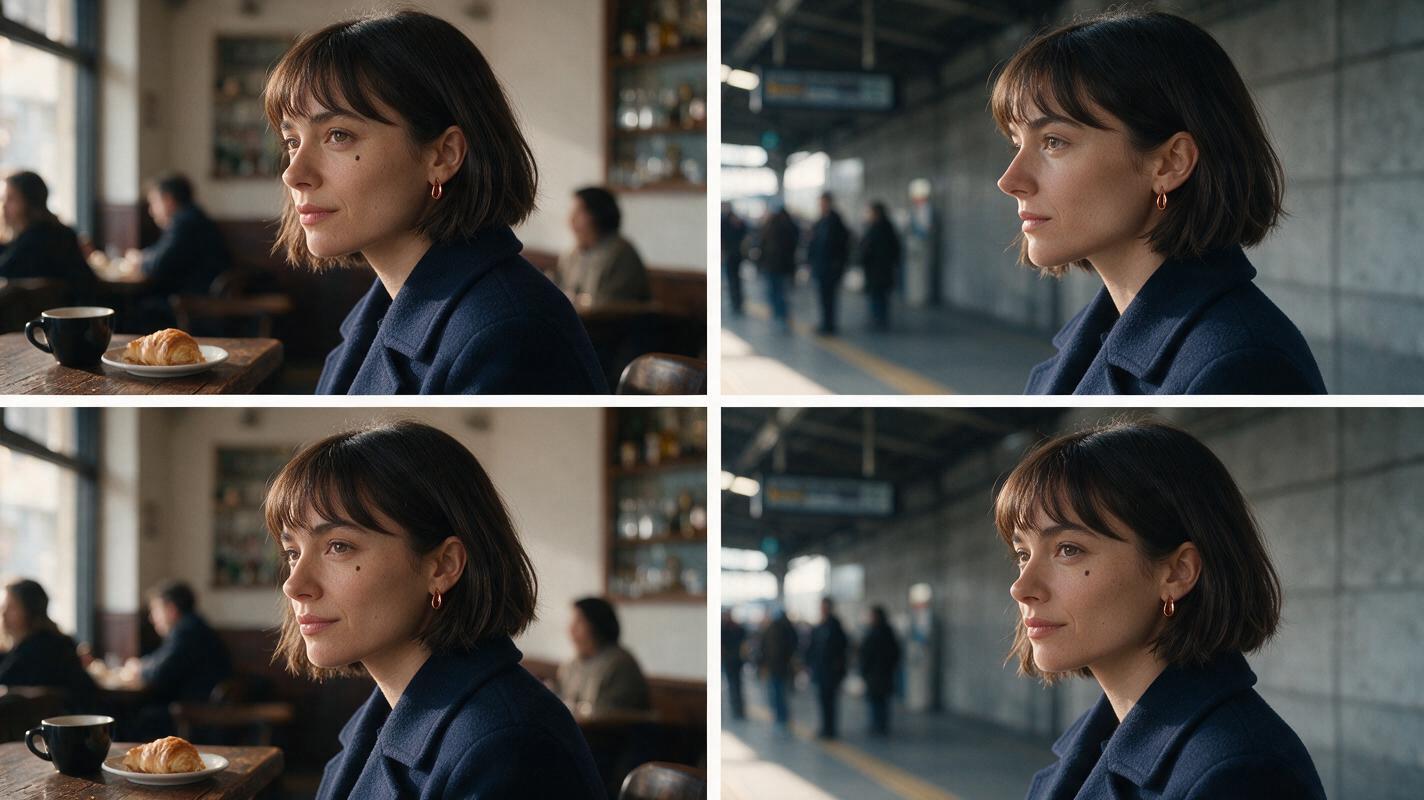
| One half has a narrower nose or different jaw. | The second scene was generated from text alone or from the first scene rather than the master sheet. | Rebuild that scene still using the approved sheet, then animate it again. |
| The mole or earring switches sides. | A mirrored reference or an ambiguous camera instruction changed laterality. | Check both stills before animation; specify Mara’s left side and reject mirrored results. |
| Faces match in stills but diverge during movement. | The motion asks for a larger turn than the references support. | Shorten the movement or approve an additional angle-specific still from the sheet. |
| The split looks like two different people despite matching features. | Face scale, crop, or color contrast differs sharply between halves. | Match face size and eye height in the edit; adjust grading without changing facial structure. |
Failure-and-fix image prompt — copy and recreate:
Photorealistic editorial comparison presented as four cinematic stills in a clean two-by-two layout, landscape 16:9 overall, without text or graphic labels. Each row pairs a morning café frame at left with an afternoon train-platform frame at right. Fictional Mara wears the same navy wool coat in all four frames. MANDATORY CAMERA: matching eye-level medium close-ups, faces similarly sized, true three-quarter views. In the upper row, make the platform version subtly but visibly wrong: a narrower nose, altered jaw, and missing mole, while the café face retains Mara's oval face, dark-brown chin-length bob, mole below the left eye, and left-ear copper hoop. In the lower row, correct the platform face so both locations unmistakably show the same Mara. Believable lived-in locations and natural light; no lettering, logos, screens, or interface elements.FAQ
Can I generate both sides in one prompt?
You can experiment, but separate scene generations give you a clearer way to reject a drifting face without rebuilding the other half. Assemble the split after both shots are approved.
Should both halves use identical lighting?
No. Morning café light and afternoon platform light can differ. Compare stable facial structure under those conditions rather than trying to make both scenes look identical.
What if the tool does not accept a character sheet?
Repeat the same identity description in both scene prompts, keep the shots short, and select stills by direct side-by-side comparison. Treat a close resemblance as something to inspect, not assume.
Final checklist
- Approve one front, side, and back sheet before generating either location.
- Use that sheet—not another scene frame—as the identity authority for both stills.
- Keep Mara’s face away from the split-screen seam.
- Animate each approved still separately and inspect the opening, head turn, and ending.
- Compare both faces at equal size in the final edit.
For a free-entry, multi-model path from character stills to moving shots in one place, try these models for free; check the current options and limits before starting a larger sequence.
Keywords
character consistency, consistent character video, consistent character across scenes, character reference, multi-shot, storyboard reference, keep the same face across video