How to Keep the Same AI Video Character Across a 35-Year Time Jump
An AI video time jump should make a character look older, not like a different person. This guide uses paired age-specific character sheets, matched scene references, and a cut-point review to preserve facial identity from a flashback to the present day.
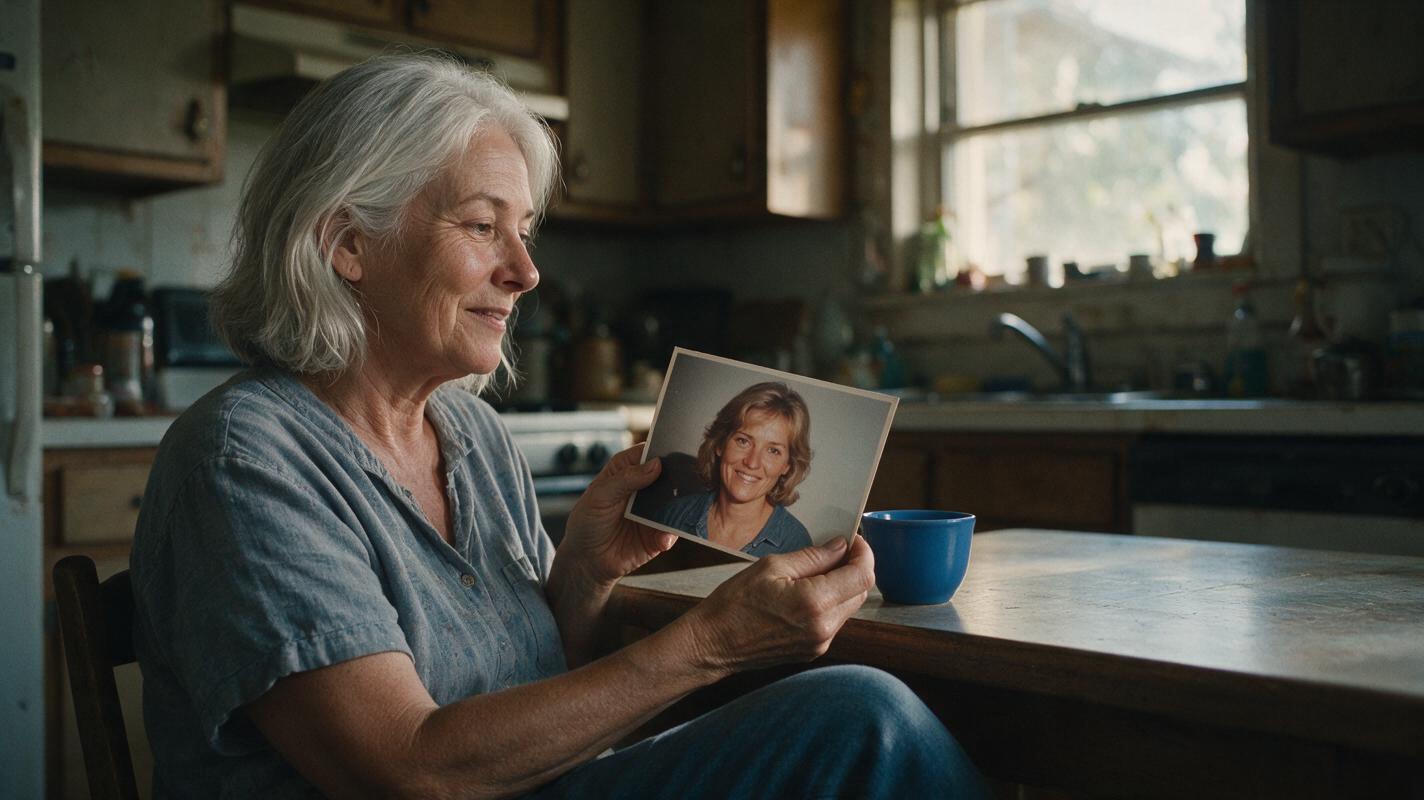
Table of contents
One character, two ages
A convincing time jump changes a character’s age while preserving the features that make viewers recognize them. The safest approach is to approve a younger reference, create an older reference from it, and use each age-specific image to guide its own scene.
Consider a fictional character named Mara: she is 30 in a kitchen flashback and 65 when she returns to the same house. Gray hair and wrinkles can establish the passage of time. Her facial proportions, gently hooked nose, slightly uneven left eyebrow, and small beauty mark below her right eye should still connect the two performances.
Cover visual — reusable prompt:
MANDATORY CAMERA: eye-level, 35 mm editorial photograph, landscape 16:9. In a believable, lived-in kitchen at late-afternoon window light, a fictional 65-year-old woman with a gently hooked nose, slightly uneven left eyebrow, and small beauty mark below her right eye holds a worn, unlettered photograph of herself at age 30. Make the younger face visibly related to the older face; show age through skin texture and gray hair, not a different facial structure. Natural color, cinematic realism, no text, logos, interface elements, or brand marks.Step 1 — Record what age can and cannot change
Write a short identity brief before generating either scene. Separate recognition anchors from age-dependent details. This prevents a prompt such as “make her look 65” from silently replacing the face.
| Keep recognizable | Allow to change with time |
|---|---|
| General facial proportions; nose shape; eyebrow asymmetry; position of the beauty mark | Skin texture; hair color and density; posture; age-appropriate styling |
| Character’s identity across the cut | Clothes, lighting, room details, and emotional state |
Use this compact character sheet template for another story:
CHARACTER: [fictional name]
YOUNGER AGE / OLDER AGE: [ages]
IDENTITY ANCHORS: [three to five stable, visible traits]
YOUNGER APPEARANCE: [hair, skin texture, posture, wardrobe]
OLDER APPEARANCE: [plausible aging, hair, posture, wardrobe]
SCENE LINK: [one location or object visible in both periods]
DO NOT CHANGE: [traits whose loss would make the character unrecognizable]
Step 2 — Approve the younger three-view sheet
Generate Mara’s front, side, and back views together on a neutral background. Compare the front and profile: a nose or jawline that changes between panels is not a dependable reference for an older version. When the sheet is satisfactory, save the approved image and its identity brief. An ai image generator can make the sheet, but the approval decision should come before scene production.
Visual prompt — younger character sheet:
MANDATORY CAMERA AND LAYOUT: photorealistic three-panel character sheet, landscape 16:9; exactly three equal full-body views of the same fictional 30-year-old woman, front view on the left, true side profile in the center, back view on the right. Neutral light-gray seamless background and soft, even studio light. She has a gently hooked nose, a slightly uneven left eyebrow, a small beauty mark below her right eye, hazel eyes, and dark brown shoulder-length hair. Simple unbranded navy clothing; consistent build and hairstyle across all views. No labels, text, logos, interface elements, extra people, or duplicate limbs.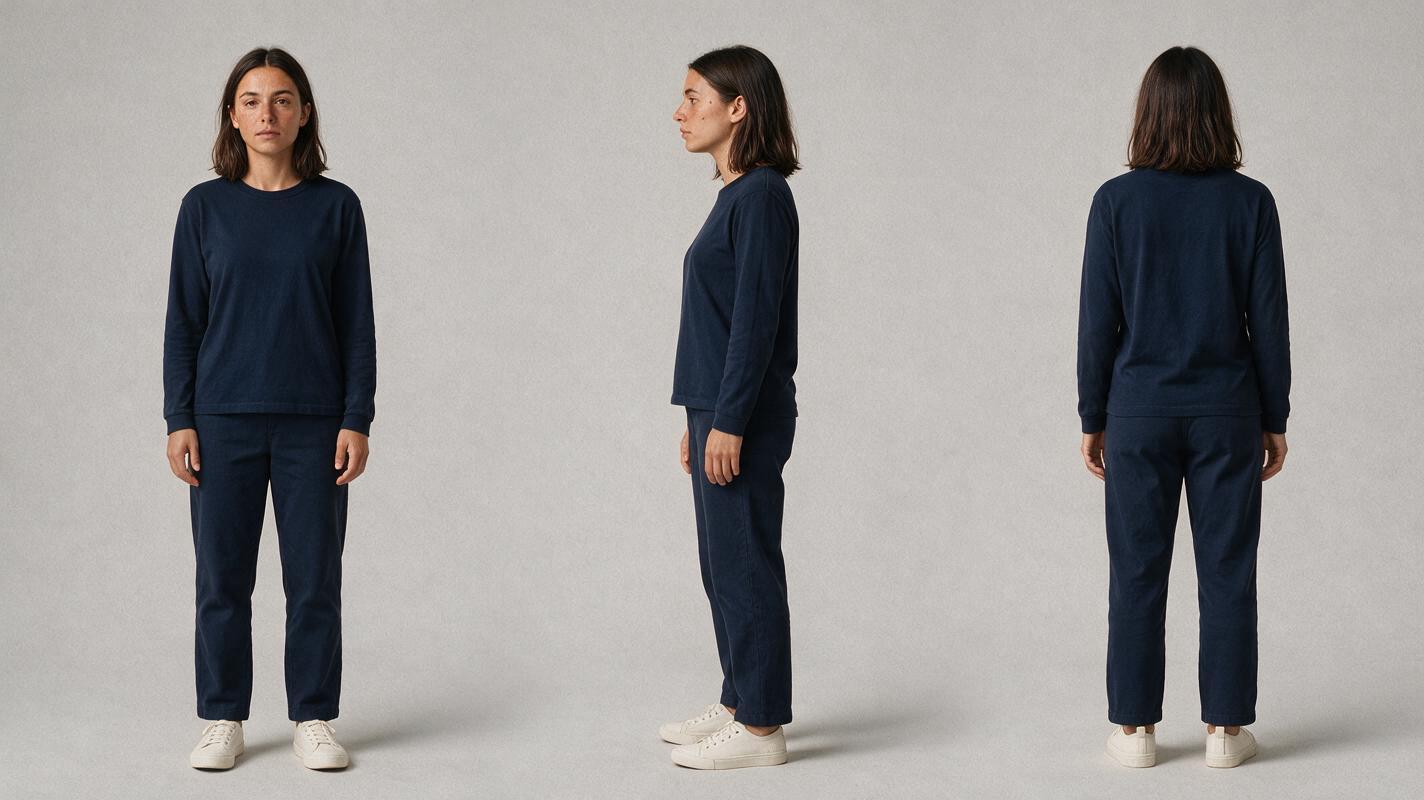
Step 3 — Age the approved identity, not a fresh description
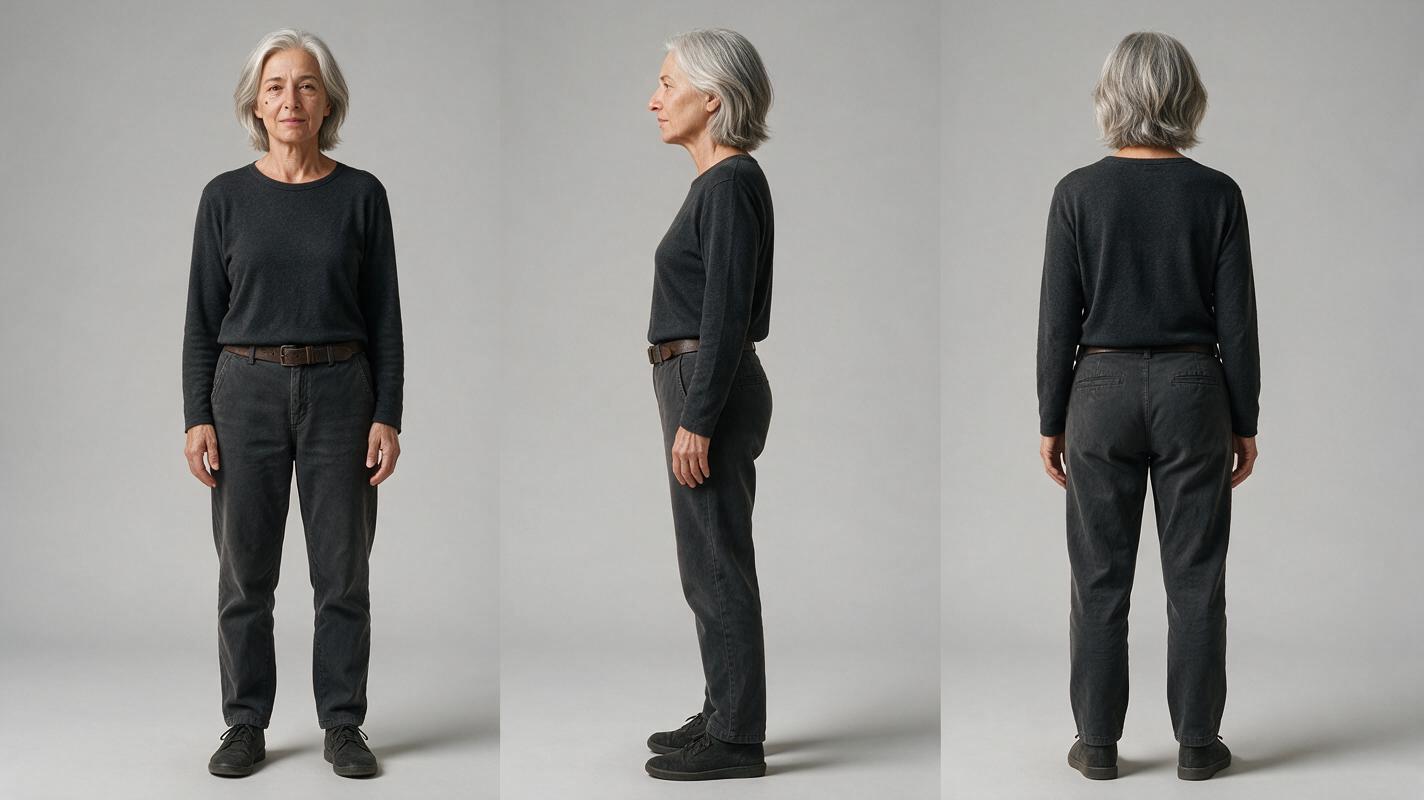
Create the older sheet with the younger sheet available as the character reference. Request plausible aging while explicitly retaining the stable traits. Approve front and profile views against their younger counterparts; then check that the back view has the same build and a plausible older hairstyle. Treat this as a second sheet for the same character, not a new casting choice.
Visual prompt — older character sheet:
MANDATORY CAMERA AND LAYOUT: photorealistic three-panel character sheet, landscape 16:9; exactly three equal full-body views of the same fictional woman from the supplied approved younger character sheet, now age 65, front view on the left, true side profile in the center, back view on the right. Neutral light-gray seamless background and soft, even studio light. Preserve her gently hooked nose, slightly uneven left eyebrow, beauty mark below the right eye, underlying facial proportions, and recognizable build. Add plausible facial aging, silver-gray shoulder-length hair, and natural posture changes. Simple unbranded charcoal clothing. No labels, text, logos, interface elements, extra people, or duplicate limbs.Reference rule: If the older front view resembles Mara but the profile does not, repair the sheet before making video. Motion will not reliably resolve an identity disagreement already present in the still references.
Step 4 — Bridge the flashback and present-day shots
Plan a simple match cut: young Mara sets a blue ceramic cup beside the kitchen window; older Mara lifts that same cup from the same position. The cup and window help viewers read the passage of time, but neither replaces the face check.
Make one approved scene still for each period. Give the flashback still the younger sheet as its character reference; give the present-day still the older sheet. Keep the camera height and face angle similar at the cut, and make each face large enough to inspect. Then use image to video for the individual shots, providing the relevant approved still wherever the chosen workflow accepts an image input. Generate the shots separately rather than asking one clip to invent the entire 35-year transformation.
Copyable shot prompts:
FLASHBACK SHOT — MANDATORY CAMERA: eye-level medium close-up, three-quarter facial view, landscape 16:9, steady camera. Use the approved age-30 character and kitchen still as references. Mara places an unmarked blue ceramic cup beside the window and glances toward the doorway. Preserve the facial proportions, gently hooked nose, uneven left eyebrow, and beauty mark below her right eye. Photorealistic, lived-in kitchen, late-afternoon daylight; no text, logos, or extra people.

PRESENT-DAY SHOT — MANDATORY CAMERA: matching eye-level medium close-up and three-quarter facial view, landscape 16:9, steady camera. Use the approved age-65 character and present-day kitchen still as references. Older Mara lifts the same unmarked blue ceramic cup from beside the same window and glances toward the doorway. Preserve her underlying facial proportions, gently hooked nose, uneven left eyebrow, and beauty mark below her right eye; show plausible aging, silver-gray hair, and natural skin texture. Photorealistic, lived-in kitchen; no text, logos, or extra people.
Step 5 — Check the cut for identity drift
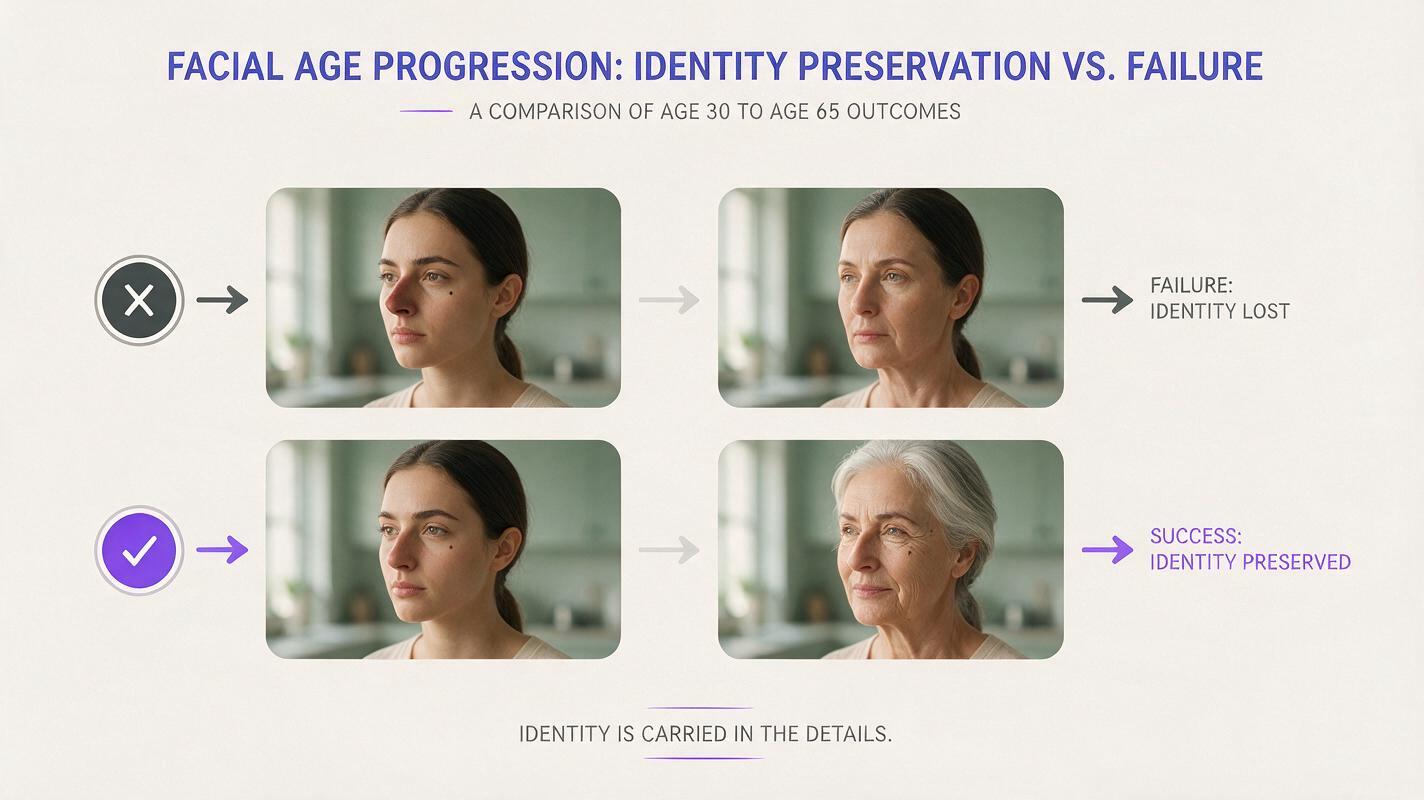
Pause on the last clear facial frame of the flashback and the first clear facial frame of the present-day shot. Compare nose profile, eyebrow asymmetry, beauty-mark placement, and overall face shape—not just hair color or wardrobe. Review the moving frames too: a correct opening image is not enough if the face changes during a glance.
Visual prompt — failure and fix comparison:
MANDATORY CAMERA AND LAYOUT: landscape 16:9, clean four-frame comparison arranged as two horizontal pairs, photorealistic editorial stills within a text-free neutral illustrative composition. In each pair, the left frame shows the same fictional 30-year-old woman in a lived-in kitchen, eye-level medium close-up, three-quarter facial view, dark hair, gently hooked nose, slightly uneven left eyebrow, and beauty mark below the right eye. In the upper pair, the adjacent older frame shows an obvious failure: a different nose and facial proportions, and the beauty mark missing. In the lower pair, the adjacent age-65 frame shows the fix: plausible wrinkles and silver-gray hair with the original nose, eyebrow asymmetry, beauty mark, and underlying facial proportions preserved. Match camera height, face angle, and natural window light across frames. No words, labels, arrows, logos, interface elements, or brand marks.| What fails | What to change |
|---|---|
| Older Mara looks like a different person | Return to the older sheet and revise its front and profile views against the approved younger sheet. |
| The beauty mark moves or disappears in motion | Use a clearer scene still and a face angle that keeps the mark visible; inspect the generated frames again. |
| The cut feels like a new location rather than a time jump | Match the cup’s position, window geometry, camera height, and eyeline in the two scene stills. |
| Facial features blend during a large head turn | Shorten the movement or establish a separate approved profile reference for that shot. |
If the identity breaks, repair the earliest failing asset: sheet first, scene still second, moving shot last. Regenerating a whole scene from an inconsistent sheet usually repeats the underlying problem.
Final checklist
- The two three-view sheets depict one recognizable fictional character at different ages.
- Stable facial traits remain visible in both scene references.
- The kitchen object and camera placement support a readable match cut.
- The last young frame and first older frame preserve facial identity.
- Motion remains consistent beyond the opening frame of each shot.
Once both age references are approved, try these models for free with the paired scene prompts and compare the cut before expanding the sequence.
Keywords
character consistency, consistent character video, character reference, consistent character across scenes, storyboard reference, keep the same face across video