How to Stage Empty Listing Rooms With Seedream 4.5 (No Wall Warping)
Empty listing photos drive fewer buyer inquiries, but professional virtual staging is often costly and slow. This guide shows real estate marketers how to use Seedream 4.5 to stage empty rooms with realistic, scale-accurate furniture while preserving original wall geometry and room dimensions. It includes reusable prompt templates for common buyer personas and troubleshooting for common AI staging errors like wall warping and floating furniture.
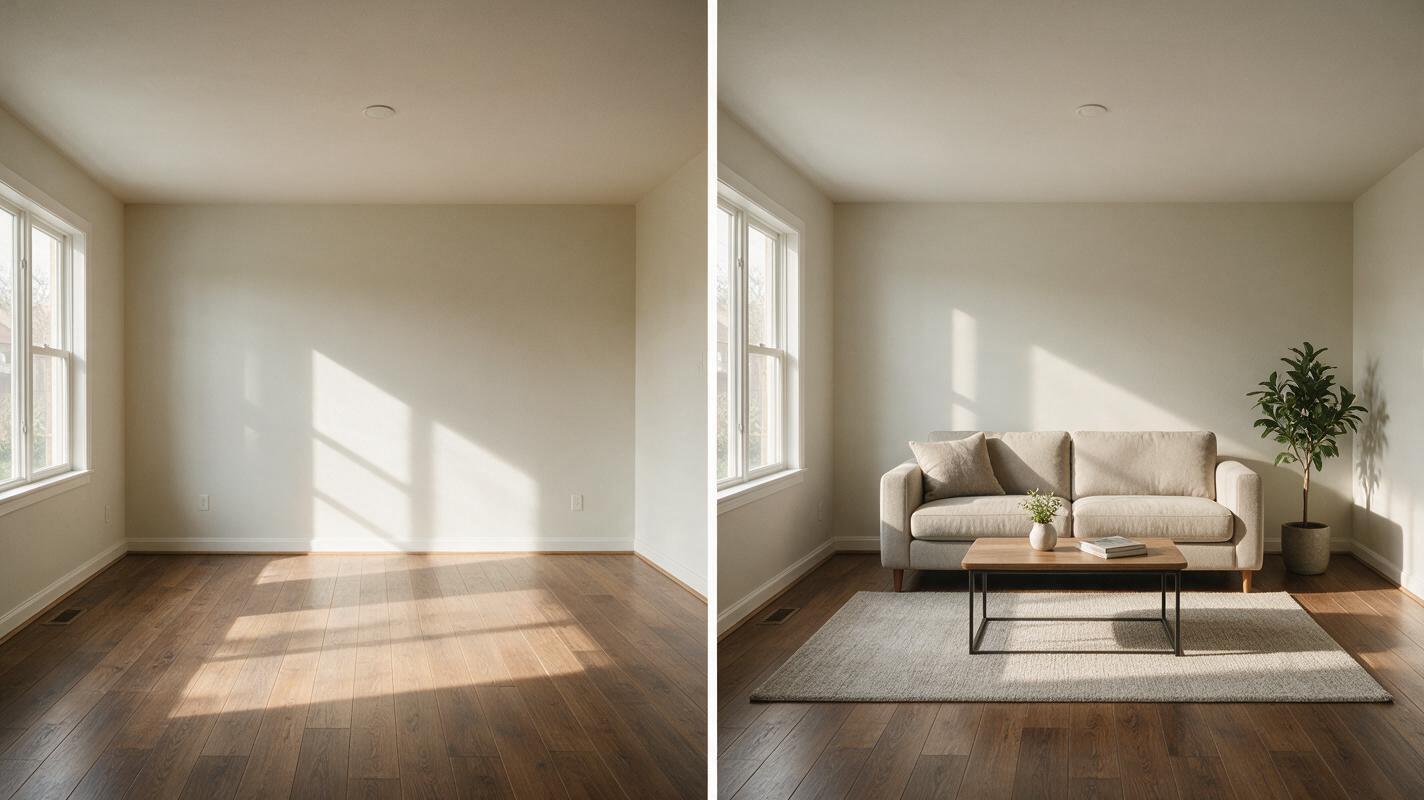
Table of contents
The problem with low-quality AI listing staging
Empty listing photos get 30-40% fewer buyer inquiries than staged ones, per real estate marketing industry data, but professional virtual staging can cost $50 to $150 per room and take 24-48 hours to deliver. Many agents turn to free AI tools for fast staging, only to get results with warped walls, mis-sized furniture, and altered window placements that misrepresent the property and turn off serious buyers.
Seedream 4.5, an ai image generator built for precise, reference-preserving photo edits, lets you stage empty listing rooms in minutes while keeping the original room geometry, wall color, and architectural details intact. This guide covers everything you need to create realistic, scale-accurate staged photos that feel authentic to the property.
Pick a base photo that preserves room geometry
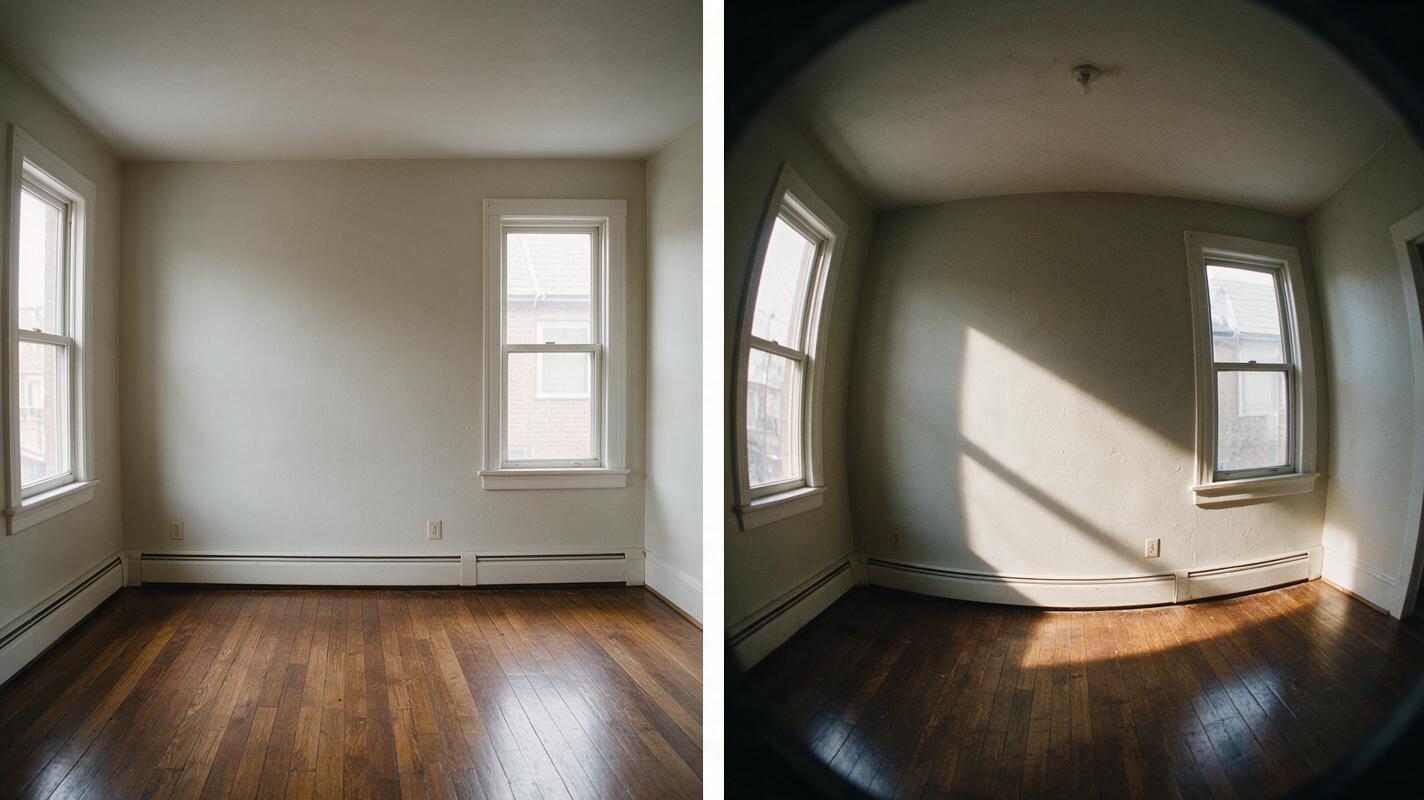
The quality of your base photo determines 70% of your staging result. A bad base photo will lead to distorted results no matter how good your prompt is. Choose a base photo that meets these criteria:
- Taken with a straight-on perspective, no tilted camera or fisheye distortion (use a tripod or level when shooting)
- Even, natural lighting with no harsh shadows or heavily overexposed windows that obscure wall edges
- All major architectural features (walls, windows, doors, baseboards, light fixtures, built-ins) fully visible
- Completely empty of furniture and clutter, so the model has a clear view of the floor and wall boundaries
Mask furniture zones to protect architectural details
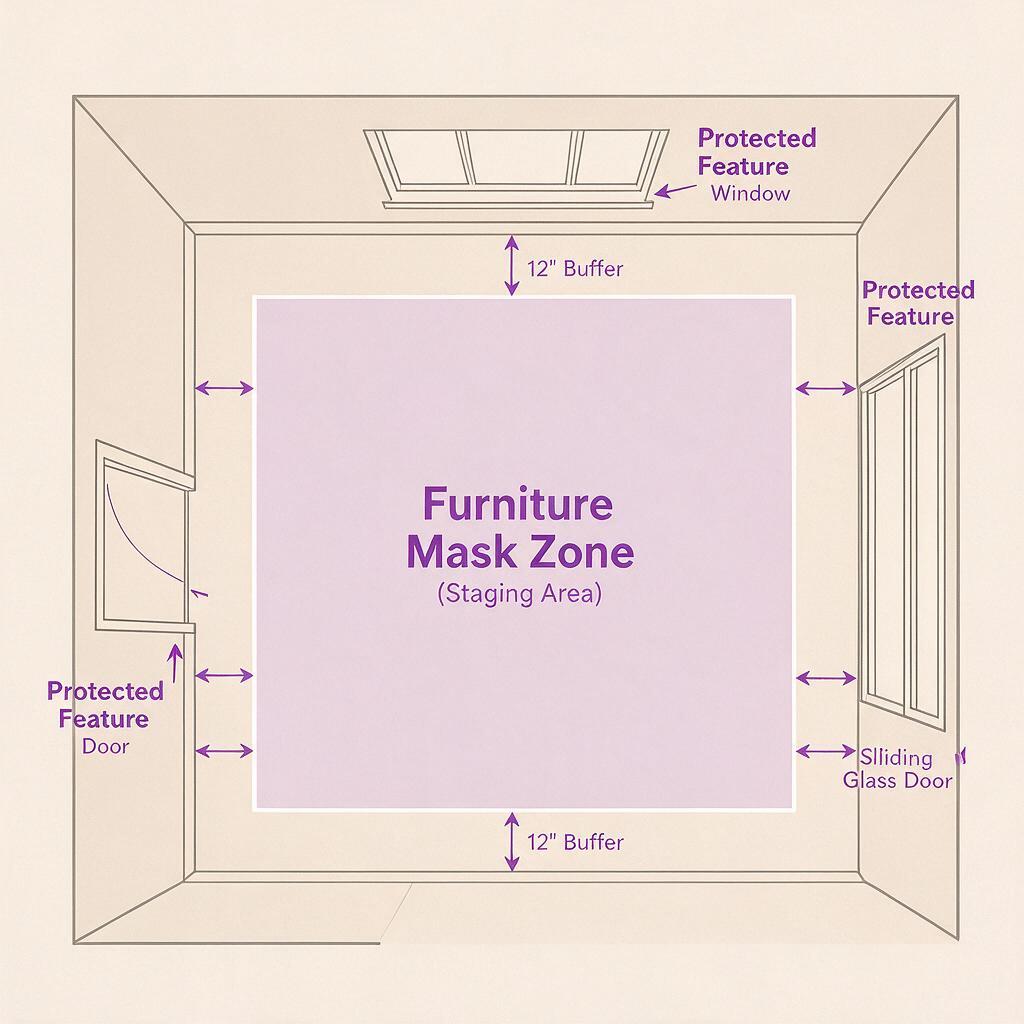
Masking is the most important step to avoid wall warping and altered architectural features. The goal is to mask only the open floor space where furniture will sit, leaving walls, windows, trim, and built-in features completely unmasked so the model cannot change them.
Follow these masking best practices:
- Leave a 6-12 inch buffer between the mask edge and any wall, window, or vertical surface to prevent the model from shifting wall lines
- Never mask over windows, doors, electrical outlets, baseboards, or crown molding — these are critical reference points for room scale
- For open-concept spaces, mask each furniture zone separately (e.g., living area, dining nook) instead of one large mask to keep the layout clear
- Avoid masking the entire floor; leave floor space near walls unmasked to preserve baseboard alignment
Write prompts that prioritize architectural preservation
Generic staging prompts lead to generic, inaccurate results. Your prompt needs three core parts: strict preservation rules (listed first, since the model weights early terms more heavily), specific furniture and style details, and realism/lighting cues.
Below are reusable prompt templates for common buyer personas, optimized for Seedream 4.5:
Young professional living room
preserve original wall color, window placement, baseboards, and room dimensions exactly. No wall warping, no altered windows. Photorealistic staging of a modern young professional living room: mid-century gray sofa, small round wooden coffee table, floating bookshelves, potted fiddle leaf fig, neutral woven area rug. Furniture is properly scaled to the room, sits firmly on the floor with realistic contact shadows. Natural lighting matches the existing room light direction. Sharp, high-resolution professional real estate photo.Family-friendly living room
preserve original wall color, fireplace, window placement, baseboards, and room dimensions exactly. No wall warping, no altered architectural features. Photorealistic staging of a family-friendly living room: large beige sectional sofa, wooden play table with soft toys, built-in media console, soft patterned area rug, table lamps with warm light. Furniture is correctly scaled to the room, sits firmly on the floor. Warm, even natural lighting. Professional real estate photo quality.Luxury primary bedroom
preserve original wall color, tray ceiling, large windows, baseboards, and room dimensions exactly. No wall warping, no altered architectural details. Photorealistic staging of a luxury primary bedroom: king-sized upholstered bed with high-end linen bedding, two wooden nightstands with marble tops and table lamps, upholstered bench at foot of bed, large wool area rug, minimalist abstract wall art. Furniture is appropriately scaled to the spacious room, sits firmly on the floor. Soft, warm natural light from windows. High-end real estate photography.Minimalist home office
preserve original wall color, window placement, built-in shelves, and room dimensions exactly. No wall warping, no altered features. Photorealistic staging of a minimalist home office: simple oak desk, ergonomic black office chair, small modern desk lamp, potted snake plant, floating shelves with neutral books and decor. Furniture is properly scaled to the room, sits firmly on the floor. Bright natural light from the window. Clean, professional real estate photo.Pro tip: Always lead with preservation rules. Seedream 4.5 prioritizes the first 20-30 words of a prompt, so putting "preserve original wall geometry and room dimensions" first drastically reduces the chance of structural errors.
Tune Seedream 4.5 settings to avoid over-editing
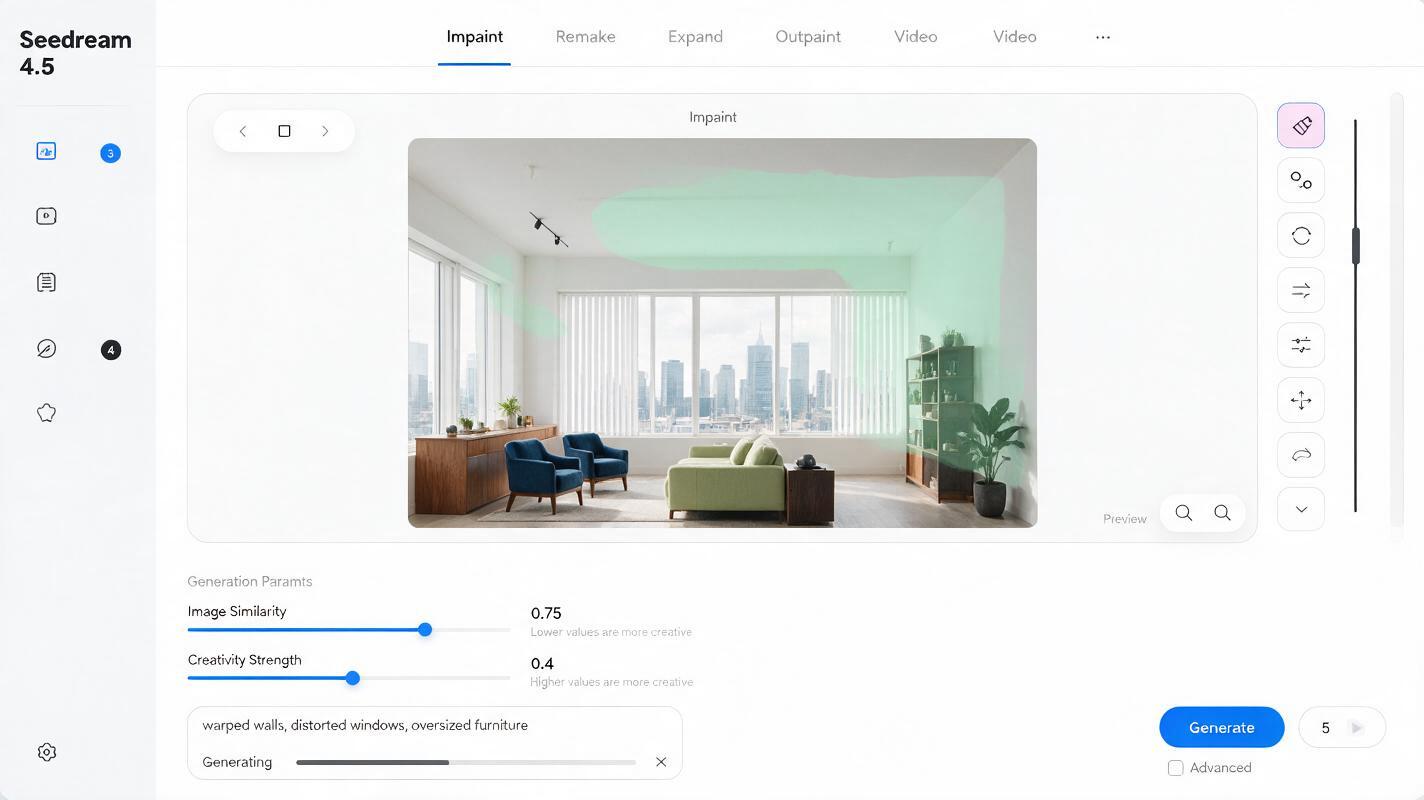
Even with a great prompt, wrong settings can lead to warped walls or unrealistic furniture. Adjust these key settings for consistent staging results:
- Image similarity: Set to 0.7–0.8. This is the most critical setting for preserving room structure. Higher values keep more of the original photo; lower values give the model more creative freedom (and more risk of warping).
- Creativity strength: Set to 0.3–0.5 for staging. You want the model to add realistic furniture, not reinvent the room's layout or finishes.
- Output resolution: Match the original photo's resolution to avoid stretching or compressing room dimensions.
- Negative prompt: Add "warped walls, distorted windows, oversized furniture, floating furniture, fake-looking decor, changed wall color, altered baseboards" to filter out common errors.
Verify architectural consistency after generation
Never use a staged photo without verifying it accurately represents the property. Run through these checks before publishing:
- Wall alignment: Use a straight edge (or your phone's level tool) to confirm walls are perfectly straight and match the original photo's angles.
- Feature placement: Cross-check windows, doors, light switches, outlets, and baseboards against the original photo to ensure they haven't shifted or changed size.
- Furniture scale: Confirm furniture fits naturally in the room — a standard sofa is ~7 feet wide, so it should not take up an entire wall of a 10-foot room.
- Lighting consistency: Make sure shadows from furniture match the direction of natural light in the original photo (e.g., if light comes from the left window, shadows should fall to the right of furniture pieces).
Fix common staging errors
If you run into issues, use these quick fixes:
- Warped walls or shifted windows: Increase image similarity by 0.1, reduce mask size to add more buffer around walls, and add "strictly preserve wall geometry" to the start of your prompt.
- Floating furniture: Add "furniture sits firmly on the floor, realistic floor contact shadows" to your prompt, and ensure your mask includes the floor area directly under the furniture.
- Mismatched wall color: Increase image similarity and add "preserve exact original wall color" to the top of your prompt.
- Oversized furniture: Add "furniture is properly scaled to the room, standard residential furniture sizes" to your prompt.
Staged photos work across every part of your listing marketing stack: MLS listings, social media carousels, email nurture campaigns, open house flyers, and virtual tour landing pages. For full transparency, always include a clear disclosure that the image is virtually staged to set accurate buyer expectations.
Once you have your base empty room photo selected, test this prompt yourself to generate a staged version in under a minute.
Final staging quality checklist
- Base photo has straight perspective, even lighting, and fully visible architectural details
- Mask covers only furniture zones, with a 6-12 inch buffer around walls and windows
- Prompt leads with preservation rules and includes scale and realism cues
- Image similarity set to 0.7–0.8 to protect room geometry
- Generated photo has straight walls, correct feature placement, and properly scaled furniture
- Clear virtual staging disclosure added to all marketing materials
Keywords
empty listing staging, seedream 4.5, virtual staging for real estate, listing photo editing, ai image generator, real estate marketing, no wall warping