Flux Prompts for Album Cover-Matched MV Character Turnaround Sheets
This article provides tested Flux prompt templates for creating album cover-matched MV character turnaround sheets, along with reference setting guidance and troubleshooting tips. Independent musicians and MV creators can use these prompts to generate consistent 4-view character references that preserve both album cover style and artist likeness. The guide also includes practical ways to use the finished turnaround sheet for MV production, promo assets, and merch design.
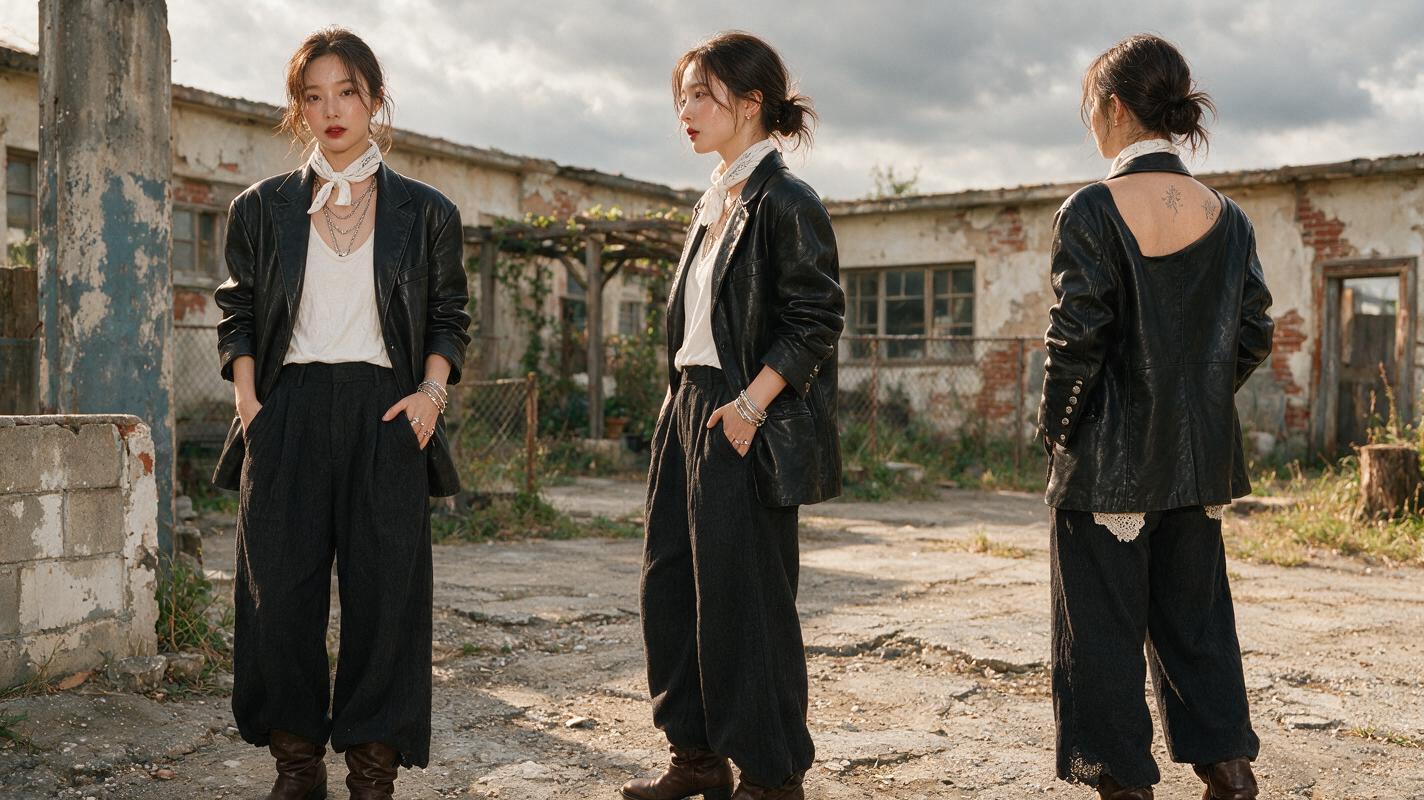
Table of contents
Why consistent character references make or break animated MVs
Animated music videos let you build surreal, album-aligned worlds around your music, but they live or die by character consistency. If the artist’s hair color changes between scenes, their face shifts shape, or their outfit doesn’t match the cover art, your whole visual campaign feels disjointed. The fastest fix is a character turnaround sheet: a single reference image showing the artist from front, 3/4, side, and back views, all in the exact style of your album cover.
Drawing one by hand takes days, and generic AI character sheets rarely nail both your cover’s visual vibe and the artist’s real likeness. Flux’s reference-aware image generation handles both, as long as you structure your prompt and reference settings correctly. These tested prompt templates and tuning tips will give you a production-ready turnaround sheet in minutes, no illustration skills required.
What you need before generating
- A high-res copy of your album cover, preferably with a clear view of the artist’s face and core outfit
- (Optional) A clear, well-lit photo of the artist if your album cover is heavily stylized, cropped, or hides facial features
- Access to Flux with reference image support (style reference and face reference modes)
- A rough idea of your MV’s art style (anime, graphic novel, watercolor, 3D render, etc.)
Prepare your album cover reference for accurate style matching
The quality of your reference image directly impacts how well your turnaround sheet matches the album cover. A messy or low-res reference will lead to style drift, mismatched colors, or unrecognizable facial features.
- Crop your cover to focus on the artist’s upper body and face, removing excess background elements that might confuse the model. You want Flux to prioritize the artist’s design, not the scenery.
- If your cover has large text overlays (like the album title or artist name), edit them out first. Text in reference images often leads to random letters appearing on the character’s clothes or skin.
- Boost contrast slightly if the artist’s features are washed out or hidden by shadows. This helps the model pick up on key facial markers and outfit details.
- For stylized covers (e.g., cartoon, abstract), pair the cover reference with a real photo of the artist set to low face reference weight to keep likeness intact without breaking the style.
Flux prompt templates for different MV styles
The best turnaround sheet prompts are specific about the sheet structure, the character details pulled from your reference, and the style rules you want to lock in. Each template below is built to work with an album cover style reference, and includes negative prompts to eliminate common errors.
Indie Pop Anime Style
Use this for bright, whimsical MVs that match a pastel or anime-inspired album cover.
character turnaround sheet of [artist name] from reference image, 4 equal panels: front view, 3/4 view, side view, back view, standing neutral pose, same character in every panel, matching outfit from reference, matching hair color and style from reference, soft anime cel shading, pastel color palette matching reference album cover, clean white background, no shadows, consistent proportions, high detail, production-ready character referenceNegative prompt:
text, logos, extra limbs, mismatched face, different outfit per panel, background scenery, dynamic pose, accessories not in reference, blurry, low resolution, distorted proportionsDark Hip-Hop Graphic Novel Style
For gritty, high-contrast MVs paired with a bold, comic-style album cover.
character turnaround sheet of [artist name] from reference image, 4 equal panels: front view, 3/4 view, side view, back view, standing neutral pose, same character in every panel, matching streetwear outfit from reference, matching tattoos and jewelry from reference, bold graphic novel line art, high contrast black and color palette matching reference album cover, clean gray background, no shadows, consistent proportions, high detail, production-ready character referenceNegative prompt:
text, logos, extra limbs, mismatched face, different outfit per panel, background scenery, dynamic pose, graffiti, blurry, low resolution, distorted proportions, soft shadingFolk Watercolor Style
For warm, organic MVs that match a hand-painted album cover.
character turnaround sheet of [artist name] from reference image, 4 equal panels: front view, 3/4 view, side view, back view, standing relaxed neutral pose, same character in every panel, matching folk-inspired outfit from reference, matching hair and facial features from reference, soft watercolor painting style, warm earth tone palette matching reference album cover, textured paper background, consistent proportions, high detail, production-ready character referenceNegative prompt:
text, logos, extra limbs, mismatched face, different outfit per panel, digital art, sharp lines, background scenery, dynamic pose, blurry, low resolution, distorted proportionsHyperpop 3D Render Style
For glossy, futuristic MVs paired with a 3D or CGI album cover.
character turnaround sheet of [artist name] from reference image, 4 equal panels: front view, 3/4 view, side view, back view, standing neutral pose, same character in every panel, matching futuristic outfit from reference, matching hair and cyber accessories from reference, glossy 3D render style, neon color palette matching reference album cover, clean studio white background, soft studio lighting, consistent proportions, high detail, production-ready character referenceNegative prompt:
text, logos, extra limbs, mismatched face, different outfit per panel, 2D art, background scenery, dynamic pose, blurry, low resolution, distorted proportions, matte finishReference settings to lock in style and likeness
Even a perfect prompt won’t give you a cover-matched sheet if your reference settings are off. Flux is one of the most reliable AI image generator options for reference-locked character work, thanks to its strong style and face preservation controls. The right balance depends on your cover’s style.
- Style reference weight: Set to 0.7–0.8 for most covers. This locks in the color palette, art style, and outfit details without forcing the model to copy the cover’s exact pose or background. Drop to 0.5 if your cover is very busy or has a strong background that’s bleeding into the turnaround.
- Face reference weight: Set to 0.6–0.7 if you’re using a real artist photo alongside the cover. This preserves likeness without pulling the real photo’s lighting or clothing into the stylized output. If you’re only using the album cover, set face reference to 0.8 to keep facial features consistent across all four views.
- Reference mode: Use style reference for the album cover, and face reference for the artist photo (if you’re using one). Don’t use both modes on the same image, as this can cause muddy, conflicting details.
- Aspect ratio: Use 16:9 or 4:3 for a horizontal turnaround sheet with four panels side by side. If you prefer a vertical 2x2 grid, use 1:1 or 9:16 for a mobile-friendly reference.
Fix common turnaround sheet failures
Even with the right prompt and settings, you might run into small issues. Here’s how to fix the most common ones:
- Mismatched face across views: This happens when the model treats each panel as a separate character. Add "same exact face in every panel" to the front of your prompt, and bump face reference weight by 0.1. If you’re only using the album cover, add a clear front-facing artist photo as a face reference.
- Style drift on side/back views: The model often defaults to generic styles for views that aren’t visible on your cover. Add "consistent art style across all panels, matching reference image exactly" to your prompt, and increase style reference weight to 0.85. If the back view still looks off, generate a separate back view using the front 3/4 view as a new style reference.
- Inconsistent proportions: If the character’s height or body shape changes between panels, add "identical proportions in every panel, same height, same body type" to your prompt, and set a higher CFG scale (7–9) to enforce prompt adherence.
- Extra props or accessories: If the model adds random jewelry, hats, or bags that aren’t on your cover, add those specific items to the negative prompt (e.g., "hat, sunglasses, necklace") and bump style reference weight slightly.
- Panels are misaligned or overlapping: Add "4 equal, evenly spaced panels, clean grid layout, no overlapping elements" to your prompt, and use a 16:9 aspect ratio for side-by-side panels.
How to use your turnaround sheet for MV production
A good turnaround sheet isn’t just a reference—it’s a tool that keeps your entire MV aligned with your album’s visual brand. Here are the most useful ways to put it to work:
- Use it as a consistent character reference for every prompt you write for MV storyboards, scene assets, and promo art.
- Import it into image-to-video tools as a style and character reference to keep the artist’s look consistent across animated clips, from 10-second teasers to full-length scenes.
- Send it to a freelance animator or rigger to ensure their work matches your album’s style, no lengthy style guide needed.
- Crop individual views to use as profile pictures, social media icons, or playlist cover art that matches your album campaign.
- Use it to create consistent merch designs (T-shirts, posters, stickers) that tie back to your album and MV aesthetic.
Ready to build your own cover-matched character turnaround and start drafting your MV? Try these models for free.
Key takeaways
- Start with a clean, cropped album cover reference to minimize style drift and unwanted background elements.
- Use genre-specific prompt templates that explicitly call out 4 equal panels, a consistent character, and reference-matched style.
- Balance style and face reference weights to preserve both album cover vibe and artist likeness.
- Fix common issues by adjusting reference weights, adding specificity to your prompt, or generating tricky views separately.
- Use your finished turnaround sheet as a master reference for all MV assets, from storyboards to animated clips.
Keywords
flux prompts, character turnaround sheet, album cover matching, mv character design, ai character reference, animated music video, style consistency