How to Create a Living Photograph With Image-to-Video AI
Turn one cinematic still into a believable living photograph by separating environmental motion, subject micro-movement, and camera behavior. This tutorial uses a restrained image-to-video workflow that works across models such as Seedance and Kling without relying on exaggerated animation.
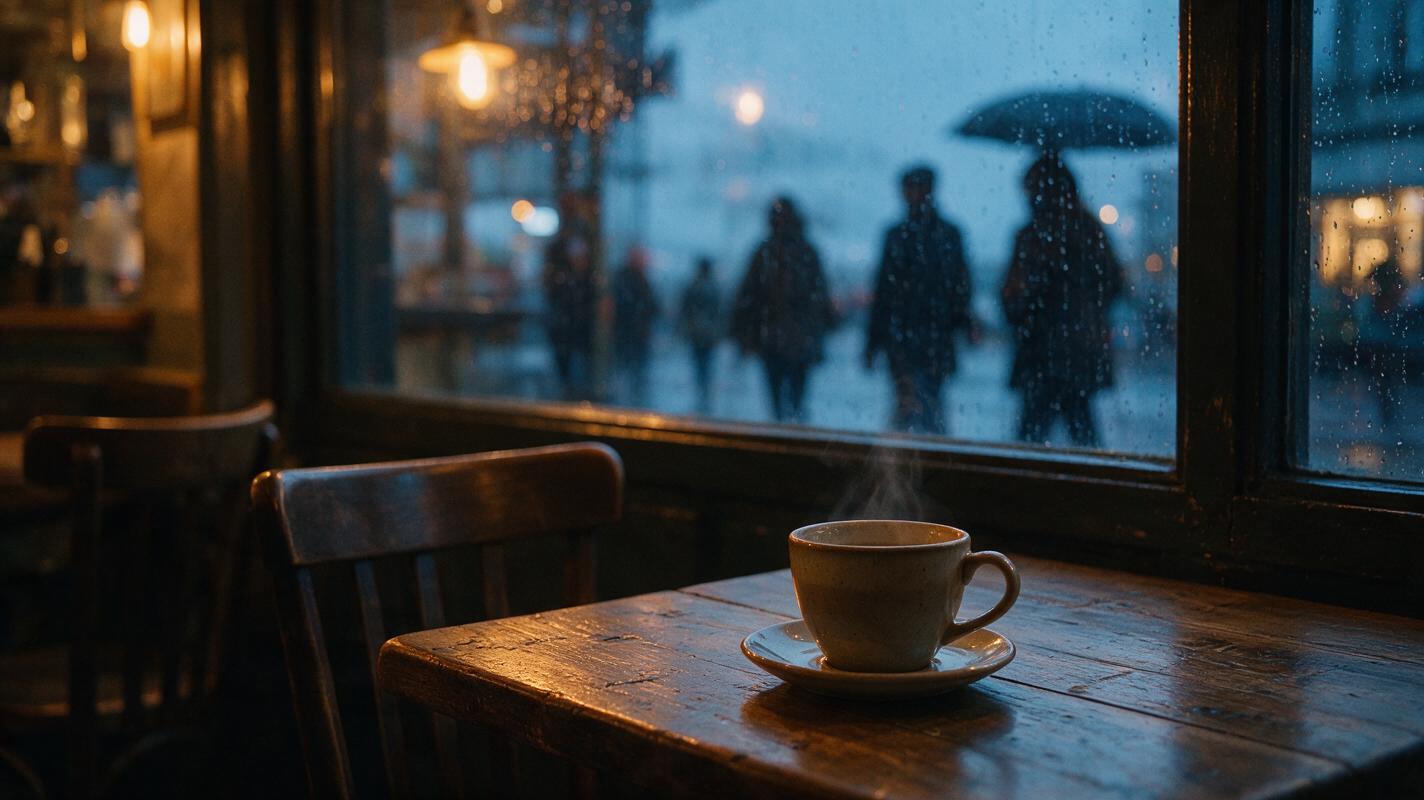
Table of contents
Turn one still image into a believable moving moment
The fastest way to create a living photograph is to begin with a strong cinematic still, identify only two or three elements that should move, and animate them with a restrained image to video prompt. Keep the camera locked or nearly locked, preserve the original composition, and describe motion in layers rather than asking the model to animate the whole image.
This workflow is designed for atmospheric portraits, travel scenes, interiors, landscapes, album artwork, and editorial images. The result should feel like a camera captured several seconds of real life—not like a still photograph being stretched, melted, or turned into an action sequence.
Cover recreation prompt: Photorealistic editorial photograph of a rain-streaked neighborhood café window at dusk, a ceramic coffee cup resting on a worn wooden table in the foreground, one empty chair, soft pedestrians passing outside as muted silhouettes, warm tungsten light inside and cool blue rain outside, subtle steam above the cup, realistic reflections and lived-in details, MANDATORY CAMERA: locked eye-level camera from the seated customer's viewpoint, 50mm lens, shallow but natural depth of field, landscape 16:9, no text, no logos, no screens, no futuristic technology.
Why living photographs often look artificial
Image-to-video models are good at finding possible movement inside an image, but they do not automatically know which movement matters. A broad instruction such as make this image come alive leaves too many decisions open. The model may animate the table, bend architecture, move reflections in the wrong direction, or make a seated subject perform an unexpected gesture.
The most common failures are easy to recognize:
- Everything moves at once: hair, clothing, furniture, walls, shadows, and the camera all drift independently.
- The subject starts acting: a quiet portrait suddenly turns, smiles, speaks, or walks away.
- Camera motion replaces environmental motion: the model adds a dramatic push-in instead of animating rain, steam, fabric, or foliage.
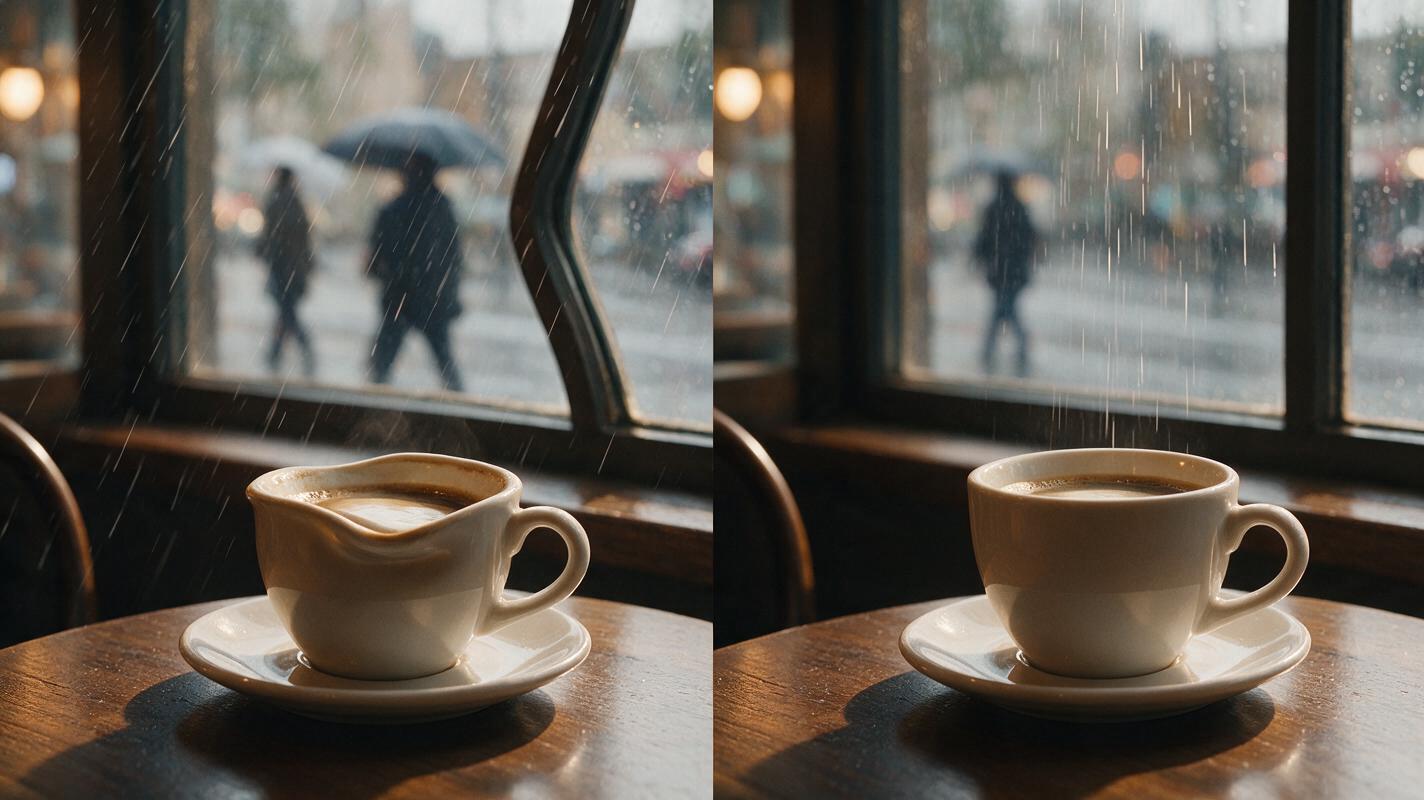
- Rigid objects deform: window frames, cups, railings, and furniture change shape between frames.
- Motion has one speed: distant clouds, foreground leaves, and a person's breathing all move with the same rhythm.
- The final frame drifts: color, exposure, facial structure, or object placement no longer matches the source image.
A convincing living photograph needs a motion hierarchy. One element carries the scene, one supports it, and everything else remains stable.
3 ways to create a living photograph
- Environment-first animation: move rain, fog, steam, curtains, leaves, water, or practical light while keeping people and structures stable.
- Portrait micro-motion: preserve a person's pose while adding breathing, one natural blink, slight hair movement, or a tiny shift of attention.
- Layered parallax: separate foreground, middle-ground, and background through subtle depth movement without turning the shot into a large camera orbit.
The environment-first method is the safest starting point because organic materials can tolerate small variations. Portrait micro-motion requires tighter identity control, while parallax works best when the source image has clear depth and minimal overlap between objects.
How MagicBoat handles a multi-model living-photograph workflow
MagicBoat provides one place to test an ai video workflow across integrated generation options rather than rebuilding the project separately for each model. You can create the source image with an image model such as Seedream, Flux, or GPT Image, then compare available video models such as Seedance, Kling, and Veo for animation.
The useful division of labor is straightforward:
| Task | Recommended approach | What to evaluate |
|---|---|---|
| Build the source still | Generate or upload a clean 16:9 image | Composition, object geometry, depth, identity |
| Create atmospheric movement | Test the same restrained prompt in different video models | Texture stability, motion rhythm, frame coherence |
| Animate a portrait | Use explicit pose and identity constraints | Eyes, mouth, hairline, hands, clothing |
| Choose the final take | Compare complete clips, not isolated frames | Unexpected gestures, exposure drift, deformation |
Model comparison matters because the same prompt can produce different interpretations. One model may preserve architecture better, while another may render softer environmental motion. Treat the source image and motion brief as constants, then change only the model or one prompt variable per test.
Step 1 — Create a still image with clear motion zones
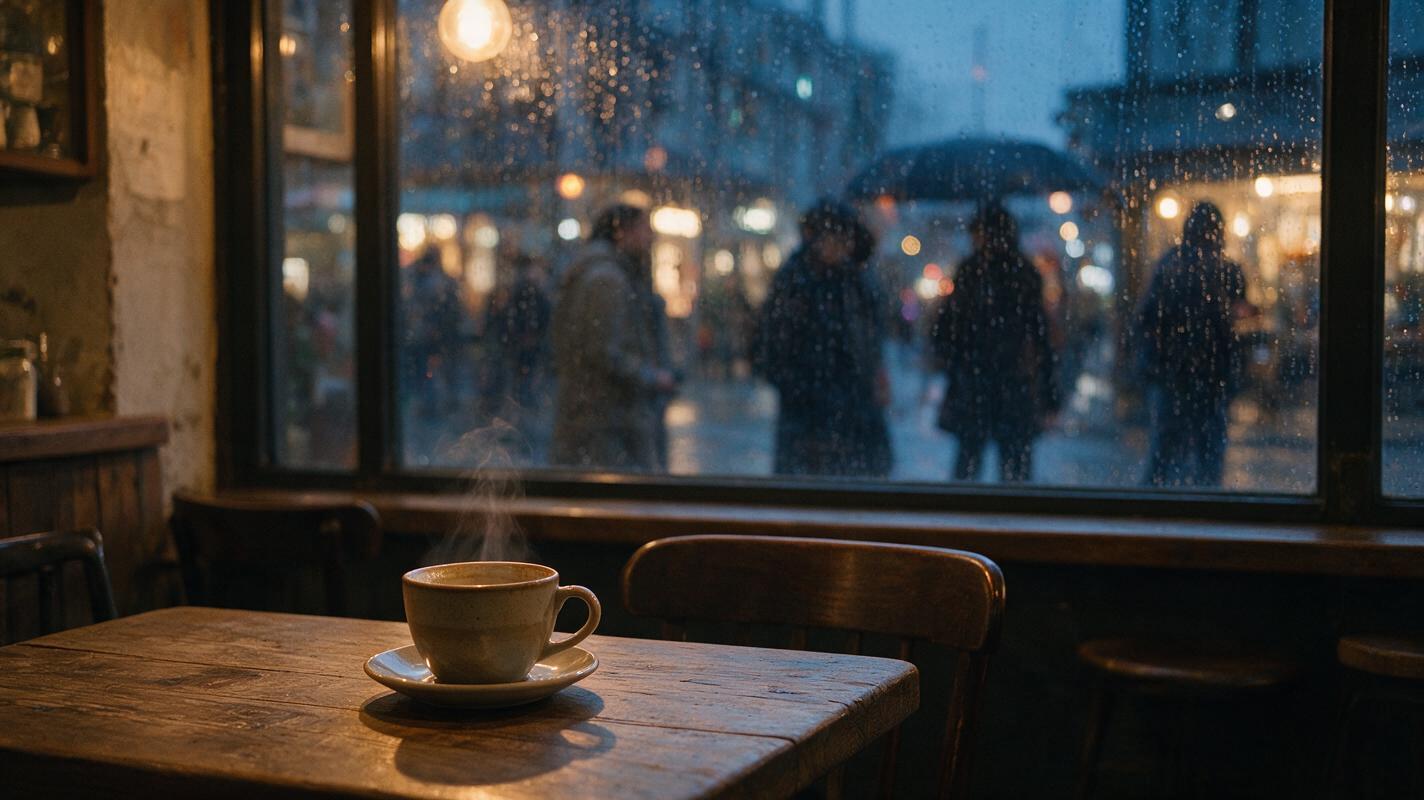
Start with a composition that contains an obvious moving element and an obvious stable element. For this tutorial, the moving zones are rain outside the window, steam above the cup, and distant pedestrians. The stable zones are the table, cup, chair, window frame, and camera.
Avoid source images containing five hands, dense crowds, unreadable signage, complex reflections, or overlapping transparent objects. These details create multiple plausible interpretations and make temporal consistency harder.
Photorealistic editorial photograph of a small neighborhood café during a rainy dusk, a ceramic coffee cup on a worn wooden table beside a large rain-streaked window, one empty chair, soft pedestrians visible outside through wet glass, warm tungsten interior light contrasting with cool blue evening rain, faint natural steam rising from the cup, realistic wood grain, stable straight window frames, lived-in but uncluttered interior, cinematic color separation, MANDATORY CAMERA: locked eye-level camera from the seated customer's viewpoint, 50mm lens, medium-wide composition, cup in the lower-left third and window filling the background, landscape 16:9, no camera tilt, no text, no logos, no distorted furniture, no duplicated objects.Visual recreation prompt: Photorealistic editorial photograph of a small neighborhood café during a rainy dusk, a ceramic coffee cup on a worn wooden table beside a large rain-streaked window, one empty chair, soft pedestrians visible outside through wet glass, warm tungsten interior light contrasting with cool blue evening rain, faint natural steam rising from the cup, realistic wood grain, stable straight window frames, lived-in but uncluttered interior, cinematic color separation, MANDATORY CAMERA: locked eye-level camera from the seated customer's viewpoint, 50mm lens, medium-wide composition, cup in the lower-left third and window filling the background, landscape 16:9, no camera tilt, no text, no logos, no distorted furniture, no duplicated objects.
Expected result: a complete image that already works as a photograph. The animation should enhance it, not rescue weak lighting or composition.
Step 2 — Write a three-layer motion brief
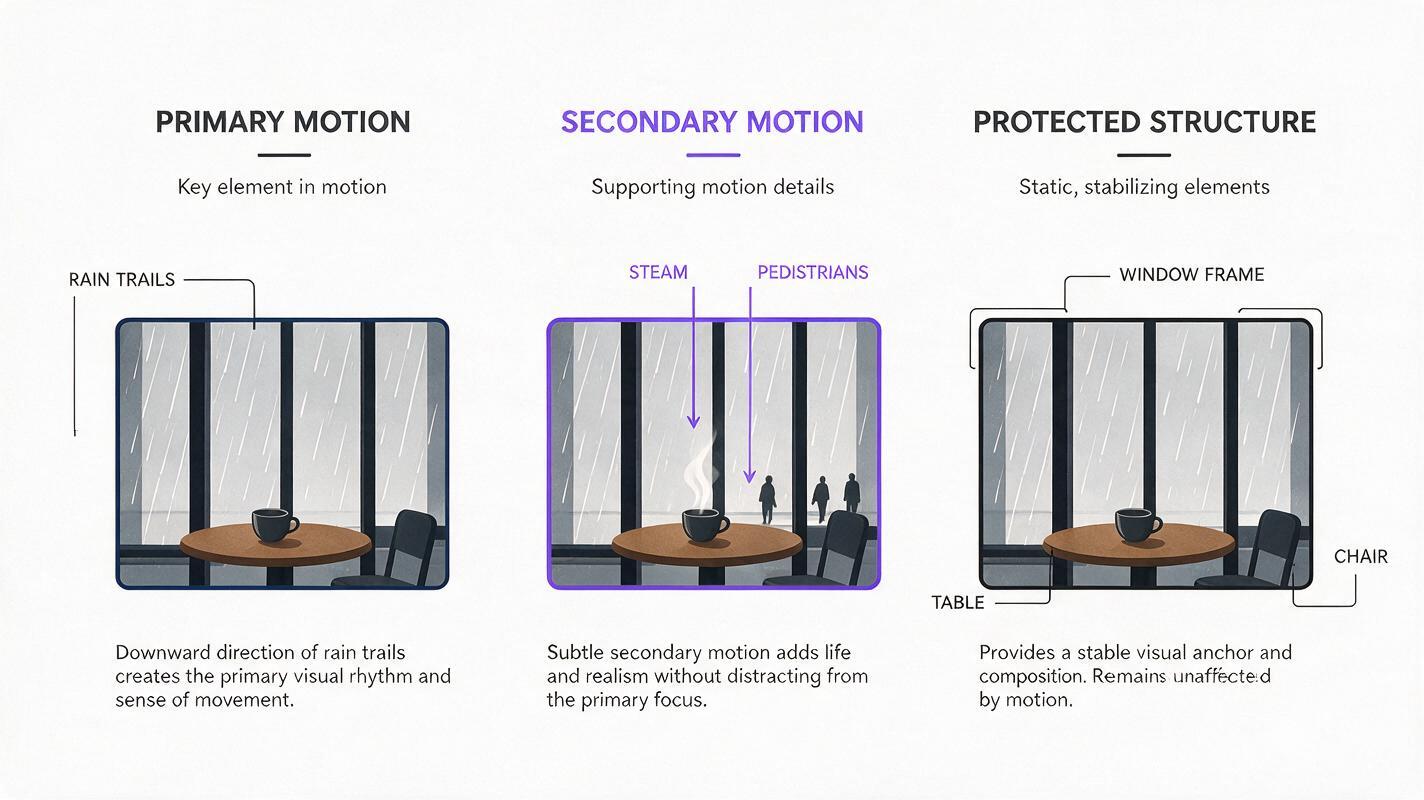
Before generating video, divide the image into primary motion, secondary motion, and protected structure. This is more reliable than describing movement as one paragraph of equally important actions.
| Layer | Café example | Instruction |
|---|---|---|
| Primary motion | Rain on the glass | Slow irregular droplets travel downward |
| Secondary motion | Steam and pedestrians | Steam curls gently; distant figures pass softly |
| Protected structure | Cup, table, chair, window frame | Remain fixed in shape and position |
Visual recreation prompt: Clean editorial process diagram showing a cinematic café frame divided into three clearly labeled motion layers: primary motion highlighting downward rain trails on the window, secondary motion highlighting steam above a coffee cup and distant pedestrian silhouettes, protected structure highlighting the cup, table, chair, and straight window frame; use realistic miniature frame thumbnails, thin directional arrows, restrained charcoal and purple annotations, MANDATORY LAYOUT: horizontal left-to-right three-column structure with equal spacing, landscape 16:9, white background, readable labels only, no software dashboard, no logos, no decorative technology graphics.
The practical prompt formula is:
[Shot behavior].
Primary motion: [one dominant action with direction and speed].
Secondary motion: [one or two small supporting actions].
Subject or object behavior: [what remains still].
Camera: [locked, handheld, push-in, or another single behavior].
Preserve: [identity, geometry, lighting, composition].
Avoid: [specific unwanted movement or deformation].
Expected result: a short motion plan in which every moving element has a different role. If four actions all feel primary, simplify the scene before continuing.
Step 3 — Generate the restrained image-to-video pass
Use the source still as the visual anchor and begin with a locked camera. Do not add a pan, zoom, orbit, rack focus, and subject gesture in the first generation. The purpose of this pass is to test whether the scene's internal motion can remain coherent.
Locked-off cinematic observation of the original café composition. Primary motion: irregular rain droplets slide slowly downward across the exterior surface of the window, with some droplets joining naturally. Secondary motion: a thin ribbon of steam curls gently above the coffee cup; one or two distant pedestrian silhouettes pass outside at an unhurried pace, remaining soft and indistinct behind the wet glass. The cup, table, chair, window frame, reflections, and interior objects remain fixed in shape and position. Maintain the original warm interior and cool exterior lighting, realistic gravity, subtle motion, and natural timing. CAMERA: completely locked, no push-in, no pan, no orbit, no handheld shake. Preserve the source composition, straight architecture, cup geometry, exposure, and color. Avoid object duplication, liquid deformation, pulsing light, sudden movement, new people entering the café, and scene changes.For Seedance prompts or Kling prompts, the core principle remains the same: action verbs should be attached to named objects. Write rain droplets slide downward, not the scene moves gently. Concrete nouns reduce ambiguity.
Expected result: the viewer first notices a café scene and only then notices that it is moving. If the motion becomes the subject of the shot, it is probably too strong for a living photograph.
Step 4 — Evaluate the complete clip in three passes
Do not judge the result only from its most attractive frame. Watch it three times, with a different purpose each time.
- Motion pass: check direction, speed, gravity, and whether the animation starts abruptly.
- Structure pass: ignore the atmosphere and watch rigid edges—the cup rim, table edge, chair legs, and window divisions.
- Continuity pass: compare the beginning and end for exposure changes, new objects, duplicated people, or altered reflections.
Save a generation only when its main motion works and its protected structure stays stable. A beautiful steam curl does not compensate for a cup that changes shape.
Useful rule: regenerate structural failures. Repair or trim only minor timing problems. Once architecture or object geometry has visibly morphed, the generation is no longer a reliable master clip.
Step 5 — Add one controlled enhancement
After obtaining a stable locked-camera version, create one variation with a single enhancement. Good options include a nearly imperceptible push-in, a soft focus transition from the cup to the rain, or slightly stronger movement in one atmospheric element.
Preserve all motion and structural constraints from the stable café pass. Add only a very slow, nearly imperceptible camera push-in of a few visual percent across the shot, as if filmed on a controlled cinema dolly. Keep the cup, table, chair, and window geometry rigid. Rain continues downward, steam remains delicate, and pedestrians remain distant and soft. No pan, no orbit, no lens distortion, no accelerating camera, no focus pulsing, and no new action.Compare the enhanced version with the locked version. The extra movement should create depth without changing the emotional tone. If the camera begins to dominate, return to the locked take.
Expected result: two usable versions: a stable master and a slightly more cinematic alternative. Keeping both prevents a subtle project from becoming over-directed during iteration.
Keep the same visual language across projects
A reusable living-photograph workflow depends less on repeating an exact prompt and more on repeating a motion grammar. Keep a short project specification containing:
- camera height and lens character;
- the usual level of camera movement;
- preferred motion speed, such as quiet, unhurried, or observational;
- lighting contrast and color temperature;
- one primary and no more than two secondary motions;
- a list of protected objects that must stay rigid.
For a set of travel images, for example, you might keep every camera locked while changing only the environmental motion: fabric moving in a market, lake reflections shifting at dawn, dust crossing a road, or curtains lifting in a hotel room. That shared restraint creates continuity even when the locations differ.
Alternative: use motion transfer for a human performance
Prompted micro-motion is appropriate for breathing, blinking, or a slight change of attention. If the scene requires a precise gesture—raising a cup, turning toward a window, or following rehearsed body movement—use motion transfer instead of trying to describe every joint trajectory in text.
The motion source should match the framing and body visibility of the target image. A waist-up source is a poor guide for a full-body target if the legs perform important actions. Keep the performance slow and avoid hands crossing the face unless the target image provides enough spatial separation.
Alternative: repair a portrait identity with face swap
If a portrait animation preserves the pose and lighting but slightly changes facial identity, face swap can be a targeted repair. It is most suitable when the head angle remains compatible with the reference face and the underlying performance is already usable.
Do not use identity replacement to hide a major generation failure. If the head deforms, the face becomes obstructed, or the lighting changes dramatically, regenerate the source clip. Repair works best on stable geometry.
Where it falls short
Living photographs are deliberately limited. They work best when the emotional effect comes from atmosphere, not plot. A single generated shot is not a substitute for a sequence requiring dialogue, precise object interaction, or several coordinated actions.
Visual recreation prompt: Photorealistic side-by-side editorial comparison of the same rainy café frame, left side showing a failed animation frame with a warped coffee cup rim, bent window mullion, duplicated pedestrian silhouette, and unnatural diagonal rain, right side showing the corrected frame with rigid cup geometry, straight architecture, one soft pedestrian, and rain following gravity; MANDATORY CAMERA: identical locked eye-level 50mm composition on both sides, equal split layout, landscape 16:9, realistic warm café lighting, small neutral BEFORE and AFTER labels only, no logos, no software interface, no futuristic graphics.
Other limitations include:
- Hands remain fragile: small finger movements may introduce shape changes even when the rest of the portrait is stable.
- Reflections can disagree: a person may move while the reflected version remains static or moves differently.
- Occlusion creates invention: when steam, hair, fabric, or another person crosses an object, the model must reconstruct hidden details.
- Text is vulnerable: signs, packaging, posters, and book covers may become less legible during animation.
- Perfect loops are not guaranteed: the ending may not match the first frame closely enough for a seamless repeat.
Design around these limits. Favor slow organic motion, uncluttered silhouettes, rigid protected objects, and short actions that do not need to return to an exact starting pose.
FAQ
Should I start from a generated image or a real photograph?
Either works. A real photograph usually provides reliable geometry and texture, while a generated image lets you design cleaner motion zones. In both cases, remove obvious visual ambiguities before animation.
How many things should move in a living photograph?
Begin with one primary motion and one secondary motion. Add a third only if the first generation remains stable. More moving elements increase the chance of deformation and competing visual rhythms.
Are negative prompts enough to stop camera movement?
Not always. State the desired behavior positively—camera remains completely locked—and reinforce it with specific exclusions such as no push-in, no pan, no orbit, no shake. The source composition should also look intentional without camera movement.
Can this workflow animate portraits?
Yes. Replace environmental actions with subtle breathing, one occasional blink, and minimal hair or clothing movement. Protect facial proportions, gaze direction, pose, hands, and wardrobe details explicitly.
Which model should I use?
Test the same source image and prompt across the video models currently available to you. Choose the take with the best structural stability and motion timing rather than assuming one model is best for every image.
Can I make the result loop seamlessly?
You can improve loop potential by using cyclical motion such as steam, water, swaying fabric, or breathing and by avoiding people crossing the frame. However, exact first-to-last-frame alignment may still require trimming, reversing, blending, or another editing pass.
Final checklist
- The source image works as a finished photograph before animation.
- The scene has one primary motion and no more than two secondary motions.
- Rigid objects and identity features are named as protected elements.
- Every motion has a direction, speed, and named subject.
- The first test uses a locked camera.
- The clip is reviewed for motion, structure, and continuity separately.
- Only one enhancement is added per new generation.
- Structural deformation triggers regeneration rather than cosmetic repair.
Keywords
image to video, living photograph, ai video tutorial, Seedance prompts, Kling prompts, prompt engineering, ai video workflow
Ready to animate your still? Create your first AI video free on MagicBoat and test the layered-motion prompt across multiple models.