Vidu Prompts for UGC-Style Cream Blush Videos (No Cakey Finish)
This guide shares reusable Vidu prompt templates for creating authentic UGC-style cream blush application videos for short-form social media. It includes a core prompt framework, four use case-specific prompts, and troubleshooting fixes for common issues like cakey texture, unnatural movements, and packaging mismatch. Beauty brands and content creators can use these prompts to scale relatable makeup content without hiring dozens of UGC creators.
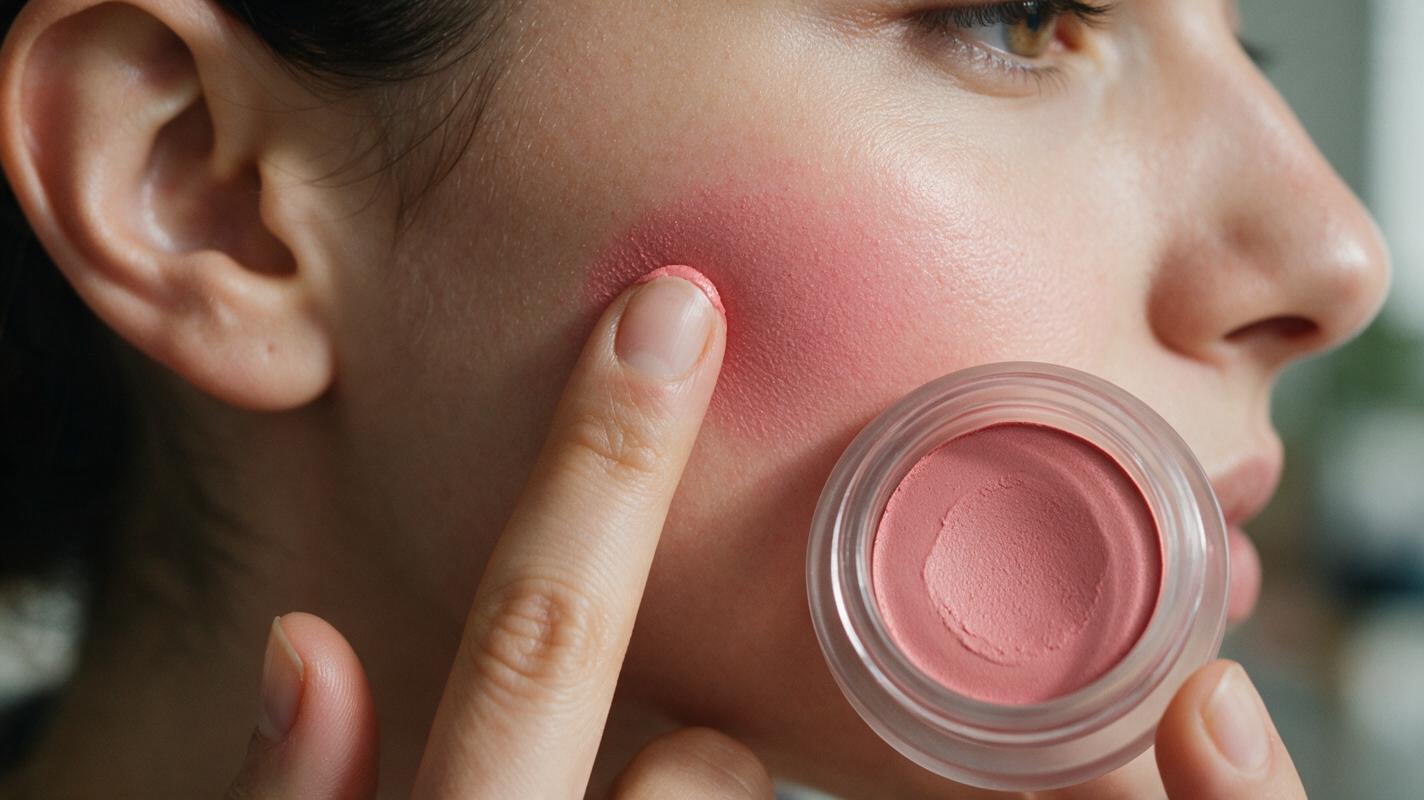
Table of contents
The problem with scaling UGC cream blush content
UGC-style cream blush application videos feel more trustworthy than polished studio ads, but producing dozens of variations across skin tones, shades, and application hacks can eat through your content budget fast. For beauty brands and content creators, the demand for short, relatable TikTok, Reels, and Shorts content never slows down — but hiring UGC creators for every new product launch or shade expansion takes time and money.
AI video generators can fill this gap by creating on-brand, authentic-looking makeup videos at scale, but many tools struggle with the subtle texture of cream blush: you end up with cakey, patchy finish, unnatural blending, fake hand movements, or packaging that doesn’t match your product. Vidu’s short-form video model excels at casual, fast-paced social content, making it a strong fit for UGC-style beauty videos — if you know how to prompt it correctly.
This guide shares reusable prompt templates, reference image tips, and troubleshooting fixes to get natural, believable cream blush videos from Vidu every time.
What makes a convincing UGC cream blush video
Before you start prompting, it helps to define what makes UGC content feel real. Unlike studio ads with perfect lighting and professional makeup artists, UGC videos have small, human imperfections that build trust. For cream blush videos, look for these key traits:
- Natural, uneven lighting: Window light, bedroom overhead light, or soft bathroom lighting — no perfectly diffused studio setups.
- Casual framing: Slightly off-center, close-up on the cheek, with the product tube visible in the corner or held up briefly.
- Realistic application movement: Finger tapping, sponge dabbing, or stick swiping that looks unscripted, not robotic.
- Soft, blended finish: Cream blush that melts into the skin, with no harsh lines or obvious patchiness — even when it’s “imperfectly” blended.
- Visible skin texture: Pores, fine lines, and natural skin undertones peeking through, not airbrushed to a plastic sheen.
Core prompt framework for Vidu cream blush videos
Every good Vidu prompt for UGC cream blush content has five core components. Skipping any of these can lead to unrealistic results or off-brand visuals. Build your prompt by filling in each part for your specific product:
- Scene setup: The setting, lighting, and framing (e.g., “close-up of a person’s cheek, natural bedroom window light, 9:16 TikTok aspect ratio, slightly shaky phone-held camera”)
- Product details: Blush formula, shade name, packaging type, and brand cues (e.g., “peachy-pink cream blush in a clear squeeze tube with white cap”)
- Application action: The exact movement happening in the video (e.g., “tapping cream blush into the cheek with the index finger, slow motion for 3 seconds”)
- Finish quality: The final look of the blush on the skin (e.g., “dewy, sheer finish, blended at the edges, no cakey texture, natural skin pores visible”)
- UGC style cues: Small details that make it feel real (e.g., “casual unpolished vibe, no professional makeup lighting, soft background blur with a bedroom shelf out of focus”)
Pro tip: Keep your prompt under 150 words for Vidu. The model responds best to concise, specific details rather than long, flowy descriptions.
When you’re building custom prompts for your brand, ai video generator tools like Vidu let you test small variations first before scaling to dozens of shades and skin tones.
Reusable Vidu prompts for common cream blush video use cases
These pre-built prompts are optimized for 9:16 short-form social videos, the most common format for UGC beauty content. Swap out the shade, packaging, and skin tone details to match your product line.
Finger application close-up
Best for TikTok/Reels “quick makeup hack” content. Focuses on the satisfying texture of cream blush being tapped into the skin.
9:16 aspect ratio, close-up of medium warm olive skin cheek, natural bedroom window light, slightly shaky phone-held camera. Peachy-pink cream blush in a matte white squeeze tube, a small dot of product on the index finger, tapping the blush into the apples of the cheek in slow, gentle motions. Dewy sheer finish, blended soft edges, natural skin pores and texture visible, no cakey patches. Casual UGC vibe, out-of-focus bedroom background, no studio lighting.Beauty sponge blended buildable look
Ideal for “buildable coverage” or “how to apply cream blush for a natural flush” tutorials.
9:16 aspect ratio, close-up of deep rich brown skin cheek, soft bathroom overhead light, steady phone angle. Warm terracotta cream blush in a clear glass jar, damp beauty sponge dabbing blush onto the cheek and blending upward toward the temple. Smooth, buildable finish, even pigment, no streaks, natural skin texture visible. Casual UGC style, bathroom mirror partially visible in background, product jar sitting on the counter in the corner of the frame.Stick blush quick swipe
Perfect for “2-minute makeup” Shorts content that highlights the ease of stick blush application.
9:16 aspect ratio, close-up of fair cool undertone skin cheek, bright living room window light, slightly tilted phone angle. Soft rose cream blush stick with a rose gold tube, swiping the stick directly across the apple of the cheek, then tapping with a finger to blend. Sheer, dewy flush, no harsh lines, natural freckles peeking through the blush. Casual UGC vibe, a stack of books blurred in the background, product cap held loosely in the other hand.Forearm swatch comparison
Great for Instagram carousel posts or “shade range” content that shows multiple blush shades on real skin.
1:1 aspect ratio, close-up of a medium deep skin forearm, natural daylight near a window, steady hand holding the arm in frame. Three cream blush shades swiped in a row: peachy pink, warm terracotta, soft plum. Each shade is blended on one edge to show the sheer finish, no patchiness, natural skin texture visible. UGC style, plain white t-shirt sleeve visible at the top of the frame, no fancy props.Fixes for common Vidu cream blush rendering issues
Even with a good prompt, Vidu can sometimes produce less-than-perfect results. Here are the most common issues and how to fix them with small prompt tweaks or reference images.
Cakey, patchy blush texture
This happens when the model interprets “cream blush” as powder or thick paint. Fix it by adding specific texture cues to your prompt:
- Add phrases like dewy cream texture, melts into skin, no powdery finish
- Specify sheer to medium pigment, not opaque to avoid thick, caked-on color
- Use a reference image of real cream blush blended on skin to guide the model’s texture output
Unnatural hand or finger movements
AI video models often struggle with realistic hand anatomy and movement for makeup application. Reduce this issue with these tweaks:
- Keep the action simple: tapping with index finger works better than complex blending motions
- Slow down the action: add slow motion, gentle movements to avoid jerky, robotic motion
- Use a reference image of a hand in the correct position to anchor the anatomy
Packaging that doesn’t match your product
If your brand has unique packaging, text prompts alone won’t get the details right. Fix this with reference images:
- Upload a clear, well-lit photo of your cream blush product as a reference image
- Set reference weight to 0.7 to balance product accuracy with natural movement
- Add the packaging details to your prompt even with a reference: matte white squeeze tube with black brand logo on the cap
Shade mismatch between prompt and result
Cream blush shades can look very different on skin vs in the tube, and AI models often misinterpret shade names. Fix this by being hyper-specific:
- Avoid vague shade names like “rose” — use descriptive terms: cool-toned soft rose, no orange undertones
- Specify the finish alongside the shade: sheer peachy pink, not neon, not dark
- Use a reference photo of the blush swatched on real skin to lock in the exact shade
Reference image prep for brand consistency
Reference images are the fastest way to make sure your Vidu videos match your brand’s product and aesthetic. For cream blush videos, you’ll get the best results with two types of reference images:
- Product reference: A high-res, well-lit photo of your cream blush packaging on a plain white background. Make sure the logo, tube shape, and cap are clearly visible.
- Skin/swatch reference: A photo of your cream blush blended on real skin in the shade you want, with lighting that matches your UGC scene (e.g., natural window light).
When uploading references to Vidu, start with a reference weight of 0.6-0.8. Too low, and the model will ignore your product details; too high, and the video will look stiff and unnatural. Test one video first to adjust the weight before batch-generating.
Key takeaways
- Vidu excels at short, casual UGC-style cream blush videos when prompted with specific texture, movement, and style details.
- Build your prompts around five core components: scene setup, product details, application action, finish quality, and UGC style cues.
- Use reference images of your product and real blush swatches to fix packaging inaccuracy and shade mismatch.
- For cakey texture or unnatural movement, add specific descriptive phrases to your prompt and test small variations first.
- When you’re ready to create your own UGC-style cream blush videos, try these models for free to test the prompts above with your brand’s products.
Keywords
vidu prompts, cream blush videos, ugc beauty content, ai video generator, cream blush application, beauty marketing, ai makeup video