How to Declutter Listing Photos With Nano Banana Pro
Learn how to remove movable clutter from listing photos with Nano Banana Pro while preserving walls, windows, fixtures, proportions, and permanent property features. This practical workflow includes room-specific prompts, quality-control checks, and safeguards against misleading edits.
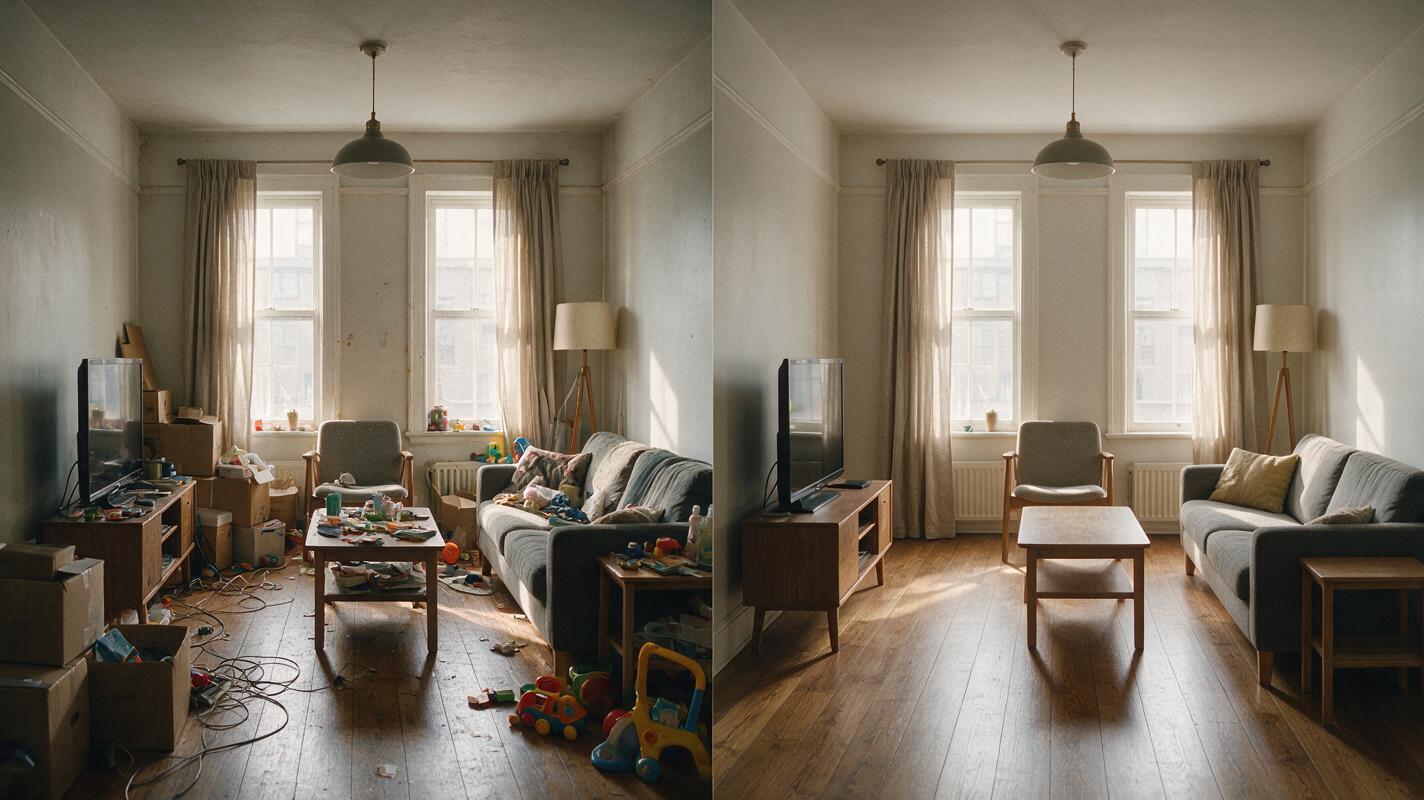
Table of contents
Declutter the room without redesigning the property
A cluttered listing photo can hide usable floor space, interrupt sightlines, and make an otherwise attractive room feel smaller. Nano Banana Pro can help remove movable distractions such as boxes, countertop items, loose cables, toys, and excess décor—but only when the prompt clearly separates removable objects from permanent property features.
The goal is not to invent a renovated home. It is to produce a cleaner marketing image that retains the original architecture, materials, dimensions, lighting direction, and camera position. This tutorial explains how to control that edit, inspect the result, and avoid publishing an image that misrepresents the listing.
Editing rule: Remove personal belongings and temporary clutter, but preserve every feature that a buyer would reasonably expect to see during a showing.
Choose a source photo that can survive editing
Start with the highest-resolution original available rather than a compressed screenshot or an image downloaded from social media. AI editing cannot reliably recover fine details that were never captured, and compression artifacts can be mistaken for objects or surface textures.
A strong source image should have:
- A level camera with limited wide-angle distortion
- Visible boundaries between furniture, walls, floors, and fixtures
- Balanced exposure without completely white windows or black corners
- Enough floor and wall texture to reconstruct small areas behind clutter
- No moving people, pets, or reflections crossing important surfaces
Decluttering is easiest when unwanted objects occupy a small portion of the frame. A room buried under furniture or storage boxes may require the model to invent too much hidden flooring, trim, or cabinetry. In that situation, reshooting the room after a physical cleanup is safer than attempting a large synthetic reconstruction.
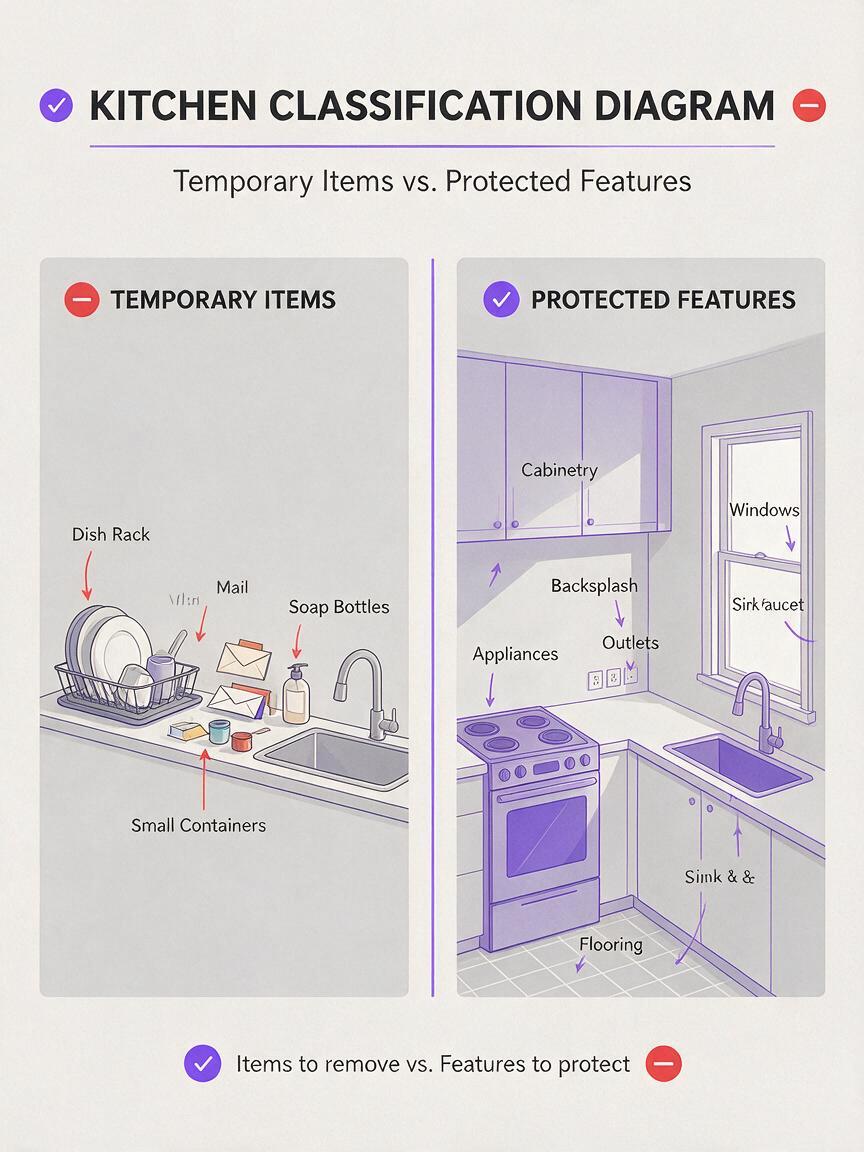
Define what may be removed and what must remain
Before opening an AI image generator, divide the scene into two categories. The removable category includes temporary objects such as laundry, mail, toiletries, magnets, small appliances, toys, trash bins, and loose cables. The protected category includes architecture, attached fixtures, major furniture needed to explain room scale, and visible property conditions.
| Usually safe to remove | Usually must remain unchanged |
|---|---|
| Boxes, bags, papers, and loose clothing | Walls, doors, windows, ceilings, and room dimensions |
| Countertop clutter and excess toiletries | Cabinets, countertops, sinks, faucets, and appliances |
| Toys, pet bowls, and temporary floor items | Flooring patterns, vents, outlets, and baseboards |
| Loose cords and small portable electronics | Permanent lighting and visible utility connections |
| Excess decorative accessories | Damage, stains, cracks, and other material conditions |
Do not instruct the model to make the room “luxurious,” “new,” or “fully renovated.” Those phrases invite material substitutions, altered fixtures, enlarged windows, and redesigned cabinetry. Use restrained language such as clean, organized, realistic, and unchanged.
Use a preservation-first master prompt
A reliable prompt states the editing objective, identifies removable objects, locks the property structure, and specifies the desired photographic finish. Begin with this reusable version:
Edit the supplied real estate listing photo by removing only temporary clutter and personal belongings. Remove [LIST THE OBJECTS]. Preserve the exact room layout, camera angle, perspective, walls, windows, doors, ceiling, flooring, baseboards, cabinetry, countertops, appliances, plumbing fixtures, lighting fixtures, furniture scale, materials, colors, shadows, and exterior view. Reconstruct only the small surfaces directly hidden by the removed objects. Do not renovate, restage, widen, repair, replace, recolor, or add architectural features. Keep the result photorealistic and consistent with professional listing photography.Replace the bracketed text with observable objects. “Remove the three cardboard boxes beside the sofa” is safer than “clean up the room” because it gives the model a bounded task.
If the first edit changes too much, shorten the removal list and process one area at a time. You can test this prompt yourself with a low-risk image before editing an entire listing package.
Adapt the prompt to each room
Different rooms contain different high-risk features. Kitchens require strict protection of cabinetry and appliances, while bathrooms need special attention to mirrors, tile lines, and plumbing fixtures.
Kitchen counters
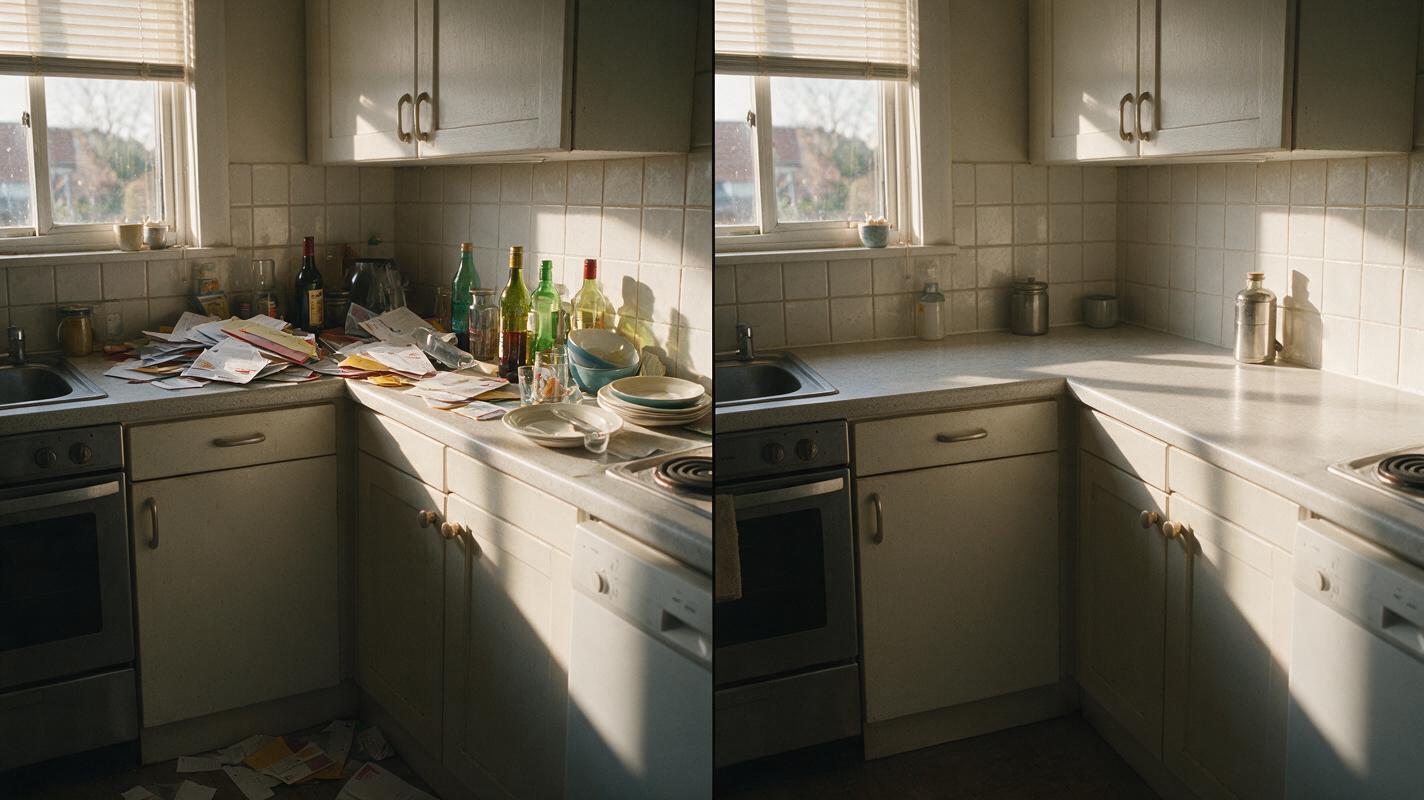
Remove the dish rack, loose mail, soap bottles, paper towels, and small countertop containers. Keep every cabinet door, handle, appliance, outlet, backsplash tile, countertop edge, faucet, sink, window, and reflection in its original position. Do not replace finishes or add décor. Preserve natural shadows and realistic surface texture.Living room floor and surfaces
Remove the moving boxes, loose cables, toys, and excess small objects from the coffee table. Keep the sofa, chairs, rug, coffee table, fireplace, windows, flooring, wall art, room proportions, and camera perspective unchanged. Reveal only the original-looking floor and tabletop areas hidden by the removed items.Bathroom vanity
Remove toothbrushes, cosmetics, towels on the counter, and personal toiletries. Preserve the exact vanity, countertop, sink, faucet, mirror, lights, tile, outlets, grout lines, reflections, and wall color. Do not retouch, repair, enlarge, or modernize the bathroom.Bedroom storage clutter
Remove clothing piles, bags, storage bins, and loose items from the floor. Keep the bed, nightstands, lamps, windows, closet doors, flooring, baseboards, wall dimensions, and existing décor unchanged. Maintain realistic floor continuity, contact shadows, and furniture spacing.For mirrors, glass doors, glossy appliances, and polished stone, explicitly protect reflections. A removed object may still appear in a mirror unless the prompt tells the model to update only the corresponding reflection without changing anything else.
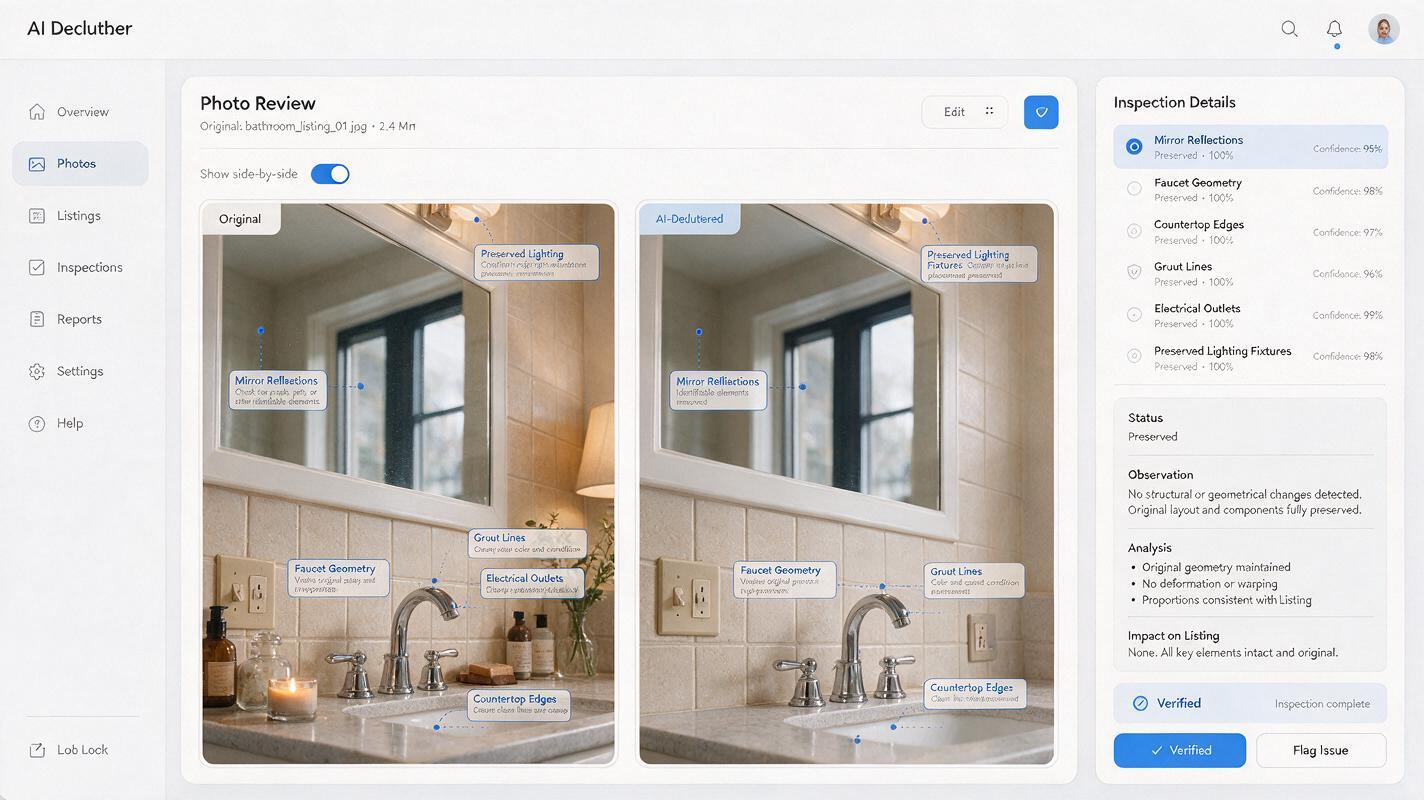
Inspect the edit at property-feature level
An image can look clean at thumbnail size while containing serious errors. Compare the original and edited files side by side at full resolution. Do not approve the result based only on its overall appearance.
Check the following areas carefully:
- Geometry: Are walls, door frames, windows, counters, and floor lines in the same positions?
- Fixtures: Are handles, outlets, vents, faucets, lights, and appliance controls still present?
- Materials: Did wood grain, tile spacing, carpet texture, or countertop veining change?
- Condition: Were stains, cracks, worn surfaces, or unfinished areas improperly repaired?
- Reflections: Do mirrors and glossy surfaces agree with the edited room?
- Exterior view: Did the model alter landscaping, neighboring buildings, weather, or scenery outside a window?
- Scale: Does the room appear larger because furniture, doorways, or focal length changed?
Create a transparent overlay in an image editor if side-by-side inspection is not enough. When the original and edited images alternate at partial opacity, shifted walls and warped furniture edges become easier to detect.
Correct small failures instead of regenerating everything
When most of the edit is accurate, target the flawed area rather than submitting a broader prompt. A full regeneration can fix one problem while introducing several new ones.
| Failure | Likely cause | Correction prompt |
|---|---|---|
| Cabinet doors changed | The model interpreted cleanup as renovation | Restore the exact original cabinet layout, door count, handles, color, and proportions. |
| Floor pattern became blurry | Too much hidden surface required reconstruction | Match the visible floorboard direction, width, color variation, seams, and perspective. |
| Furniture moved or disappeared | The removal request was too general | Keep all furniture in its original position; remove only the specifically named objects. |
| Mirror shows old clutter | The reflection was treated as a separate scene | Update only the corresponding reflected clutter while preserving the mirror, lighting, and reflected architecture. |
| Room looks unnaturally empty | Too many objects were removed at once | Restore the essential furniture and a limited amount of neutral existing décor. |
If the model repeatedly alters a permanent feature, return to the original photograph and make a smaller edit. Several controlled passes are generally easier to audit than one request to transform the entire room.
Keep the final listing accurate and transparent
Virtual decluttering should not conceal defects, change finishes, replace dated fixtures, or suggest that included furniture is part of the sale. Follow the listing platform, brokerage, photographer, and local advertising requirements that apply to edited property images.
Maintain an organized file set containing the untouched original, each generated version, the approved final image, and the prompt used. Clear filenames such as kitchen-original, kitchen-ai-decluttered-review, and kitchen-approved reduce the risk of uploading an unverified draft.
Where disclosure is required or useful, label the image with plain language such as “virtually decluttered” rather than suggesting that the room was physically prepared before photography. The edited image should help buyers understand the space—not replace an honest record of the property.
Final checklist
- Use the original high-resolution listing photo.
- Name the exact temporary objects to remove.
- Lock architecture, fixtures, materials, perspective, and room scale.
- Avoid renovation, repair, luxury, or redesign language.
- Inspect geometry, reflections, textures, and exterior views at full resolution.
- Correct isolated errors with narrow prompts.
- Retain the original image and document the approved edit.
- Apply any required virtual-editing disclosure before publication.
Keywords
declutter listing photos, Nano Banana Pro, real estate photo editing, AI image editing, listing image prompts, property marketing, virtual decluttering