Novel to Video: Create a 30-Second AI Book Trailer From an Excerpt
Turning a novel excerpt into a snappy 30-second book trailer is fast and accessible with novel to video AI tools, no film crew required. This guide walks you through adapting a 100-200 word excerpt into a tight trailer script, generating a consistent AI storyboard, rendering motion clips, and assembling a final polished video with voiceover and text overlays. You’ll get copyable prompts for every stage and pacing tips to hook viewers in the first 3 seconds.
Table of contents
Turn a Novel Excerpt Into a 30-Second AI Book Trailer
You don’t need a film crew or animation budget to turn your novel’s most gripping excerpt into a high-converting 30-second book trailer — novel to video AI tools let you build one in an afternoon.
This step-by-step guide walks you through adapting a 100-200 word novel excerpt into a tight trailer script, generating a consistent AI storyboard, rendering motion clips, and assembling a final polished video with voiceover and text overlays. You’ll get copyable prompts for every stage and pacing tips to hook viewers in the first 3 seconds.
Step 1 — Adapt Your Novel Excerpt Into a 30-Second Trailer Script
Start by picking the right excerpt from your novel. Choose a 100-200 word passage that has a clear hook, a hint of conflict, and no major spoilers — this is the emotional core of your trailer. For a 30-second runtime, your voiceover script will be roughly 75 words total, as the average speaking rate for promotional content is 2.5 words per second.
Structure your script to match classic trailer pacing that holds viewer attention from the first frame:
- 3-second opening hook: A striking visual + one line of voiceover that stops scrollers cold
- 20-second rising build: 3-4 shots that tease the main character, central conflict, and story tone
- 7-second closing reveal: Book title, author name, and a small call to action (e.g., "Pre-order now")
Use this copyable prompt to turn your excerpt into a structured trailer script in seconds:
Turn the following novel excerpt into a 30-second book trailer script.
Structure: 3s opening hook, 20s rising build, 7s closing reveal.
Include: time codes for each shot, voiceover text, visual description, on-screen text.
Genre: [your book genre, e.g., cozy mystery, YA fantasy, thriller]
Target aspect ratio: [16:9 for YouTube, 9:16 for TikTok/Reels]

Excerpt:
[paste your 100-200 word novel excerpt here]
After generating the script, do a trimming pass to cut any lines that don’t serve the core hook. Every second counts in a 30-second trailer, so remove backstory, side character details, or worldbuilding tangents that don’t move the teaser forward.
Step 2 — Generate a Consistent AI Storyboard From the Script
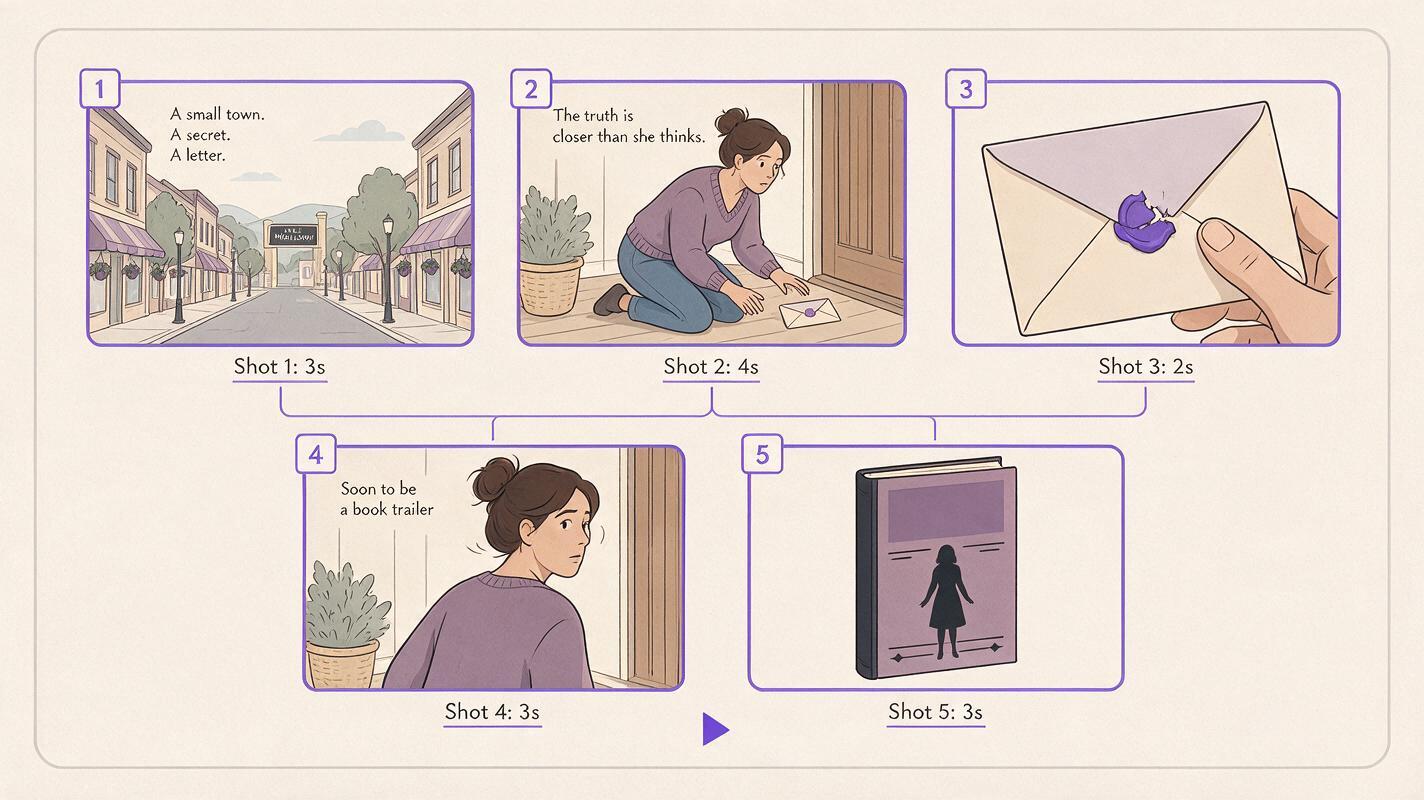
Once your trailer script is locked, you can generate a full set of consistent storyboard frames in minutes with an AI storyboard generator. Turn your script beats into storyboard frames now to skip the manual drawing process and move straight to production.
The biggest mistake new creators make with novel to video projects is inconsistent visuals across shots. A professional-looking trailer requires matching art style, character design, and color palette in every frame. Lock these elements in your first generated frame, then use that frame as a reference for all subsequent shots.
Pick an art style that matches your book’s tone: warm watercolor for cozy mystery, gritty high-contrast noir for thriller, bright cel-shaded animation for YA fantasy. For each shot in your script, use a structured prompt that includes the shot description, style reference, and consistency rules.
Here’s a copyable storyboard frame prompt:
Create a storyboard frame for a [genre] book trailer.
Shot description: [e.g., wide shot of a 1950s small town main street at golden hour, a red-haired woman walks toward a white picket fence]
Art style: warm watercolor, soft edges, muted earth tones
Consistency rules: match character design from reference frame: middle-aged woman, curly red hair, wire-rimmed glasses, cream cardigan
Aspect ratio: [16:9 / 9:16]
Generate 5-7 frames total for your 30-second trailer — one per major script beat. Label each frame with its planned duration so you can map clip timing later.
Step 3 — Render Individual Clips With an AI Clip Maker
Next, turn each static storyboard frame into a short motion clip using an AI clip maker. Keep motion subtle for book trailers — slow pans, gentle zooms, or soft fades work better than fast action, as they let viewers focus on the voiceover and story tease without feeling overwhelmed.
Each clip should match the duration you mapped in your script. For a 30-second trailer, clips will range from 2 seconds (a quick cut of a clue or plot hint) to 6 seconds (the opening establishing shot). Use this copyable clip prompt to keep style consistent with your storyboard:
Animate the provided storyboard reference frame into a [duration]-second clip.
Motion: [e.g., slow pan to the right, gentle zoom in on the sealed letter on the porch]
Style: match reference frame exactly — warm watercolor, soft edges, muted earth tones
No text overlays, no sudden movement, no camera shake
Generate all clips one by one, and save them to a folder labeled by shot number to make editing easier. If a clip’s style or character design doesn’t match the rest, regenerate it using the first storyboard frame as a direct image reference.
Step 4 — Assemble and Polish Your Final Trailer
Once you have all your clips rendered, import them into your preferred video editor (free tools like CapCut or DaVinci Resolve work perfectly for this) and arrange them in script order. Trim each clip to its exact planned duration, and add 0.5-second crossfades between clips for smooth, professional transitions.
Add your voiceover next — you can record it yourself with a cheap USB mic, or use an AI voice tool with a tone that matches your book’s genre (warm and curious for cozy mystery, tense and gravelly for thriller). Sync key visual beats to moments in the voiceover, like cutting to a close-up of a mysterious letter when the VO mentions an unexpected delivery.
Add soft, genre-appropriate background music at a low volume (so it doesn’t overpower the voiceover) and on-screen text for the book title, author name, and pre-order link in the final 7 seconds. Do a final pass to make sure the total runtime is exactly 30 seconds, and that the hook hits within the first 3 seconds to stop scrollers on social media.
Final Book Trailer Checklist
- Your source excerpt is 100-200 words and includes a clear, spoiler-free hook
- Script follows 3s hook / 20s build / 7s reveal structure, with ~75 words of voiceover
- All storyboard frames share a consistent art style, character design, and color palette
- Each motion clip matches its planned duration and has subtle, distraction-free movement
- Voiceover is clear, synced to visual beats, and matched to your book’s tone
- Final trailer is exactly 30 seconds, with a clear end card showing book title and author
Keywords
novel to video, script to video ai, ai storyboard generator, ai clip maker, create ai video from script, ai story video generator, turn a script into an ai storyboard