How to Make a One-Location AI Microdrama That Never Feels Static
A one-location AI microdrama becomes engaging when the room changes meaning as the conflict escalates. This tutorial shows how to design a compact episode around one objective, map distinct story zones, generate stable anchor frames, and create visual progression without unnecessary location changes.
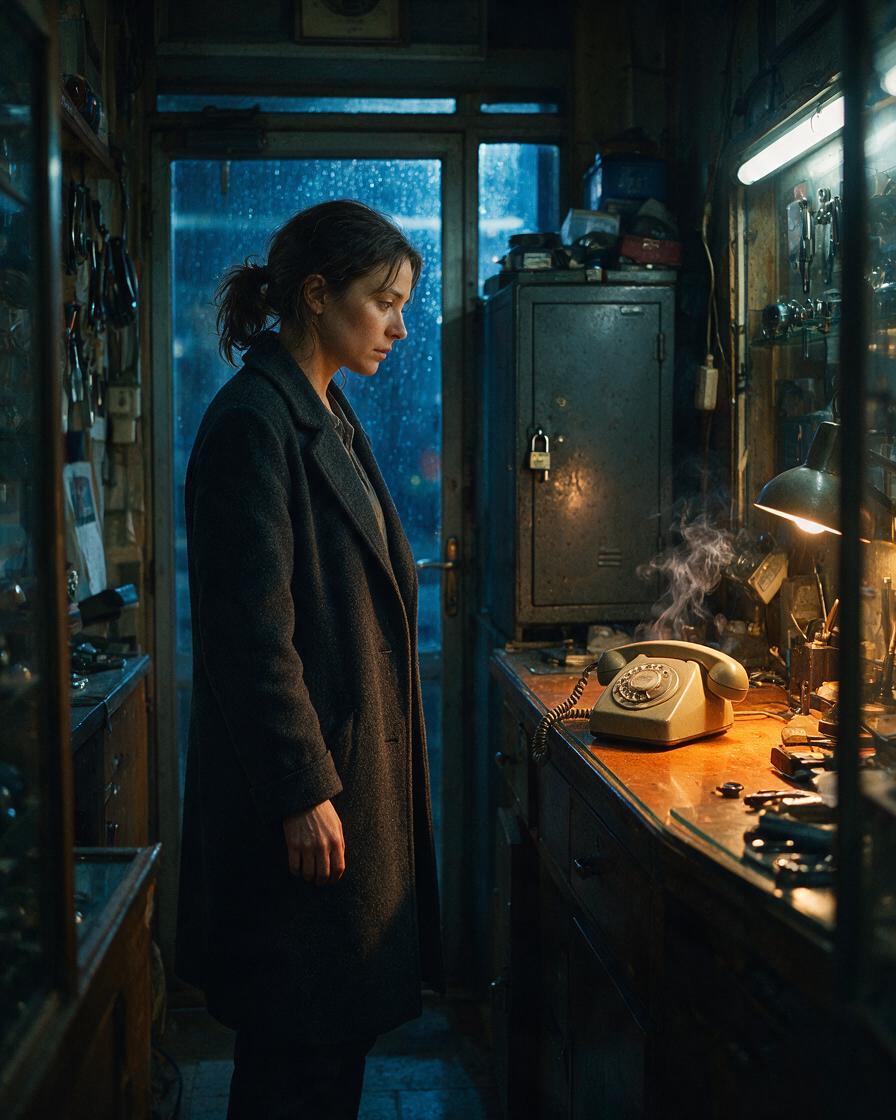
Table of contents
A small location can carry a complete episode
The best one-location AI microdrama does not compensate for its limited setting with constant camera movement. It makes the same room reveal new information.
Build the episode around one character, one urgent objective, three functional areas, and one irreversible discovery. This reduces visual continuity pressure while giving every shot a clear dramatic purpose.
Working example: Mara enters her late father's repair shop to retrieve a locked metal case before the building is sold. A caller insists that she leave it untouched. The episode ends when she discovers a recent photograph of herself inside.
Step 1 — Reduce the script to a pressure line
Before generating images, compress the episode into a single pressure line:
CHARACTER must achieve OBJECTIVE before DEADLINE,
but OBSTACLE forces a CHOICE that reveals NEW INFORMATION.
For the repair-shop episode:
Mara must recover her father's metal case before the buyer arrives,
but an anonymous caller knows she is inside and forces her to choose
between leaving safely and opening the case.
This sentence prevents the room from becoming a collection of unrelated cinematic shots. Every beat must either move Mara closer to the case, increase the caller's control, or change what the case means.
Convert the pressure line into five playable beats:
- Entry: Mara unlocks the dark shop and checks the street behind her.
- Search: She finds the cabinet where the case should be.
- Interruption: The landline rings even though the shop is closed.
- Reversal: The caller directs her to a hidden compartment.
- Discovery: The case contains a photograph taken that morning.
Write actions that can be photographed. Replace internal lines such as “Mara realizes she was followed” with evidence: a fresh photograph, wet footprints, a moving door chain, or a ringing telephone.
Step 2 — Lock one character and one physical objective
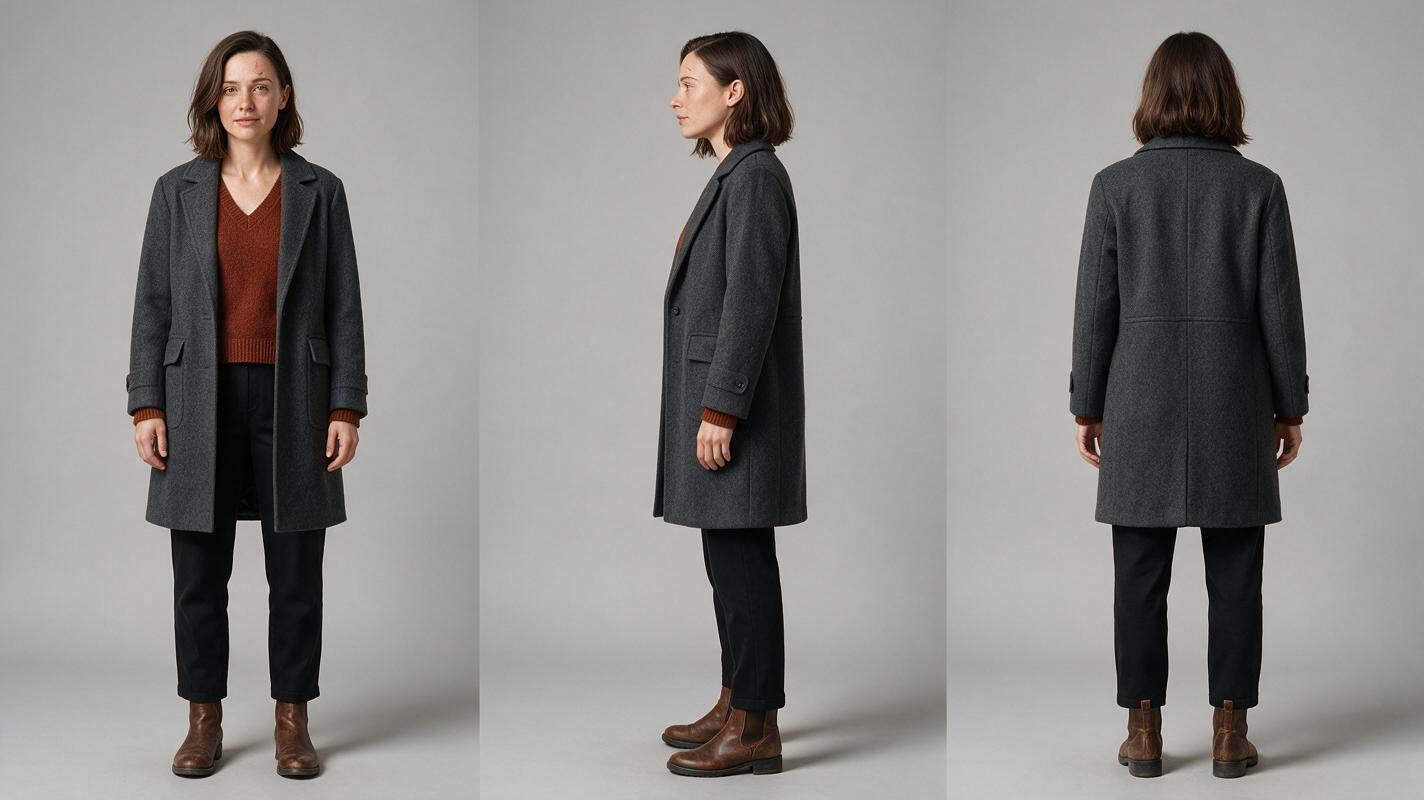
Visual recreation prompt: Photorealistic three-panel character reference sheet of the same woman named Mara, age 31, shoulder-length dark brown hair with a precise left-side part, narrow oval face, small scar through the right eyebrow, charcoal wool coat over a muted rust sweater, black straight-leg trousers and worn leather ankle boots; front view, exact left side profile and back view arranged evenly from left to right; full body, neutral posture, identical wardrobe and proportions in every panel; neutral light-gray seamless studio background; soft diffused studio lighting; landscape 16:9 canvas; MANDATORY CAMERA: eye-level full-body reference framing with a 70mm lens look; no text, logos, props, interface elements or decorative borders.
A one-location episode magnifies identity drift because viewers repeatedly see the same person under similar conditions. Create a character sheet before any dramatic frame, then keep the description short and unchanged across prompts.
Give the character a physical objective that can organize blocking. Mara is not merely “investigating.” She is trying to reach, locate, and open a specific metal case. That object gives her a reason to cross the room and lets the camera anticipate or obstruct her progress.
Use a compact identity block:
IDENTITY LOCK — MARA
31-year-old woman; narrow oval face; shoulder-length dark brown hair;
left-side part; small scar through right eyebrow; charcoal wool coat;
rust sweater; black trousers; worn leather ankle boots.
Preserve face, age, hair, body proportions and wardrobe exactly.
Generate the neutral reference before using an ai short drama workflow. Do not ask the dramatic scene prompt to redesign her appearance.
Step 3 — Divide one room into three story zones
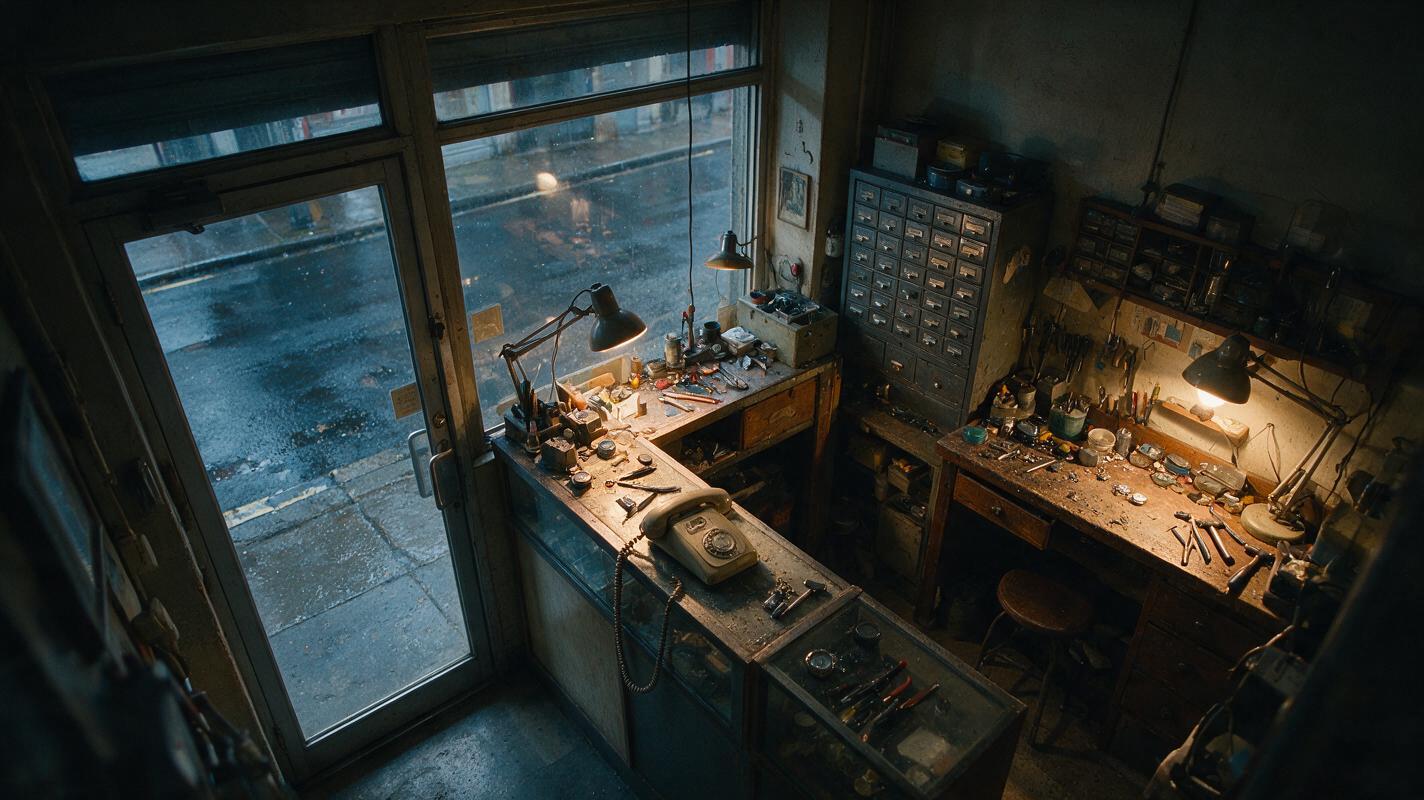
Visual recreation prompt: Cinematic editorial-realism establishing image of a narrow, lived-in watch-repair shop after closing, glass entrance door and rain-dark street at the front, cluttered repair counter with an old corded telephone in the middle, locked steel parts cabinet and scarred workbench at the rear, practical amber desk lamps mixed with cool blue window light, dust, tools and believable wear; no people; landscape 16:9; MANDATORY CAMERA: high true three-quarter view from the front-left ceiling corner using a 28mm lens, all three functional zones visible with clear walking paths; natural perspective, film-style lighting, no text, logos, UI or brand marks.
Treat the location as three connected mini-sets rather than one undifferentiated background:
| Zone | Story function | Visual signature |
|---|---|---|
| Door | Safety and escape | Cool street light, glass reflections, visible lock |
| Counter | Interruption and negotiation | Telephone, amber lamp, restricted movement |
| Workbench | Discovery and danger | Steel cabinet, deep shadows, close evidence |
The episode now has visual progression without changing locations. Mara begins near the exit, is pulled toward the telephone, and finally chooses to move into the darkest rear zone.
Generate one clean master image of the empty room. From that approved design, create a front-door angle, a counter angle, and a rear-workbench angle. Preserve permanent landmarks such as windows, lamps, shelving, cabinet handles, and door direction.
Step 4 — Build anchor frames before generating motion
Visual recreation prompt: Neutral cinematic production diagram on a landscape 16:9 canvas showing six separate vertical 9:16 storyboard frames arranged in two rows of three, depicting the same woman moving through the same repair shop from glass door to telephone counter to rear workbench, with consistent wardrobe, room geometry and lighting; each frame uses a visibly different shot size and blocking position, ending on a close insert of a photograph inside a metal case; thin neutral dividers only; MANDATORY LAYOUT: chronological left-to-right progression with generous margins; no words, numbers, logos, software chrome, buttons or brand marks.
Create still anchor frames for the episode's decision points before requesting video. An ai storyboard can expose continuity problems while repairs are still inexpensive and isolated.
A useful six-frame sequence is:
- Frame A: Wide entry composition with Mara beside the locked door.
- Frame B: Medium search shot at the steel cabinet.
- Frame C: Telephone insert as it begins ringing.
- Frame D: Tight profile while Mara listens, with the exit behind her.
- Frame E: Rear three-quarter view as she opens the workbench compartment.
- Frame F: Evidence insert showing the recent photograph.
Each anchor should introduce a meaningful change in information, position, or power. If two adjacent frames communicate the same fact, combine them.
ANCHOR FRAME PROMPT
Mara, preserve the attached identity reference exactly, stands at the
rear workbench of the established watch-repair shop. Her right hand has
just opened a shallow hidden compartment; her left hand remains visible
against the bench. She looks down at an unseen object with restrained alarm.
Cool window spill behind her, warm task lamp on her hands.
Vertical 9:16 composition.
MANDATORY CAMERA: true rear three-quarter medium shot, eye level, 50mm lens look.
Preserve cabinet position, workbench scratches, wardrobe and screen direction.
No duplicate person, extra fingers, readable text, logos or added furniture.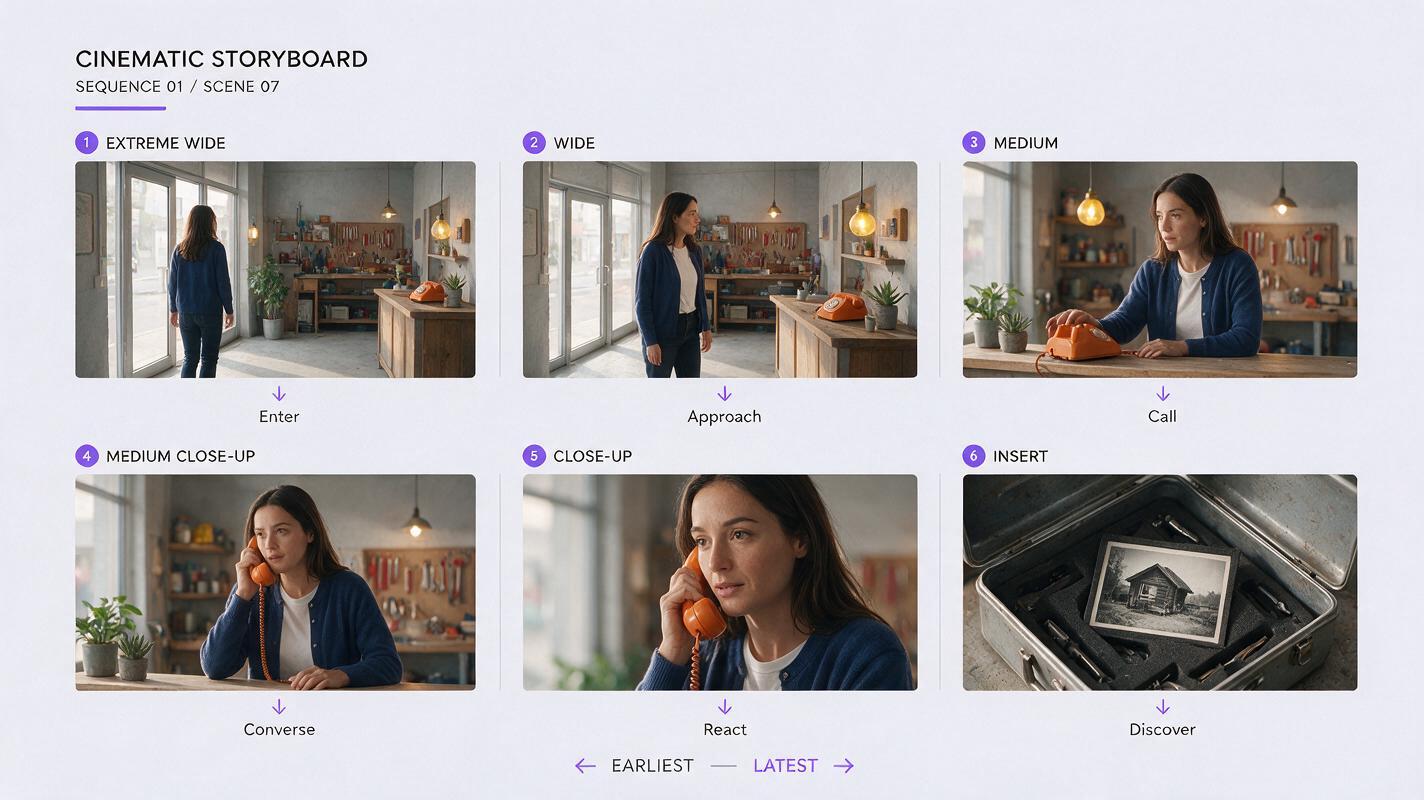
Step 5 — Animate one change per shot
Do not ask one generation to cover entering, searching, answering the phone, opening the cabinet, and reacting. Assign each clip one dominant change:
- Mara enters and locks the door.
- Her hand stops when the telephone rings.
- She lifts the receiver and listens.
- She crosses from the counter to the workbench.
- She opens the hidden compartment.
Keep motion prompts mechanical and bounded:
Animate only this action: Mara slowly lifts the telephone receiver with
her right hand and brings it to her ear. Her feet remain planted. Her left
hand stays on the counter. The camera makes a subtle five-percent push-in.
Preserve her face, hair, coat, room layout, telephone design and lighting.
No speaking, no hand swap, no new objects, no background movement.
Separate dialogue, facial reaction, and large body movement when possible. A brief listening shot followed by a controlled reaction is easier to edit than a long clip containing several emotional and physical transitions.
Step 6 — Make repetition feel intentional
Returning to the same composition can strengthen the episode if one story variable changes. Repeat the doorway frame after the call, but place Mara deeper inside the shop. Repeat the telephone insert after she hangs up, but leave the receiver swinging. Repeat the cabinet angle after the discovery, but reveal a shadow crossing the frosted glass behind her.
This creates visual rhyme rather than visual stagnation. The audience recognizes the composition and immediately notices the changed evidence.
For a vertical drama video, keep the active clue and the character's face within the central story column. Use depth—foreground tools, midground character, background exit—instead of spreading information across a wide horizontal frame.
Step 7 — Edit around discoveries, not coverage
Assemble the episode according to information flow:
- Show the room clearly enough to establish the exit, telephone, and workbench.
- Shorten shots as the caller demonstrates knowledge of Mara's actions.
- Hold slightly longer before she opens the compartment.
- Cut to the photograph only after her hand and gaze direct attention toward it.
- End on a consequence, not a general reaction.
The final image might show the shop door locking by itself, the caller appearing in the photograph's reflection, or the photograph bearing evidence from moments earlier. Choose one concrete change that can launch the next episode.
Once the character sheet, location plate, and six anchors are ready, try these models for free with the same pilot scene and compare which path best preserves the approved references.
FAQ
How many shots should a one-location AI microdrama use?
Use only the shots needed to establish geography, show decisions, reveal evidence, and preserve edit clarity. A short episode benefits more from distinct information changes than from an arbitrary shot count.
Should every shot use a different camera angle?
No. Repeating an angle can create suspense when blocking, props, lighting, or background evidence changes. Change the camera only when the new angle reveals something useful.
Can an off-screen character participate in the episode?
Yes. A caller, voice message, knock, or shadow can apply pressure without requiring another visible identity. Give the unseen participant observable effects on the room and protagonist.
What should be generated first: the character or the location?
Approve both before dramatic frames. The character sheet locks identity, while the empty location plate locks geometry and lighting. Dramatic anchors combine those approved assets.
Sources
Final checklist
- The episode has one urgent objective and one deadline.
- The location contains three visually distinct story zones.
- The recurring character has an approved three-view reference sheet.
- Permanent room landmarks remain stable across anchor frames.
- Every shot contains one dominant action or information change.
- Repeated compositions reveal new evidence.
- The final frame creates a concrete consequence for the next episode.
Keywords
ai microdrama, ai short drama, ai short film generator, ai series video, short drama from script, vertical drama video