How to Change Outfits Without Losing Character Consistency
Keep the same AI character recognizable through wardrobe changes by separating permanent identity traits from editable clothing traits. The fastest workflow is to build an identity-only reference sheet, create controlled outfit keyframes, and animate those approved frames instead of asking a video model to redesign the character mid-shot.
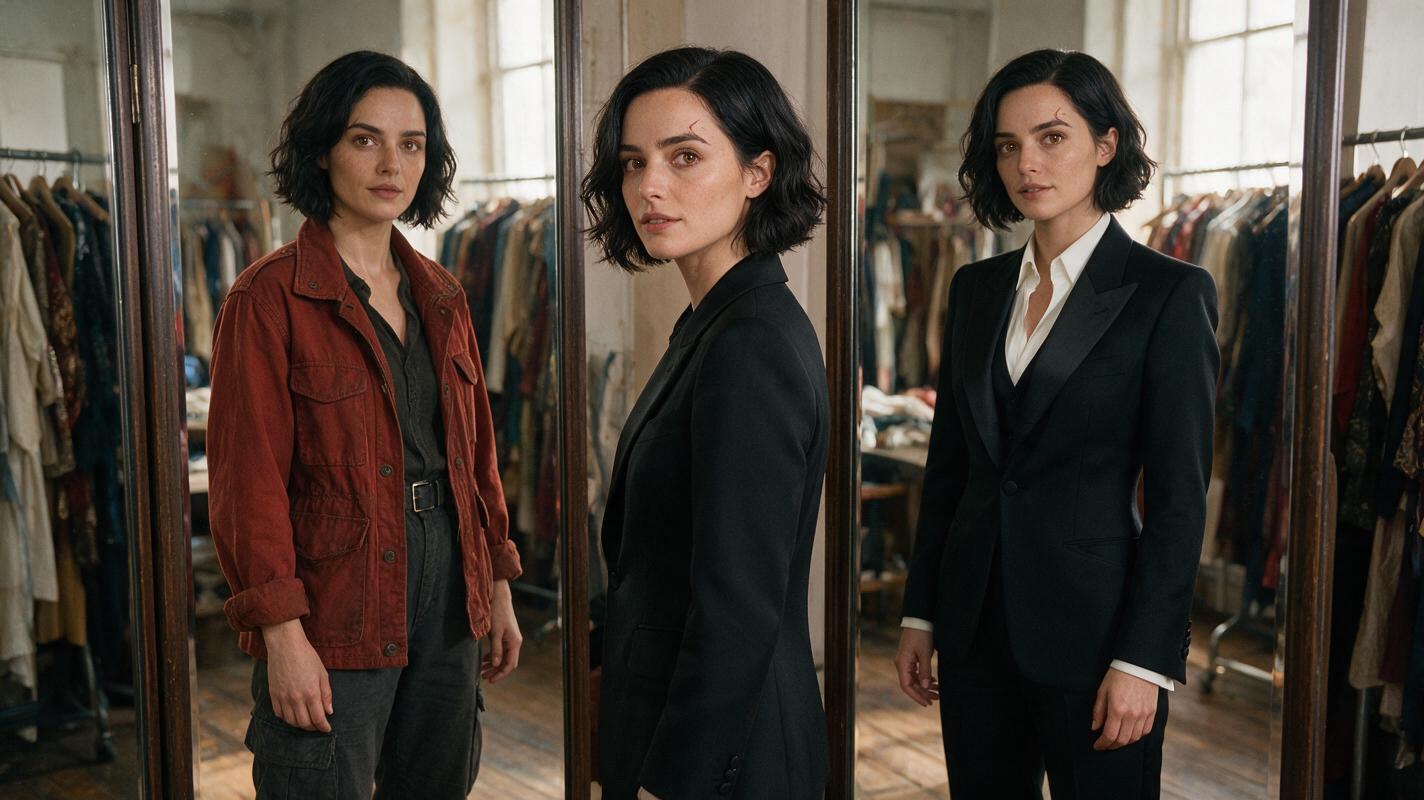
Table of contents
TL;DR: Separate identity from wardrobe
To change an AI character’s clothes without changing the character, define the face, body proportions, hair, and permanent features separately from the outfit. Generate and approve a still image for each wardrobe state, then use image to video to animate those locked designs with restrained movement.
This tutorial follows Maya, a fictional documentary photographer who changes from a rust-red field jacket into formal black eveningwear. The method works for fashion transitions, time jumps, superhero transformations, uniform changes, and multi-scene narrative videos.
Cover image recreation prompt: Photorealistic editorial photograph of the same fictional woman standing between two full-length wardrobe mirrors in a lived-in costume fitting studio, her left reflection wearing a rust-red field jacket and charcoal cargo trousers while her right reflection wears a tailored black evening suit, identical face, short wavy black bob, brown eyes, small crescent scar beneath the right eyebrow, natural window light, fabric racks and wooden floor in the background, MANDATORY CAMERA: eye-level medium-wide view from the front-left, 35mm lens, both reflections fully visible, landscape 16:9, realistic skin and fabric texture, no text, no logos, no duplicated limbs.
Why outfit changes break character consistency
Video models do not always treat clothing as an independent layer. A prompt that changes “rust jacket” to “black suit” may also reinterpret the face, hairstyle, age, body shape, or visual style. The new clip can look like a different actor playing the same role.
Typical failures include:
- Face drift: the jaw narrows, eye spacing changes, or the character appears older.
- Hair drift: length, parting, curl pattern, or color changes with the wardrobe.
- Body drift: a bulky coat causes the model to redesign the underlying proportions.
- Outfit leakage: parts of the first costume survive inside the second one.
- Transition mutation: buttons, sleeves, hands, and fabric merge during an on-camera transformation.
The solution is not a longer all-in-one prompt. It is a staged workflow in which identity remains fixed while clothing is the only planned variable.
Three ways to create a consistent wardrobe change
| Approach | Best for | Main risk |
|---|---|---|
| Separate outfit clips | Dialogue, narrative scenes, reliable edits | The cut needs motivated action |
| Matched-pose transition | Fashion reveals and short social videos | Pose mismatch creates a visible jump |
| Visible transformation | Fantasy or stylized costume changes | Hands and fabric may mutate |
The first method is the most dependable: create one approved clip before the change and another after it, then hide the edit with a turn, doorway, foreground wipe, or camera movement. The other methods are useful alternatives once the identity references are stable.
How MagicBoat handles a multi-model outfit workflow
MagicBoat lets you test image and video models from one free account rather than rebuilding the project across disconnected tools. Seedream, Flux, or GPT Image can be used to explore character and wardrobe stills, while Seedance, Kling, or Veo can animate approved frames when available in the platform.
The practical sequence is: generate identity references, produce outfit-specific keyframes, animate each keyframe, compare results, and repair only the layer that failed. This modular ai video workflow also makes it easier to compare how different models interpret the same reference and motion brief.
Rule of thumb: Use an image model to decide what the character wears. Use a video model to decide how the approved character moves.
Step 1 — Build an identity-only character sheet
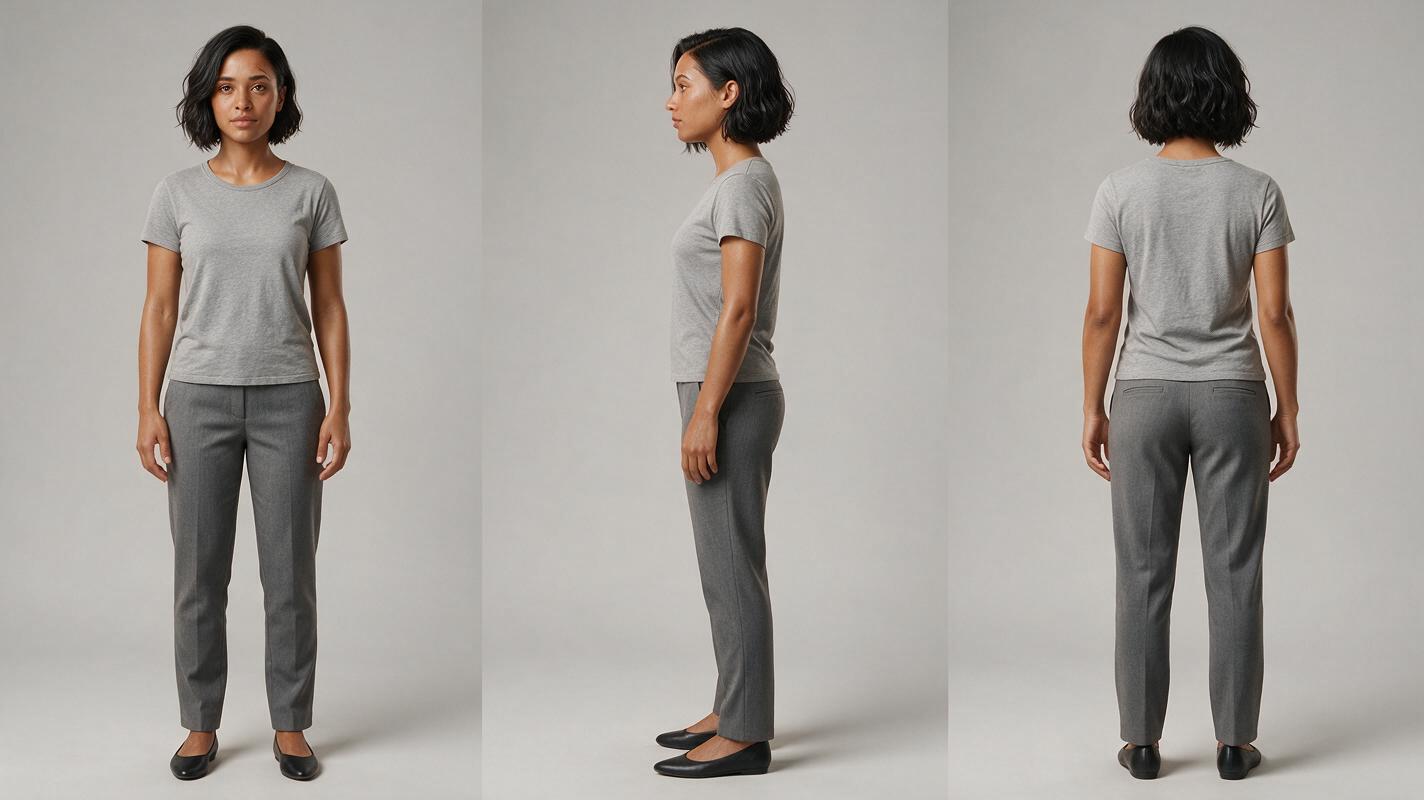
Create a three-view reference before introducing elaborate clothing. Maya wears a plain fitted gray base layer so her body proportions remain visible. Her permanent anchors are a short wavy black bob, brown almond-shaped eyes, a rounded jaw, warm medium-brown skin, and a small crescent scar beneath her right eyebrow.
Photorealistic three-panel character reference sheet of the same fictional woman, Maya, age 31, warm medium-brown skin, brown almond-shaped eyes, rounded jaw, short wavy black bob ending at the chin, side part, small crescent-shaped scar beneath the right eyebrow, straight medium-width nose, natural eyebrows, average athletic build, wearing a plain fitted medium-gray crew-neck shirt, straight gray trousers and neutral shoes. PANEL LAYOUT: exactly three equal vertical panels showing front view, left side profile and back view; the same person, proportions, hairstyle and clothing in every panel. MANDATORY CAMERA: eye-level full-body orthographic-style reference photography, camera centered on each view, 70mm lens appearance, no perspective exaggeration. Neutral light-gray seamless studio background, soft even lighting, landscape 16:9, realistic skin texture, no jewelry, no props, no text, no logos, no extra people.Expected result: one clean identity source in which the face, hair silhouette, body proportions, and scar can be checked from multiple directions. Regenerate if any panel appears to show a different person.
Step 2 — Create a controlled wardrobe board
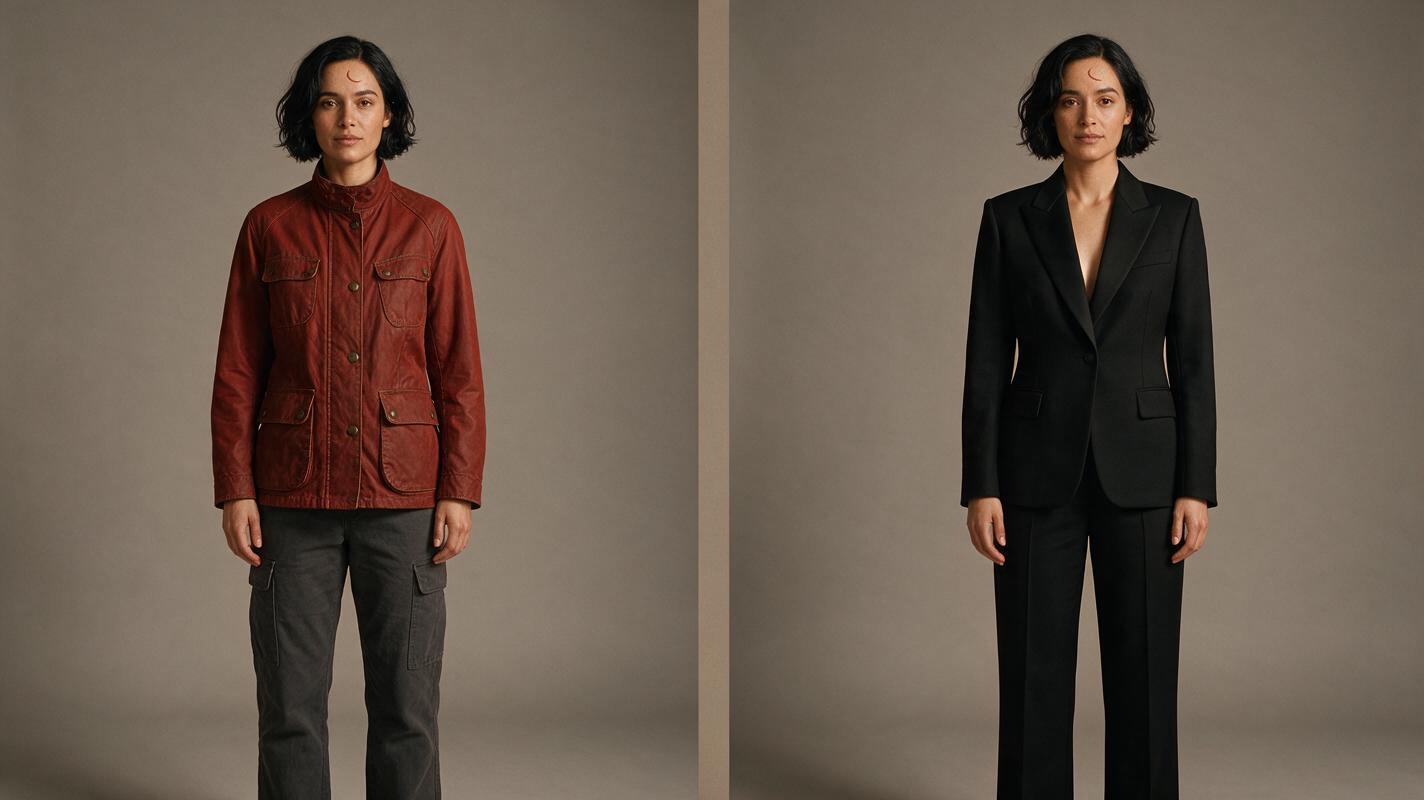
Next, place both costumes beside the character without asking for motion. Keep the pose, camera, lighting, and grooming identical. This reveals whether the image model changes Maya’s anatomy when it changes her silhouette.
Photorealistic two-panel wardrobe continuity board featuring the same fictional woman from the supplied character reference: Maya, age 31, warm medium-brown skin, brown almond-shaped eyes, rounded jaw, short wavy black bob with side part, small crescent scar beneath the right eyebrow, identical face and body proportions in both panels. LEFT PANEL: rust-red waxed field jacket over an ivory crew-neck shirt, charcoal cargo trousers, dark brown ankle boots. RIGHT PANEL: tailored matte-black evening suit, single-breasted jacket, black silk camisole, straight black trousers, polished black loafers. Identical relaxed standing pose with arms slightly away from the torso. MANDATORY CAMERA: eye-level full-body front view, camera centered, 50mm lens, equal subject scale in both panels. Neutral warm-gray studio, soft daylight, landscape 16:9, realistic fabric construction, no text, no logos, no accessories, no pose change, no hairstyle change.Expected result: the viewer notices the clothing change first, not a new face or body. Compare eye spacing, jaw width, hairline, scar placement, shoulder width, and height across the two panels.
Step 3 — Generate one keyframe for each outfit
Build two separate scene stills instead of requesting a full transformation immediately. Keep the location and camera fixed so the wardrobe is the primary visual difference.
Use this first-state prompt:
Maya stands beside the open doorway of a small independent photography gallery, wearing her rust-red waxed field jacket, ivory crew-neck shirt, charcoal cargo trousers and dark brown ankle boots. Preserve her exact reference identity: warm medium-brown skin, brown almond-shaped eyes, rounded jaw, short wavy black bob with side part, crescent scar beneath the right eyebrow, average athletic proportions. She looks toward the gallery interior with one hand resting naturally near the doorframe. MANDATORY CAMERA: true three-quarter view, camera near front-right at chest height, medium-full shot, 50mm lens, locked composition. Cinematic editorial realism, late-afternoon window light, framed photographs and worn wooden floor, landscape 16:9, anatomically correct hands, no extra people.Duplicate the scene description for the second state, replacing only the clothing sentence with the black evening suit. Do not rewrite the face or location description between versions.
Expected result: two matched keyframes that look like consecutive scenes featuring the same performer.
Step 4 — Animate the outfit states as separate clips
Upload the first keyframe to an image-to-video model and request one simple action that can motivate an edit. A doorway crossing works well because the frame can become briefly obscured.
Seedance-style motion prompt:
Locked identity and wardrobe. Maya takes two calm steps toward the gallery doorway and passes behind the dark wooden doorframe. Her expression remains neutral and focused. The jacket, hair length, scar, facial proportions and body proportions remain unchanged. Natural walking motion, restrained fabric movement, stable background geometry. Camera makes a very slight forward push only. No clothing transformation, no new accessories, no extra people, no face change.Kling-style motion prompt:
Same woman and exact rust-red outfit throughout. She walks slowly from her mark and becomes fully hidden for a moment by the foreground doorframe. Preserve face, short black bob, crescent scar, anatomy and gallery layout. MANDATORY CAMERA: slow controlled push-in, no pan, no orbit, no cut. Realistic weight shift and subtle cloth motion; avoid morphing, duplicated limbs and background movement.Animate the black-suit keyframe as a second clip beginning with Maya emerging from behind the same doorframe. Keep camera direction and walking direction consistent.
Expected result: two stable clips with a natural point where the character is hidden, allowing a clean wardrobe-change edit.
Step 5 — Join the clips at a motivated occlusion
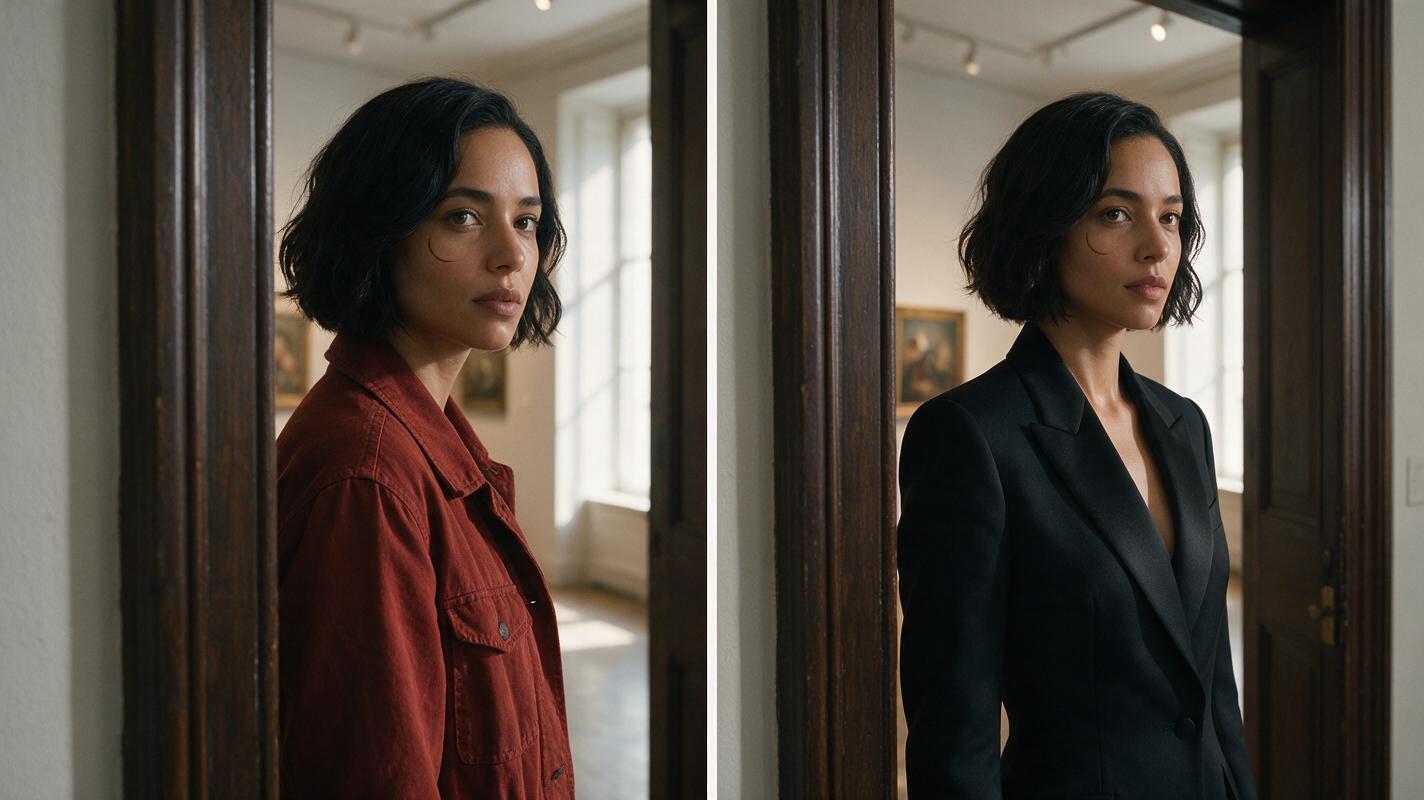
Cut from the first clip to the second while Maya is mostly or completely covered by the doorframe. The audience accepts the wardrobe change because the location, movement direction, scale, and face remain continuous.
Editorial before-and-after comparison presented as two equal cinematic frames from the same gallery doorway scene. LEFT FRAME: Maya in a rust-red field jacket approaching and becoming partly hidden by a dark wooden doorframe. RIGHT FRAME: the identical Maya emerging from the same doorframe in a tailored matte-black evening suit. Preserve identical face, short wavy black bob, crescent scar, body proportions, gallery geometry, daylight direction and camera height. MANDATORY LAYOUT: horizontal side-by-side comparison with equal frame sizes and a narrow neutral divider; MANDATORY CAMERA: matching chest-height three-quarter compositions, 50mm lens, camera near front-right. Photorealistic editorial film stills, landscape 16:9, no labels, no arrows, no text, no extra people.Expected result: the cut reads as an intentional costume reveal rather than an identity discontinuity. If the doorway edges jump, align or crop the clips before changing the prompts.
Step 6 — Inspect identity and clothing separately
Review several frames before and after the cut. Do not judge continuity from a single attractive frame.
- Cover the clothing and compare the face, hairline, scar, ears, and jaw.
- Cover the face and compare height, shoulder width, arm length, and movement direction.
- Check whether old clothing colors leak into the new sleeves, collar, or trousers.
- Inspect the occlusion frame for extra fingers, partial faces, or duplicate limbs.
- Confirm that gallery lines, light direction, and camera height remain stable.
If identity is correct but the clothing is wrong, regenerate the still rather than the video. If the still is correct but motion introduces defects, simplify the action or test the same frame in another video model.
Keep the same wardrobe system across projects
Save a small continuity package for each recurring character:
- The approved three-view identity sheet.
- A short permanent-traits description that never changes.
- Front and three-quarter references for every approved outfit.
- Exact color and material terms, such as “rust-red waxed cotton.”
- Notes about items that must not appear in other outfits.
Name costumes by story function—field outfit, evening outfit, winter outfit—rather than “look one” and “look two.” This reduces accidental prompt mixing when a project grows.
Alternative: show the transformation on camera
A visible transformation is possible, but it should be short and mechanically simple. Lock the camera, keep the character almost still, and describe an ordered change: jacket darkens, silhouette sharpens, trousers become black, footwear changes last. Avoid simultaneous spinning, walking, hand gestures, and camera movement.
For a realistic drama, a hidden edit is usually more believable. Reserve visible morphing for magical, comic-book, or deliberately surreal scenes.
Alternative: preserve a recorded performance
If timing matters more than generative movement, record a performer turning behind a doorway or crossing behind a foreground object. Apply the same motion to separately designed outfit states, then cut at the occlusion. This keeps posture and timing more repeatable than generating both performances independently.
Alternative: repair a successful face
If the outfit, body motion, and scene are correct but the face drifts briefly, localized face swap can be more efficient than discarding the whole clip. Use a clean, front-facing reference of the fictional character and inspect the result around hair, ears, profile angles, and occlusions. Regenerate when skull shape or body proportions have changed; face replacement cannot repair structural drift.
Where this workflow falls short
- Transparent or reflective clothing: sequins, veils, and glossy fabrics can flicker during movement.
- Extreme silhouette changes: moving from fitted clothing to a large coat may alter perceived body proportions.
- Long visible transformations: extra duration gives the model more opportunities to mutate hands, seams, and facial details.
- Complex occlusion: hair, hands, and clothing may reconnect incorrectly when the character reappears.
- Profile-only references: identity is harder to recover if the model never sees a clear front or three-quarter face.
When these problems persist, replace the transformation with a cutaway to a prop, room detail, or establishing shot. Editing is often a better continuity tool than additional prompt complexity.
FAQ
Can I change clothes with text to video alone?
Yes, but repeatability is lower because the model must invent both identity and wardrobe in every clip. Reference-first animation gives you approved visual states before motion begins.
Should both outfits appear on the character sheet?
Keep the primary identity sheet neutral. Store clothing in separate wardrobe boards so permanent identity traits do not become entangled with one costume.
How many identity anchors should I repeat?
Use a concise set of visible anchors: face shape, eye description, hair silhouette, skin tone, one distinctive feature, and body build. Repeating too many decorative details can compete with the shot action.
Which model should I use for the final animation?
Test the same approved keyframe and motion brief in available models. Choose the result that best preserves this particular outfit, face, and movement rather than assuming one model wins every shot.
What is the easiest transition for beginners?
A doorway or foreground wipe is the easiest because it briefly hides the character. Match walking direction, camera height, subject scale, and background geometry across both clips.
Final checklist
- Build a neutral three-view identity sheet before designing outfits.
- Change clothing while keeping pose, lens, light, hair, and anatomy fixed.
- Approve still keyframes before generating motion.
- Animate each wardrobe state as a separate restrained clip.
- Hide the edit behind a doorway, turn, foreground object, or camera wipe.
- Repair facial drift only when the underlying head and body structure remain correct.
Keywords
character consistency, AI outfit change, image to video, Seedance prompts, Kling prompts, prompt engineering, AI video workflow. Test this outfit-change workflow on MagicBoat now.