How to Turn a Product Photo Into a Cinematic Image-to-Video Ad
Create a polished product ad by building one accurate hero frame, animating only the camera and environmental details, and rejecting any result that changes the product itself. This reference-first image-to-video workflow works especially well for cosmetics, electronics, packaged goods, footwear, and other objects whose shape must remain recognizable.
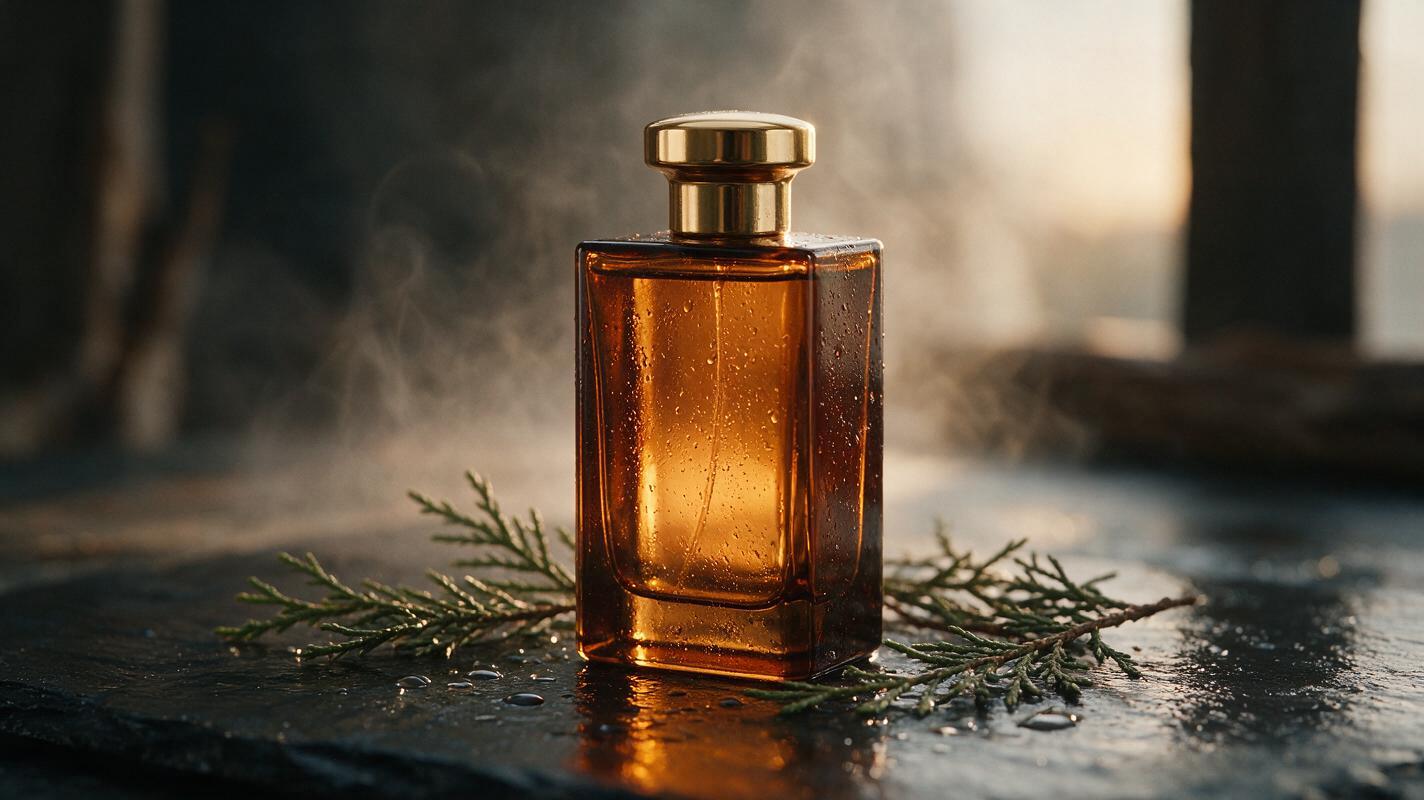
Table of contents
TL;DR: Start with the finished ad frame, not a long text prompt
The fastest way to make a cinematic product commercial is to create one accurate hero image, then use image to video to add a restrained camera move and small environmental motion. Keep the product rigid, animate the scene around it, and generate several short versions before attempting a longer sequence.
This tutorial builds a fictional fragrance shot, but the same method works for watches, headphones, drinks, shoes, skincare packaging, and small appliances.
Cover visual prompt: Photorealistic editorial advertising photograph of a rectangular amber-glass fragrance bottle standing on wet dark slate in a believable studio set, warm sunrise light passing through the liquid, fine condensation on the glass, a few natural cedar branches and scattered droplets around the base, subtle haze behind the bottle, premium but restrained styling, no visible brand name, no people, landscape 16:9; MANDATORY CAMERA: low eye-level true three-quarter product view from the front-right, 85mm lens appearance, bottle geometry straight and symmetrical, cap fully visible, realistic reflections, shallow depth of field with the entire bottle readable.
Why AI product videos often deform the object
Product advertising is less forgiving than a landscape or mood shot. A viewer may overlook a drifting cloud, but will immediately notice a bottle changing width, a shoe gaining an extra lace, or a watch crown moving to the wrong side.
The most common failure is asking the model to invent the product and animate it simultaneously. That creates several visible symptoms:
- Geometry drift: straight edges bend as the virtual camera moves.
- Label mutation: letters, symbols, and decorative marks change between frames.
- Material switching: glass becomes plastic, brushed metal turns glossy, or liquid loses its transparency.
- False rotation: the background suggests a camera orbit while the object appears to twist independently.
- Object duplication: caps, buttons, straps, or highlights are interpreted as separate moving parts.
The solution is not a longer cinematic prompt. It is a controlled workflow that separates product design, scene design, and motion.
Three ways to create an AI product ad
- Reference-first animation: create a finished advertising still and animate it. This is the most reliable approach and the focus of this guide.
- Text-first concept testing: generate rough moving ideas from text, then rebuild the strongest composition as a controlled keyframe.
- Motion-reference adaptation: transfer the pacing or action of a suitable source clip when the product needs a more specific reveal.
Use the first method when product accuracy matters. The other two are useful for exploration, but they usually require more cleanup.
How MagicBoat handles the multi-model product workflow
MagicBoat brings image and video generation models into one account, so the still-image and animation stages do not have to be treated as separate creative projects. Seedream, Flux, or GPT Image can be used to explore product keyframes, while Seedance, Kling, or Veo can be tested for the moving shot through an ai video workflow.
The practical advantage is comparison. One model may preserve glass edges well, while another may produce a better dolly movement or more natural water droplets. Instead of assuming one model is best for every object, keep the same source image and motion brief while testing outputs.
| Stage | Main goal | Useful model family |
|---|---|---|
| Reference preparation | Readable shape, materials, and proportions | Seedream, Flux, or GPT Image |
| Hero keyframe | Finished lighting and composition | Seedream, Flux, or GPT Image |
| Motion test | Stable product with controlled camera movement | Seedance, Kling, or Veo |
| Alternative movement | Adapt pacing from a source performance or clip | Motion transfer when appropriate |
Step 1 — Build a clean product reference pack
Start with a real product photograph whenever possible. Use even light, a plain background, and enough resolution to inspect the silhouette. Include front, side, and rear views if those angles may appear in the commercial.
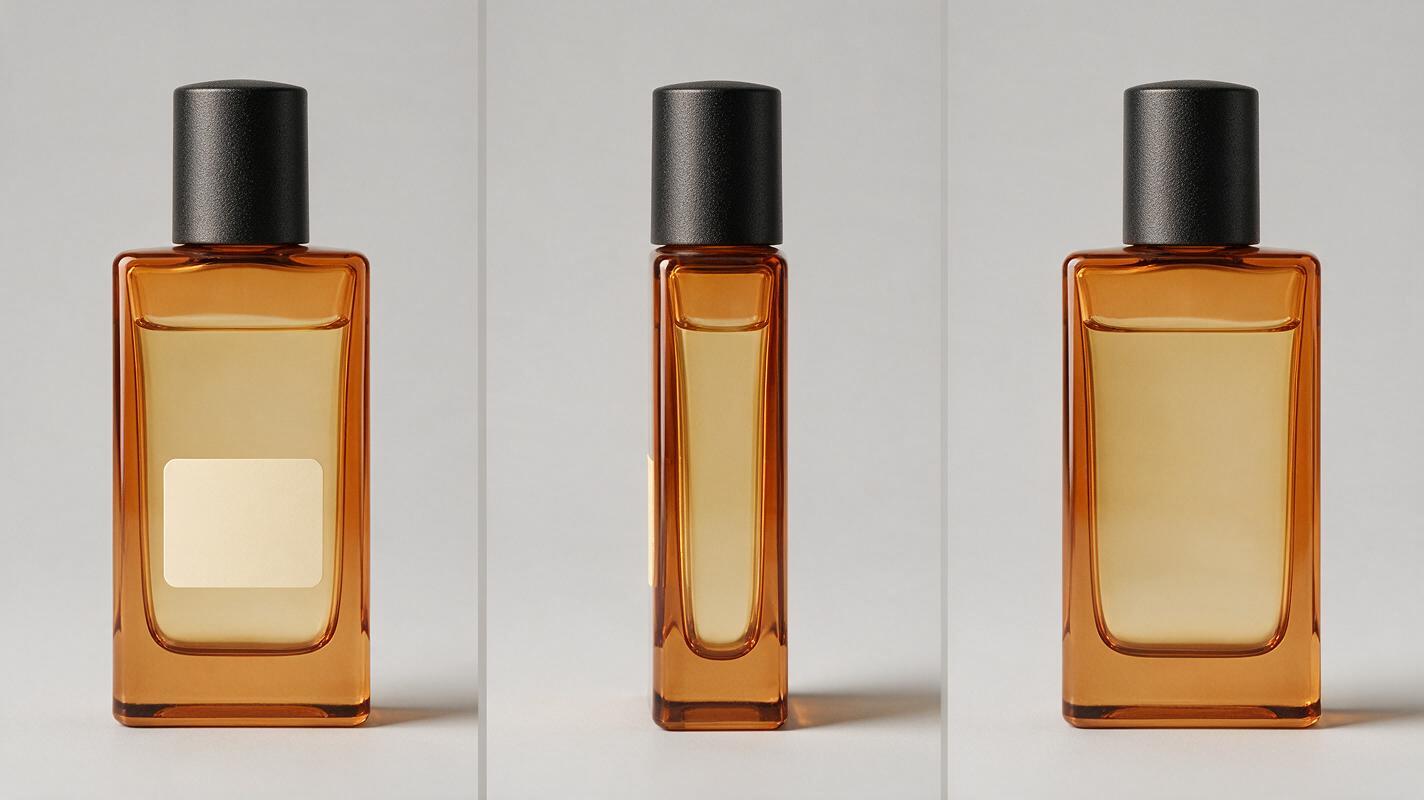
If the object is fictional, generate a three-view reference sheet before creating the advertising scene. The views should show the same dimensions, cap, materials, and color. Do not add dramatic fog, splashes, hands, props, or extreme reflections yet.
Photorealistic three-panel product reference sheet showing the exact same fictional rectangular fragrance bottle in front view, right-side view, and back view; amber transparent glass, thick square glass base, matte black cylindrical cap, pale gold liquid, minimal blank cream label area with no letters or logo, identical proportions and materials in every panel, neutral light-gray seamless studio background, soft even catalog lighting, landscape 16:9. MANDATORY CAMERA AND LAYOUT: three evenly spaced full-object panels at the same scale, orthographic-looking eye-level views, no perspective exaggeration, bottle centered vertically, complete silhouette visible, no props, no hands, no decorative typography.Expected result: a neutral identity document for the product. If the side view becomes rounder, the cap changes height, or the liquid level moves, regenerate the sheet before continuing.
Reusable visual prompt: Photorealistic three-panel product reference sheet showing the exact same fictional rectangular fragrance bottle in front view, right-side view, and back view; amber transparent glass, thick square glass base, matte black cylindrical cap, pale gold liquid, minimal blank cream label area with no letters or logo, identical proportions and materials in every panel, neutral light-gray seamless studio background, soft even catalog lighting, landscape 16:9; MANDATORY CAMERA AND LAYOUT: three evenly spaced full-object panels at the same scale, orthographic-looking eye-level views, complete silhouettes visible, no props, no hands, no decorative typography.
Step 2 — Create the finished advertising keyframe
Design the frame as if it were already the final shot of the commercial. This is where you decide the location, lens feel, lighting direction, surface texture, and empty space for future copy. A strong input frame leaves the video model fewer decisions to improvise.
Keep the product large enough to inspect but not so close that the frame cuts through its silhouette. Place atmospheric elements behind or beside it rather than over the label area.
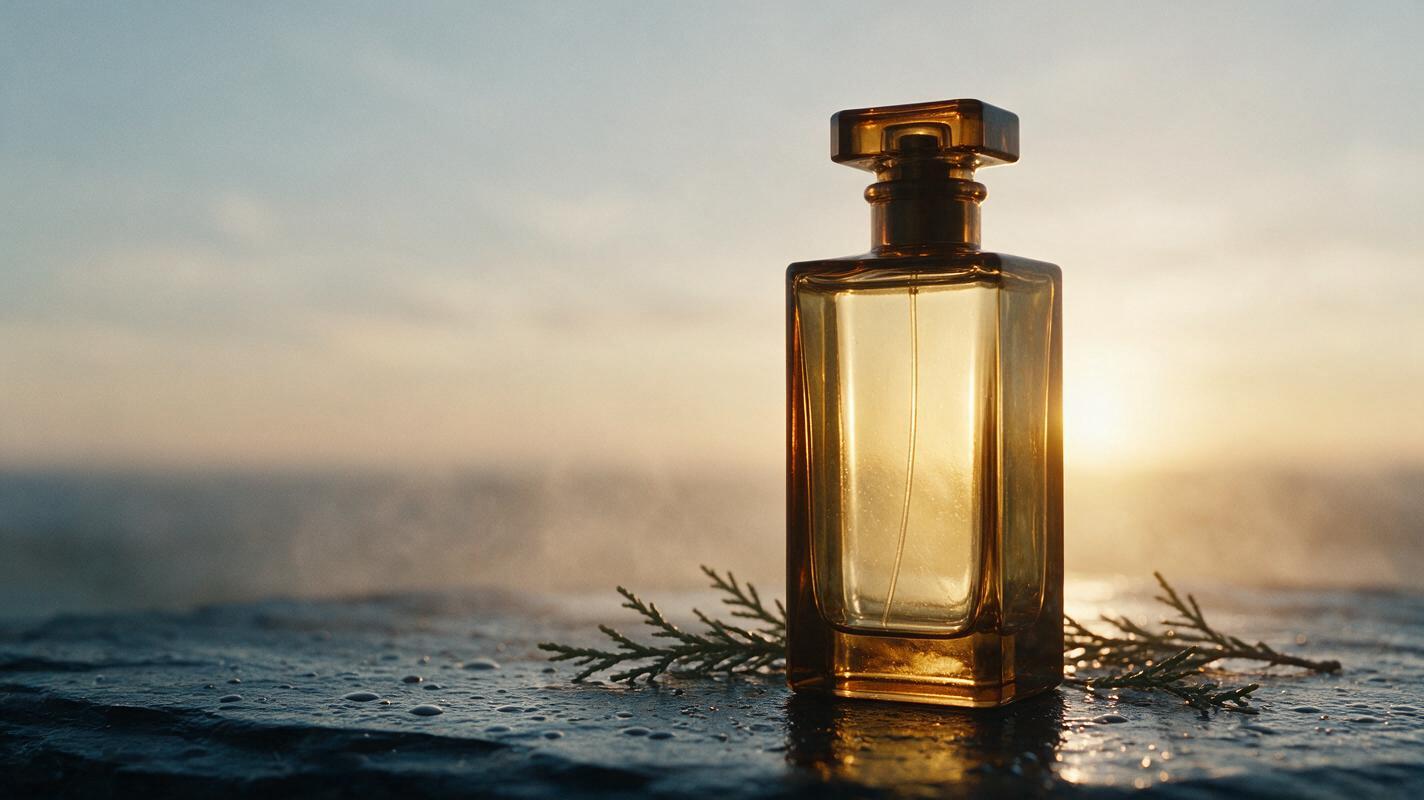
Use the reference bottle without changing its rectangular silhouette, cap, glass thickness, liquid color, or proportions. Place it upright on wet dark slate in a believable premium fragrance set at sunrise, with sparse cedar branches near the base, small water droplets on the stone, warm backlight passing through the amber liquid, restrained cool fill light from camera-left, subtle background haze, realistic glass refraction and contact shadow, cinematic editorial realism, landscape 16:9. MANDATORY CAMERA: low eye-level true three-quarter view from the front-right, 85mm lens appearance, vertical edges straight, complete cap and base visible, product centered slightly right with clean negative space on the left. No visible brand text, no duplicate bottle, no floating cap, no warped label, no splash covering the product.Expected result: a frame that could work as a print advertisement without animation. Inspect the cap connection, vertical edges, liquid line, base thickness, and contact shadow at full size.
Reusable visual prompt: Photorealistic cinematic editorial advertisement of the same rectangular amber-glass fragrance bottle standing upright on wet dark slate at sunrise, sparse cedar branches near the base, tiny water droplets, warm backlight passing through pale gold liquid, restrained cool fill from camera-left, subtle natural haze and realistic contact shadow, landscape 16:9; MANDATORY CAMERA: low eye-level true three-quarter view from the front-right with an 85mm lens appearance, straight bottle edges, full cap and base visible, product slightly right of center, clean negative space on the left, no text, no duplicate bottle, no hands, no warped reflections.
Step 3 — Choose one camera move and one environmental action
Product shots fail when the prompt combines an orbit, crane move, zoom, rack focus, rotating object, exploding particles, and liquid splash. Start with one camera instruction and one secondary action.
| Desired mood | Camera move | Safe environmental action |
|---|---|---|
| Premium reveal | Very slow dolly-in | Haze drifts behind the product |
| Craft detail | Subtle lateral slide | Highlights travel gently across the surface |
| Fresh and energetic | Small push-in | A few droplets move in the background |
| Quiet luxury | Nearly locked camera | One branch moves slightly in a breeze |
For the fragrance scene, use a slow dolly-in with haze moving behind the bottle. Do not rotate the bottle. A stable object gives the model a fixed visual anchor.
Step 4 — Write a motion prompt that protects the product
The image already defines appearance, so the animation prompt should describe change over time rather than repeat every visual adjective. Put the camera movement first, then state what may move and what must remain fixed.
Very slow cinematic dolly-in toward the bottle. The bottle remains completely stationary, rigid, and unchanged in shape, proportions, cap position, glass thickness, liquid level, and label area. Thin background haze drifts gently from right to left. Tiny highlights move naturally across the wet slate as the camera advances. Cedar branches remain almost still. Preserve straight vertical edges and realistic glass reflections. No bottle rotation, no label animation, no cap movement, no duplicate objects, no large splash, no sudden focus pulse, no camera shake.Use a short initial clip and moderate motion rather than asking for a dramatic transformation. If the selected model exposes motion controls, begin conservatively. Control names and available options can vary, so judge the rendered frames rather than relying on a universal numeric value.
Expected result: the background and perspective change subtly while the bottle still looks like the approved keyframe.
Step 5 — Generate variants and judge the object before the motion
Create several candidates from the same input and prompt. Do not change the wording between the first tests; otherwise, you will not know whether differences came from the model or the prompt.
Review each clip in this order:
- Pause on the first, middle, and final frames.
- Compare the product silhouette across those frames.
- Inspect small components such as caps, buttons, laces, ports, and clasps.
- Check whether reflections follow the camera movement naturally.
- Only then evaluate cinematic quality and motion smoothness.
A visually exciting clip with a deformed product is not a usable product ad. Select structural stability before dramatic atmosphere.
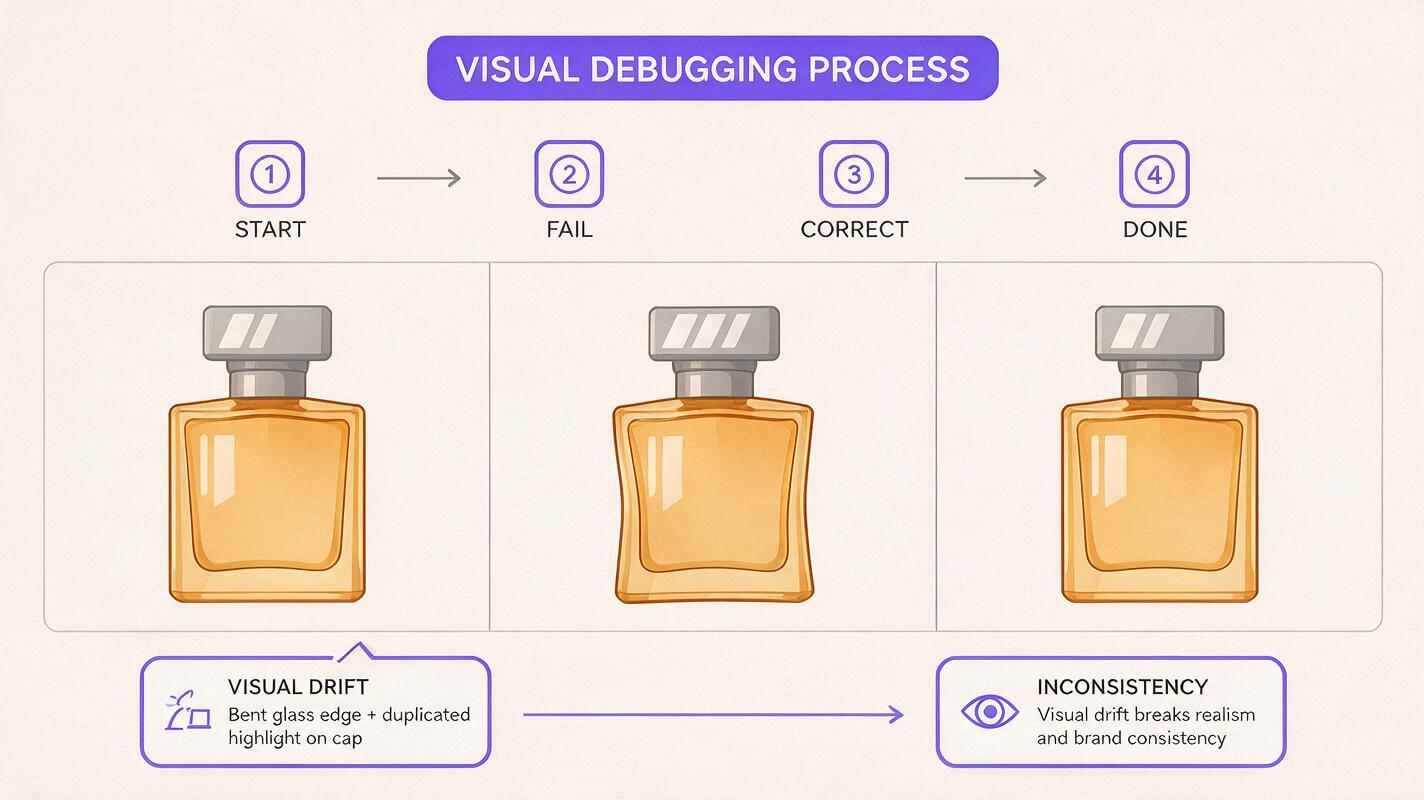
Reusable visual prompt: Clean landscape 16:9 editorial comparison board with three large photorealistic frames of the same amber fragrance commercial arranged from left to right: a correct starting bottle, a failed middle frame with subtly bent vertical glass edges and a duplicated cap highlight, and a corrected final frame with rigid geometry and consistent reflections; neutral off-white board, thin charcoal separators, no software interface, no logos, no decorative text; MANDATORY LAYOUT: equal-size frames aligned on one baseline with matching low front-right three-quarter camera angle so structural differences are immediately visible.
Step 6 — Repair weak moments and assemble a short sequence
If a clip is stable except for its final second, trim before the failure rather than trying to preserve every generated frame. For a longer advertisement, generate separate shots from separate approved keyframes:
- Shot A: wide environmental reveal.
- Shot B: medium hero shot with a slow dolly-in.
- Shot C: close detail of glass, fabric, metal, or packaging texture.
- Shot D: clean final product frame with space for separately added copy.
Do not ask one generation to perform all four shots. Independent clips are easier to reject, reorder, trim, and replace. Add exact brand text, legal copy, prices, and calls to action during editing rather than relying on moving generative text.
Expected result: a modular product sequence in which every shot can be approved for object accuracy on its own.
Keep the same product across future campaigns
Save the neutral reference sheet, the approved hero frame, and the exact product-description block. Reuse the identity description without rewriting basic attributes such as dimensions, material, cap shape, and color.
Change only the campaign layer: location, props, lighting, season, and camera plan. This separates permanent product identity from temporary art direction.
Alternative: use motion transfer for a precise reveal
If you have a source clip with the exact pacing you need, motion transfer can be an alternative to describing complex movement in words. Choose a source with a clear subject, stable framing, and motion that makes physical sense for the product scene.
Motion transfer is less suitable when the source depends on flexible human anatomy or rapid turns that would force a rigid object to deform. A restrained pedestal turn, camera push, or simple reveal is safer than a highly articulated performance.
Alternative: use face swap only for presenter shots
A face replacement workflow can help when the advertisement includes a presenter, but it does not repair a malformed package or drifting logo. Keep presenter footage and product beauty shots separate whenever possible. This prevents face processing from altering the product region and makes consent, review, and replacement easier to manage.
Where this workflow falls short
- Exact typography remains fragile: preserve critical labels from source photography or add approved text in post-production.
- Transparent and reflective products are difficult: glass, chrome, and mirrors can produce inconsistent highlights during camera movement.
- Large rotations reveal unseen surfaces: an input image cannot fully define the rear of an object. Use additional references or reduce the orbit.
- Mechanical actions need tighter control: opening a lid, pressing a button, or pouring liquid introduces contact and continuity problems.
- Model behavior varies: the same prompt can produce different levels of stability across products and generations, so comparison remains necessary.
FAQ
Should I use a real product photo or an AI-generated product?
Use a real photograph when exact commercial identity matters. An AI-generated reference is useful for fictional products, pitches, and previsualization, but every view should be checked for consistency before animation.
How long should the first product clip be?
Keep the first test short enough to inspect easily. A concise hero shot is usually more controllable than a long prompt containing several camera moves and events.
Can I make the bottle or package rotate?
Yes, but rotation exposes surfaces not visible in the source frame and increases deformation risk. Use a multi-angle reference, request a small turn, and verify the silhouette frame by frame.
Which model should I choose?
Test the same approved keyframe and motion brief across the available models. Choose according to product preservation first, then camera quality and atmosphere; no single model is automatically best for every material.
How do I keep a logo readable?
Minimize motion over the label area and avoid aggressive rotations. For exact brand typography, composite the approved label or final copy during editing rather than asking the video model to redraw it in every frame.
Can this workflow create a complete commercial?
It can create the visual shots. Editing, sound design, approved copy, product claims, accessibility requirements, and legal review remain separate production tasks.
Final checklist
- Create or photograph a clean multi-angle product reference.
- Approve one finished 16:9 hero frame before adding motion.
- Use one camera move and one environmental action per shot.
- Explicitly state that the product remains rigid and unchanged.
- Compare the first, middle, and final frames for geometry drift.
- Trim unstable endings and build longer ads from separate clips.
- Add exact logos and marketing copy during editing.
Create your first product image to video shot free and test this prompt now.
Keywords
image to video, AI product video, cinematic product ad, AI video workflow, prompt engineering, Seedance prompts, Kling prompts