Beyond Runway: 5 AI Video Alternatives for Different Workflows
Runway combines video generation and editing in one mature creative platform, but its credit system and workflow will not suit every project. This guide compares five Runway alternatives across generation methods, pricing models, creative controls, and ideal use cases.

Table of contents
Runway is powerful—but it is not the only practical choice
Runway is a mature AI video platform with generation, transformation, and editing tools, but credit-based usage and a broad production workspace can be more than some creators need. This shortlist compares five real Runway alternatives—Kling AI, Luma Dream Machine, Pika, Adobe Firefly, and OpenAI Sora—so you can choose around your source material, workflow, and budget.
Pricing note: Pricing structures and access routes were checked on official product pages on October 13, 2026. Exact checkout totals are not reproduced because regional availability, taxes, billing periods, credit allowances, and promotional offers can change.
Why creators look beyond Runway
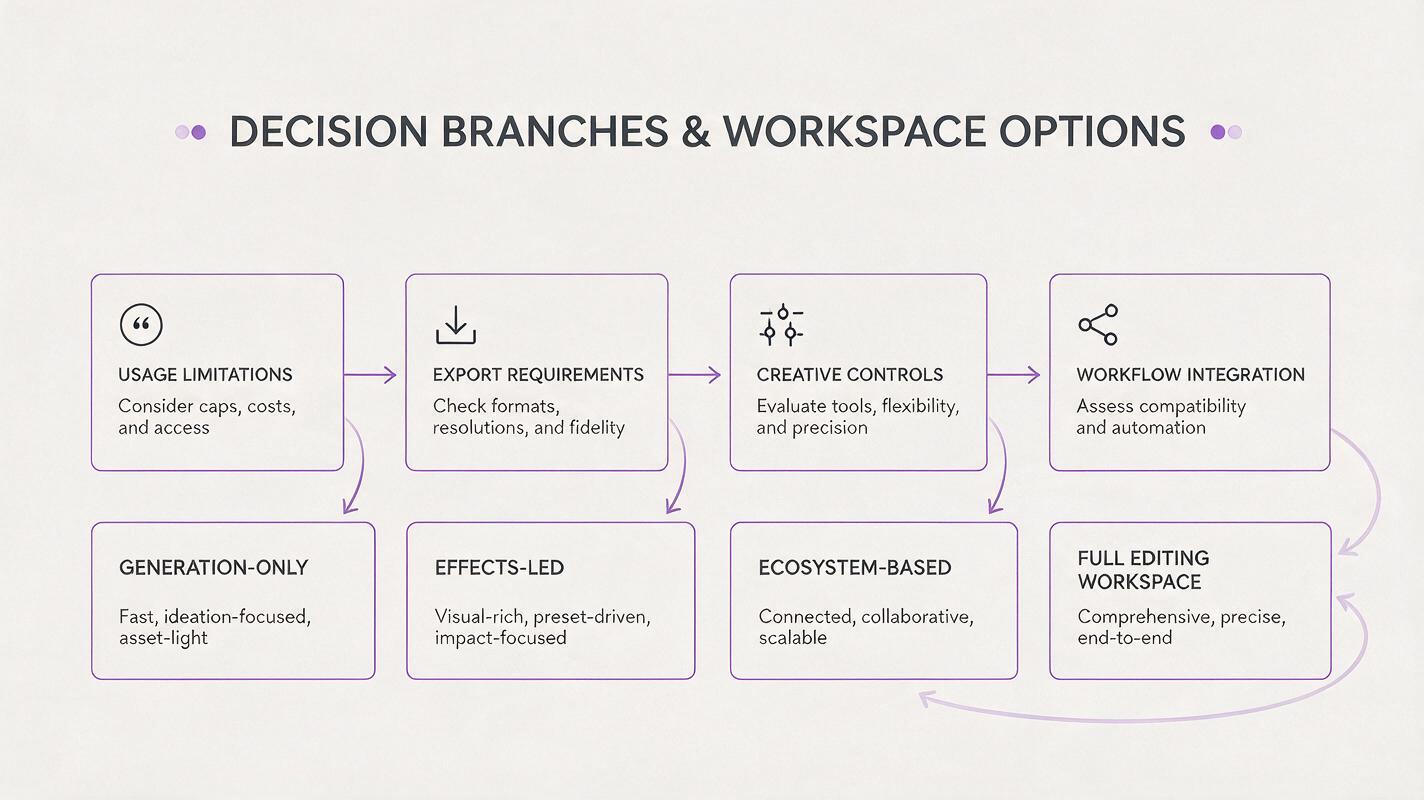
Runway is attractive when generation and post-production need to live in the same environment. Alternatives become useful when a project calls for a different balance of simplicity, motion control, ecosystem integration, or entry-level access.
- Credit consumption: Iterative video work can require several generations before the motion, framing, and continuity feel right.
- Free-plan restrictions: Entry tiers may limit generation volume, resolution, queue priority, downloads, or watermark-free exports.
- Workflow fit: A social clip, cinematic concept, presentation asset, and client campaign do not need the same interface.
- Feature specialization: Some platforms emphasize reference-image motion, playful effects, commercial integration, or conversational prompting.
- Availability: Models and features can differ by country, account type, subscription, and rollout stage.
The best Runway alternative is not necessarily the platform with the longest feature list. It is the one that gives you usable shots with the least unnecessary regeneration and assembly work.
The five alternatives at a glance
| Tool | Core workflow | Pricing structure | Best fit |
|---|---|---|---|
| MagicBoat (Recommended) | One-stop multi-model workflow: compare Kling, Luma, Pika, Firefly and Sora-style tools under one free account | Free trial credits, no credit card; pay per use | Testing alternatives to Runway with the same prompt before committing |
| Kling AI | Text-to-video and image-to-video | Free entry access plus paid plans | Reference-led motion and cinematic experiments |
| Luma Dream Machine | Prompt and image-based video generation | Limited free access plus subscriptions | Fast visual ideation and shot exploration |
| Pika | Short-form generation and creative effects | Free tier plus paid credit plans | Social content and effect-driven clips |
| Adobe Firefly | Generative video within Adobe workflows | Free allocation and paid credit-based plans | Adobe users and commercial production pipelines |
| OpenAI Sora | Prompt-led video creation and remixing | Account- and plan-dependent access | Storyboard-style exploration and prompt iteration |
Kling AI: strong motion from text or a reference image
Kling AI supports both text-to-video and image-to-video creation. Its reference-image workflow is particularly relevant when you already have a character frame, product composition, or environment and want to explore how that still image could move.
- Core capability: Generating video from prompts or supplied images, with controls and availability depending on the active model and account.
- Pricing: Kling offers an entry route with limited usage and paid subscriptions for additional generation capacity and account benefits. Check the official Kling AI site for current regional terms.
- Best for: Creators who begin with keyframes, concept art, product images, or carefully composed reference shots.
- Compared with Runway: Kling is a compelling generation-first option, while Runway offers a broader integrated editing and transformation environment.

Luma Dream Machine: rapid visual exploration
Luma Dream Machine is designed for generating video from written prompts and source images. It works well as an ideation tool when the goal is to test camera direction, atmosphere, subject movement, or several interpretations of one scene.
- Core capability: Text- and image-driven video generation through a streamlined browser workflow.
- Pricing: Luma provides limited entry access and paid subscription options with different usage and priority conditions. Current details appear on the Dream Machine product page.
- Best for: Mood films, pitch visuals, story concepts, and quickly comparing alternate shots.
- Compared with Runway: Dream Machine is more focused on generation and exploration; Runway is better suited to creators who want generation beside a larger collection of editing tools.
Pika: an accessible choice for short, effect-led clips
Pika combines prompt-based generation with tools built around concise, visually distinctive clips. Its playful transformation features make it relevant to social posts, promotional hooks, memes, and transitions where a striking moment matters more than a long production timeline.
- Core capability: Text-to-video, image animation, and platform-specific creative effects.
- Pricing: Pika maintains free access with restrictions and sells paid plans based on credits and account benefits. See the official Pika pricing page before selecting a tier.
- Best for: Social creators, rapid experiments, stylized transformations, and short attention-grabbing assets.
- Compared with Runway: Pika generally feels more effect-oriented and approachable, whereas Runway gives experienced users a wider production toolkit.
Adobe Firefly: the alternative for Adobe-centered production
Adobe Firefly includes generative video capabilities and connects naturally with Adobe's wider creative ecosystem. That connection can matter more than model novelty when footage must move into established design, review, editing, and delivery processes.
- Core capability: Generating video from text or images, with outputs designed to complement Adobe creative applications and workflows.
- Pricing: Adobe uses monthly generative-credit allocations across free and paid Firefly plans. Allowances and premium-feature consumption should be confirmed on the official Firefly plans page.
- Best for: Designers, agencies, editors, and teams already using Adobe software.
- Compared with Runway: Firefly's main advantage is ecosystem continuity; Runway remains attractive as a more self-contained AI-native video workspace.
OpenAI Sora: prompt-led ideation and remixing
Sora provides a prompt-oriented environment for creating and revising video ideas. Its appeal is strongest for users who prefer describing scenes conversationally, testing variations, and organizing a concept before committing to a conventional editing workflow.
- Core capability: Video creation from prompts, alongside available remixing and storyboard-oriented controls.
- Pricing: Access depends on supported accounts, plans, regions, and current OpenAI policies. Review the official Sora page rather than assuming that every ChatGPT account includes identical limits.
- Best for: Narrative concepts, prompt iteration, visual brainstorming, and creators already working in OpenAI's ecosystem.
- Compared with Runway: Sora centers the prompt-and-variation experience; Runway offers more of the surrounding production workspace in the same product.
Choose by workflow, not by hype
| If your priority is… | Start with… | Reason |
|---|---|---|
| Animating a prepared reference frame | Kling AI | Its image-led workflow is central to the experience. |
| Exploring many visual directions | Luma Dream Machine | The focused interface suits fast concept generation. |
| Making a short social hook | Pika | Effect-led tools support compact, stylized clips. |
| Staying inside an Adobe pipeline | Adobe Firefly | Creative Cloud integration reduces workflow switching. |
| Developing scenes through prompts | OpenAI Sora | Prompt iteration and remixing support early ideation. |
| Combining generation with broad editing tools | Runway | Its integrated workspace remains a core advantage. |
Before buying a yearly plan, run the same small test across two or three candidates. Use one source image, one aspect ratio, and one motion brief. Record how many attempts produce a usable result, whether the export meets your delivery requirements, and how much work remains afterward.
Subject: a ceramic coffee cup on a wooden café table
Action: steam curls upward while the camera slowly pushes in
Camera: stable eye-level shot, gentle forward movement
Lighting: soft morning window light
Constraints: preserve the cup shape, no added objects, no text
Format: short landscape product shot
This structured prompt separates subject, action, camera, light, and constraints. It will not force different models to behave identically, but it makes comparison more consistent than giving every platform a different brief.

Compare multiple creation routes in one place
MagicBoat offers a one-stop workflow for experimenting with integrated creative models. You can test an ai video concept, compare a text to video workflow, and decide which approach fits your source material before restructuring the whole project around one platform.
Compare the results yourself and evaluate motion quality, prompt adherence, visual consistency, and iteration speed with your own brief.
Final checklist
- Choose image-to-video when preserving an existing composition matters.
- Choose text-to-video when exploration matters more than exact visual continuity.
- Confirm regional access, credit rules, watermarks, and commercial terms on official pages.
- Test identical prompts and source assets before comparing output quality.
- Count failed generations as part of the real project cost.
- Check whether you need an integrated editor or only a generation tool.
- Avoid long subscriptions until one platform proves reliable for your recurring work.
Keywords
runway alternative, ai video generator alternatives, text to video, image to video, kling ai, luma dream machine, pika ai