SaaS Carousel Ad Prompts: Turn One Product Feature Into 5 Slides
Build coherent five-slide SaaS carousel ads without letting AI redesign the product interface or dilute the campaign message. This guide provides a slide-role framework, reusable Nano Banana Pro prompts, continuity controls, and a practical review scorecard for creative testing.

Table of contents
Build a carousel that sells one idea, not five disconnected slides
A SaaS carousel ad can explain a product feature more clearly than a single static image, but AI-generated slides often drift in layout, interface design, colors, and message. The result looks like five unrelated ads rather than one persuasive sequence.
The solution is to assign every slide a specific conversion role while locking the product interface and visual system across the set. This framework uses nano banana pro for reference-led image creation, but the underlying method works with any model that accepts visual references and precise editing instructions.
The governing rule: generate a sequence around one feature, one audience problem, and one desired action. Do not ask AI to invent a new campaign concept on every slide.

Define one conversion job for the whole carousel
Start with the business decision the carousel should influence. A feature tour, objection-handling sequence, product comparison, and customer story require different narrative structures. Combining them usually produces crowded slides and weak calls to action.
Write a one-sentence campaign brief before generating anything:
Convince [specific audience] that [feature] helps them achieve [result]
without [primary pain or objection], then invite them to [single action].
For example:
Convince lifecycle marketers that automated audience segmentation helps them
launch relevant campaigns faster without manually maintaining dozens of lists,
then invite them to start a product trial.
This sentence becomes the filter for every creative decision. If a slide does not strengthen the problem, mechanism, proof, or action, remove it.
Give every slide a distinct persuasion role
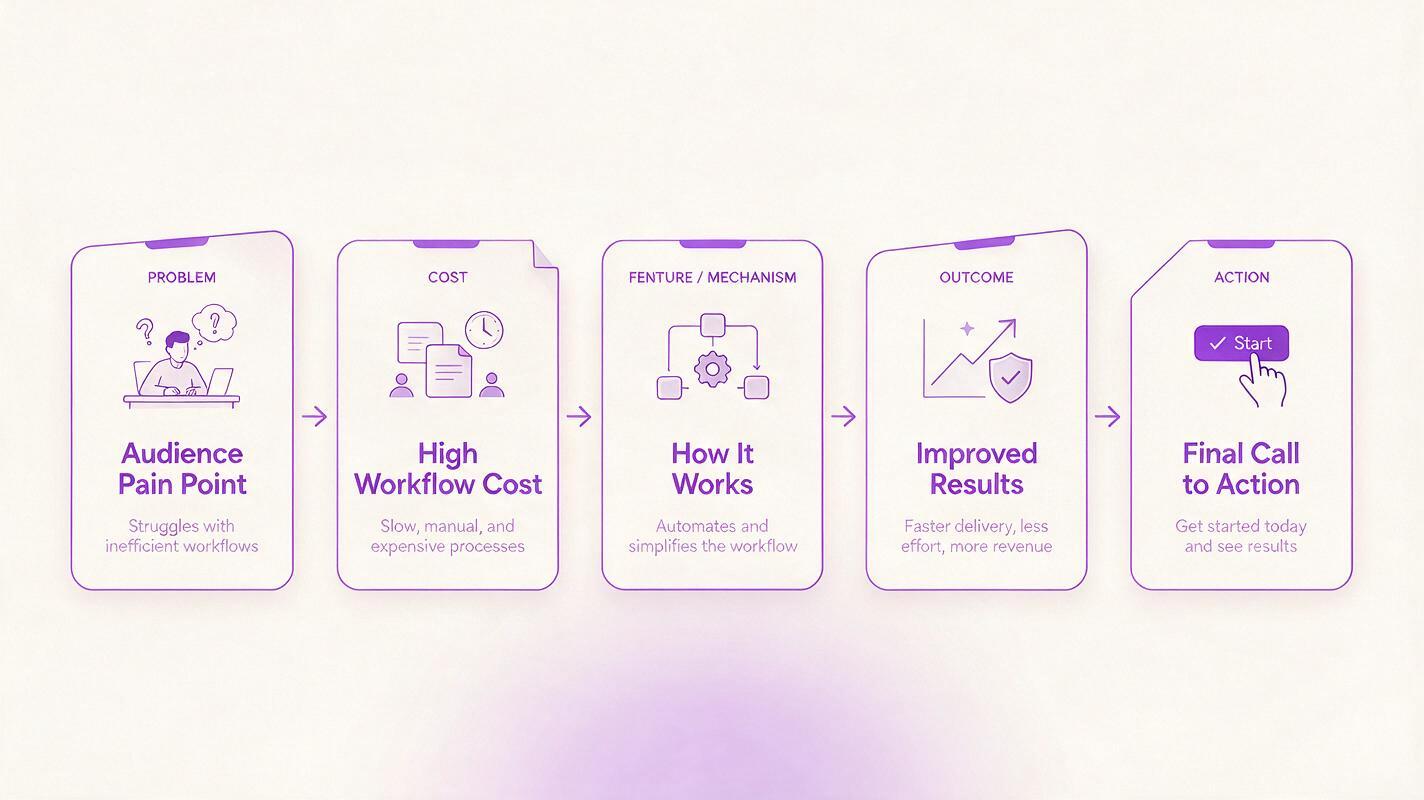
A five-slide carousel needs progression, not five versions of the same headline. Use the sequence below as a starting structure:
| Slide | Persuasion role | What the viewer should understand | Primary visual |
|---|---|---|---|
| Opening | Problem hook | This is relevant to my current frustration. | Painful workflow or outcome contrast |
| Context | Cost of the problem | The existing process wastes time or limits results. | Messy process, repeated task, or bottleneck |
| Mechanism | Feature reveal | This specific capability changes the workflow. | Accurate product interface |
| Outcome | Benefit demonstration | I can picture the improved state. | Clean result, completed task, or simplified flow |
| Close | Action | I know what to do next and why. | Product, concise benefit, and CTA area |
The sequence can change when the campaign has strong proof. For example, a recognizable performance result may lead the opening slide. What matters is that adjacent slides perform different jobs while supporting the same promise.
Lock the visual system before generating slides
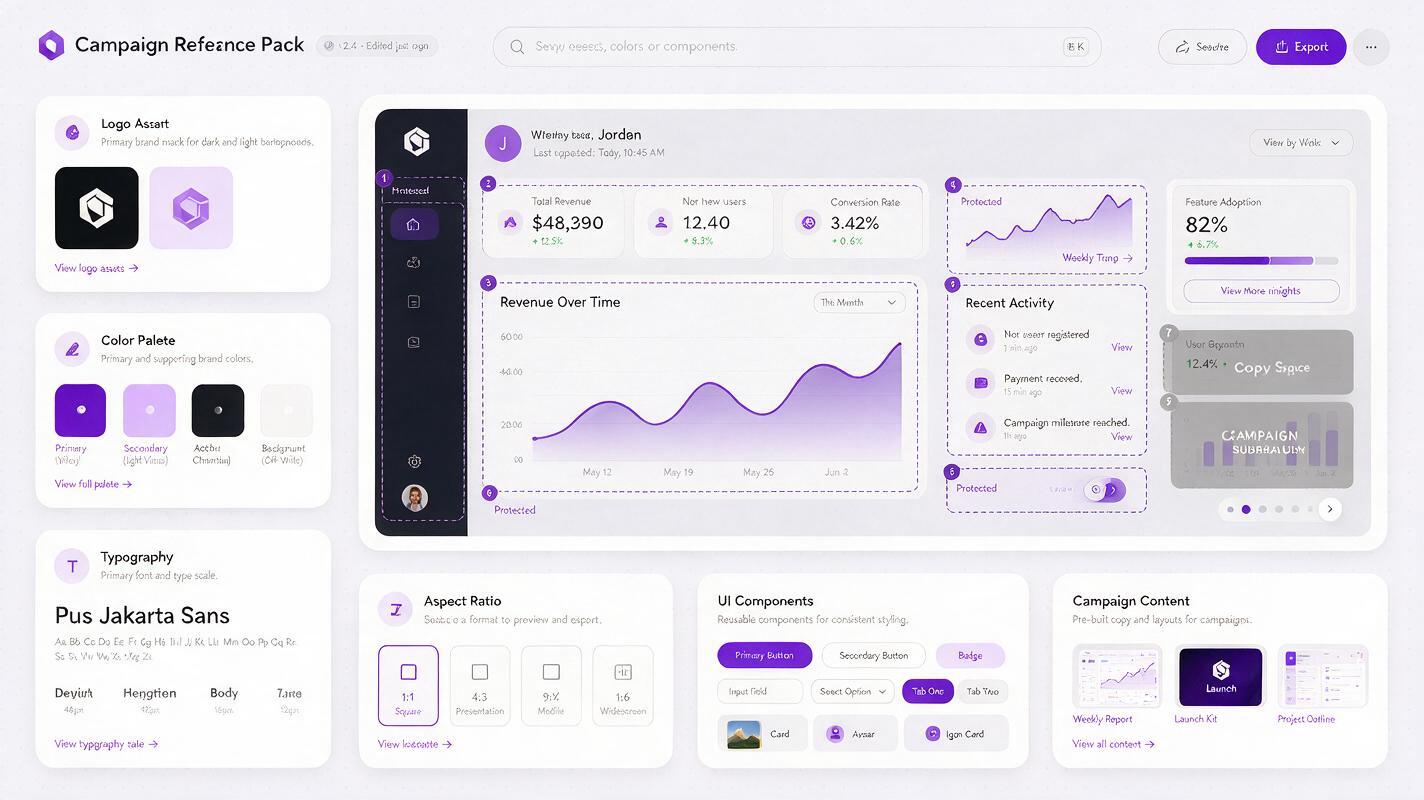
Prepare a compact reference pack rather than relying on a long brand description. Include the real product screenshot, logo file, approved colors, type direction, and one existing campaign asset that represents the desired visual tone.
- Product reference: Use a clean, high-resolution screenshot with irrelevant account data removed.
- Interface boundary: State which areas must remain unchanged and which may be cropped.
- Campaign constants: Fix the background family, lighting style, device treatment, and illustration approach.
- Text boundary: Reserve headline and CTA zones instead of asking the model to produce final ad copy inside the image.
- Format: Choose the required aspect ratio before generating the first slide.
An ai image generator should create the supporting scene and composition, not reinterpret the product. Add final copy in your design tool when exact wording, typography, pricing, or legal language matters.
Use a continuity prompt across the complete set
Create one shared prompt block and reuse it without modification. This block acts as the visual contract for the carousel:
VISUAL SYSTEM
Create a cohesive SaaS social carousel using the supplied brand and product references.
Keep the same deep violet, warm white, and charcoal color palette across all slides.
Use clean editorial product photography, soft directional studio light, subtle shadows,
and generous negative space for final copy.

PRODUCT PRESERVATION
Preserve the supplied interface structure, navigation, icons, chart shapes, and component
positions. Do not invent buttons, metrics, notifications, logos, or interface text.
Place the interface inside the same three-quarter-view laptop frame on every relevant slide.

CONTINUITY
Maintain identical device materials, corner radius, lighting direction, camera height,
background texture, and graphic accent style across the set.
Do not render final headline or CTA text.
Append a slide-specific instruction after this block. Keep the shared language stable; changing adjectives between generations can cause avoidable style drift.
Prompt templates for five slide roles
Problem hook
SLIDE ROLE: Problem hook
Show a lifecycle marketer facing an overcrowded campaign planning board with many manually
maintained audience segments. Emphasize duplicated effort through repeated cards and tangled
connections, but keep the scene credible and organized enough for a professional SaaS ad.
Leave the upper-left third uncluttered for a short headline. Do not show the product yet.
Cost of the old workflow
SLIDE ROLE: Cost of the problem
Create a close editorial composition of repeated audience-list cards being copied between
campaign columns. Use subtle repetition to communicate maintenance overhead without clocks,
warning symbols, or exaggerated frustration. Reserve the right side for one supporting line.
Feature reveal
SLIDE ROLE: Feature reveal
Place the supplied product screenshot inside the established laptop frame. Make the audience
segmentation panel the visual focus using composition and lighting only. Preserve the actual
interface exactly; do not rewrite labels or invent data. Add a restrained violet graphic path
that visually connects audience conditions to campaign groups.
Improved outcome
SLIDE ROLE: Improved outcome
Show a simplified campaign workspace with three clearly organized audience groups flowing into
relevant campaign cards. Continue the same materials, perspective, palette, and lighting.
Communicate clarity and control rather than futuristic automation. Leave lower-left negative
space for benefit copy.
Closing action
SLIDE ROLE: Closing action
Create a confident final product composition using the same laptop, background, lighting, and
violet accents. Show the supplied interface without alteration. Keep the center-right area open
for a concise benefit statement and CTA button added later. The image should feel like the
natural conclusion of the previous four slides, not a separate hero banner.
Generate anchors before filling the sequence
Do not generate all five slides blindly. First create the opening, feature reveal, and closing slide. These are the visual anchors of the campaign: the opening determines stopping power, the feature slide establishes product credibility, and the close defines the final design state.
Compare the three anchors side by side. Check whether the same campaign could plausibly contain all of them. Once they agree, use the strongest outputs as additional references for the context and outcome slides.
This approach reduces expensive rework. If the anchor slides already disagree on perspective, color temperature, or device treatment, generating more assets will only multiply the inconsistency.
Protect product truth during creative generation
AI may produce an attractive interface that does not exist. That is a serious problem for acquisition creative because viewers can interpret invented screens, metrics, and controls as product claims.
- Never use fabricated analytics as evidence of performance.
- Do not add integrations, controls, or automation states the product does not support.
- Keep pricing, trial terms, and offer language outside the generated image.
- Replace distorted interface regions with the source screenshot before launch.
- Ask the product owner to verify feature representation, not merely visual quality.
A polished carousel is not ready when it looks consistent. It is ready when the visual story is consistent and every product implication is accurate.
Score the carousel as a sequence and as individual ads
Review the slides in their intended order, then inspect each one independently. A user may encounter any slide first when a platform displays or shares carousel content differently.
| Review criterion | Question | Reject when |
|---|---|---|
| Sequence clarity | Does each slide advance the argument? | Two adjacent slides communicate the same point. |
| Standalone meaning | Can a slide be understood without the others? | The visual depends on missing context. |
| Product accuracy | Does the interface match the real product? | Controls, data, or capabilities were invented. |
| Visual continuity | Do palette, lighting, framing, and materials match? | The set looks assembled from separate campaigns. |
| Copy space | Can final text be added without covering the subject? | Important visual information occupies every open area. |
| Testability | Is the campaign hypothesis identifiable? | Too many messages or creative variables changed together. |
Turn one approved sequence into a controlled creative test
After approving the base carousel, vary one strategic element at a time. Test an outcome-led opening against a pain-led opening while preserving the remaining four slides. Alternatively, keep the narrative fixed and compare a product-dominant visual treatment with a workflow-dominant treatment.
Avoid simultaneously changing the hook, audience, offer, visual style, and CTA. That may create variety, but it will not reveal why one carousel performs differently.
When you have the product screenshot and campaign brief ready, try these models for free and produce the three anchor slides before committing resources to the full set.
Final checklist
- The carousel promotes one feature to one defined audience.
- Every slide has a different persuasion role.
- The visual system remains constant across the complete sequence.
- Real product screenshots are preserved rather than reimagined.
- Final headlines, offers, and CTA text are added outside the generated image.
- The opening, feature, and closing anchors are approved before intermediate slides.
- Every product implication has been checked for accuracy.
- Creative test variants change one meaningful variable at a time.
Keywords
saas carousel ad prompts, AI marketing creative, social media ad generator, Nano Banana Pro, campaign creative, creative testing, product marketing content