How to Turn a Script Into an AI Short Drama Without Losing the Story
A screenplay cannot go directly into video generation without losing actions, reactions, and continuity. This tutorial shows how to convert a short script into visible dramatic beats, locked reference assets, generation-ready shot packets, and an edit that preserves cause and effect.
Table of contents
Turn prose into visible cause and effect
The safest way to make a short drama from script is to translate every important story event into something the audience can see, hear, or infer from a reaction.
A screenplay may describe emotion, compress several actions into one paragraph, or rely on dialogue to explain what happened off screen. Video generation needs more explicit instructions: who is present, what changes, which object matters, where the camera is, and what must remain consistent.
The workflow below converts one script into a compact production packet before expensive video attempts begin. It is designed for an ai short drama, but the same method works for a vertical episode, serialized cliffhanger, or self-contained short film.
Step 1 — Mark the script’s visible evidence
Read the script once for story, then read it again only for evidence. Highlight each detail that proves a plot point to the viewer.
Consider this short scene:
Mara enters her apartment and realizes that someone has been there. She calls her brother, but stops when she notices his hospital wristband beside an open window.
The realization is internal and cannot be generated directly. Its visible evidence can be separated into production facts:
- The apartment door is already unlocked.
- A chair has been moved away from the table.
- The window is open although rain is entering.
- A hospital wristband bearing a recognizable color pattern lies on the sill.
- Mara raises her phone, sees the wristband, and lowers the phone without calling.
Write one evidence line for every essential revelation. If a plot point has no evidence line, it is likely to disappear during generation or become dependent on explanatory dialogue.
Step 2 — Split dialogue into playable dramatic beats
Do not treat a paragraph of dialogue as one shot. Divide it whenever the character’s objective, information, or physical behavior changes. Each beat should contain one dominant action and one emotional adjustment.
| Beat | Visible action | Story change | Useful coverage |
|---|---|---|---|
| Arrival | Mara tests the unlocked door | Normal routine becomes suspicious | Hand insert and medium reaction |
| Search | She scans the disturbed room | Suspicion becomes certainty | Point-of-view frame and close-up |
| Call | She raises her phone | She chooses to seek help | Profile medium shot |
| Discovery | She notices the wristband | The incident becomes personal | Object insert and silent reaction |
This decomposition creates edit points. It also prevents a model from attempting door interaction, room inspection, phone handling, object discovery, and a complex reaction inside one unstable clip.
Reusable visual prompt: silent beat strip
Create a four-frame cinematic contact strip showing one continuous suspense scene with the same woman in every frame: testing an unlocked apartment door, scanning a disturbed room, raising a phone, then noticing a hospital wristband on a rain-wet windowsill. MANDATORY LAYOUT: four equal left-to-right frames with no borders containing text and no labels. MANDATORY CAMERA: alternate medium three-quarter views with one close object insert; preserve screen direction from left to right. Editorial realism, believable lived-in apartment, cool rainy evening light, restrained performance, consistent navy rain shell, no logos, no interface elements, landscape 16:9.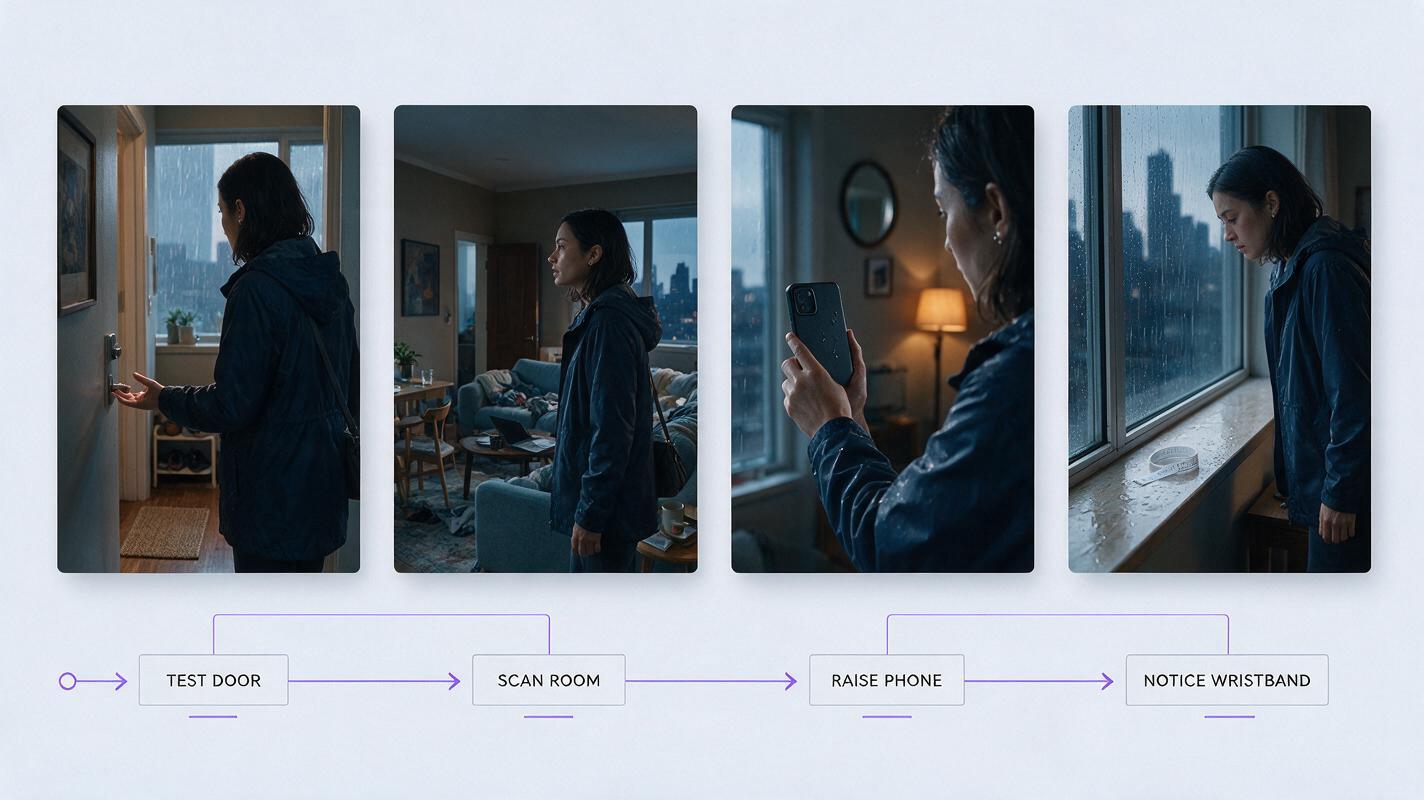
Step 3 — Lock the facts that must survive every shot
Create a small continuity packet before generating scene frames. Do not fill it with decorative biography. Record only facts that affect what appears on screen.
- Character: face shape, approximate age, hairstyle, clothing layers, footwear, and one identifying detail.
- Location: room layout, door and window positions, practical lights, weather, and recurring furniture.
- Props: size, material, color, condition, and ownership.
- Story states: door locked or unlocked, window closed or open, phone pocketed or raised, wristband hidden or discovered.
Assign a short state code to each shot, such as W0 for wristband unseen and W1 for wristband discovered. State codes make contradictions easier to catch than paragraphs of prose.
Reusable visual prompt: Mara reference sheet
Photorealistic three-panel character reference sheet of the same fictional woman, Mara Chen, age 31, oval face, dark brown eyes, straight black chin-length bob tucked behind the right ear, small silver stud earrings, navy rain shell over a charcoal crewneck shirt, black utility trousers, dark waterproof shoes. MANDATORY LAYOUT: exactly three full-body panels showing front view, true left side profile, and back view; equal scale and spacing. MANDATORY CAMERA: eye-level 70mm full-body reference photography with neutral posture and hands relaxed beside the body. Neutral light-gray seamless studio background, soft even illumination, accurate garment construction, no text, no logos, no props, landscape 16:9.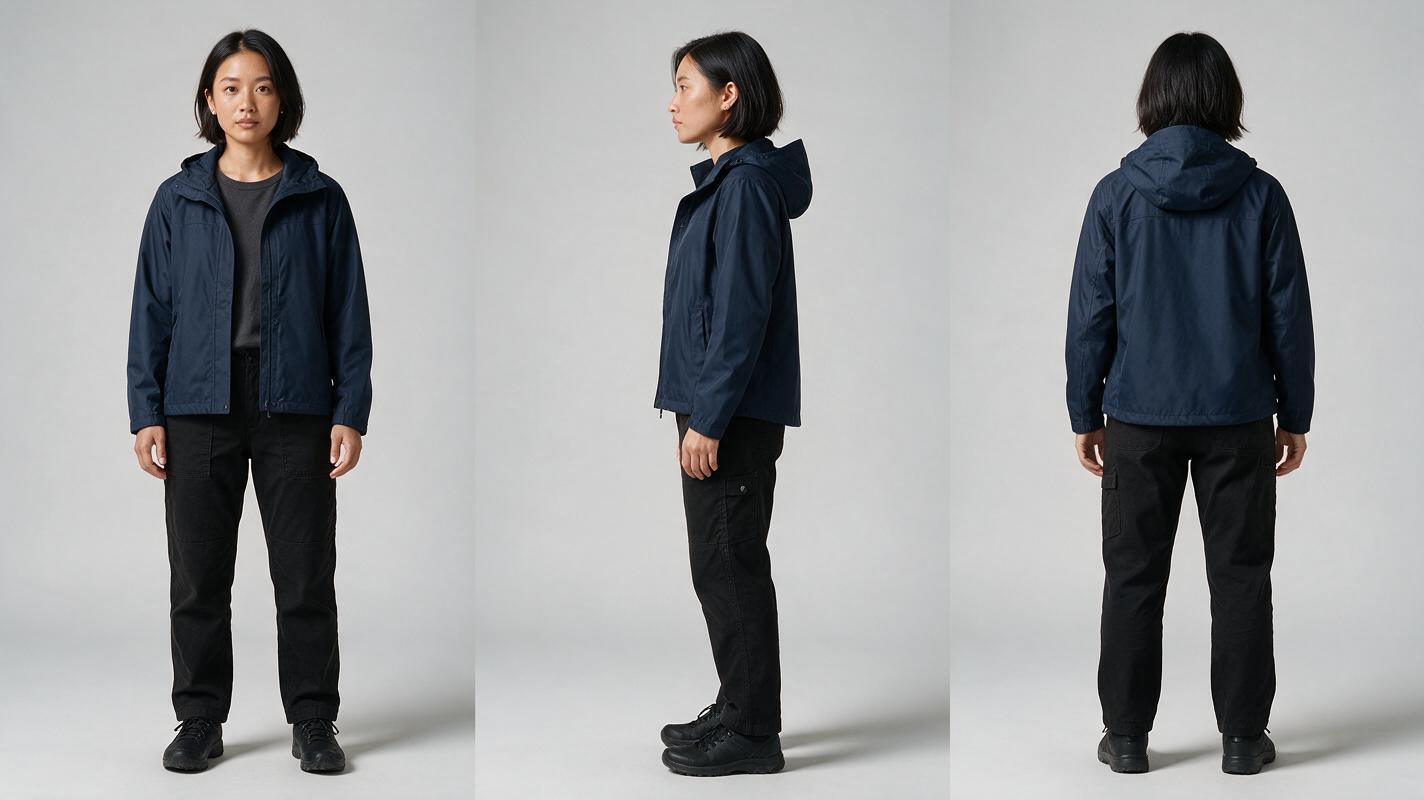
Step 4 — Write one shot packet for each beat
A generation-ready shot packet should state what the shot must communicate, not merely what it looks like. Use the same field order for every shot so omissions become obvious.
SHOT ID: S04
STORY PURPOSE: Connect the intruder to Mara's brother.
CHARACTER STATE: Mara at window, phone raised, tense but controlled.
PROP STATE: Wristband visible on wet sill, untouched.
FRAMING: Tight over-shoulder insert toward the wristband.
ACTION: Mara's phone hand enters frame and stops.
CAMERA: Static; no push-in or orbit.
LIGHT: Cool window light with warm lamp spill from frame right.
CONTINUITY: Navy shell wet at shoulders; window open inward.
END FRAME: Wristband clear, hand motionless, rain behind it.
AVOID: Extra hands, duplicate wristbands, readable invented text, moving furniture.
The story purpose is the most important field. If two planned shots communicate the same information, remove one or change its purpose. For a vertical drama video, also define whether the important face, hand, and prop can occupy the central story column without competing for width.
Once the packets are approved, a script to video workflow can organize the passage from written beats to frames and motion, but approval should still happen at the shot level.
Step 5 — Approve anchor frames before generating motion
Generate a still anchor for every new character angle, location direction, and prop state. Check identity and continuity while the frame is easy to replace. Motion should begin only after the anchor communicates the intended story beat without explanation.
For the wristband discovery, verify these points:
- The object is visible at normal viewing size.
- Mara’s gaze leads toward the correct position.
- The open window and rain support the intrusion without hiding the prop.
- The phone hand has enough space to enter without crossing the face.
- The composition can be reframed vertically if required.
Animate one bounded action from the approved frame: the hand enters and stops, Mara turns toward the sill, or rain moves behind the static object. Avoid requesting all three at once.
If you want to compare multiple generation models while keeping planning and video tests together, try for free after the anchor frames and shot packets are ready.
Reusable visual prompt: failed and corrected discovery frame
Create a photorealistic side-by-side film comparison of the same fictional suspense shot. LEFT: failed version with two hospital wristbands, an extra malformed hand near the phone, inconsistent hairstyle, and the important prop partly hidden by rain glare. RIGHT: corrected version with one wristband on the windowsill, one anatomically natural phone hand stopping before it, consistent chin-length black bob and navy rain shell, clear visual hierarchy. MANDATORY LAYOUT: two equal cinematic frames separated by a narrow neutral gutter, no text or labels. MANDATORY CAMERA: identical tight over-shoulder 50mm composition in both frames, static eye-level camera. Cool rainy window light, warm practical spill, editorial realism, no logos, no interface elements, landscape 16:9.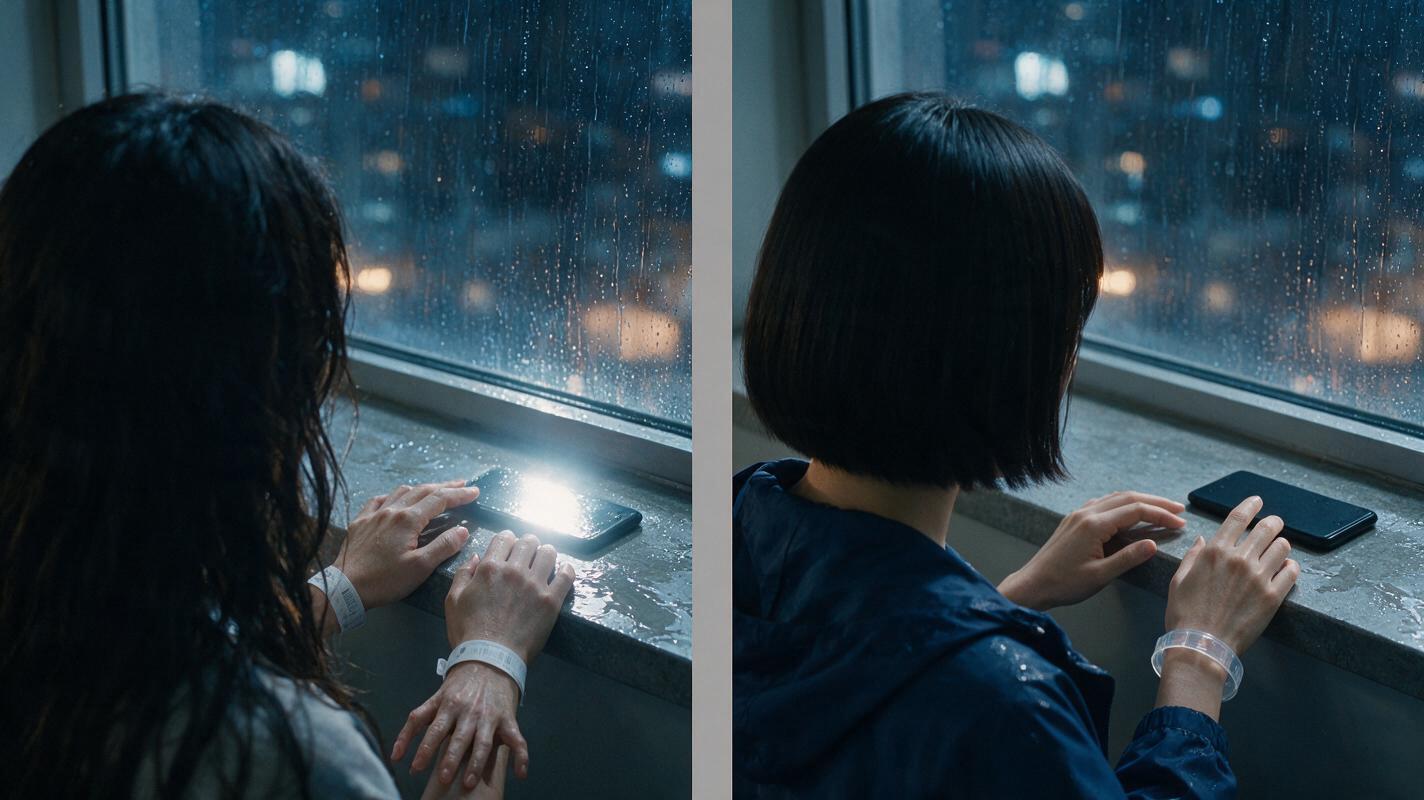
Step 6 — Edit by revelation, not by script order
A script is read linearly, but a short drama is understood through controlled information. Arrange the edit around what the audience knows at each cut.
- Show the abnormal condition: the unlocked door.
- Show Mara registering it before revealing more evidence.
- Escalate with the disturbed room and open window.
- Let her begin a reasonable response by raising the phone.
- Interrupt that response with the wristband insert.
- Hold the reaction long enough for the personal connection to register.
Use dialogue only when it adds information that cannot be communicated more efficiently through behavior, props, or sound. In this scene, an unfinished inhale and the sound of rain may carry more tension than a line explaining that the wristband belongs to her brother.
Editing test: mute the scene and watch it once. If the main revelation becomes incomprehensible, add or improve visible evidence before adding explanatory speech.
FAQ
Can I paste a complete screenplay into an AI short film generator?
You can use a complete screenplay as planning input, but final generation should be divided into beats and shot packets. Smaller units make character state, prop continuity, framing, and repairs easier to control.
How many shots should one dramatic beat contain?
Use the fewest shots that clearly communicate context, evidence, and reaction. A simple beat may need one frame; an important reveal often benefits from an object insert followed by a character reaction.
Should I generate dialogue or visuals first?
Lock the intended line timing before final motion when visible speech is important. For silent reactions, approve the visual beat first and design sound around the edited duration.
What should I regenerate when one detail fails?
Replace the smallest failed unit. Regenerate an insert when the prop is unclear, a reaction when the emotion is wrong, or an anchor frame when identity has drifted. Avoid rebuilding an otherwise usable scene.
Sources
Final checklist
- Every essential plot point has visible or audible evidence.
- Complex paragraphs have been divided into playable beats.
- Character, location, prop, and story-state references are locked.
- Every shot packet states one clear story purpose.
- Anchor frames are approved before motion generation.
- Each clip contains one bounded performance action.
- The edit reveals information in a deliberate order.
- The muted scene remains understandable.
Keywords
short drama from script, ai short drama, ai microdrama, ai short film generator, ai drama generator, ai series video, vertical drama video