Script to Video AI: Direct Crowd Scenes Without Character Duplication
Crowd scenes often fail when an AI model must invent every person, movement, and camera decision in one generation. This tutorial shows how to convert a crowd-scene script into layered storyboard plates, controlled motion clips, and composite-ready shots without duplicating the lead character.
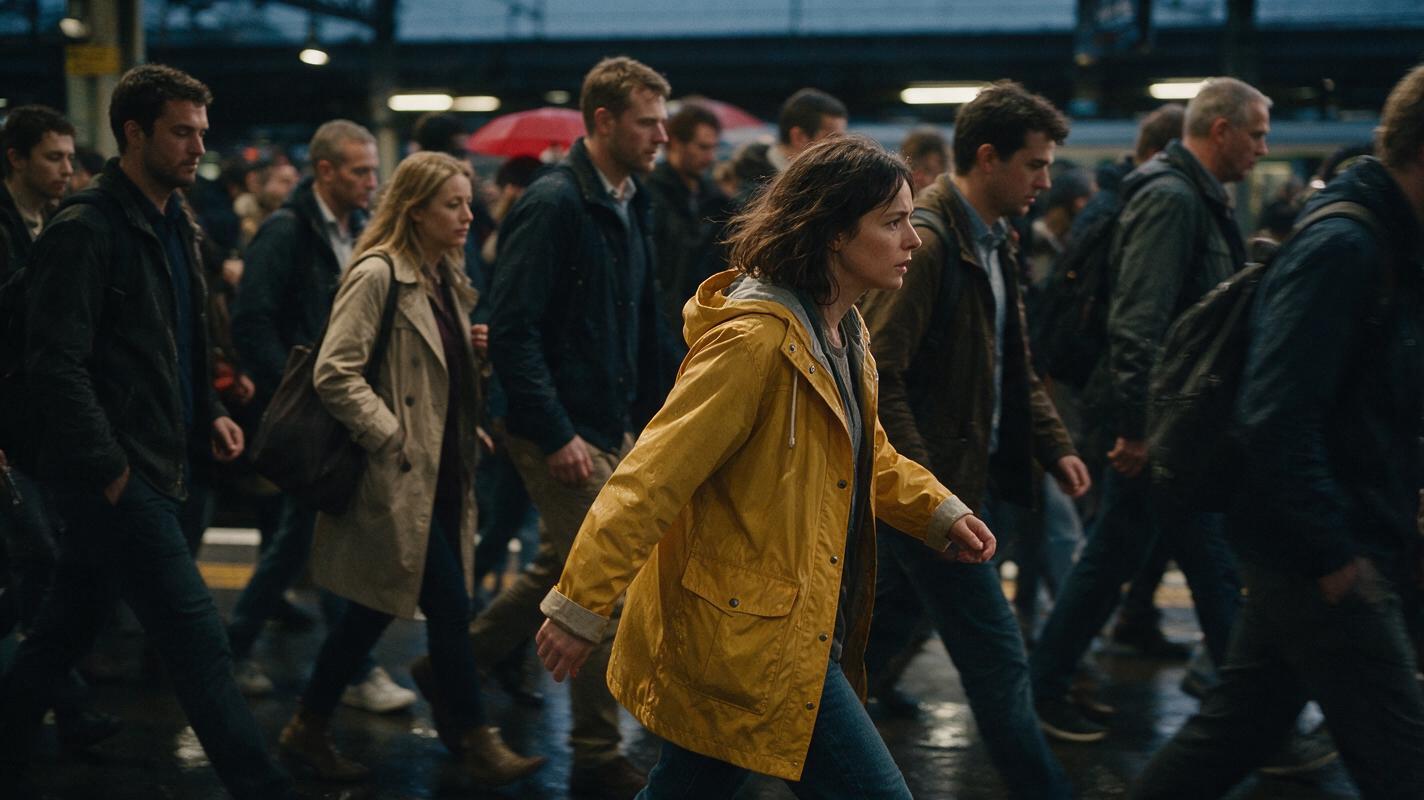
Table of contents
Build the crowd in layers, not in one prompt
The reliable way to direct an AI crowd scene is to separate the lead performance, featured background actions, and anonymous crowd movement into different visual layers. Asking one prompt to generate twenty identifiable people, coordinated blocking, dialogue, and a moving camera gives the model too many continuity decisions at once.
This tutorial uses a fictional railway-platform sequence: Mara, a courier in a mustard raincoat, pushes through evening commuters while looking for a man carrying a red umbrella. The method works for rallies, parties, station concourses, school halls, markets, and other scenes where one important character must remain readable inside a busy frame.
Core rule: lock the hero first, establish the location second, and add crowd density only after the shot remains understandable without it.
Cover recreation prompt: Photorealistic cinematic editorial photograph of a woman in a mustard raincoat moving against the flow of evening commuters on a rain-darkened railway platform, one distant red umbrella visible through the crowd, practical station lighting, believable wardrobe variety, natural human spacing, subtle motion blur on background pedestrians while the lead remains sharp, no text, logos, interface elements, or brand marks, landscape 16:9.
Step 1 — Define who the camera must recognize
Before using a script to video workflow, divide the cast into three levels. This stops anonymous extras from competing with the lead character.
- Hero: the person whose face, clothing, and actions must remain consistent.
- Featured extra: a story-relevant figure identified by one strong visual signal, such as a red umbrella.
- Atmosphere crowd: people who provide scale and movement but do not need persistent identities.
Create a reference sheet only for the hero and any featured extra who appears clearly in more than one shot. Do not create detailed identities for every commuter. The more named visual attributes you distribute across the crowd, the more opportunities the generation has to merge them.
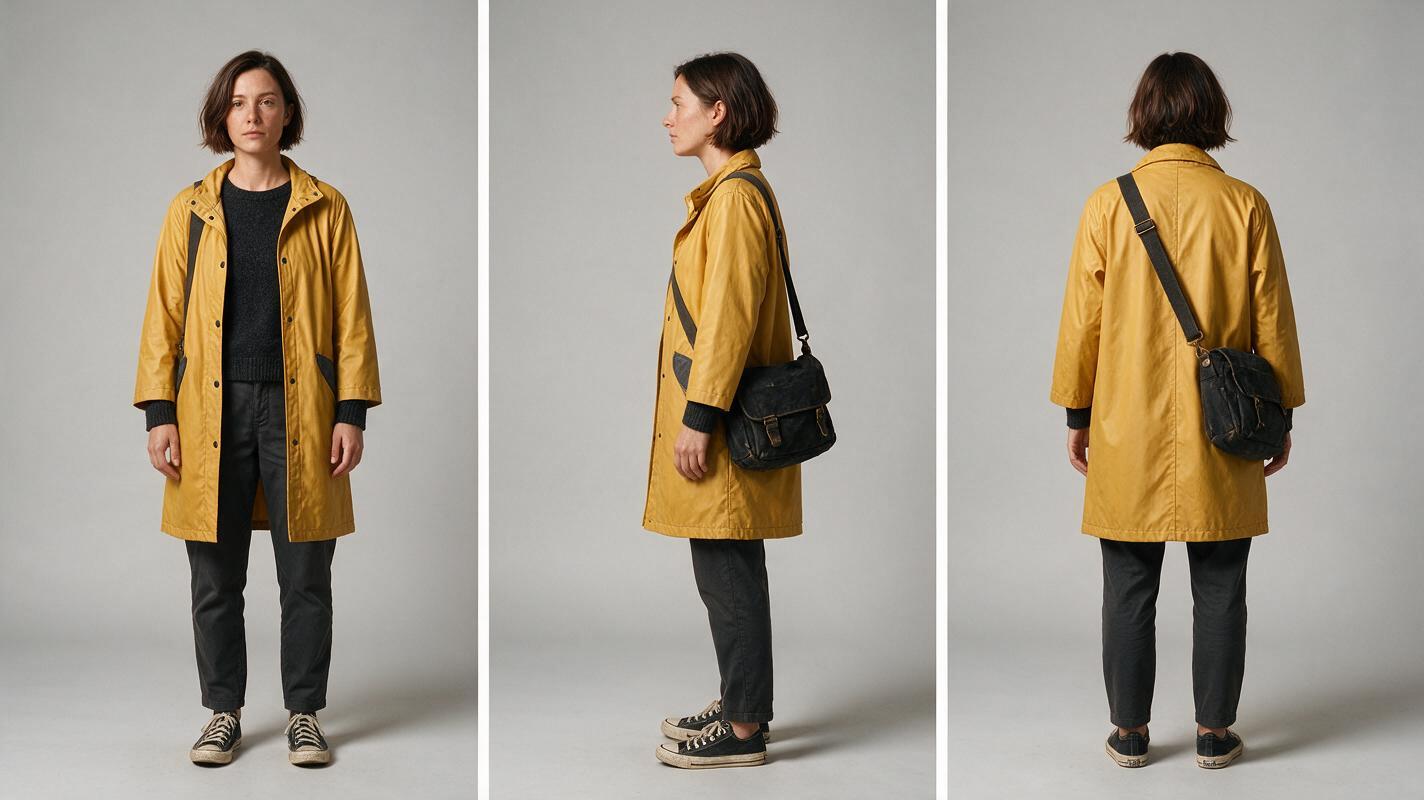
CHARACTER REFERENCE — MARA
Woman, early 30s, oval face, short dark-brown bob tucked behind the left ear, brown eyes, mustard-yellow knee-length raincoat, charcoal sweater, dark trousers, worn black leather messenger bag crossing from right shoulder to left hip.

Keep constant in every view: face proportions, haircut, raincoat color and length, bag shape and strap direction.

Exclude: umbrella, hat, jewelry, duplicate person, alternate coat, text, logos.
Visual recreation prompt: Photorealistic three-panel character reference sheet showing the same woman in front, exact left-side profile, and back views, short dark-brown bob, mustard-yellow knee-length raincoat, charcoal sweater, dark trousers, worn black messenger bag crossing from right shoulder to left hip, identical clothing and proportions in all panels, neutral stance and expression, neutral light-gray seamless studio background, even soft lighting, full body visible, MANDATORY CAMERA: eye-level orthographic-style reference views with minimal perspective distortion, MANDATORY LAYOUT: three equal vertical panels in a landscape 16:9 frame, no text, labels, logos, UI, or additional people.
Step 2 — Convert the scene into a blocking map
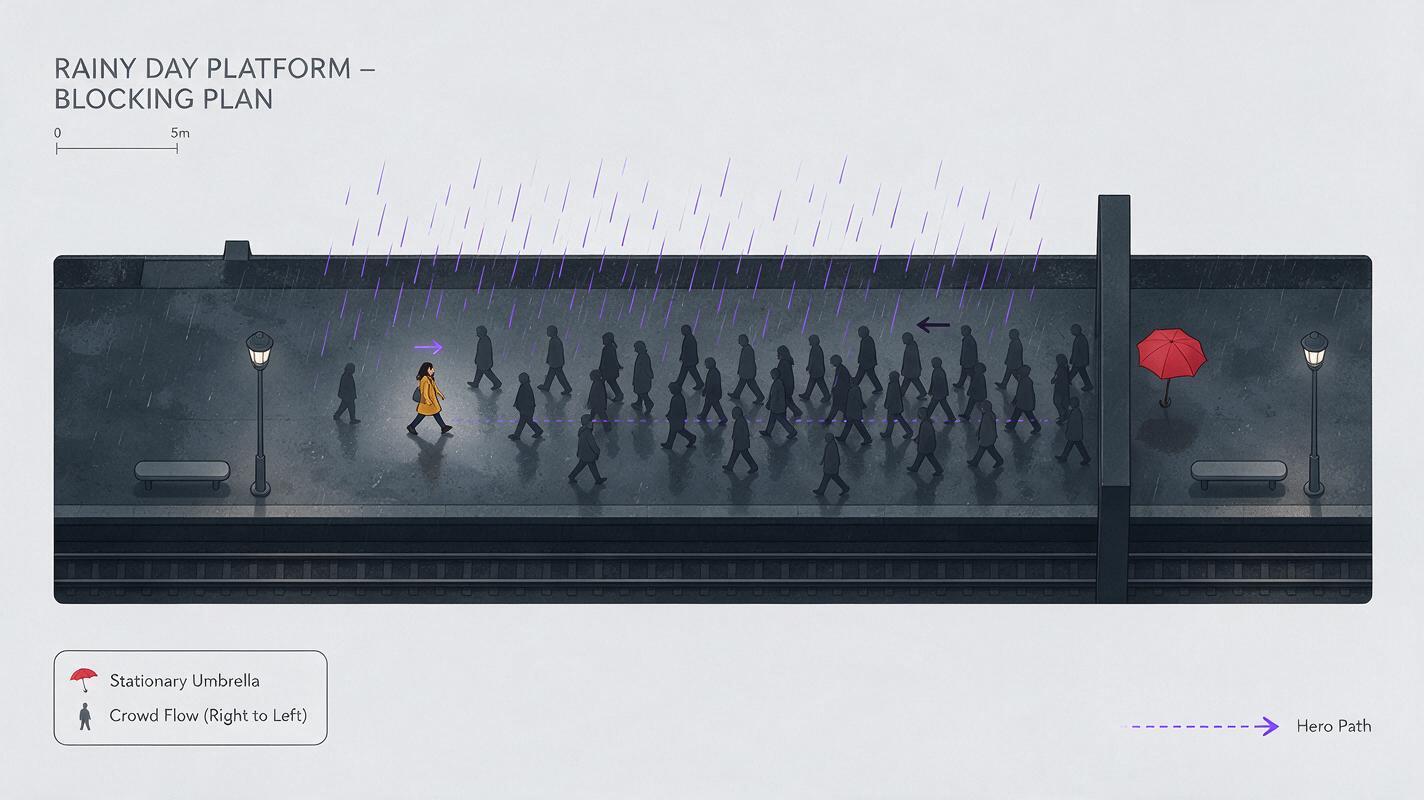
Turn the screenplay paragraph into movement lanes before generating polished frames. A useful blocking map answers four questions: Where does the hero enter? Which direction does the crowd flow? Where is the featured extra revealed? Where does the hero stop or change direction?
For the railway scene, assign Mara a left-to-right path, the main crowd a right-to-left flow, and the umbrella carrier a stationary position near a platform column. That opposition makes Mara visible without requiring every extra to perform a unique action.
| Layer | Screen direction | Story purpose | Continuity lock |
|---|---|---|---|
| Mara | Left to right | Searches and advances | Raincoat, bag, face |
| Main crowd | Right to left | Creates resistance | General density only |
| Red umbrella | Mostly stationary | Provides the target | Color and position |
| Foreground passersby | Across lens | Motivates hidden edits | Silhouette, not identity |
Use an ai storyboard to test this geometry with still frames. If the viewer cannot identify Mara and the umbrella in a still image, additional motion will not repair the composition.
Visual recreation prompt: Cinematic top-down blocking visualization of a rain-darkened railway platform built as a realistic miniature film set, one mustard-coated woman moving left to right, several neutral commuters flowing right to left, one red umbrella held stationary beside a structural column, clear open travel lanes and natural spacing, MANDATORY CAMERA: true 90-degree overhead view, MANDATORY LAYOUT: wide landscape 16:9 composition with the hero path crossing the crowd flow, no arrows, labels, text, logos, UI, or brand marks.
Step 3 — Design coverage that hides crowd instability
A crowd scene does not need to be a continuous wide shot. Build it from coverage that gives each generation a limited responsibility:
- Establishing plate: a short wide view that defines platform scale and crowd direction.
- Hero medium shot: Mara pushes forward while only partial commuters cross the foreground.
- Target insert: the red umbrella appears between shoulders or beside the column.
- Reaction close-up: Mara recognizes the target; the background becomes soft and non-specific.
- Exit shot: Mara changes direction as a passerby briefly fills the frame.
Foreground occlusions are especially useful. A dark coat crossing close to the lens can conceal a cut between two independently generated clips. The edit feels motivated by the crowd rather than by a technical correction.
STORYBOARD FRAME PROMPT
Mara in her mustard raincoat pushes left to right through evening commuters moving in the opposite direction. Medium shot from chest height. Mara is the only fully readable face. Two foreground pedestrians are cropped at the frame edges and softly motion-blurred. A closed red umbrella is barely visible beside a column in the deep background. Wet platform, practical fluorescent station light, restrained cinematic realism.

MANDATORY CAMERA: chest-height medium tracking composition, 50mm lens equivalent.
MANDATORY LAYOUT: Mara on the left third with open travel space to the right.
AVOID: duplicate Mara, repeated faces, merged bodies, crowd looking at camera, readable signs, logos, text.
Step 4 — Generate clean plates before adding motion
Produce one clean location plate, one hero-led frame, and one crowd plate for each important camera angle. Keep the camera height, lens impression, light direction, and architectural landmarks consistent. The clean location plate becomes a recovery asset if a later generation introduces an unwanted person or malformed foreground object.
Generate crowd density in controlled bands rather than requesting “a huge crowd.” Useful descriptions include “six commuters in the middle distance,” “two cropped silhouettes near the lens,” or “a loose queue with visible gaps.” Explicit spacing reduces accidental body fusion and makes the frame easier to composite.
At the first render pass, try these models for free and compare which output best preserves the locked hero, location geometry, and crowd spacing before committing to all shots.
Plate rule: save the simplest successful frame. A restrained crowd plate is more reusable than a visually spectacular frame containing continuity errors.
Step 5 — Animate one movement layer at a time
Use image to video from approved storyboard frames rather than regenerating every shot from text alone. Assign one dominant motion instruction to each clip.
- For the hero shot: Mara advances while the camera tracks beside her.
- For the crowd plate: commuters drift in the opposite direction at varied walking speeds.
- For the insert: the umbrella tilts slightly as a train breeze reaches the platform.
- For the reaction: Mara stops, focuses past the lens, and takes one controlled breath.
If performance timing matters, motion transfer AI video can help define a specific turn, stop, or shoulder movement. Keep the source performance simple and frame-compatible. A reference containing fast spins, crossed limbs, or several interacting performers can introduce more ambiguity than it removes.
MOTION PROMPT — HERO SHOT
Preserve Mara's identity, mustard raincoat, messenger bag, body proportions, and screen position. She walks steadily from left to right and turns her eyes toward the distant red umbrella without turning her whole body. The camera tracks smoothly beside her. Background commuters move right to left with restrained natural motion.

Motion priority: Mara's walk and eye-line change.
Camera: smooth lateral tracking, no zoom, no orbit.
Keep fixed: facial structure, coat design, bag strap, station architecture.
Avoid: duplicate hero, face replacement, crowd collision, extra limbs, sudden camera acceleration.
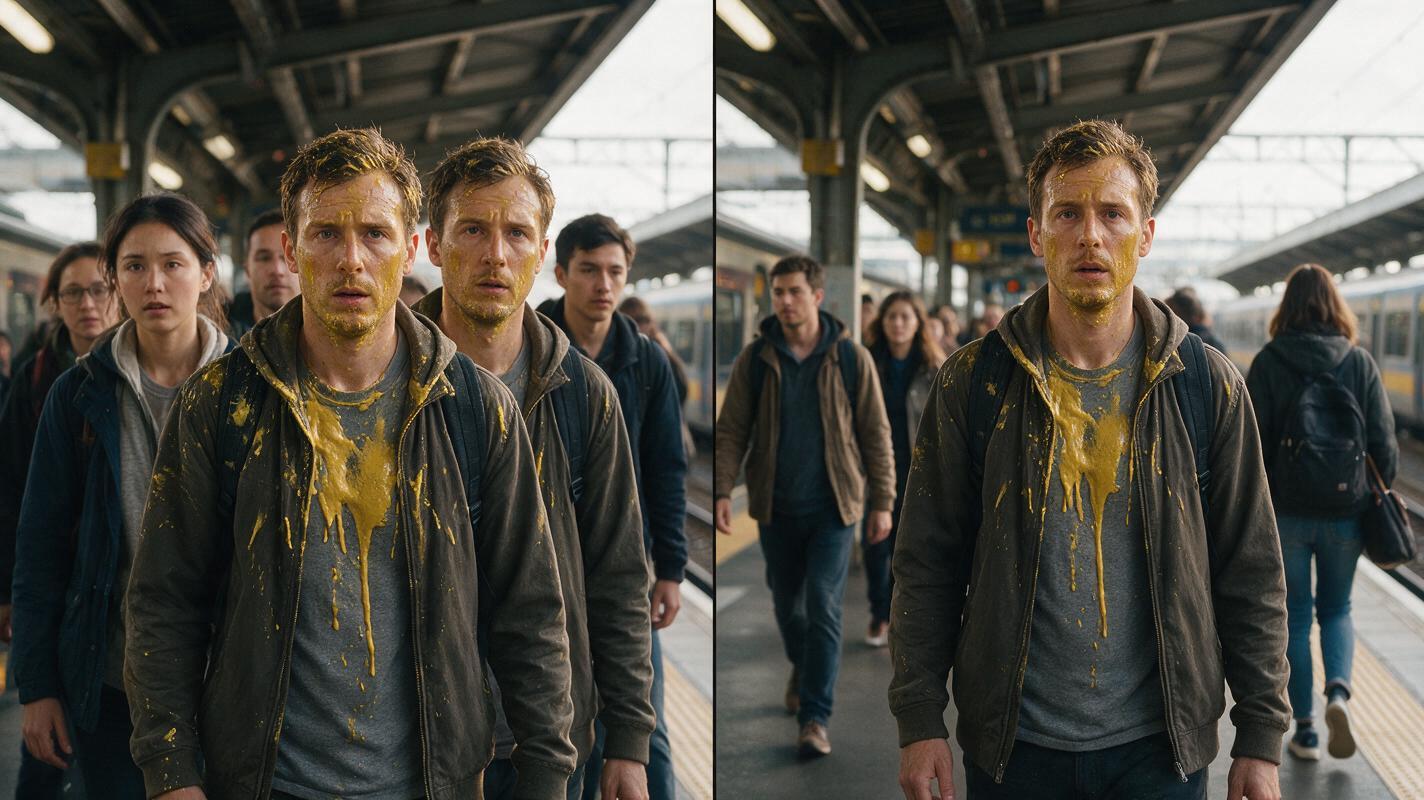
Visual recreation prompt: Photorealistic side-by-side cinematic failure-and-correction comparison on the same railway platform, left half showing two accidental copies of the mustard-coated lead and several commuters with blended shoulders, right half showing one clearly preserved lead with naturally separated pedestrians and coherent spacing, matching lighting and camera angle on both halves, MANDATORY CAMERA: eye-level medium-wide view with a 50mm lens equivalent, MANDATORY LAYOUT: equal split-screen landscape 16:9 comparison, no captions, text, logos, UI, dividing labels, or brand marks.
Step 6 — Composite, cut, and review by identity
Assemble the sequence from the cleanest layers rather than choosing clips only for dramatic motion. A practical edit might open on the wide crowd plate, cut to Mara's medium tracking shot, insert the umbrella, return to her reaction, and hide the final transition behind a foreground coat.
Use crowd sound to connect separate clips. Footsteps, distant announcements, rolling luggage, rain, and train brakes can make independently generated shots feel like one continuous environment. Keep important dialogue or breathing distinct from the ambience.
Review the final scene three times, with a different purpose each time:
- Identity pass: watch only Mara's face, hair, coat, and bag.
- Geography pass: check screen direction, column position, and the umbrella's location.
- Artifact pass: inspect frame edges, foreground hands, merged shoulders, duplicate faces, and sudden crowd disappearances.
Replace a failing shot instead of repairing the entire sequence. Because the coverage was designed in layers, one unstable crowd clip should not force a new hero performance.
Final checklist
- The hero has a three-view reference sheet with locked wardrobe details.
- Featured extras are defined by one unmistakable visual signal.
- Hero movement and crowd flow have separate screen directions.
- Each shot has one dominant movement instruction.
- Wide shots establish scale; closer shots protect identity.
- Foreground passersby provide motivated places to hide cuts.
- Clean location and crowd plates are saved for recovery.
- The finished edit passes identity, geography, and artifact reviews.
FAQ
Why does an AI crowd sometimes duplicate the main character?
The model may interpret repeated wardrobe or facial descriptions as instructions to distribute the same identity across several people. Define the hero once, describe background people generically, and avoid giving extras the hero's distinctive colors or accessories.
How many people should appear in the first storyboard?
Use the minimum number needed to communicate scale and flow. Start with clearly separated middle-distance figures, approve the composition, and add foreground or deep-background density only where the scene needs it.
Should every crowd member have a reference image?
No. Reference sheets are most useful for the hero and recurring featured extras. Anonymous crowd members should remain visually varied but narratively non-specific.
Can one generated clip handle the entire crowd scene?
It can, but a single long generation gives identity, motion, blocking, and camera errors more time to accumulate. Short coverage-based clips are easier to direct, replace, and conceal in the edit.
What is the safest camera move for a hero inside a crowd?
A restrained lateral track or slow push is usually easier to control than a fast orbit. Whatever move you choose, keep the hero's direction and the location's major landmarks consistent across adjacent shots.
Sources
- Runway — AI video product overview
- Adobe Firefly — AI video generator
- Google DeepMind — Veo model overview
Keywords
script to video AI, AI storyboard generator, create AI video from script, direct an AI short film, motion transfer AI video, AI movie maker, AI clip maker