Script to Video AI: Create Seamless Match Cuts From a Screenplay
Learn how to turn scripted transitions into seamless match cuts by pairing storyboard anchors, aligning compositions, generating controlled motion, and editing on shared visual cues. The workflow includes reusable prompts for a character sheet, matched frames, and a failure-mode comparison.
Table of contents
Turn written transitions into visual match cuts
A convincing match cut begins before video generation: the outgoing and incoming shots must share a deliberate visual or motion anchor.
This tutorial explains how to build that anchor while moving from script to video. The example cuts from a brass compass in a courier’s hand to a full moon above a rooftop, linking two locations without relying on a dissolve or generic transition effect.
The method works for short films, trailers, story videos, and novel adaptations. It is especially useful when separately generated clips need to feel as if they belong to one directed sequence.
Core rule: Match the final composition of Shot A to the opening composition of Shot B, then change only the story information that needs to change.
Step 1 — Mark the transition pairs in the script
Start by identifying cuts that can carry meaning rather than merely move the story forward. Look for repeated shapes, mirrored actions, related colors, similar silhouettes, or sounds that can continue across locations.
For this example, the screenplay contains the following transition:
INT. MAYA'S APARTMENT — NIGHT

Maya opens her palm. An old brass compass catches the window light.
The camera moves closer until its circular face fills the frame.

MATCH CUT TO:

EXT. CITY ROOFTOP — NIGHT

A full moon occupies the same position and scale.
The camera slowly pulls back, revealing Maya at the roof's edge.
Convert the transition into a compact continuity record before generating imagery:
| Control | Shot A | Shot B |
|---|---|---|
| Visual anchor | Circular compass face | Full moon |
| Frame position | Centered | Centered |
| Relative scale | About half the frame height | About half the frame height |
| Camera motion | Slow push-in | Slow pullback |
| Light direction | Cool light from upper left | Cool light from upper left |
| Continuity cue | Metallic circular highlight | Luminous circular edge |
Because Maya appears on both sides of the sequence, create her identity reference before producing either shot. Her face, hair, wardrobe, and proportions should not be redesigned by individual scene prompts.
Reusable visual prompt: Maya character reference sheet
Photorealistic three-panel character reference sheet of the same woman named Maya, a 29-year-old bicycle courier with an oval face, warm brown skin, dark brown eyes, short tightly curled black hair, and a small scar through the right eyebrow; she wears a weathered olive courier jacket, charcoal shirt, black utility trousers, and plain dark boots; show exact front view, exact right-side profile, and exact back view as three evenly sized full-body panels; identical clothing, hairstyle, body proportions, age, and neutral expression in every panel; neutral light-gray seamless studio background; soft even studio lighting; no props, no typography, no labels, no logo, no interface elements; landscape 16:9. MANDATORY CAMERA: eye-level orthographic reference framing with minimal perspective distortion. MANDATORY LAYOUT: front, side, and back views arranged left to right with equal spacing and the entire body visible.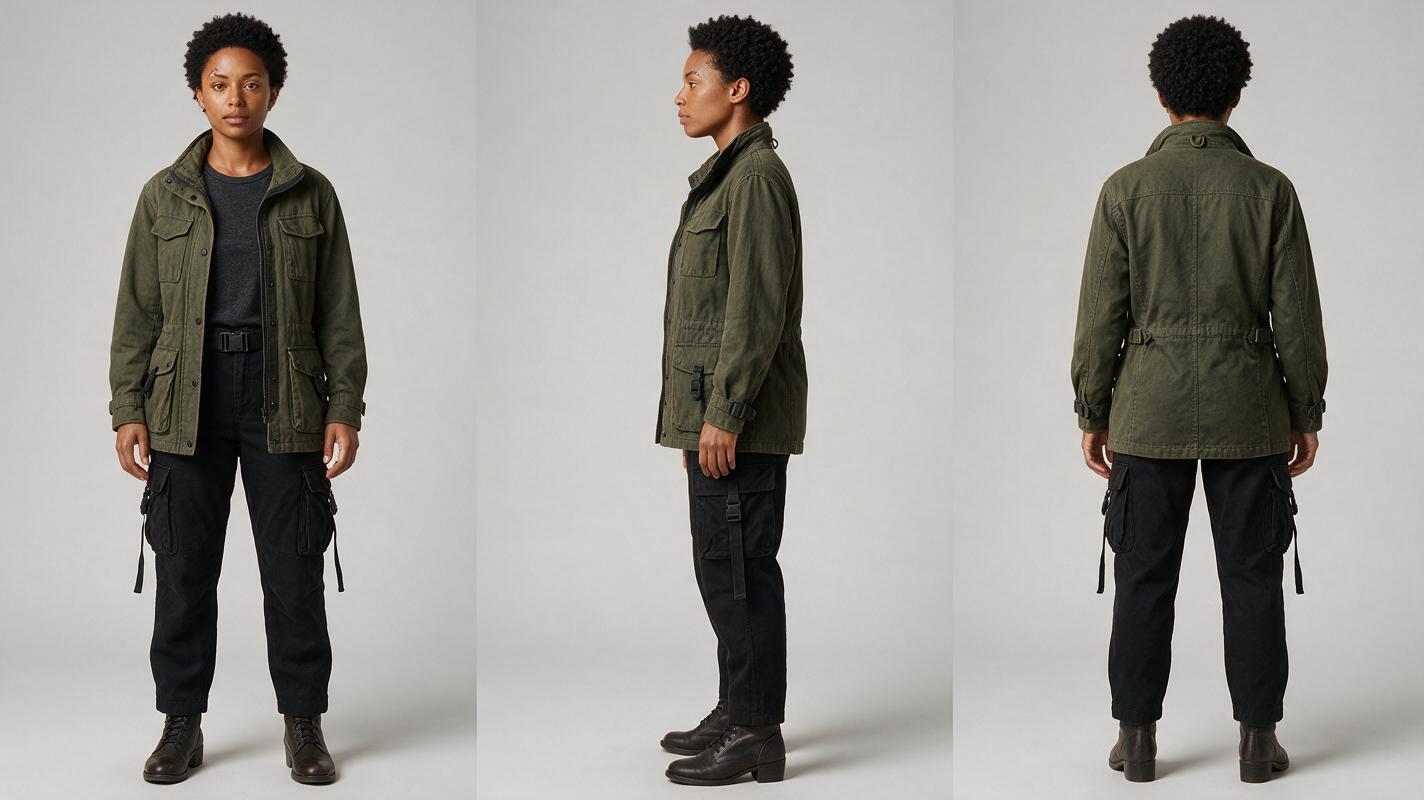
Step 2 — Build paired storyboard anchors
Generate the last frame of Shot A and the first frame of Shot B as a pair. This is more reliable than creating complete clips independently and hoping their endpoints align.
An ai storyboard should define composition, object scale, lighting direction, lens feeling, and negative space. Treat these frames as production specifications rather than loose concept art.
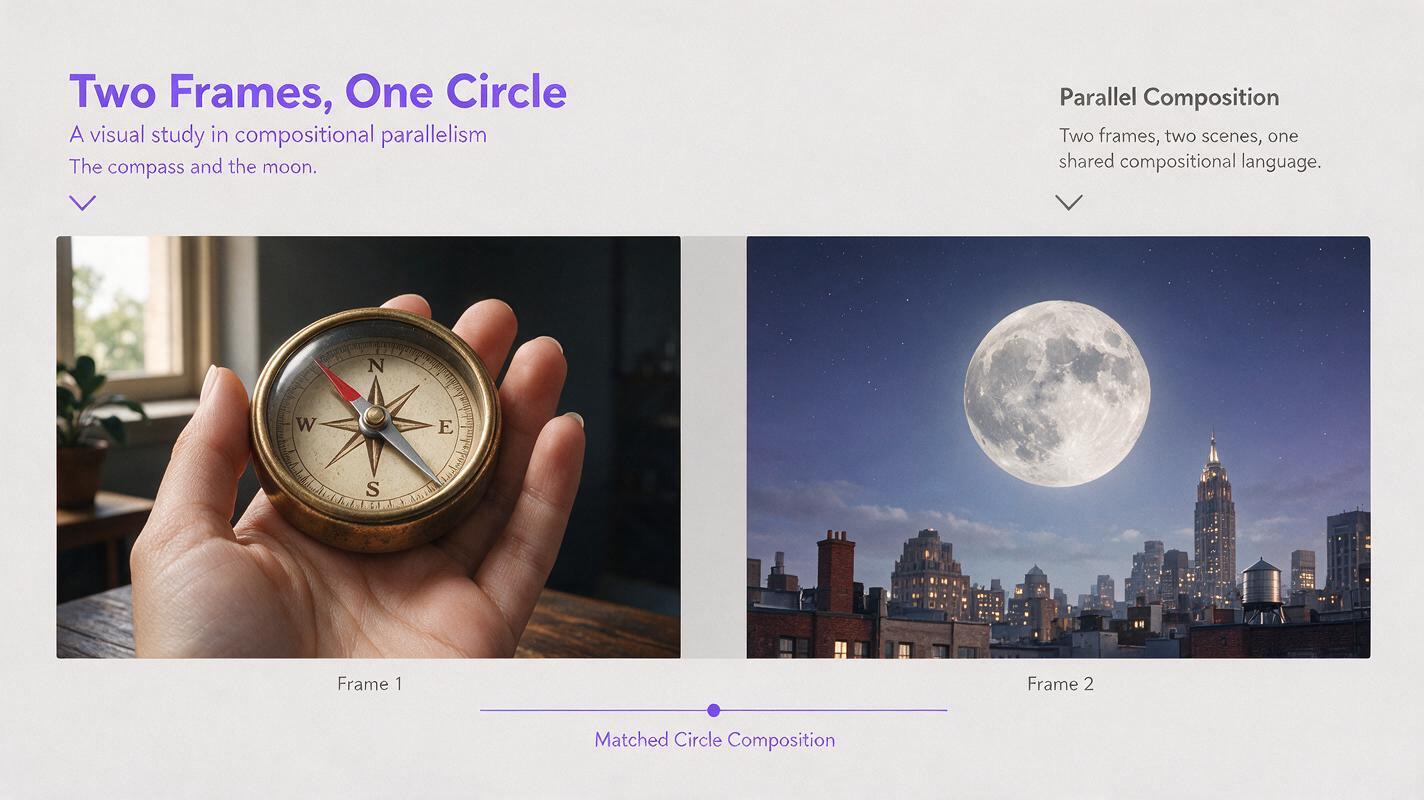
For the compass-to-moon cut, both circles must occupy nearly the same coordinates. The second frame can introduce a new sky and color palette, but the central geometry should remain stable.
Reusable visual prompt: paired transition anchors
Create a cinematic two-frame storyboard contact sheet with no text and a thin neutral divider. LEFT FRAME: extreme close-up of an aged brass compass resting in a woman's open palm inside a dim lived-in apartment, circular compass face centered and occupying exactly 52 percent of frame height, cool window light from upper left, realistic skin and metal texture, shallow depth of field. RIGHT FRAME: a full moon above a believable city rooftop at night, moon centered at exactly the same coordinates and occupying exactly 52 percent of frame height, cool illumination from upper left, subtle atmospheric haze, rooftop details barely visible along the lower edge. Photorealistic editorial realism, restrained cinematic color, landscape 16:9, no words, labels, logos, borders, software controls, or brand marks. MANDATORY CAMERA: perfectly centered frontal view in both frames with matched optical perspective. MANDATORY LAYOUT: two equal-width frames aligned horizontally; the compass and moon must overlap precisely if the frames are superimposed.Overlay the two anchors at partial opacity in an editor. If the circles jump in size or position, correct the storyboard frames now. Video generation will amplify rather than repair a compositional mismatch.
Step 3 — Lock the shared variables
Separate what must remain constant from what is allowed to change. For this cut, the shared variables are center position, circular scale, light direction, and the momentary absence of fast lateral movement. The location, material, background, and camera direction may change.
This principle also applies to other match-cut structures:
| Match type | Keep constant | Change across the cut |
|---|---|---|
| Shape match | Outline, scale, frame position | Object, setting, texture |
| Action match | Gesture direction, speed, limb position | Character, wardrobe, location |
| Color match | Dominant hue and occupied area | Subject and context |
| Eyeline match | Gaze angle and screen direction | Shot size and viewed subject |
| Audio-led match | Sound rhythm or sustained tone | Visual environment |
Avoid stuffing both prompts with decorative details. Every extra moving object, flickering light, or dramatic camera instruction creates another opportunity for the clips to diverge.
Useful constraint: At the cut point, preserve at least three shared variables and introduce no more than two major visual changes.
Step 4 — Generate motion with matching endpoints
Animate Shot A and Shot B separately, using the approved anchors as image references. Give each clip one simple camera instruction and describe its required endpoint explicitly.
Shot A motion prompt
Use the supplied compass storyboard frame and Maya reference sheet. Maya holds her hand completely steady while the camera performs a slow, smooth push-in toward the brass compass. Preserve the compass design, hand anatomy, cool upper-left lighting, and centered circular composition. End with the compass face centered and occupying 52 percent of frame height. No hand rotation, no extra fingers, no object duplication, no rack focus, no camera roll, no sudden acceleration.Shot B motion prompt
Begin from the supplied moon storyboard frame. Hold the full moon perfectly centered for the opening moment, then perform a slow, smooth pullback to reveal a realistic city rooftop and Maya standing at the roof edge in the same approved wardrobe. Preserve the moon's circular shape, cool upper-left lighting, Maya's identity, and stable horizon. No moon deformation, no duplicate character, no camera roll, no abrupt pan, no fantasy architecture.Generate several short alternatives instead of asking for a long, complex take. Select Shot A by its final frames and Shot B by its opening frames; the middle of each clip is secondary to the transition.
A one-stop, multi-model workspace is useful here because the same anchors can be tested across different generation options without rebuilding the production package. Once the paired frames are approved, try for free and compare which render preserves the required endpoint most accurately.
Reusable visual prompt: failed and corrected match cut
Photorealistic four-frame cinematic comparison arranged as two pairs with no text. LEFT PAIR shows a failed match cut: an aged brass compass sits low and off-center in a woman's palm, followed by an oversized moon high in the next frame, visibly mismatched scale and position. RIGHT PAIR shows the corrected cut: the same compass and moon are both precisely centered, equal in apparent diameter, and lit from the upper left. Realistic apartment and rooftop environments, natural skin texture, believable brass reflections, restrained night color, no labels, arrows, logos, interfaces, or brand marks; landscape 16:9. MANDATORY CAMERA: frontal locked-off composition with identical framing boundaries across all four frames. MANDATORY LAYOUT: four equal panels from left to right, failed compass, failed moon, corrected compass, corrected moon, with narrow neutral gutters.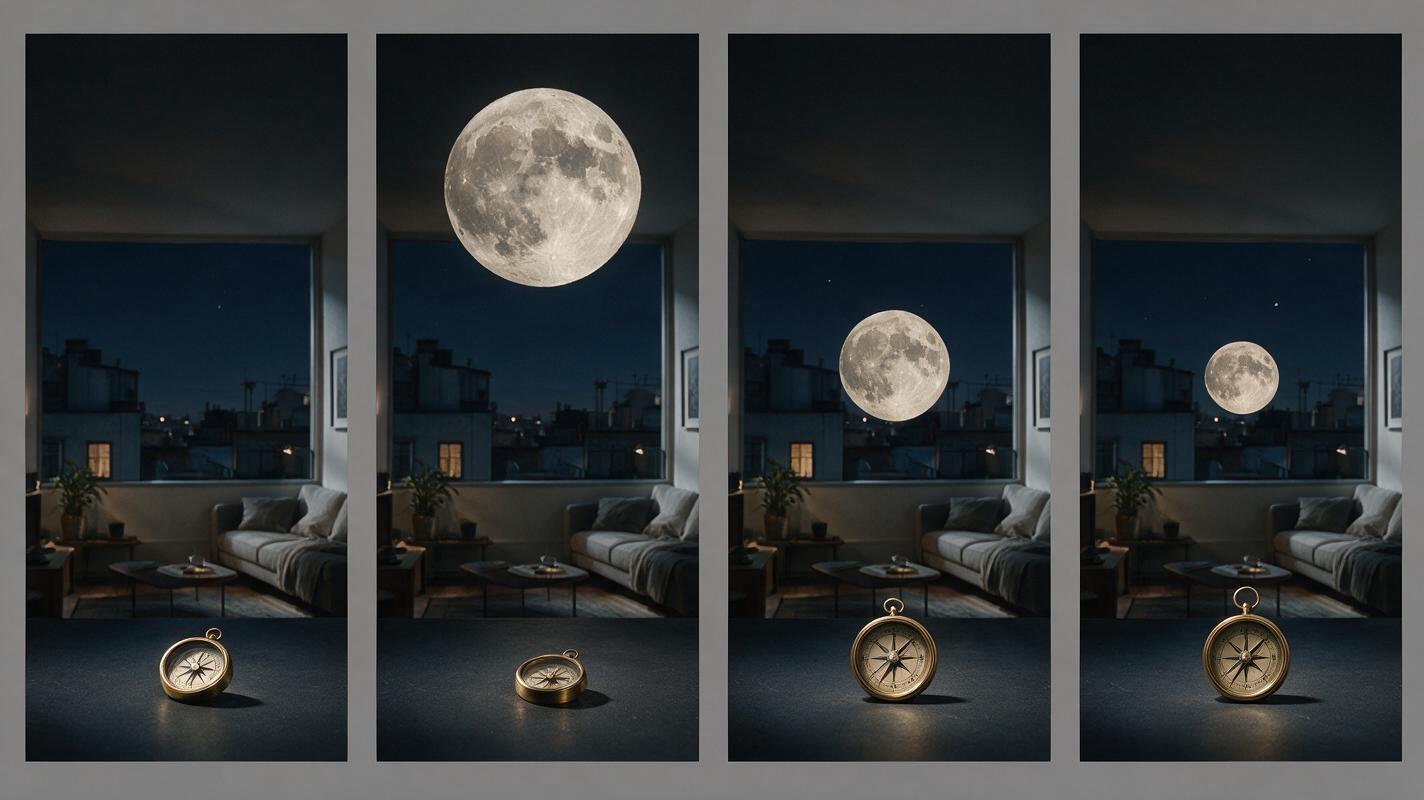
Step 5 — Edit on the visual alignment point
Place the two clips on adjacent tracks and temporarily reduce the opacity of the upper clip. Slide the cut until the compass and moon overlap as closely as possible.
Trim for visual alignment before adjusting dramatic timing. A cut that is a few frames earlier or later than planned may work better if it preserves shape and motion continuity.
- Cut during stable geometry: Avoid frames where the compass is deforming, the hand is turning, or motion blur hides the edge.
- Match apparent speed: A slow push-in should meet a similarly controlled opening, not an immediate whip movement.
- Use sound to bridge the cut: Let a low metallic hum begin over the compass and continue under the moon shot.
- Keep transition effects off: Test the direct cut first. A dissolve can weaken the visual logic.
- Review at full speed: Frame-by-frame perfection matters less than whether the audience perceives one intentional visual idea.
If the cut still bumps, return to the anchor frames rather than hiding the problem with blur. Recenter the mismatched object, correct its scale, and regenerate only the affected clip.
FAQ
What is the best match cut for a first AI short film?
A centered shape match is usually the easiest to control. Circles, doorways, windows, eyes, plates, clocks, and lights provide clear edges that can be aligned between storyboard frames.
Should both clips use the same generation model?
Not necessarily. The decisive requirement is that both outputs respect the approved anchors. Test models with the same reference package and choose clips based on composition, identity continuity, and usable endpoint frames.
Can this workflow create an action match?
Yes. Replace the shared shape with a shared body pose or object trajectory. Keep screen direction, gesture phase, framing, and speed consistent while changing the character or location.
Why does a match cut fail even when the prompts are similar?
Similar wording does not guarantee similar geometry. Independently generated shots often assign different coordinates, object scales, lenses, or camera movement. Paired storyboard anchors solve those variables before motion is introduced.
Can this method be used for a novel adaptation?
Yes. Look for repeated imagery in the prose, such as a coin becoming a sun or falling snow becoming airborne ash. Convert the literary association into two precisely composed screenplay shots.
Sources
Final checklist
- The screenplay identifies a specific shape, action, color, eyeline, or sound match.
- Recurring characters have approved front, side, and back references.
- The final frame of Shot A and opening frame of Shot B were designed together.
- At least three visual variables remain constant across the cut.
- Each motion prompt specifies its required starting or ending composition.
- The selected clips align at the cut without depending on a dissolve.
- Sound supports the transition without masking a visual mismatch.
Keywords
script to video ai, ai storyboard generator, create ai video from script, how to make an ai video from a script, direct an ai short film, ai story video generator, ai clip maker