Script to Video AI: Direct Parallel Action Without Timeline Confusion
Learn how to convert parallel action in a screenplay into clear AI-generated scenes without losing time, location, or cause and effect. This tutorial uses synchronized beat maps, paired storyboards, controlled frame generation, and sound bridges to build suspenseful intercut sequences.
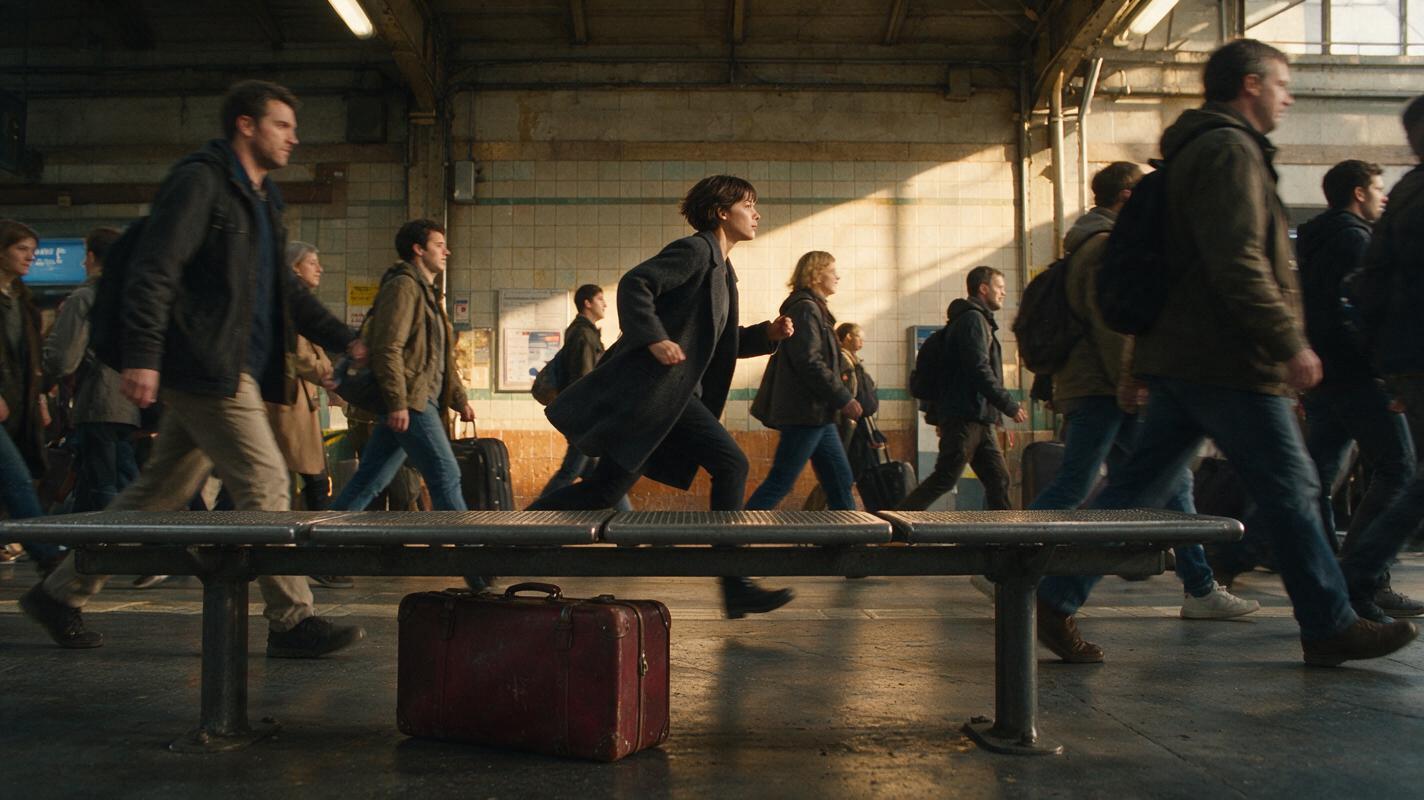
Table of contents
Turn simultaneous screenplay events into one clear sequence
Parallel action works when viewers understand that two events are unfolding at the same time—and that each cut brings them closer to a shared consequence.
In a conventional production, the editor can repair unclear timing with reaction shots, inserts, and extra coverage. A script to video workflow needs that timing designed before generation. Otherwise, independently generated clips may suggest different times of day, inconsistent countdowns, reversed movement, or actions that appear to happen twice.
This tutorial uses a simple suspense sequence: a woman named Mina runs through a railway station while an unattended suitcase approaches an irreversible trigger. The method applies equally to rescues, races, simultaneous discoveries, split-location conversations, and converging storylines.
Core rule: Do not generate two complete scenes and alternate them afterward. Break both scenes into synchronized cause-and-effect beats first.
Step 1 — Build a synchronized beat map from the script
Begin by separating the screenplay into two action lanes. Lane A follows Mina; Lane B follows the suitcase. Every row must represent one shared interval of story time, even if the finished edit gives one lane more screen time.
| Shared beat | Lane A: Mina | Lane B: Suitcase | Audience information |
|---|---|---|---|
| Recognition | Mina sees the platform clock | A hidden light begins pulsing | The events are simultaneous |
| Escalation | She pushes through the crowd | The pulse becomes faster | Time is running out |
| Obstruction | A closing gate blocks her route | A train vibration shifts the case | Both lanes become unstable |
| Convergence | She reaches the platform edge | The suitcase enters her eyeline | The locations finally connect |
| Payoff | She grabs the handle | The pulsing light stops | One action resolves both lanes |
Write observable actions rather than emotional summaries. “Mina becomes desperate” is difficult to synchronize. “Mina drops her ticket, leaves it, and accelerates” creates visible escalation that can be paired with a faster pulse or shorter inserts.
Use this prompt to convert a scene into a production-ready beat map:
Read the screenplay excerpt below and divide its parallel action into two synchronized lanes.

For each shared beat, provide:
- Lane A's visible action
- Lane B's visible action
- the new information revealed by the cut
- the continuity state at the end of the beat
- the strongest visual match or contrast between lanes

Preserve the screenplay's outcome. Do not add dialogue, locations, characters, or plot events. Make every action directly filmable.

SCREENPLAY:
[PASTE SCENE]
If an action cannot be assigned to a shared interval, decide whether it occurs before, during, or after the other lane. That decision prevents temporal contradictions later.
Step 2 — Lock the recurring character before storyboarding
Visual prompt to copy
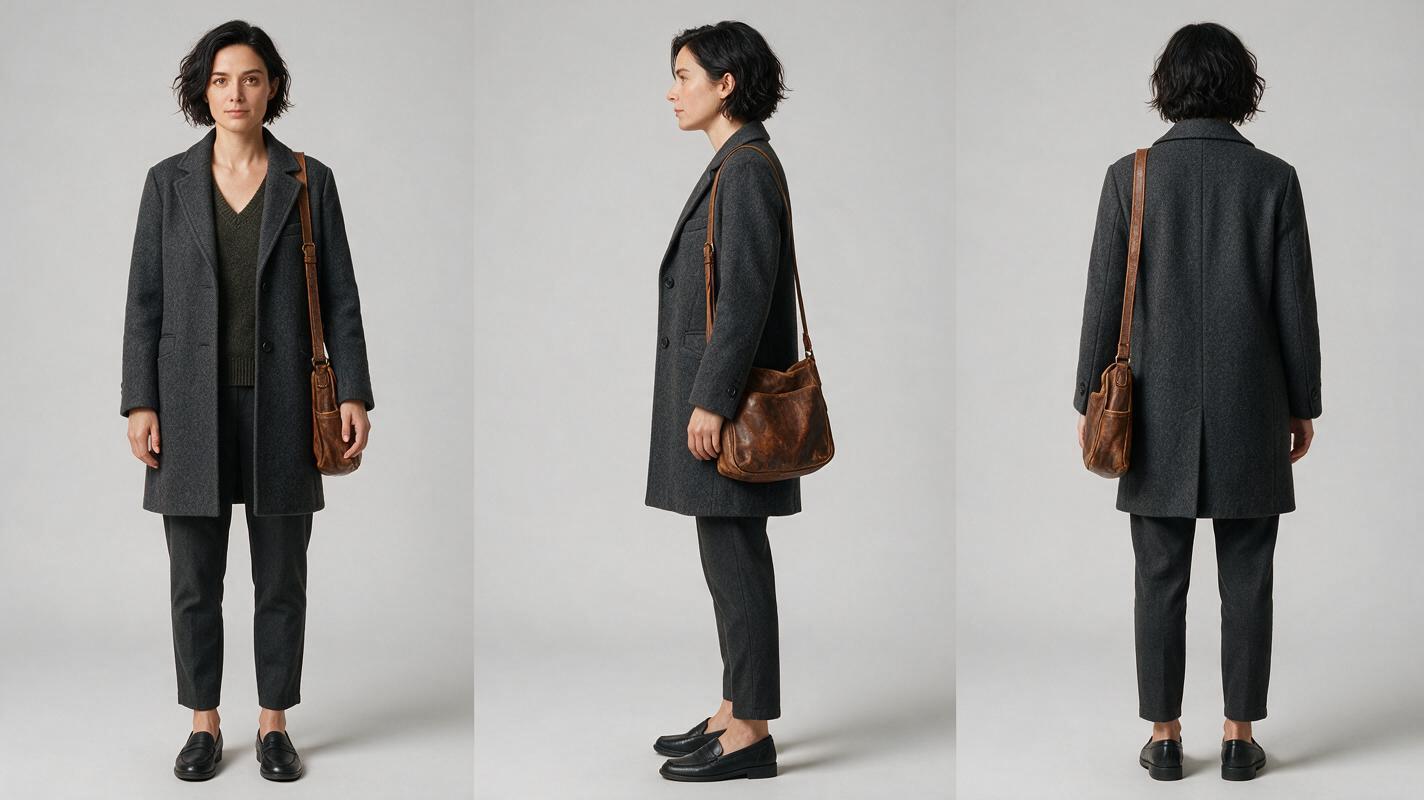
Create a photorealistic three-panel character reference sheet of the same woman, Mina, age 32, short wavy black hair, narrow oval face, brown eyes, charcoal wool coat over a muted green sweater, dark trousers, practical black shoes, and a weathered tan shoulder bag. Show exact front, side, and back views with identical clothing, hairstyle, body proportions, and bag placement in every panel. Neutral expression, relaxed anatomical pose, full body visible. MANDATORY CAMERA: eye-level orthographic reference views with minimal perspective distortion. MANDATORY LAYOUT: three evenly spaced vertical panels in one landscape 16:9 image. Neutral light-gray seamless studio background, soft diffuse lighting, realistic skin and fabric texture. No text, labels, logos, borders, interface elements, or extra people.Create Mina’s reference sheet before generating the station shots. Record the features that must remain unchanged: hairstyle, coat length, shoulder-bag side, footwear, and overall silhouette. Avoid relying only on adjectives such as “cinematic woman,” which leave too much room for reinterpretation.
The suitcase also needs a continuity description even though it is not a character. Define its dimensions, material, color, handle position, damage, and practical light source. Copy the same wording into every relevant storyboard and clip prompt.
- Identity lock: face shape, hair, age range, and body proportions.
- Wardrobe lock: coat, sweater, trousers, shoes, and bag.
- State lock: whether the coat is open, which shoulder carries the bag, and whether Mina is holding anything.
- Object lock: suitcase color, scratches, orientation, and light position.
This preparation allows an ai storyboard to function as a continuity plan rather than a collection of unrelated concept images.
Step 3 — Design paired storyboard frames
Visual prompt to copy
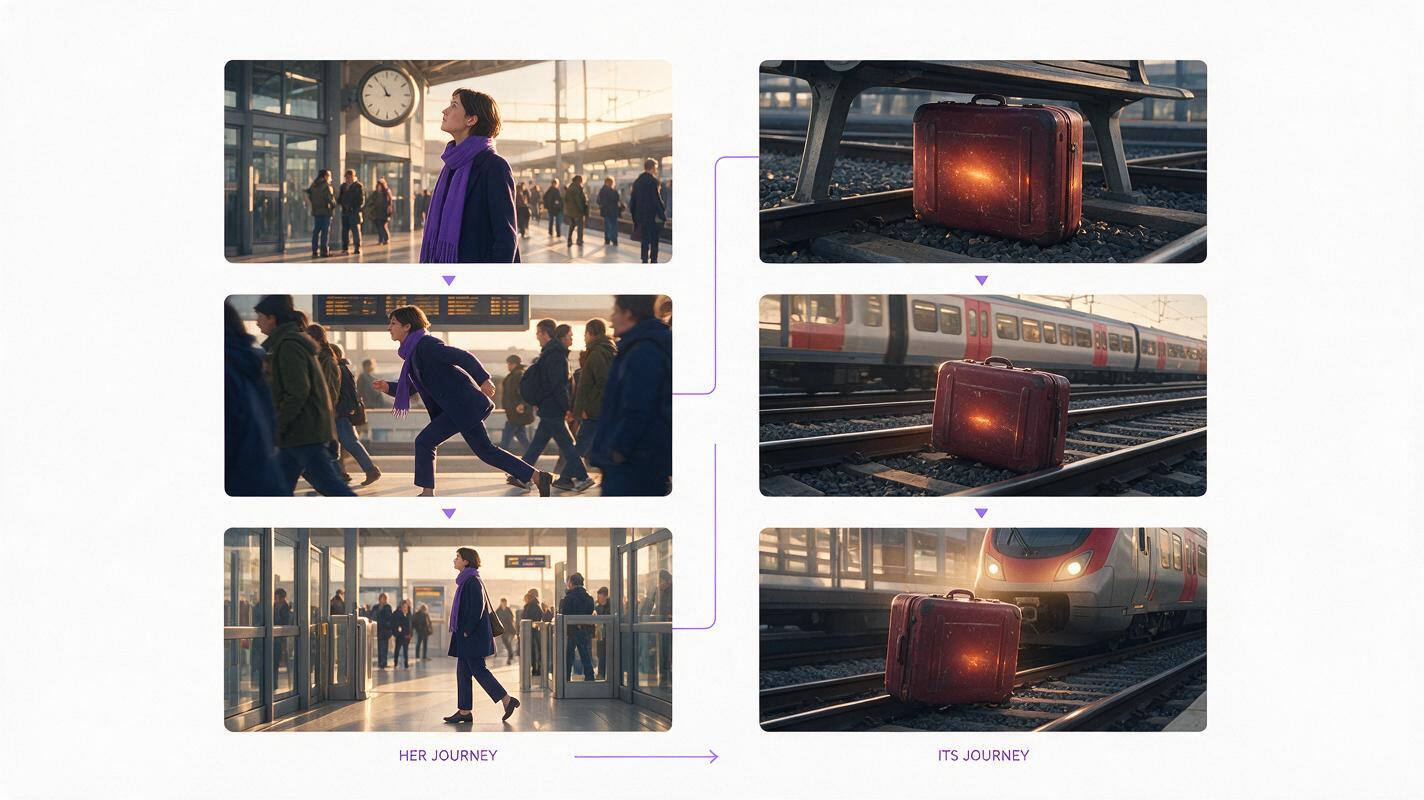
Create a six-frame cinematic storyboard contact sheet for a parallel-action suspense sequence, arranged as two columns and three rows. Left column: the same woman from the supplied character reference first noticing a station clock, then running through commuters, then reaching a platform gate. Right column: the same weathered dark-red suitcase beneath a metal bench, first with a faint amber pulse, then shifted by vibration, then seen near an arriving train. Preserve identical character identity, wardrobe, suitcase design, station architecture, weather, and late-afternoon lighting across all frames. MANDATORY CAMERA: alternate eye-level medium shots with low-angle suitcase inserts; maintain left-to-right travel for the woman. MANDATORY LAYOUT: clean two-column by three-row landscape 16:9 contact sheet with equal frame sizes. Cinematic editorial realism, lived-in railway station, natural crowd behavior. No text, captions, numbers, arrows, logos, borders, UI, or brand marks.Storyboard the lanes as pairs. Each pair should communicate simultaneity through at least one visual relationship:
- Matched motion: Mina pushes through a turnstile; the suitcase slides beneath the bench.
- Matched composition: a close-up of her eye cuts to a close-up of the pulsing light.
- Scale contrast: a wide station obstacle cuts to a tight mechanical insert.
- Directional convergence: Mina travels left to right while the train carrying the threat approaches right to left.
- Cause and effect: train vibration in one frame explains suitcase movement in the next.
Mark an exact entry state and exit state for every proposed clip. For example, Mina enters a shot behind the ticket barrier and exits beside the platform map. The suitcase begins beneath the center of the bench and ends closer to its right leg. These endpoints give the edit verifiable continuity anchors.
Do not over-cover every beat. A useful pair normally has one dominant shot and one concise counterpoint. If both lanes receive equally long, self-contained coverage, the sequence may feel like two scenes taking turns rather than simultaneous action.
Step 4 — Generate controlled clips without resetting continuity
Visual prompt to copy
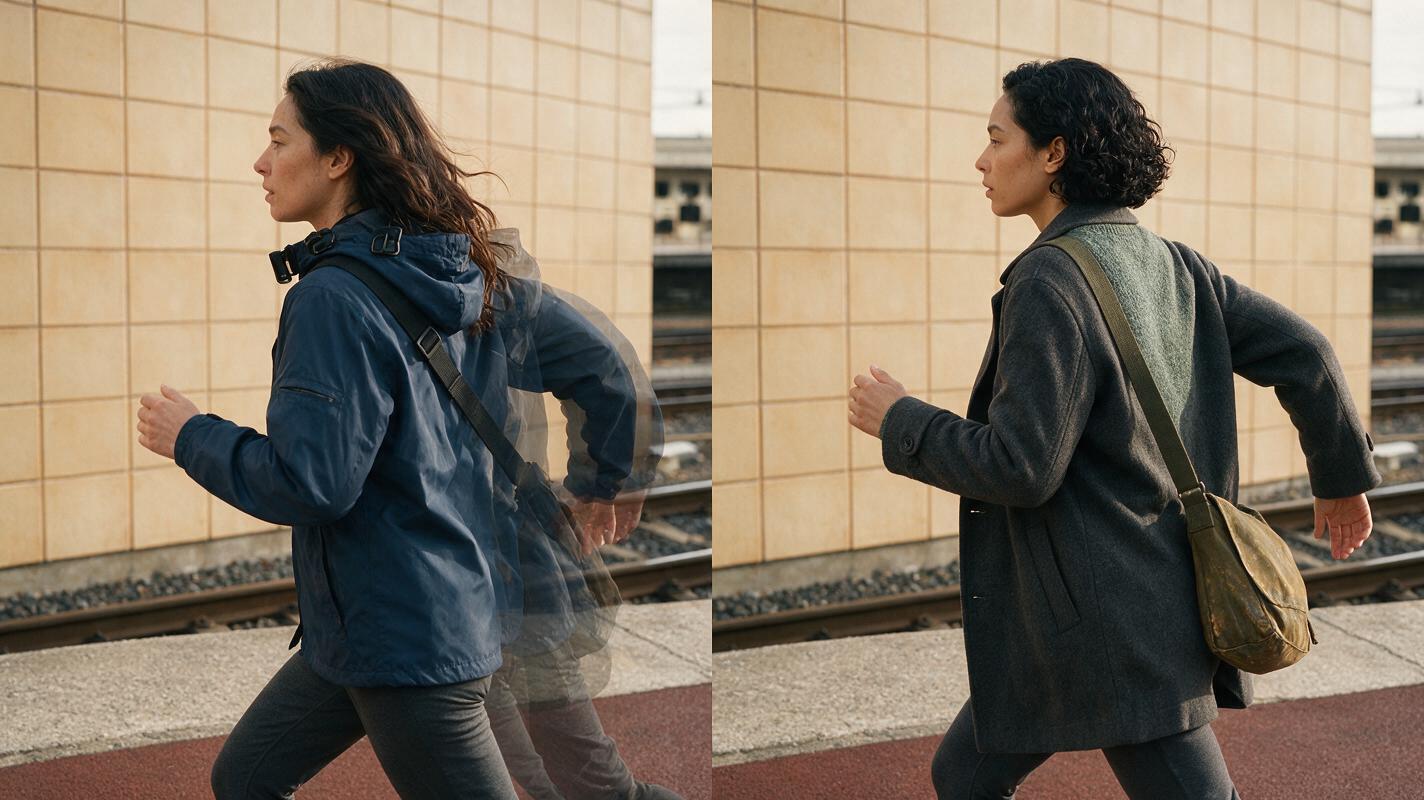
Create a photorealistic side-by-side continuity comparison in a railway station. Both halves show one woman running past the same tiled platform wall. On the left, deliberately show continuity failure: altered facial structure, longer hair, a blue jacket replacing the charcoal coat, shoulder bag on the wrong side, and an accidental partial duplicate behind her. On the right, show corrected continuity: the exact same woman as the supplied reference, short wavy black hair, charcoal wool coat, muted green sweater, weathered tan bag on the locked shoulder, clean natural anatomy, and no duplicate. MANDATORY CAMERA: identical eye-level true three-quarter tracking view on both halves, 50mm documentary-film perspective. MANDATORY LAYOUT: equal vertical split within a landscape 16:9 frame. Matching late-afternoon light, station background, pose, and motion direction. No text, labels, logos, interface elements, or brand marks.Generate short units around one action change. Do not ask a single clip to cover recognition, running, obstruction, and arrival. Long compound prompts increase the chance that the character, location, or action state will mutate before the required endpoint.
A controlled motion prompt should distinguish fixed elements from changing elements:
Use the supplied character and station frame as the visual reference.

FIXED:
The woman's facial identity, short wavy black hair, charcoal wool coat, green sweater, dark trousers, tan shoulder bag on her locked shoulder, late-afternoon station lighting, tiled wall, and left-to-right screen direction.

ACTION:
She notices something ahead, tightens her grip on the bag strap, and accelerates through the frame. Commuters move naturally without blocking or duplicating her.

CAMERA:
Eye-level medium tracking shot, steady lateral movement, natural motion blur, no orbit, no direction reversal.

END FRAME:
She exits frame right beside the platform map.

AVOID:
Face drift, wardrobe changes, bag switching shoulders, extra limbs, character duplication, crowd fusion, sudden weather changes, camera crossing the movement axis.
Render the two lanes separately, but retain their paired storyboard IDs in filenames or edit notes. This prevents a strong-looking suitcase insert from being placed beside the wrong Mina action.
Before rendering the full sequence, test one recognition pair, one escalation pair, and the convergence pair. If the character, object, and timing survive those three stress points, try for free with the remaining storyboard frames and assemble the complete passage.
Step 5 — Use picture and sound to prove simultaneity
Begin with fewer, longer cuts so viewers can learn both locations. Shorten the alternation only after the relationship is clear. A rapid opening can create energy, but it may also make the audience assume the shots are a montage rather than simultaneous events.
Sound can connect lanes even before the image cuts. Let the station announcement begin over the suitcase insert, or carry the pulsing tone under Mina’s run. This technique preserves spatial separation while signaling shared time.
- Use one recurring sound from each lane.
- Carry selected sounds across cuts instead of restarting the entire ambience.
- Increase urgency through rhythm, not merely loudness.
- Reserve silence for a meaningful interruption, such as the pulse stopping.
- Confirm that the final convergence resolves the visual and sonic patterns together.
Watch the rough cut once without sound. You should still understand who is moving, where the object is, and which event causes the payoff. Then listen without looking. The sound progression should imply increasing proximity and urgency rather than two unrelated audio beds.
Final checklist
- Both action lanes are divided into the same shared story beats.
- Every cut adds information, contrast, or causal pressure.
- The recurring character and story-critical object have locked references.
- Storyboard pairs share compatible light, direction, and continuity states.
- Each generated clip performs one principal action change.
- Entry and exit frames connect to neighboring clips.
- The cutting rhythm accelerates only after simultaneity is established.
- Sound bridges reinforce shared time without erasing location differences.
- The convergence shot visibly resolves both lanes.
FAQ
How do I show that two AI-generated scenes happen at the same time?
Establish each location clearly, then connect the scenes with synchronized actions, recurring sounds, matched visual motifs, or a shared time reference. The relationship should be understandable before the cutting becomes fast.
Should both sides of parallel action have the same number of shots?
No. They need synchronized story beats, not equal screen time. Give more coverage to the lane carrying the most important action while using the other lane to introduce pressure, information, or consequences.
Why does intercut AI footage often feel like a montage?
The clips may share a theme without sharing cause and effect. A beat map fixes this by assigning both lanes to common intervals and recording how each cut changes the audience’s understanding of the same unfolding event.
Can text-to-video clips be used instead of reference frames?
They can, but reference-led generation is generally easier to control when character identity, wardrobe, object condition, location, and screen direction must survive several cuts. Generate and approve the key frames before adding motion.
What is the best way to repair a confusing parallel sequence?
Return to the earliest cut where simultaneity becomes uncertain. Add an establishing frame, repeat a shared visual or sound cue, or replace a decorative insert with a shot that communicates timing, location, or consequence.
Sources
Keywords
script to video AI, AI storyboard generator, create AI video from script, how to make an AI video from a script, direct an AI short film, AI story video generator, AI clip maker