How to Create a Seamless AI Video Loop With Image to Video
Create a seamless AI video loop by starting with a loop-friendly still, limiting the scene to cyclical motion, and prompting the final moment to return to the opening composition. This tutorial shows how to generate, compare, trim, and repair looping clips with MagicBoat’s image-to-video models.
Table of contents
The fastest way to make an AI video loop
TL;DR: Start with a still image containing one or two naturally repeating motions, animate it through image to video, and tell the model to return every moving element to its opening position before the clip ends. Generate several short candidates, then trim at the pair of frames with the closest composition rather than automatically joining the exported first and last frames.
The most reliable loops are visually restrained. Steam can curl and settle, a hanging lamp can swing out and back, or rain can ripple across a puddle. A character walking across the frame, an object transforming, or a camera continuously pushing forward has no natural route back to its starting state.
Why AI-generated loops often jump at the seam
An ordinary video prompt describes what happens next. A loop prompt must also describe how the shot returns. Without that second instruction, a model keeps inventing forward motion until the final frame.
The resulting seam usually fails in one of four recognizable ways:
- Position mismatch: a curtain, hand, cup, or character ends somewhere different from where it began.
- Camera drift: a subtle push-in accumulates across the clip, so the final frame has a different crop.
- Lighting drift: highlights brighten, shadows move, or the color temperature changes.
- Structural mutation: small objects, lettering, fingers, or background details change shape during the motion.
A prompt saying only “make this loop seamlessly” rarely solves all four problems. The model needs a closed motion path, a protected camera, and explicit instructions about which parts of the reference must remain unchanged.
Three ways to build a seamless AI video loop
- Natural cycle: animate motion that already repeats, such as steam, breathing, blinking, swaying fabric, rotating fans, or reflected light.
- Return-to-start performance: describe an action with an outward phase and a return phase, such as looking left and then facing forward again.
- Boomerang loop: play a generated clip forward and then backward. This guarantees positional continuity but reverses physics, which can look wrong with smoke, splashes, speech, or walking.
This tutorial focuses on the natural-cycle method because it produces forward-moving time without an obvious reversal. The return-to-start and boomerang approaches are covered as alternatives.
How MagicBoat handles a multi-model looping workflow
MagicBoat brings multiple generation models into one ai video workflow, so you can test the same anchor image and motion plan with models such as Seedance and Kling from one account. That matters for looping shots because a prompt that produces attractive motion in one model may preserve the opening composition more accurately in another.
| Workflow stage | Recommended capability | What to evaluate |
|---|---|---|
| Anchor creation | Seedream, Flux, or GPT Image | Clear geometry, stable lighting, limited moving elements |
| Loop animation | Seedance or Kling | Motion path, camera stability, final-frame similarity |
| Alternative exploration | Text to video | Fast concept testing before creating a precise anchor |
| Performance-driven loop | Motion transfer | Repeatable body movement with a controlled starting pose |
Do not choose the winner from a single attractive frame. Scrub the complete clip, then compare the opening region with several frames near the end.
Step 1 — Design a loop-friendly anchor image
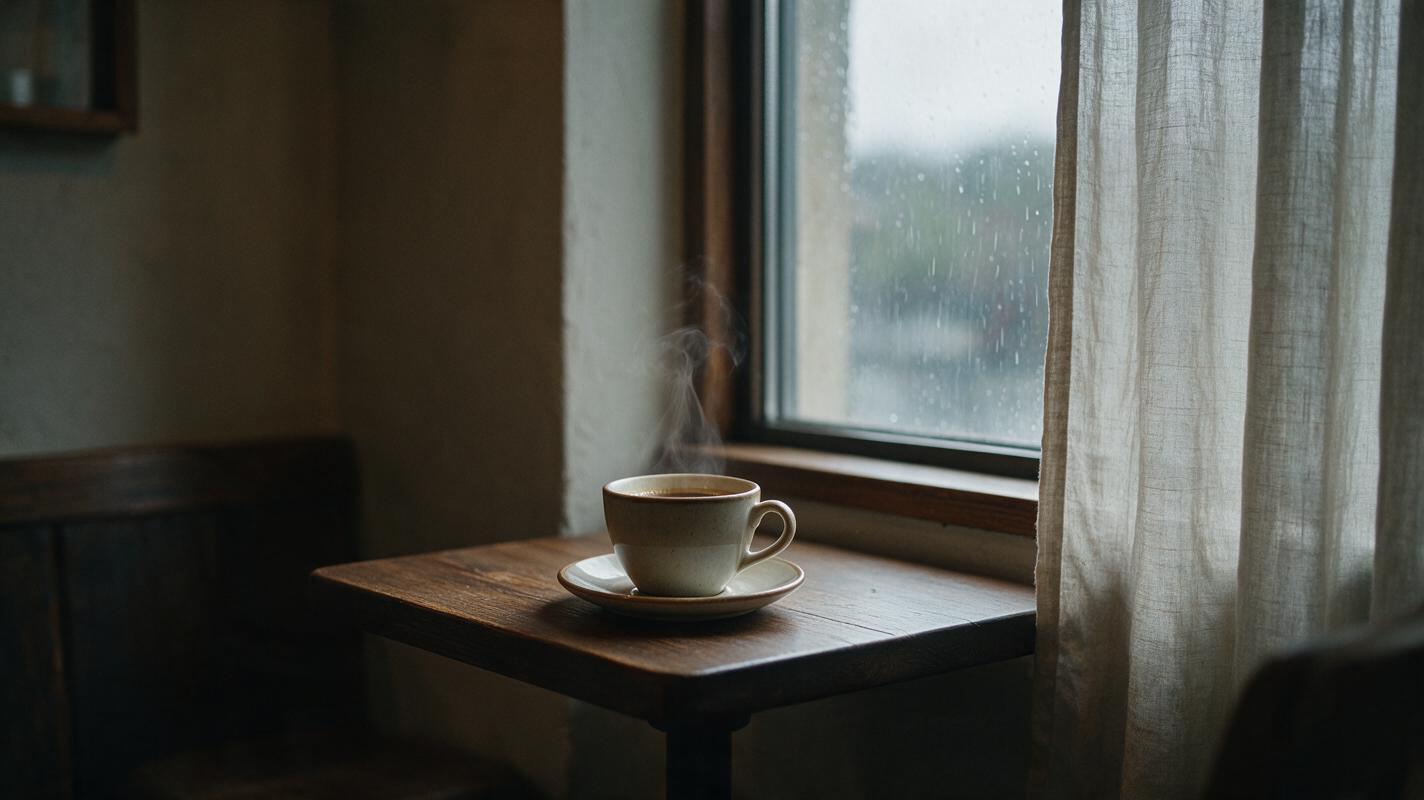
Build a scene in which the permanent elements are visually strong and the animated elements are easy to isolate. For this example, use a quiet café table with a steaming cup, a lightly moving curtain, and rain outside the window. The table, cup, saucer, window frame, and camera remain fixed; only steam, fabric, and rain move.
Avoid readable packaging, crowds, complicated hand poses, mirrors, and dozens of small props. Each additional detail gives the video model another opportunity to mutate the scene.
Reusable visual prompt:
Photorealistic cinematic editorial photograph of a quiet lived-in corner café on a rainy morning, one ceramic coffee cup and saucer centered on a small dark wooden table beside a tall window, thin natural steam rising from the coffee, a pale linen curtain resting near the window, soft rain visible outside, muted warm interior light balanced with cool overcast daylight, realistic wood grain and ceramic texture, no people, no text, no logos. MANDATORY CAMERA: locked eye-level medium-wide shot, camera directly facing the table from a slight front-right three-quarter angle, 50mm lens look, no dutch angle, no motion blur. MANDATORY LAYOUT: landscape 16:9, cup fully visible in the lower center, curtain on the right third, window frame vertical and undistorted, generous stable negative space around the steam.Expected result: a realistic 16:9 anchor with a clear subject, fixed architectural lines, and three plausible sources of low-amplitude motion.
Step 2 — Separate protected structure from allowed motion
Before writing the video prompt, divide the image into two mental lists. This prevents a common prompt-engineering mistake: requesting atmosphere without specifying what must stay still.
| Protected structure | Allowed motion |
|---|---|
| Cup and saucer shape | Steam curls upward and reforms |
| Table edges and wood grain | Curtain moves outward and settles back |
| Window geometry | Rain runs down the exterior glass |
| Framing, focus, and exposure | Very slight fluctuation in reflected daylight |
Use concrete motion verbs. “Atmospheric movement” is ambiguous; “the curtain moves five centimeters inward and returns to rest” gives the model a bounded path. Likewise, “cinematic camera” may introduce an unwanted push or orbit. For a loop, request a locked camera directly.
Keep the number of major motions low. Steam, curtain movement, and rain are already enough for this shot. Adding a spoon that rotates, a chair that moves, and flickering lights makes the closing state much harder to recover.
Step 3 — Plan motion as a closed cycle
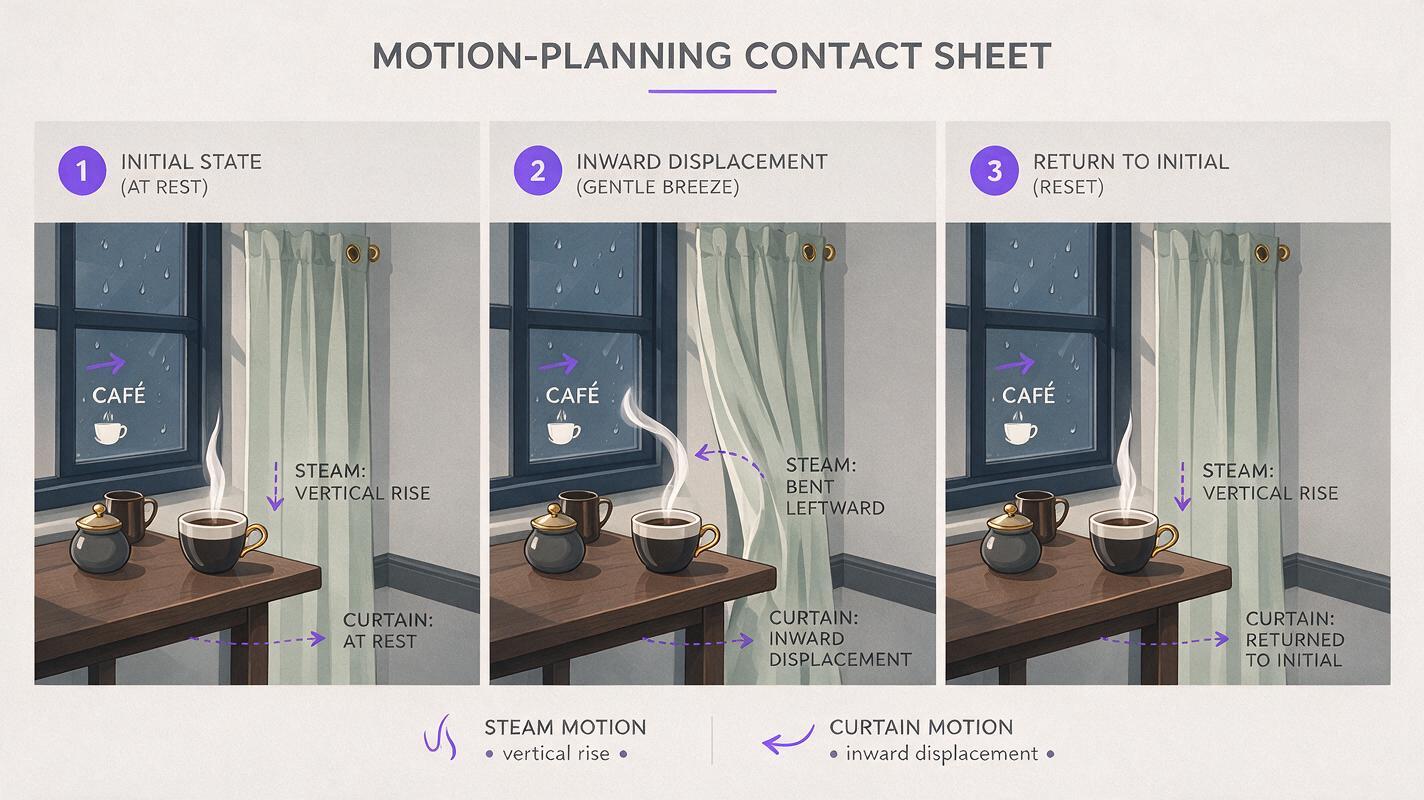
Write the shot as three phases: opening state, outward motion, return state. The return should occupy the final portion of the clip rather than being squeezed into the last instant.
For the café shot, the motion map is:
- The curtain begins nearly still while a narrow strand of steam rises.
- A soft draft moves the curtain inward as the steam bends gently left.
- The draft fades; the curtain returns to its exact resting position and the steam reforms into a narrow vertical strand.
Reusable visual prompt:
Create a clean cinematic three-frame motion-planning contact sheet for one photorealistic rainy café shot. Left panel labeled by visual sequence only: ceramic coffee cup on a dark wooden table, narrow vertical steam strand, pale curtain at rest. Center panel: the same exact camera and objects, curtain gently displaced inward, steam bending left. Right panel: the curtain returned to its original resting position and the steam returned to a narrow vertical strand. MANDATORY CAMERA: identical locked eye-level front-right three-quarter view in all three panels, 50mm lens look, no zoom, no crop change. MANDATORY LAYOUT: landscape 16:9 contact sheet with three equal horizontal panels, consistent window geometry, lighting, cup shape, and table position; thin neutral dividers; no software interface, no logos, no decorative technology graphics.Expected result: a practical motion map showing that the middle can change while the beginning and ending compositions remain equivalent.
Step 4 — Generate short candidates with Seedance and Kling prompts
Upload the anchor image as the visual reference and keep the first test short. Short clips reduce cumulative camera and structure drift. Use the same motion plan in both models before changing the wording; otherwise, you will not know whether the model or the prompt caused the difference.
Seedance prompt
Locked-camera cinematic café shot. A soft breeze gently moves the pale linen curtain inward, then the curtain slowly returns to its exact starting position before the shot ends. The coffee steam bends slightly left with the breeze, then reforms into the same narrow vertical strand seen at the beginning. Rain continues softly outside the window. Preserve the exact cup, saucer, table, window geometry, composition, focus, exposure, and color throughout. No camera movement, no zoom, no reframing, no new objects, no object deformation. The final moment visually matches the opening moment for a seamless continuous loop.Kling prompt
Animate only the steam, curtain, and exterior rain. Begin with the curtain at rest and the steam rising vertically. A gentle draft moves the curtain a small distance inward and bends the steam left. The movement slows naturally, then both return to their precise opening positions and shapes before the final frame. Static cup and saucer, static table, static window frame, locked tripod camera, constant lighting, constant focus, realistic restrained motion. End in the same composition as the first frame. Do not pan, tilt, push in, orbit, crop, flicker, morph, or add objects.These prompts use different wording but the same closed motion logic. Generate multiple candidates rather than repeatedly extending one imperfect clip. An extension can preserve the story while increasing the positional distance from the original frame.
Expected result: several clips with similar atmosphere but different seam quality. Favor the clip with the most stable geometry even if another candidate has more dramatic motion.
Step 5 — Test the seam and repair only what breaks
Place a candidate on a timeline twice in succession or preview it repeatedly. Watch the transition, then inspect the frames around it. The best cut point may occur before the exported final frame.
Look for the following in order:
- Global framing: do the window and table edges jump?
- Primary object: does the cup change width, rim shape, or position?
- Motion phase: does the curtain reverse or teleport?
- Light and texture: does brightness pulse at the join?
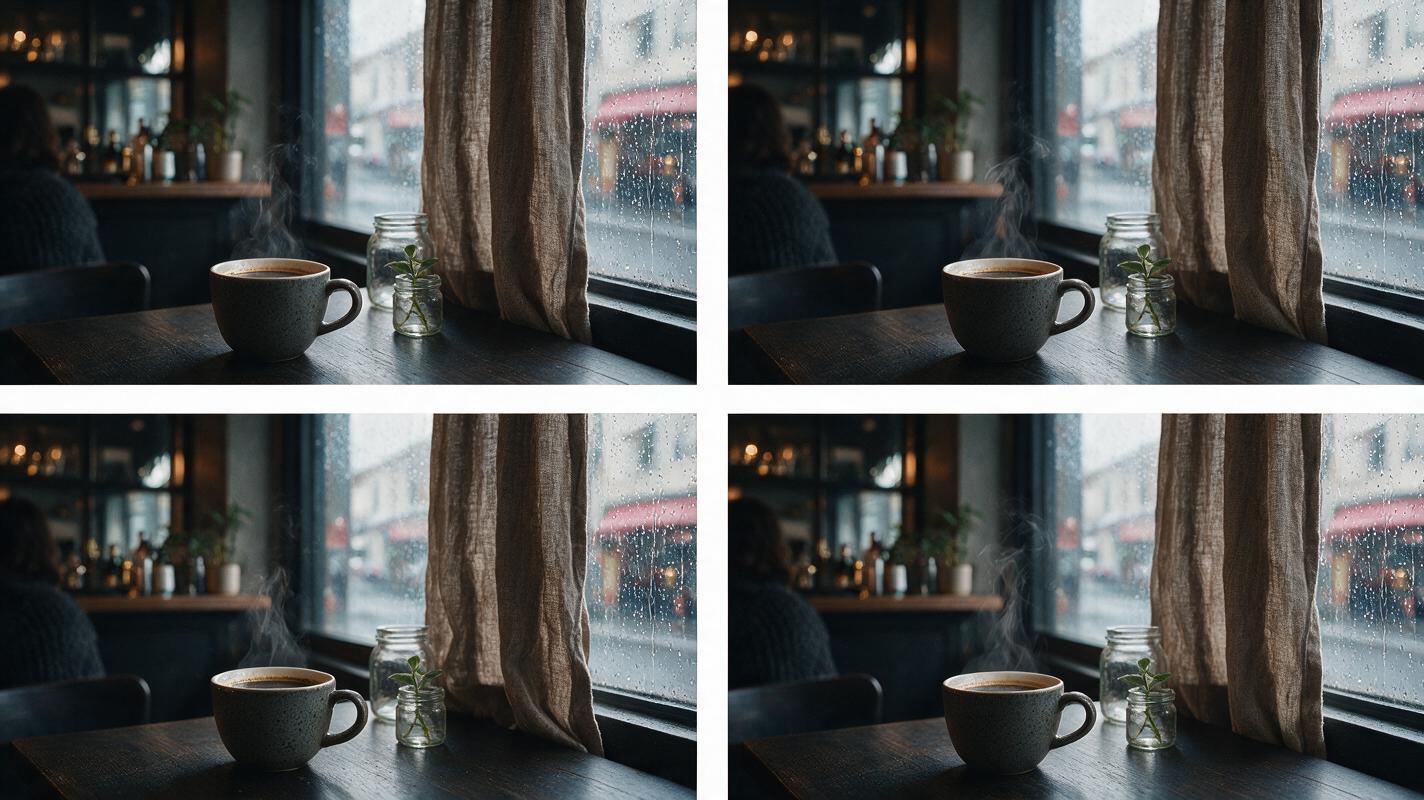
If the architecture jumps, regenerate with stronger locked-camera language. If only the curtain misses its resting position, reduce its travel distance. If the seam is structurally clean but the steam pops, trim at a frame where the steam silhouettes are closest or hide the join with a very short dissolve.
Reusable visual prompt:
Photorealistic editorial before-and-after comparison of the same rainy café loop seam, displayed as two equal side-by-side frame pairs. Left comparison shows a failed seam: identical café composition but the curtain jumps position, the coffee cup subtly changes width, and the window crop shifts between adjacent frames. Right comparison shows a corrected seam: cup, table, window, curtain resting position, steam direction, lighting, and crop match across adjacent frames. MANDATORY CAMERA: locked eye-level front-right three-quarter view, identical 50mm perspective in every frame. MANDATORY LAYOUT: landscape 16:9, four evenly sized frames arranged as two clearly separated pairs, realistic photographic frames only, no app interface, no logos, no abstract graphics.Expected result: the corrected pair should look almost like duplicate stills while retaining enough ongoing motion to avoid a frozen pause.
Step 6 — Export without introducing a new discontinuity
Trim the clip to the closest matching frame pair and remove any duplicate boundary frame. If the last visible frame and the first visible frame are identical, displaying both can create a tiny pause on every repetition.
Use a hard cut when moving shapes already align. A short dissolve can disguise steam or lighting differences, but it may create a ghosted curtain or doubled cup edge. Treat a dissolve as a finishing tool, not a substitute for matching composition.
Preview at least several repetitions. The first replay may feel acceptable because the scene is new to the viewer; repeated playback makes a small brightness pulse or camera jump much easier to notice.
A successful loop does not need mathematically identical pixels. It needs continuous composition, compatible motion direction, and no detail that calls attention to the join.
Keep the same loop language across projects
Save a reusable prompt block containing the continuity constraints, then replace only the subject-specific motion:
[OPENING STATE].
[MOVING ELEMENT] performs one small, smooth cycle.
It returns to its precise opening position and appearance before the shot ends.
Preserve [PROTECTED OBJECTS], framing, geometry, lighting, focus, and color.
Locked tripod camera. No zoom, pan, tilt, orbit, reframing, flicker, morphing, or new objects.
The ending composition matches the opening composition for continuous playback.
This structure works for candle flames, swaying plants, breathing portraits, rotating signs, blinking neon, reflected water, and gently shifting clothing. Change the scale and timing of the motion, but keep the protected structure explicit.
Alternative: use motion transfer for a repeatable performance
For a character loop, record or select a source performance that begins and ends in the same neutral pose. A simple shoulder roll, weight shift, or two-beat dance move is easier to loop than walking into or out of frame.
Keep the performer fully visible and avoid crossed limbs at the seam. Motion transfer can reproduce the cycle, but it cannot make mismatched source poses identical. The source clip itself should already have a clean closed path.
Alternative: build a boomerang loop
If the scene contains reversible movement, duplicate the clip and reverse the second copy. Remove one duplicated frame at the turnaround point. This works well for a head turn, a curtain sway, a camera orbit that stops cleanly, or an object rising and falling.
Avoid this method for rain, smoke, pouring liquid, breaking objects, lip movement, or human walking. Viewers recognize when gravity, speech, or gait runs backward.
Where this workflow falls short
- Chaotic fluids remain difficult: splashes, flames, and dense smoke rarely recreate the same silhouette.
- Long clips accumulate drift: even subtle changes in crop or object shape become obvious at the seam.
- Complex human action exposes reversals: hands, speech, walking, and clothing may not return cleanly.
- Text and logos can mutate: stable-looking signage in the anchor may shift during animation.
- Perfect pixel matching is not guaranteed: trimming and restrained motion remain important even with a strong prompt.
FAQ
How long should an AI video loop be?
Use the shortest duration that allows the motion to leave and naturally return to its starting state. Short loops usually preserve structure better and are easier to inspect.
Should I use text to video or image to video?
Use image to video when composition and object identity matter. Text to video is useful for exploring loop concepts, but the opening and closing geometry is harder to control without an anchor image.
Does the last frame need to be identical to the first?
No. It needs to be visually compatible. Fine steam, rain, grain, and subtle reflections can differ if stable edges, lighting, and motion direction remain continuous.
Why does my loop pause at the seam?
You may have retained the same pose for too many final frames or repeated an identical boundary frame. Trim the hold and remove one duplicate frame.
Can I loop a talking character?
Yes, but loop a complete phrase with a matching neutral mouth pose at both ends. Facial motion, blinking, and audio timing make talking loops harder than atmospheric shots.
Which model should I use?
Test the same reference and motion plan in more than one model. Select the output with the most stable framing and structure, not simply the most energetic animation.
Final checklist
- Choose a scene with one or two naturally cyclical motions.
- Protect camera position, lighting, geometry, and primary objects.
- Describe an opening state, outward phase, and return state.
- Generate several short candidates in Seedance or Kling.
- Compare frames near the end instead of trusting the exported endpoint.
- Trim duplicate frames and use dissolves only for minor atmospheric differences.
- Preview several repetitions before publishing.
Ready to test the closed-cycle prompt? Create your first seamless image to video loop free with MagicBoat.
Keywords
image to video, AI video loop, seamless video loop, AI video tutorial, Seedance prompts, Kling prompts, prompt engineering