How to Create Stable Crowd Scenes With Image to Video AI
Stable AI crowd scenes come from designing the cast as visual layers instead of asking a model to invent many equally important people at once. Build one controlled staging frame, separate the hero from near and background extras, then use restrained image-to-video motion and regenerate structural failures rather than trying to repair them afterward.
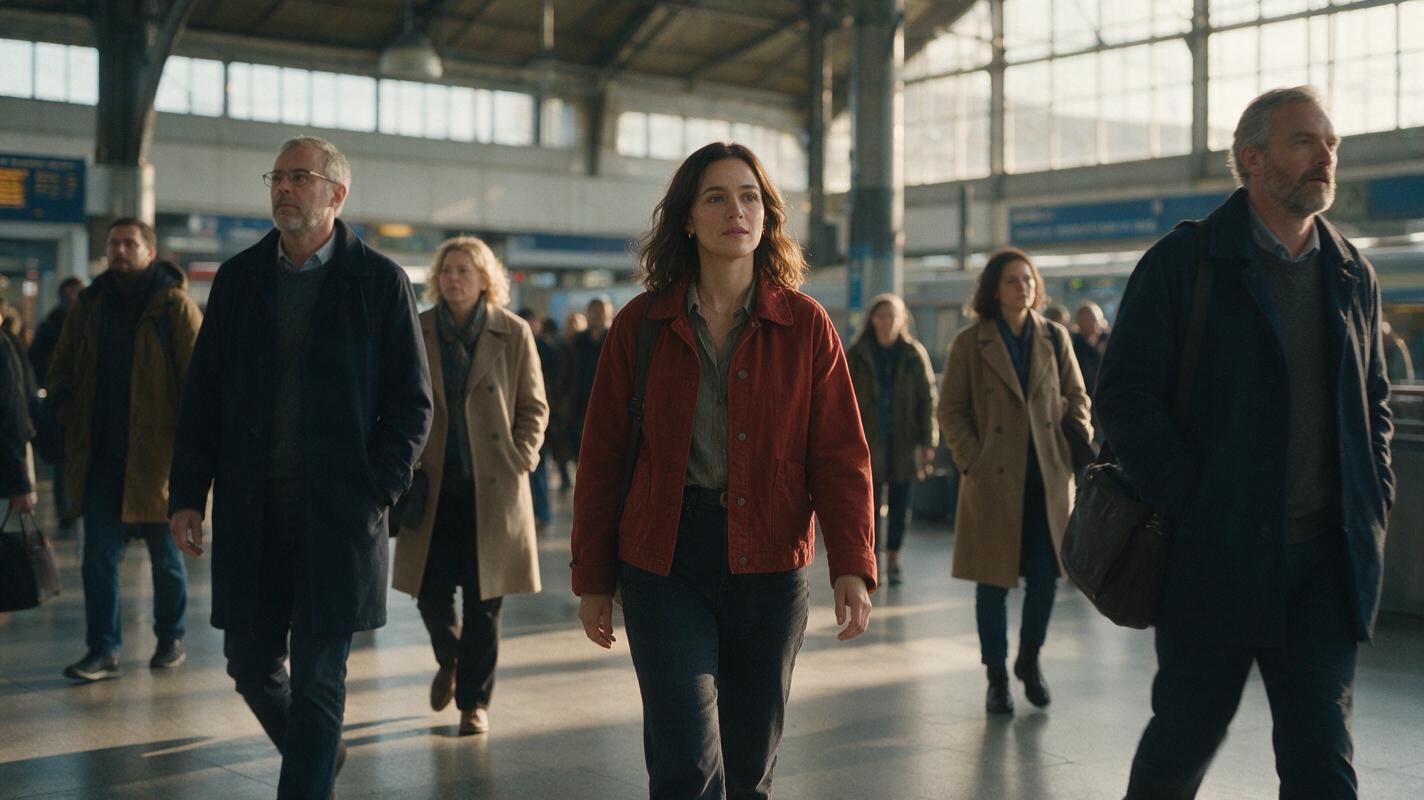
Table of contents
TL;DR
The fastest way to create a believable crowd is to generate a carefully staged still frame first, then animate only a few motion layers.
For a stable crowd scene, use image to video rather than asking text-to-video AI to invent the location, cast, identities, poses, and movement simultaneously. Give one hero visual priority, limit nearby extras to distinct silhouettes, reduce distant people to background texture, and keep the first animation pass restrained.
Why AI crowd scenes produce duplicate people
A prompt such as “a busy station full of commuters” sounds clear to a person, but it leaves a video model with dozens of unresolved decisions. The model must decide how many people exist, where every body begins and ends, which limbs are visible, how everyone moves, and whether a person crossing behind another should remain the same person afterward.
Common failures include:
- Duplicate identities: the same coat, face, or hairstyle appears on several extras.
- Body merging: two people passing each other temporarily share an arm, shoulder, or torso.
- Population flicker: new figures materialize between frames or disappear behind thin objects.
- Hero drift: the main subject’s face changes because the model treats every visible face as equally important.
- Motion conflict: the crowd moves in several directions while the camera also pans, increasing temporal instability.
The practical solution is not a longer descriptive prompt. It is a simpler visual hierarchy.
Three ways to build a more stable crowd
- Reference-first animation: create a populated keyframe with deliberate spacing, then animate it.
- Layered compositing: generate the hero, near extras, and distant crowd as separate visual layers when one-pass generation remains unstable.
- Controlled motion transfer: use a source performance when the scene needs specific group timing rather than loosely generated movement.
This tutorial uses the first method because it offers the best balance of speed, composition control, and repeatability. The alternatives are covered later.
How MagicBoat handles a crowd-focused AI video workflow
MagicBoat lets you try multiple image and video models through one account. A practical workflow is to use Seedream, Flux, or GPT Image for the staging frame, then compare that same frame in Seedance, Kling, or Veo rather than rebuilding the project around one model.
The still image controls population, wardrobe, spacing, and location geometry. The image to video stage adds restrained environmental and human motion. This separation also makes diagnosis easier: if two bodies are already fused in the still, fix the still; if they merge only after animation, simplify the motion prompt or test another video model.
| Production task | Useful model group | Main objective |
|---|---|---|
| Hero reference | Seedream, Flux, GPT Image | Lock face, hair, wardrobe, and proportions |
| Location and staging frame | Seedream, Flux, GPT Image | Control crowd placement and depth |
| Subtle crowd animation | Seedance, Kling, Veo | Preserve the frame while adding motion |
| Targeted correction | Face swap or regenerated keyframe | Repair identity without replacing good motion |
Step 1 — Define one hero and a crowd grammar
Choose one person whose identity must remain recognizable. Everyone else should be described by role, wardrobe family, and silhouette—not by detailed facial biographies. This prevents the prompt from assigning equal visual importance to ten faces.
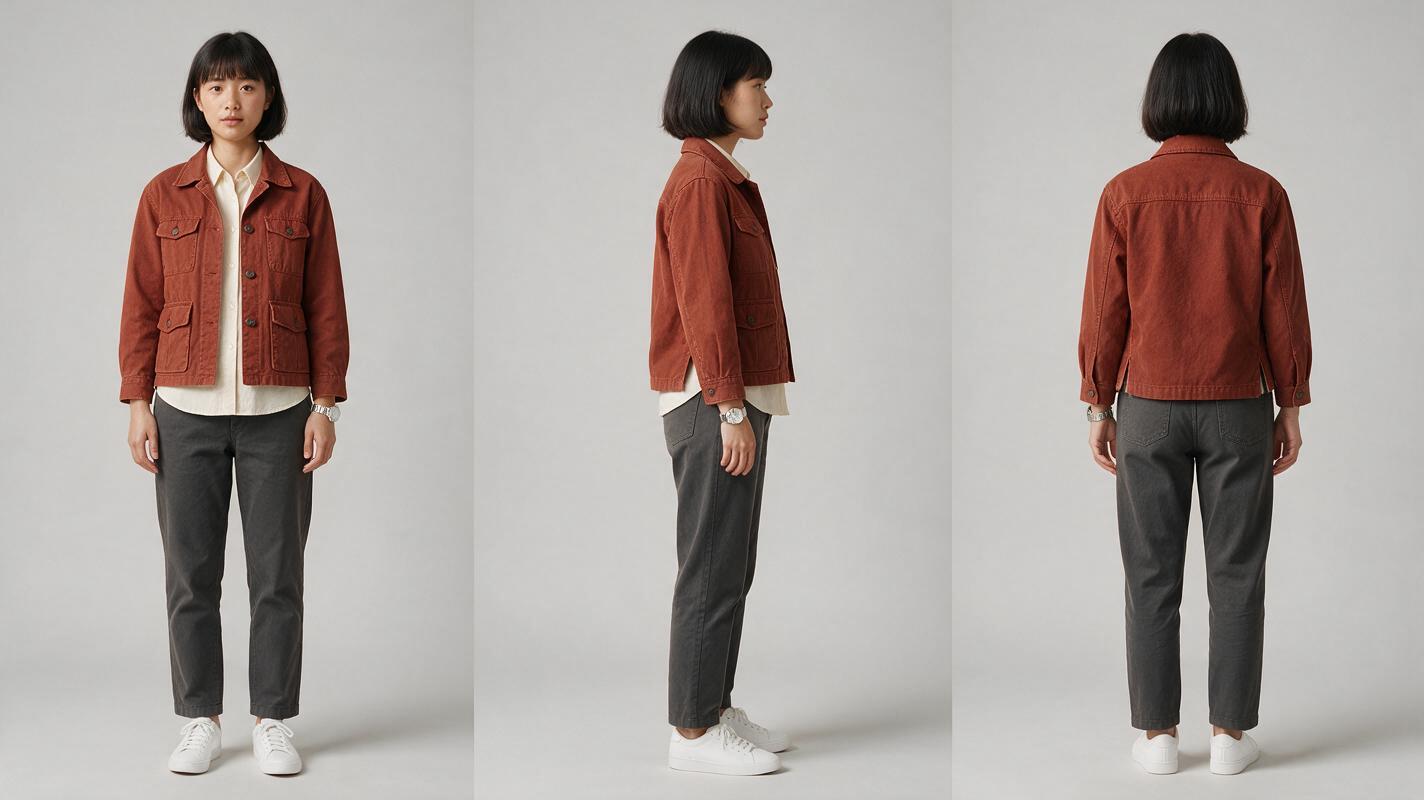
Create a three-view reference sheet for the hero before building the crowd scene. Keep the outfit practical and distinctive: one recognizable jacket, one hairstyle, and one accessory are easier to preserve than intricate fabric patterns.
Photorealistic three-panel character reference sheet of the same 28-year-old East Asian woman in every panel, oval face, straight chin-length black bob with blunt ends, dark brown eyes, rust-red cropped field jacket over a cream crew-neck shirt, charcoal straight-leg trousers, white low-profile sneakers, slim silver wristwatch; full body visible in all panels; left panel front view, center panel exact left-side profile, right panel back view; identical wardrobe, hairstyle, body proportions, and neutral expression across all three views; neutral light-gray seamless studio background; soft even editorial studio lighting; realistic skin and fabric texture; no props, no text, no extra people. MANDATORY CAMERA: eye-level camera, orthographic reference-sheet feeling, equal subject scale in all panels, no wide-angle distortion. MANDATORY LAYOUT: landscape 16:9, three evenly spaced vertical panels, complete figure from head to shoes with clear separation.Expected result: one reusable identity sheet with no pose drama, environmental shadows, or wardrobe variation. If the three panels look like relatives rather than the same person, regenerate before continuing.
Step 2 — Build a location plate with movement lanes
Design the location before adding people. A useful crowd location has visible depth, open walking lanes, and objects that naturally divide the frame. Benches, columns, shopfronts, and floor markings help keep people in separate spatial zones.
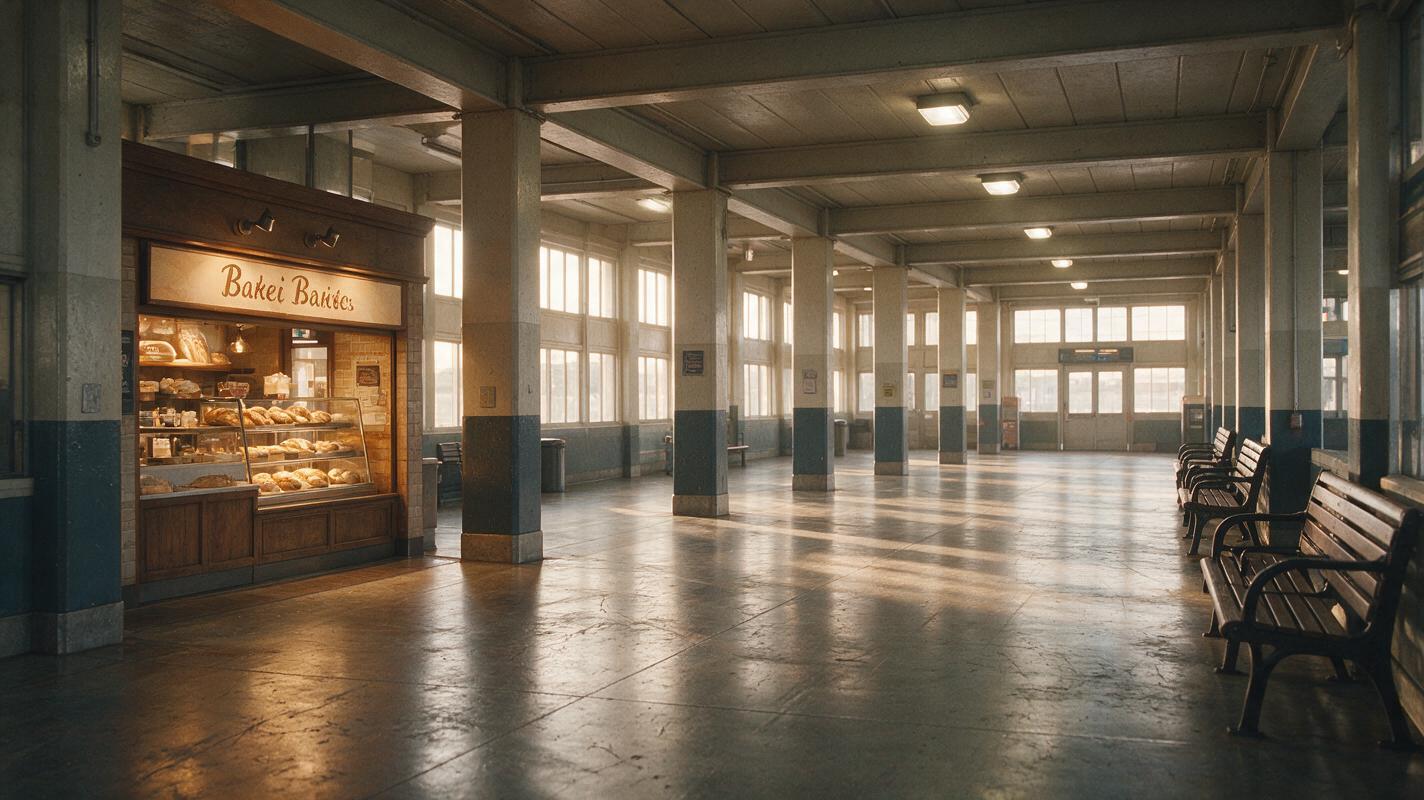
For this example, use a commuter rail concourse with a clear foreground crossing lane, a central hero zone, and a softer background waiting area.
Cinematic editorial-realism photograph of a lived-in urban commuter rail concourse in early morning, polished stone floor with subtle scuffs, warm bakery storefront on the left, timetable boards in the far background without readable text, structural columns creating distinct depth lanes, benches along the right wall, soft overcast daylight entering through tall windows, practical ceiling lights still glowing, realistic reflections and everyday wear, completely empty of people so it can be used as a clean location plate. MANDATORY CAMERA: eye-level true three-quarter view from the front-right side of the concourse, 35mm lens, locked camera, straight vertical lines, moderate depth of field. MANDATORY LAYOUT: landscape 16:9, open central path for the hero, unobstructed foreground crossing lane, deep background area reserved for a soft crowd layer.Expected result: a believable location with three readable depth zones. Avoid locations filled with mirrors, repeating glass panels, or narrow railings; those details can create extra reflections and fragmented bodies during animation.
Step 3 — Compose the populated staging frame
Add the hero and crowd to the location as a single still image. Keep the hero near the center third, use only three or four clearly visible near extras, and describe distant people collectively. Every near extra should have a different color block and orientation.
Do not ask for “twenty unique detailed commuters.” Ask for a few separated foreground figures and a soft, non-prominent background population.
Use the supplied rail-concourse location as the exact environment and the supplied three-view woman as the hero identity. Place the hero in the central middle ground walking toward camera-left, rust-red jacket fully visible, face in three-quarter view. Add four clearly separated near extras: an older man in a navy overcoat walking away on the far left, a young woman in a mustard raincoat standing beside the right bench, a tall man in a gray hoodie crossing in the foreground with his face turned away, and a commuter in a forest-green coat near the bakery. Add a sparse distant crowd of small soft silhouettes behind the columns; no repeated outfits, no identical faces, no touching bodies, no overlapping heads, no twins. Preserve realistic scale by depth and keep open floor visible between near figures. Cinematic editorial realism, natural morning light, restrained color grade. MANDATORY CAMERA: match the location plate exactly, eye level, 35mm lens, locked framing. MANDATORY LAYOUT: landscape 16:9, hero is the only visually dominant face, four near extras occupy separate non-overlapping zones, distant crowd remains secondary.Expected result: a frame that reads as busy without becoming visually congested. Inspect every silhouette at full size. A malformed stationary person will usually become worse once animated.
Step 4 — Animate one motion layer at a time
Start with a short, locked-camera pass. The hero may take two calm steps while near extras make small independent movements. Keep the distant crowd soft and slow. Do not combine walking, waving, luggage handling, camera orbiting, and rapid foreground crossings in the first test.
Seedance-style prompt
Locked-camera cinematic crowd shot. The woman in the rust-red jacket takes two natural steps toward camera-left while maintaining the same face, hair, outfit, and body proportions. The older man continues slowly away from camera. The woman by the bench makes one small weight shift. The gray-hooded foreground commuter crosses smoothly without blocking the hero's face. Distant commuters move subtly and remain soft background figures. Preserve the exact station architecture, population count, clothing colors, and spatial separation from the reference image. Natural walking cadence, stable anatomy, no new people entering, no duplicated figures, no camera movement, no morphing.Kling-style prompt
Locked 35mm station shot. Hero in rust-red jacket walks two calm steps left, identity and outfit unchanged. Four separated near commuters make minimal natural movements; distant crowd moves slowly. Preserve every person's position, scale, and clothing color. No new people, no twins, no body merging, no camera movement.Expected result: a restrained clip in which the original composition remains recognizable. Run the same staging frame through more than one model before rewriting everything; crowd stability can differ by scene, occlusion pattern, and requested motion.
Step 5 — Audit duplication, anatomy, and motion
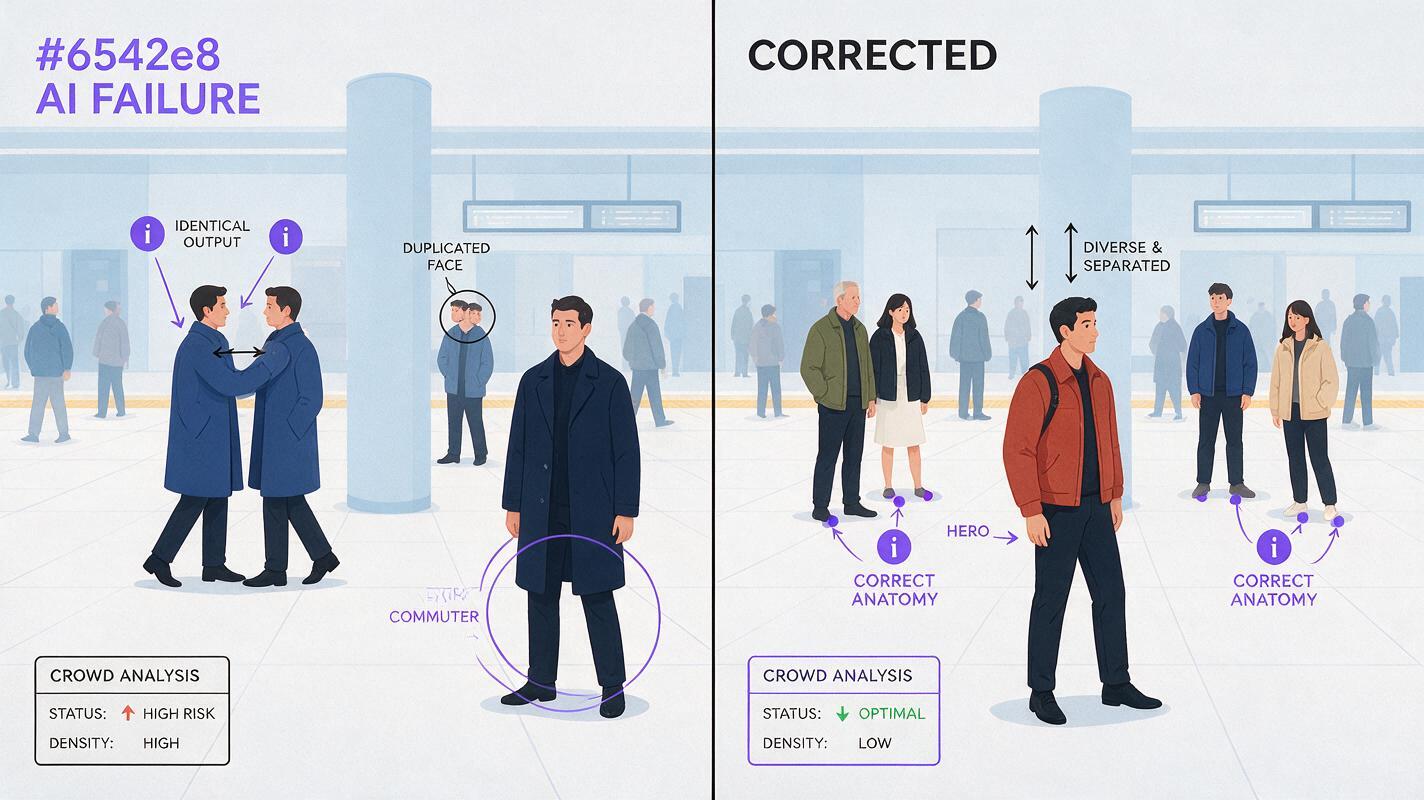
Review the clip in three passes. First, ignore the hero and count visible people from beginning to end. Second, inspect the hero’s eyes, jaw, hairline, and jacket. Third, pause at every occlusion—especially where one person crosses behind another or exits the frame.
Two-panel photorealistic film-frame comparison of the same commuter concourse and camera angle; left panel shows a failed AI crowd with two identical navy-coated men, one merged shoulder, a duplicated face in the background, and a commuter appearing from nowhere; right panel shows the corrected scene with one rust-red-jacket hero, four clearly separated near commuters in different clothing colors, stable anatomy, open floor gaps, and a sparse soft background crowd; realistic early-morning station light and consistent architecture. MANDATORY CAMERA: eye-level locked 35mm view, identical framing in both panels. MANDATORY LAYOUT: landscape 16:9 split evenly into left failure and right correction, no interface, no logos, no decorative graphics, defects visible but non-grotesque.| Failure | Best response | Why |
|---|---|---|
| Hero face drifts, motion is good | Apply a targeted face swap | Preserves the successful performance |
| Two bodies merge | Reduce crossing motion or regenerate | Face repair cannot restore body geometry |
| Extra person appears | Strengthen population and entry constraints | The error is temporal, not cosmetic |
| Background flickers | Reduce background motion or soften depth | Fine distant figures are difficult to track |
| Entire frame warps | Test a different model with the same input | The reference frame may be sound |
Expected result: a clip with constant population, readable separation, and no distracting identity duplication. Regenerate structural failures; reserve post-processing for localized identity problems.
Keep the same crowd language across projects
Save a compact “crowd grammar” beside your hero reference and location plates. Record the wardrobe palette, maximum number of near extras, preferred camera height, movement direction, and depth structure. Reusing that grammar produces a recognizable visual world even when every background extra is not literally identical.
- Hero: one protected identity and one signature color.
- Near extras: three to five separated silhouettes with distinct color blocks.
- Background: soft, sparse, and non-prominent.
- Camera: locked until body motion is stable.
- Occlusion rule: no more than one important crossing action per shot.
Alternative: use layered generation for denser scenes
If a single staging frame cannot hold a larger crowd, generate the clean location, hero, near extras, and distant population separately. Composite those elements into one keyframe before animation. This takes more preparation but gives you independent control over scale and overlap.
Keep lighting direction and camera perspective identical in every layer. A foreground figure photographed from eye level will not blend convincingly into a plate generated from a high-angle view.
Alternative: use motion transfer for exact group timing
Use motion transfer when people must perform synchronized choreography, coordinated exercise, or a precisely timed entrance. Record or source a clean performance with full bodies visible, stable framing, and limited occlusion. The source should already contain the spacing and timing you want; motion transfer cannot reliably invent missing limbs hidden behind other performers.
Alternative: replace hero drift with face swap
Face swap is useful when the hero’s body motion, lighting, and wardrobe are correct but facial identity changes. Use a clean reference with a similar angle and expression. Do not use it to fix duplicated bodies, incorrect head direction, severe blur, or a face hidden behind another person.
Where this workflow falls short
Very dense crowds remain difficult because small faces and limbs provide limited visual information. Fast handheld cameras also amplify identity and population drift. Reflections, umbrellas, flags, bicycles, and rolling luggage introduce more intersections that a model must track through time.
A stable keyframe improves the odds but does not guarantee temporally perfect results. For shots requiring exact recurring extras, generate them as separate characters or film separate motion layers rather than treating them as an anonymous crowd.
FAQ
How many people should I include in the first crowd test?
Begin with one hero, three or four readable near extras, and a soft background population. Increase density only after that structure animates reliably.
Should every extra have a detailed character prompt?
No. Detailed identity descriptions for every person compete for attention. Define near extras by silhouette, clothing color, orientation, and position; reserve detailed identity anchors for recurring characters.
Is text to video suitable for crowd scenes?
It can work for exploratory shots where exact population and identity do not matter. For repeatable composition, a reference-first image-to-video workflow gives you more control over spacing and hierarchy.
Why do people appear when the camera moves?
Camera movement reveals new image areas that the model must synthesize. It may populate those areas inconsistently. Start with a locked camera, then test a slow push or pan only after body motion is stable.
Can face swap remove duplicated people?
No. It can correct a visible face, but duplicate bodies and merged silhouettes require regeneration, compositing, or simpler staging.
Which model should I use?
There is no universal winner for every crowd layout. Keep the staging frame and prompt fixed, compare available models, and judge population count, occlusion handling, hero identity, and architectural stability.
Final checklist
- Create a neutral three-view reference for the hero.
- Build the location with clear foreground, middle-ground, and background lanes.
- Limit detailed near extras and give each a distinct silhouette.
- Check the populated still for fused anatomy before animation.
- Animate one main action with a locked camera first.
- Count people at the beginning, middle, and end of the clip.
- Regenerate body failures; use face swap only for localized identity drift.
Ready to test the layered-crowd method? Create your first ai video free with MagicBoat and compare the same reference frame across multiple models.
Keywords
image to video, AI crowd scenes, AI video workflow, character consistency, Seedance prompts, Kling prompts, prompt engineering