How to Stop an AI Video Character From Duplicating in Crowd Scenes
Crowd scenes can produce an unwanted second copy of a recurring character, especially when background faces share the lead’s defining features. This tutorial shows how to separate the lead from the crowd in reference images, scene prompts, and cut-point checks.

Table of contents
One lead character, not two
A busy platform should make your lead feel surrounded—not make her appear twice. The most reliable way to prevent duplication is to define the lead separately, give background people different visual traits, and approve a crowded still before animating it.
This guide follows Noor, a fictional traveler crossing a commuter-train platform. She has short dark curls, a small notch in her left eyebrow, an ochre wool coat, and a teal scarf. Those details identify Noor; they must not migrate to an extra behind her. If you are building the references from scratch, begin with an ai image generator and retain the approved files rather than recreating her from memory for each shot.
Cover recreation prompt:
Photorealistic editorial film still of one adult woman with short dark curls, a small notch in her left eyebrow, an ochre wool coat, and a teal scarf standing near the center of a lived-in commuter-train platform; several commuters around her wear visibly different colors and hairstyles; worn floor tiles, soft morning light, believable depth and restrained cinematic color; MANDATORY CAMERA: eye-level medium-wide view, 35 mm perspective, landscape 16:9; exactly one person with the woman's identifying features; no readable text, logos, screens, or interface elements.Step 1 — Lock the lead before adding anyone else
Create a character reference that shows Noor alone. Use the same hairstyle, eyebrow notch, coat, and scarf in front, side, and back views. The side view helps establish her profile; the back view preserves her outline when she walks away. Approve one sheet and keep it unchanged throughout the sequence.
Character sheet template: record the character’s apparent age range, facial structure, distinctive facial marker, hair silhouette, outerwear, accessory, and features that must never appear on an extra. For Noor, the teal scarf and ochre coat are reserved for her. Give background commuters separate clothing palettes; a prompt that simply asks for “people dressed like the reference” invites accidental copies.
Visual recreation prompt — lead character sheet:
Photorealistic three-panel character reference sheet of the SAME fictional adult woman in front, true side-profile, and back views; short dark curls, small notch in her left eyebrow, ochre wool coat, teal scarf, consistent proportions and clothing construction in every panel; neutral light-gray seamless studio background, soft even light; MANDATORY CAMERA: fixed eye-level full-body framing in all three panels, front view at left, true side-profile at center, back view at right, landscape 16:9; no other people, labels, text, logos, or interface elements.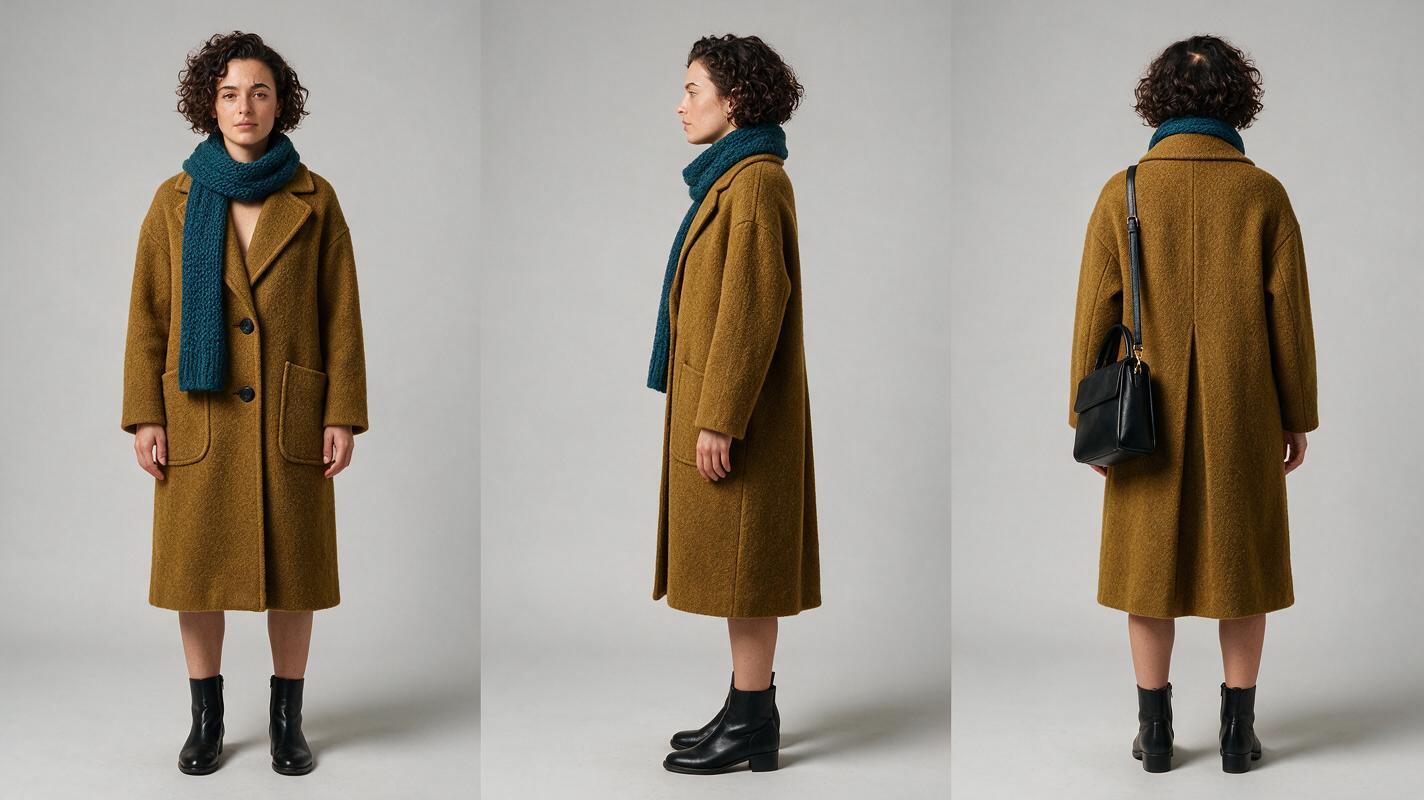
Step 2 — Design the crowd as separate entities
Before introducing Noor, establish the platform and its occupants. Place extras in specific zones: a commuter in a navy jacket near the left pillar, a person with a cream tote in the distant center, and a traveler in a rust-colored sweater by the right bench. Keep faces individually plausible, but do not give anyone Noor’s curls-and-scarf combination. This is multi-entity consistency: every visible person has a stable place and role, even when only one is the lead.
Make a clean background plate or storyboard frame without Noor. Then place her into the planned walking lane. This separates a location reference from a person reference; it also makes it easier to spot a duplicate before motion or editing hides it.
Visual recreation prompt — empty lead lane:
Cinematic editorial-realism still of a lived-in commuter-train platform with worn floor tiles, a left-side pillar, a right-side wooden bench, and soft morning light; a commuter in a navy jacket stands near the pillar, a person with a cream tote stands farther back, and a traveler in a rust-colored sweater waits by the bench; leave a clear walking lane through the center foreground for a lead character to be added later; MANDATORY CAMERA: locked eye-level medium-wide view, 35 mm perspective, landscape 16:9; believable human proportions, no ochre coats or teal scarves, no readable signs, logos, screens, or interface elements.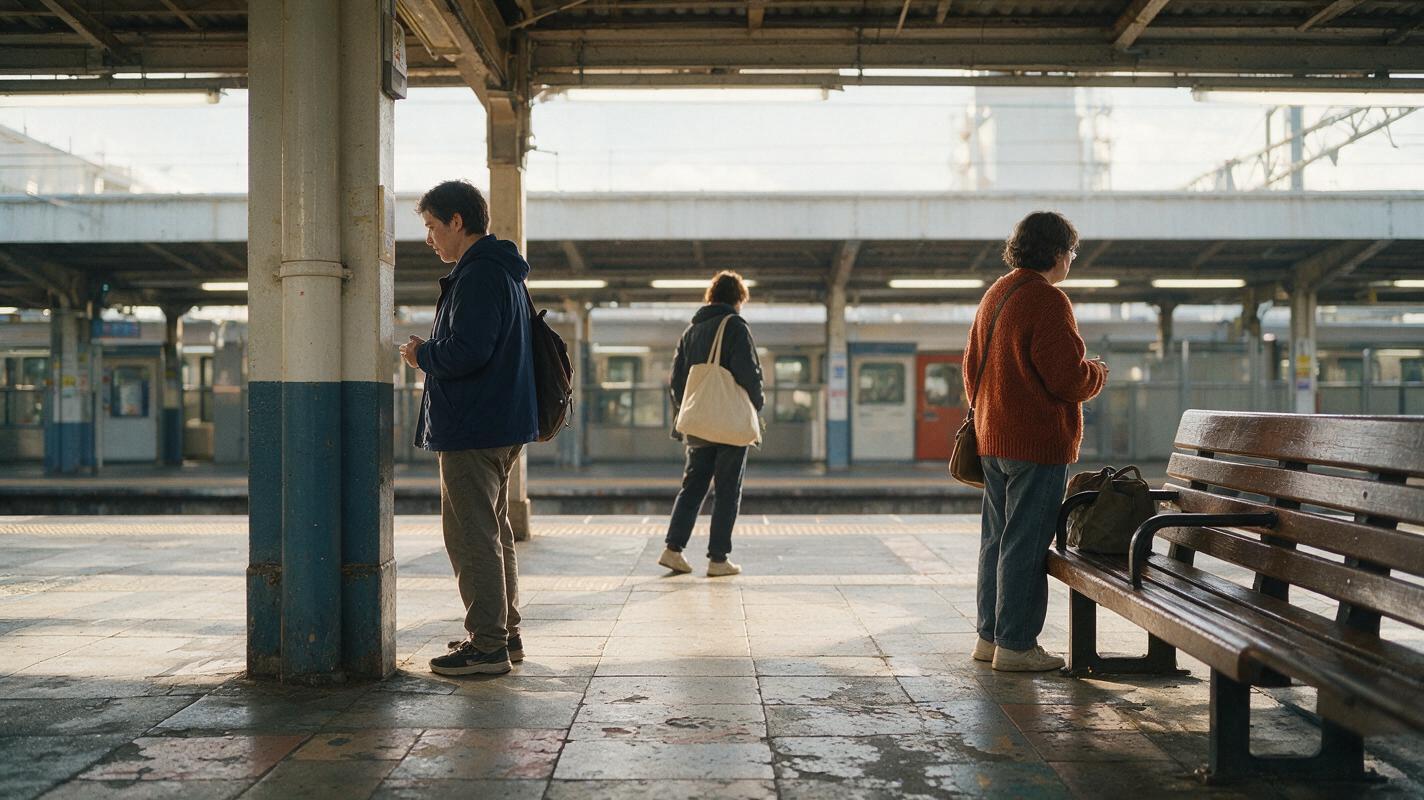
Step 3 — Approve a frame with one unmistakable lead
Combine the approved sheet and platform reference into a storyboard reference frame. Specify Noor’s location, direction of travel, and distance from the camera. Ask for exactly one person with her identifying features; describe extras by their own positions and clothing rather than by resemblance to her.
Continuity rule: If you can find Noor twice in the still, do not animate it. Correct the still first.
Check the background at three scales: the full frame for repeated silhouettes, a closer view for copied scarves or coats, and the intended crop for a second face resembling Noor. A duplicate at the edge may become prominent after a camera move. Once the frame passes, use it as the starting reference for image to video, if that workflow is available in your chosen model.
Copyable scene prompt:
Use the approved three-view sheet as the identity reference for Noor and the approved commuter-platform frame as the location reference. Show exactly one Noor walking through the clear center lane toward camera-left. Preserve her short dark curls, left-eyebrow notch, ochre coat, and teal scarf. Keep the navy-jacket commuter by the left pillar, the cream-tote commuter in the distant center, and the rust-sweater traveler by the right bench. Extras must not share Noor's face, hairstyle, ochre coat, or teal scarf. MANDATORY CAMERA: locked eye-level medium-wide composition, 35 mm perspective, landscape 16:9. No extra copies, reflections, readable text, logos, or interface elements.Step 4 — Check motion and the next shot for new copies
A clean starting frame does not guarantee a clean multi-shot sequence. Review the generated clip at its beginning, midpoint, and end, particularly when Noor passes close to an extra or crosses behind a moving person. Pause at the cut into the next shot and count people with her coat, scarf, hair, or face on both sides.
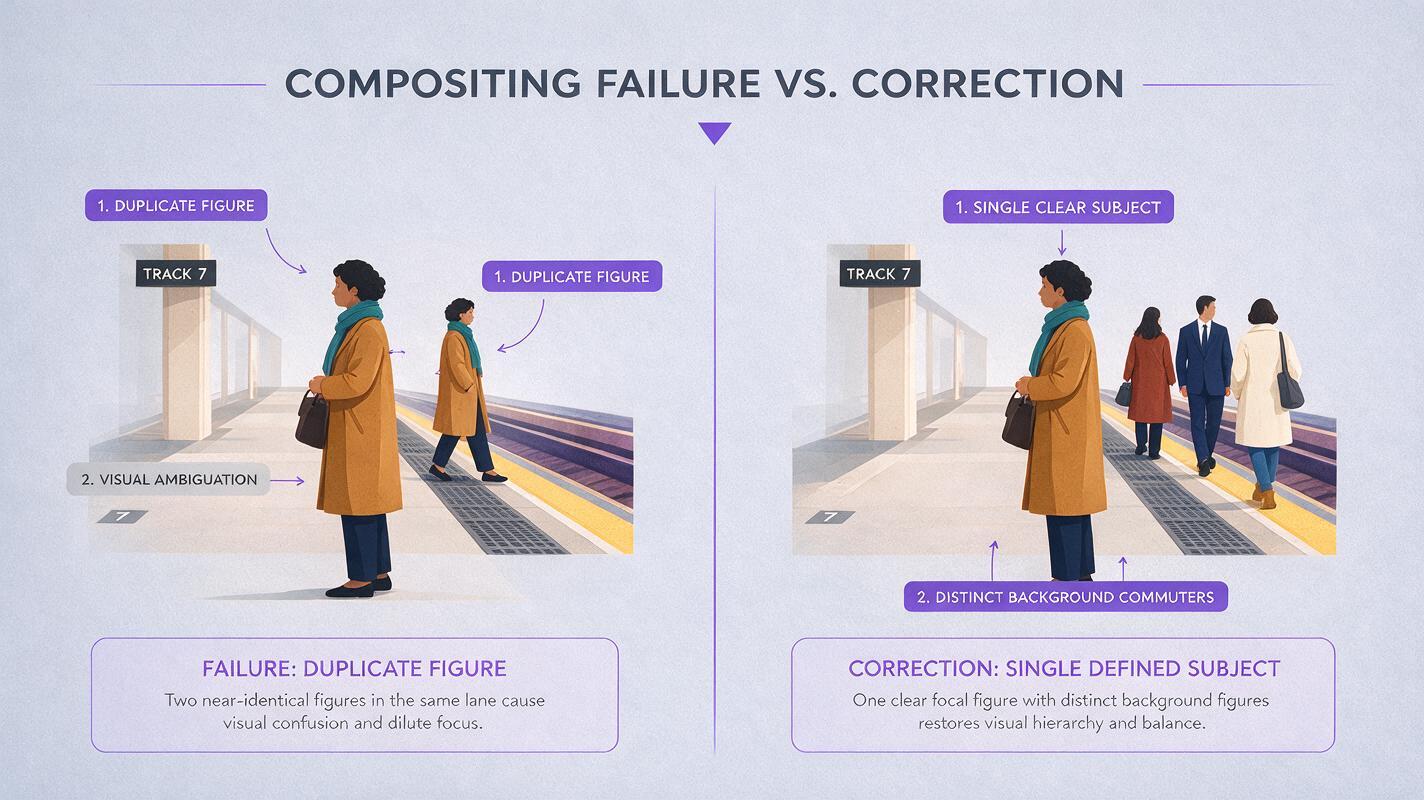
If a second Noor appears, narrow the correction to what changed. A copied outfit calls for more distinct background clothing. A copied face calls for clearer separation between the lead reference and extra descriptions. A duplicate that appears only during motion may require a simpler walking path, fewer nearby extras, or a shorter shot. Regenerate the affected shot rather than changing the approved character sheet.
Visual recreation prompt — failure and corrected frame:
Neutral photorealistic side-by-side comparison of two cinematic frames from the same commuter-train platform, with a clean central separation and no labels: LEFT frame intentionally illustrates the failure, showing the adult woman with short dark curls, an ochre coat, and teal scarf in the center lane plus an unwanted near-identical second figure farther behind her; RIGHT frame shows the corrected composition, with only one such woman and clearly distinct background commuters in navy, cream, and rust; match platform architecture, morning light, and camera angle across both frames; MANDATORY CAMERA: locked eye-level medium-wide view in each half, 35 mm perspective, overall landscape 16:9; editorial realism, no text, logos, screens, or interface elements.Common failures and targeted fixes
| What you see | Likely prompt or reference issue | What to change |
|---|---|---|
| A background extra wears Noor’s coat and scarf | Lead styling was not reserved for the lead | Assign extras distinct clothing colors and explicitly reserve ochre and teal for Noor. |
| A second face resembles Noor | The character reference was applied too broadly | Specify Noor’s position; describe extras independently rather than as variations of her. |
| No duplicate in the still, but one appears in motion | Too many overlapping people or movements | Increase spacing, simplify crossing paths, or shorten the shot. |
| The next shot contains a different-looking Noor | A new scene was generated without the approved reference | Reuse the same sheet and approve the first frame of the next shot before generating motion. |
FAQ
Will “exactly one character” solve duplication by itself?
Not necessarily. Count instructions help define the intention, but a distinct lead reference, assigned crowd positions, and a checked starting frame give you more ways to catch and correct a failure.
Should every extra have a character sheet?
Usually not for a brief crowd shot. Give recurring or prominent extras stable descriptions and positions. Reserve a full sheet for anyone whose identity needs to survive multiple shots.
What if the same person must appear twice intentionally?
Treat that as a different scene requirement. Specify two intentional instances, their separate positions, and the reason both are visible; do not reuse the “exactly one” crowd prompt.
Final checklist
- One approved three-view sheet defines the lead’s face, silhouette, and clothing.
- The background plate gives extras distinct positions and visual traits.
- The starting frame contains exactly one identifiable lead.
- Beginning, midpoint, end, and cut-point frames have been checked for copies.
- Corrections target the failed shot without changing the approved identity.
When the references are ready, try these models for free and compare which image-and-video workflow preserves the single lead most clearly in your scene.
Keywords
character consistency, multi-entity consistency, consistent character video, consistent character across scenes, character reference, multi-shot, storyboard reference