How to Write Better Text-to-Video Prompts for Seedance and Kling
Better text-to-video results come from directing one readable shot instead of packing a prompt with unrelated cinematic terms. This tutorial shows how to structure Seedance and Kling prompts around subject motion, camera motion, timing, and continuity, then compare both models with the same shot brief.
Table of contents
TL;DR: Direct the shot, not just the appearance
The fastest way to improve a text to video prompt is to describe one subject action, one camera movement, and one clear progression through time. Start with a simple shot brief, generate it in Seedance and Kling, and only add atmosphere or visual styling after the motion works.
This workflow is designed for cinematic establishing shots, product reveals, travel clips, music-video inserts, and short narrative moments. It does not depend on a long list of camera jargon or on asking the model to create an entire edited sequence in one generation.
Why camera prompts fail in AI video
Many weak video prompts are visually descriptive but temporally vague. They explain what the frame should contain without specifying what should change after the first frame. The model may produce a polished image that barely moves, or it may invent motion that conflicts with the intended shot.
A second problem is contradictory direction. A prompt might request a static tripod composition, a handheld feeling, a rapid orbit, and a slow zoom at the same time. Those phrases do not combine into a richer result. They compete for control, often producing uneven speed, drifting backgrounds, sudden reframing, or subjects that slide through the scene.
Common symptoms include:
- Frozen action: the character holds a pose while only hair, smoke, or background lights move.
- Camera-action confusion: asking the camera to move forward causes the subject to walk forward instead.
- Speed changes: a slow push-in becomes an abrupt zoom near the end.
- Composition loss: the subject begins centered but is cropped or pushed out of frame.
- Geometry drift: vehicles, furniture, architecture, or products subtly change shape as the viewpoint moves.
- Overloaded scenes: several actions happen at once, so none of them reads clearly.
A useful prompt should answer four questions: What moves? How does it move? What does the camera do? What should remain stable?
Three ways to control an AI video shot
This tutorial combines three levels of control. Use the simplest option that can communicate your idea:
- Single-action prompting: one subject performs one action while the camera remains fixed or makes one restrained move.
- Timed shot prompting: the prompt describes a beginning, middle, and end without turning the clip into several disconnected scenes.
- Reference-led animation: a prepared image fixes the composition before image-to-video generation adds controlled movement.
Single-action prompting is the best place to begin. Timed prompts are useful when the shot needs a reveal or reaction. Reference-led animation is preferable when a specific costume, product shape, room layout, or opening composition must be preserved.
How MagicBoat handles camera-directed AI video
MagicBoat provides a one-account workflow for testing integrated generation models rather than committing every shot to a single model. You can use Seedance or Kling for moving shots, try Veo where appropriate, and prepare source frames with image models such as Seedream, Flux, or GPT Image before animating them.
This makes model comparison practical: keep the creative brief unchanged, run the same shot through more than one model, and judge the visible output rather than rewriting the concept for every tool. MagicBoat’s ai video workflow also lets you move from a text-generated experiment to an image-led version when composition needs tighter control.
| Workflow | Use it when | Main control |
|---|---|---|
| Text to video | You are exploring a scene or camera idea | Prompt structure and shot simplicity |
| Image to video | The opening frame must match a design | Reference composition and motion prompt |
| Motion transfer | A specific body performance matters | Recorded source movement |
| Face swap | The motion works but identity needs correction | Facial appearance |
Step 1 — Reduce the idea to one visible shot
Write a plain-language shot brief before writing the generation prompt. It should fit into one sentence and describe something a camera could record continuously.
Weak brief: “A chef remembers childhood, cooks dinner, serves a restaurant, and becomes successful.” This is a story outline, not one shot.
Usable brief: “A chef places a finished dish on the counter as the camera slowly moves closer.” It contains one subject, one readable action, and one camera instruction.
Use this planning template:
Subject: one primary subject
Action: one visible action
Camera: one movement or a locked frame
Environment: one location
Ending: the final composition or reveal
Expected result: a brief that can be understood without adjectives, art references, or editing terminology. If the brief already contains “then we cut to,” divide it into separate generations.
Step 2 — Separate subject motion from environmental motion
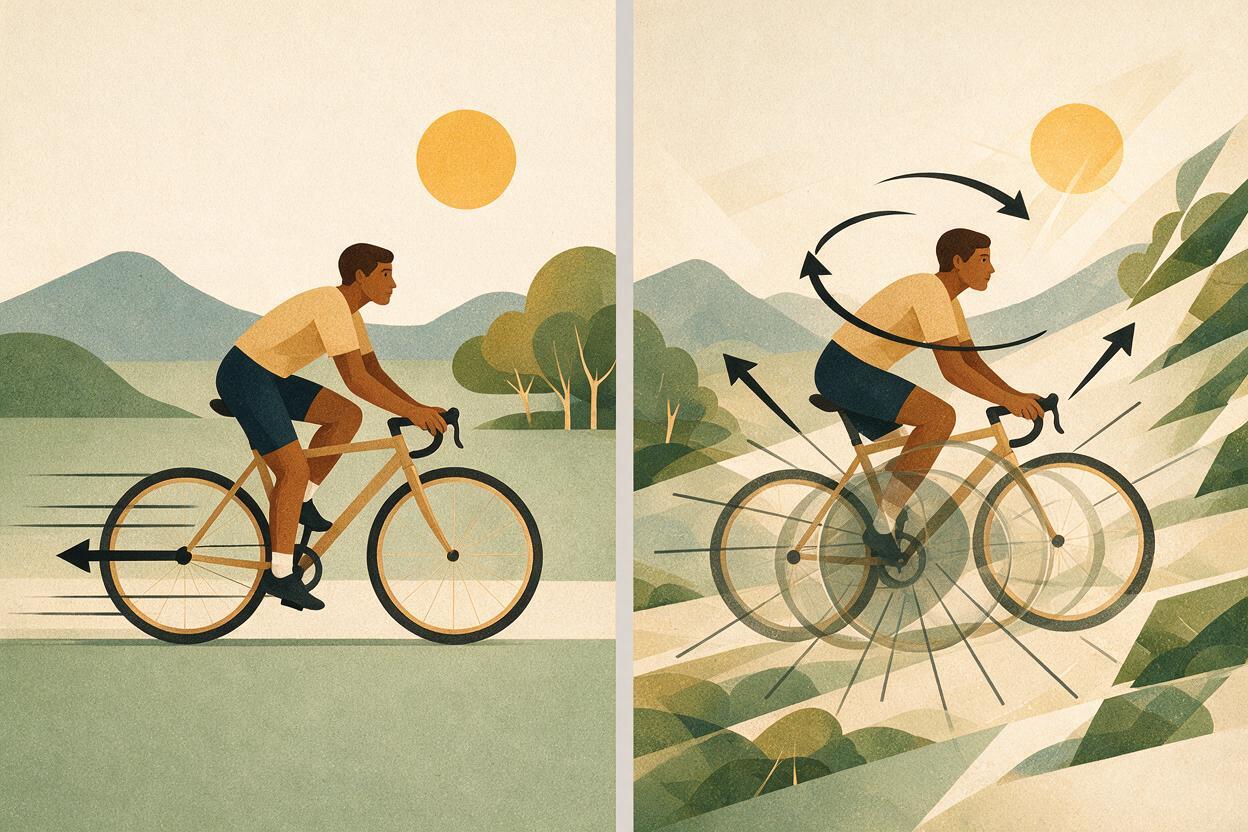
Models need to know which changes are essential and which are supporting details. State the primary action first. Add no more than two subtle environmental motions after it.
A cyclist pauses at the top of a mountain road and turns toward the valley. Her jacket moves lightly in the wind. Thin morning mist drifts between the distant hills.The cyclist’s turn is the primary action. Jacket movement and mist are secondary. The verbs are concrete and visually compatible. Avoid assigning independent complex movement to every person, object, cloud, reflection, and light source in the frame.
For a product shot, stability is usually more important than environmental activity:
A silver wristwatch rests on dark stone. A narrow band of warm sunlight travels slowly across the dial while the watch remains stationary and structurally unchanged.Expected result: the viewer immediately notices the intended action, while background movement adds life without pulling the scene apart.
Step 3 — Write one unambiguous camera instruction
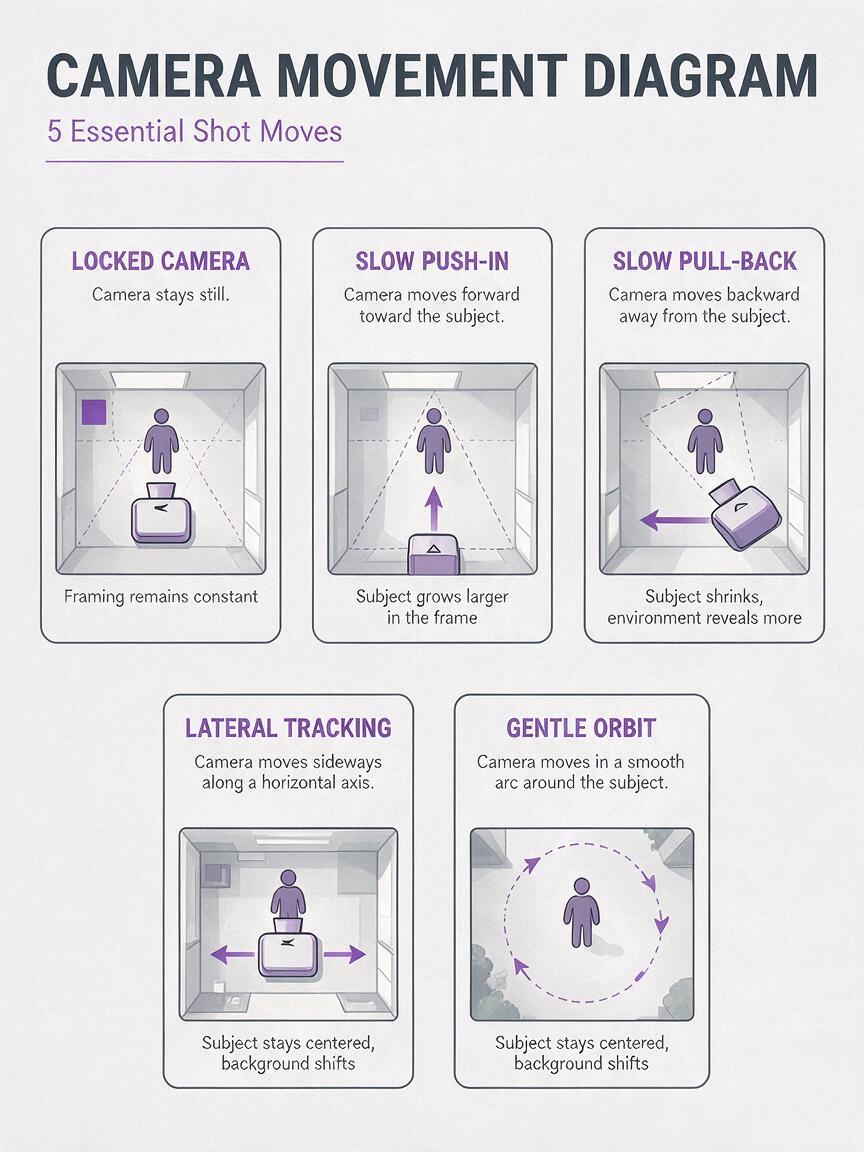
Choose a camera move based on what the shot must communicate. A push-in adds attention or tension. A pull-back reveals context. A lateral tracking shot follows travel. An orbit exposes form but puts more pressure on geometry and background consistency.
| Camera instruction | Best use | Typical risk |
|---|---|---|
| Locked camera | Performance, products, subtle atmosphere | The result may feel too static |
| Slow push-in | Emotion, detail, anticipation | May resemble digital zoom |
| Slow pull-back | Location or scale reveal | New background details may mutate |
| Lateral tracking | Walking, cycling, vehicles | Feet or wheels may slide |
| Gentle orbit | Sculptures, products, stationary subjects | Shape and hidden surfaces may drift |
Write the instruction literally rather than stacking labels:
The camera tracks slowly from left to right at a constant distance, keeping the runner in a medium side profile. The framing remains level and the runner stays fully visible.Do not combine “dolly in,” “zoom out,” “handheld,” “static,” and “360-degree orbit” unless an intentional transition between them is essential. For most short generations, one continuous move is more reliable.
Expected result: steady screen direction, readable framing, and fewer unexplained speed changes.
Step 4 — Add timing with beginning, middle, and end states
When a shot needs a reveal, describe temporal beats rather than asking for several edited scenes. Keep all beats in the same location and camera path.
Opening: a ceramic artist holds a newly glazed bowl at chest height in a quiet workshop.
Middle: she slowly rotates the bowl toward the window as soft daylight catches the blue glaze.
Ending: the camera completes a gentle push-in and settles on the surface detail, with her hands remaining steady and natural.
This format tells the model how the shot develops without demanding a montage. The ending is particularly important because it defines where the motion should settle.
For a reveal shot, preserve one continuous visual relationship:
The shot begins close behind a weathered wooden gate. The camera moves forward slowly as the gate opens inward, revealing a sunlit field. It ends in a wide, stable composition with the gate framing both sides of the image.Expected result: a clip with a readable arc instead of random motion from a strong opening frame.
Step 5 — Add visual style after the motion is clear
Styling should support the shot rather than replace its mechanics. Add lighting, color, lens character, and atmosphere after the action and camera instructions.
A street musician closes her violin case and looks toward approaching rain. The camera makes a slow, stable push-in from a medium shot. Pedestrians pass softly in the distant background, and a light breeze moves the edge of her coat. Overcast natural daylight, restrained colors, realistic skin texture, shallow depth of field, continuous single shot.Avoid long chains such as “cinematic, epic, viral, award-winning, masterpiece, 8K, ultra-detailed.” These words do not resolve unclear staging. Prefer visible qualities: low winter sunlight, soft contrast, muted green walls, shallow focus, or a slightly low camera height.
If your workflow accepts exclusions or negative instructions, keep them tied to observable failures:
Avoid abrupt camera acceleration, subject duplication, warped hands, changing clothing, background morphing, text, logos, and cuts.Negative language is not a substitute for a clear positive prompt. Use it to protect essential details, not to list every possible defect.
Expected result: a coherent cinematic look without sacrificing the subject action or camera path.
Step 6 — Compare Seedance and Kling with the same shot brief
Do not evaluate models with completely different prompts. Use the same core brief, similar output settings where available, and the same acceptance criteria. Minor syntax adjustments are reasonable, but the requested action and camera movement should remain unchanged.
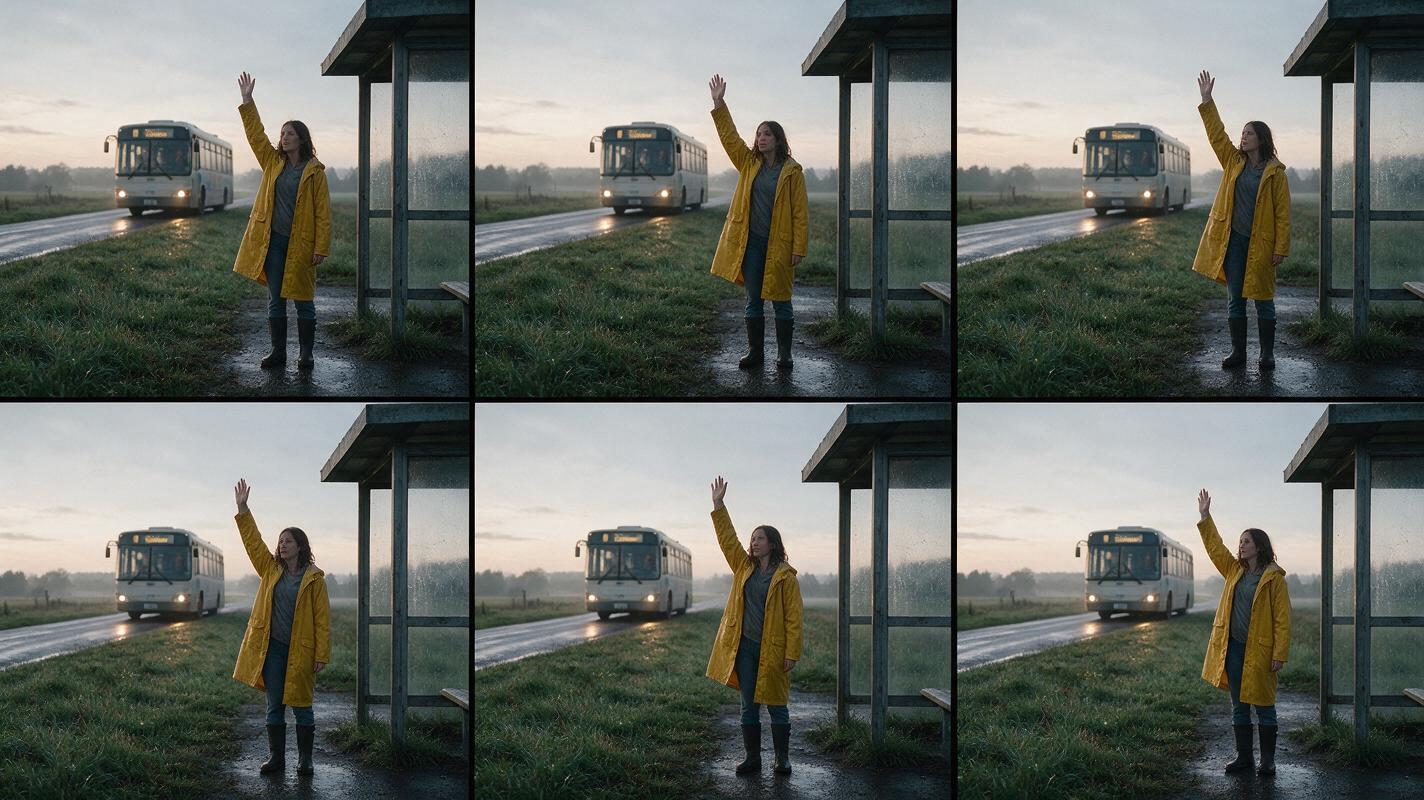
A woman in a yellow raincoat waits beside a rural bus stop at dawn. She lifts one hand as a bus approaches from the distance. The camera tracks slowly sideways, maintaining a medium-wide profile composition. Wet grass moves gently in the wind. Soft gray morning light, realistic motion, continuous shot, no cut, stable clothing and facial appearance.Review each result for five things:
- Does the hand rise naturally and only once?
- Does the camera move sideways rather than zoom?
- Does the woman remain the same size and identity?
- Does the approaching bus preserve its structure?
- Does the shot end cleanly rather than accelerating or dissolving?
Choose the generation that best preserves the shot’s intent, not necessarily the one with the most texture or dramatic lighting. A visually spectacular clip that reverses screen direction or changes the subject’s action may be harder to use in an edit.
Expected result: a fair model comparison and a reusable prompt that can be refined without changing the concept.
Step 7 — Convert difficult shots to an image-led workflow
If repeated text generations cannot preserve the opening composition, create a reference frame first. This is especially useful for products, architecture, costumes, stylized sets, and scenes with several carefully placed objects.
Generate the still image with Seedream, Flux, or GPT Image, then animate it with a concise motion prompt:
Keep the established composition and object design. The camera performs a very slow push-in toward the red chair. Sunlight shifts subtly across the floor, and sheer curtains move gently. No new objects appear. The chair, windows, and room geometry remain unchanged.The image supplies spatial facts; the motion prompt explains what changes over time. Do not redescribe every visual detail if it is already visible in the source frame. Repeating or contradicting the image can encourage unwanted reinterpretation.
Expected result: stronger control over the first frame, art direction, object placement, and color palette.
Keep the same camera language across a project
A short sequence feels more intentional when its prompts use a consistent visual grammar. Create a compact shot bible that defines recurring choices:
- Camera movement: locked frames and slow push-ins only.
- Camera height: eye level for dialogue, waist level for walking shots.
- Lighting: soft overcast daylight with neutral shadows.
- Color: muted earth tones with one yellow wardrobe accent.
- Motion: realistic speed, restrained background activity.
- Continuity: single action per clip and no in-generation cuts.
Reuse this language, but vary shot size and subject action. Consistency does not mean generating every scene from the same angle.
Alternative: use motion transfer for exact performance
A text prompt can describe a gesture, but it cannot always reproduce precise choreography, comic timing, dance, or a distinctive body movement. In those cases, record a clean source performance and use motion transfer. Keep the performer visible, avoid severe occlusion, and choose a reference character whose body proportions can plausibly follow the movement.
Use text-directed video for camera and environmental exploration; use performance transfer when the exact rhythm of the body is the shot’s main requirement.
Alternative: repair identity with face swap
If the generated movement and composition work but the face drifts, replacing the whole clip may waste a good motion result. A face-swap pass can be a practical finishing option when the face is visible, reasonably sharp, and not heavily covered by hair, hands, or extreme shadows.
Face replacement will not fix head deformation, poor lip movement, or inconsistent lighting by itself. Select a structurally sound clip first, then treat identity correction as post-processing.
Where this workflow falls short
Prompt engineering improves direction, but it does not guarantee physically exact video. Complex hand interactions, overlapping limbs, fast rotations, reflections, crowds, readable text, and objects revealed from previously unseen angles remain difficult. Orbiting around a subject is inherently less stable than using a locked camera because the model must invent hidden surfaces.
Long prompts can also reduce control when every sentence introduces another priority. If a result fails, remove optional details before adding more instructions. Test the subject action with a locked camera, then introduce camera movement once the action is stable.
Finally, text-to-video is usually better at producing individual shots than finished sequences. Generate separate clips for separate angles and assemble them in an editor rather than expecting one prompt to create reliable cuts, continuity, and pacing.
FAQ
How long should a Seedance or Kling prompt be?
Long enough to define the subject, action, camera, environment, visual treatment, and essential constraints. A focused paragraph is often more useful than a page of adjectives. Remove any phrase that does not change something visible.
Should I put the camera instruction first?
Start with the subject and primary action so the shot has a clear purpose. Place the camera instruction immediately afterward, then add environment and style. For a camera-test clip, leading with the framing and movement can also work, provided the action remains explicit.
Can I request several camera moves in one clip?
You can, but reliability generally falls as the path becomes more complex. If two moves are necessary, describe a simple transition, such as a slow pull-back that settles into a locked wide frame. Generate separate shots when the direction changes sharply.
Is image to video always more consistent than text to video?
It usually gives more control over the opening composition, but movement can still distort the reference. Large rotations and aggressive camera travel require the model to invent information that the source image does not contain.
Why does a dolly prompt sometimes look like a zoom?
Both moves change subject scale, and a model may not reproduce the parallax that distinguishes physical camera travel from lens zoom. Mention foreground objects passing at different speeds, maintain a clear environment, and keep the move slow enough for depth changes to remain visible.
What should I change first when a prompt fails?
Reduce it to one action and a locked camera. Once the action works, add one camera movement. Add atmosphere and secondary motion last. This reveals which instruction causes the failure.
Final checklist
- Write a one-sentence shot brief before the full prompt.
- Give the subject one primary action.
- Choose one camera move and state the framing.
- Use beginning, middle, and end states for reveals.
- Add only one or two secondary environmental motions.
- Describe visible lighting and color instead of promotional adjectives.
- Compare Seedance and Kling using the same creative brief.
- Switch to an image-led workflow when composition must be fixed.
- Generate separate clips when the concept requires a cut.
- Create your first AI video free and test the same camera prompt across multiple models.
Keywords
text to video, prompt engineering, Seedance prompts, Kling prompts, camera movement, AI video workflow, cinematic AI video