Vertical Drama Video: Build Shots That Survive the 9:16 Frame
A vertical drama video needs more than a landscape shot cropped down the middle. This tutorial shows how to design a narrow story column, build crop-safe locations, control character motion, and repair common 9:16 framing failures.
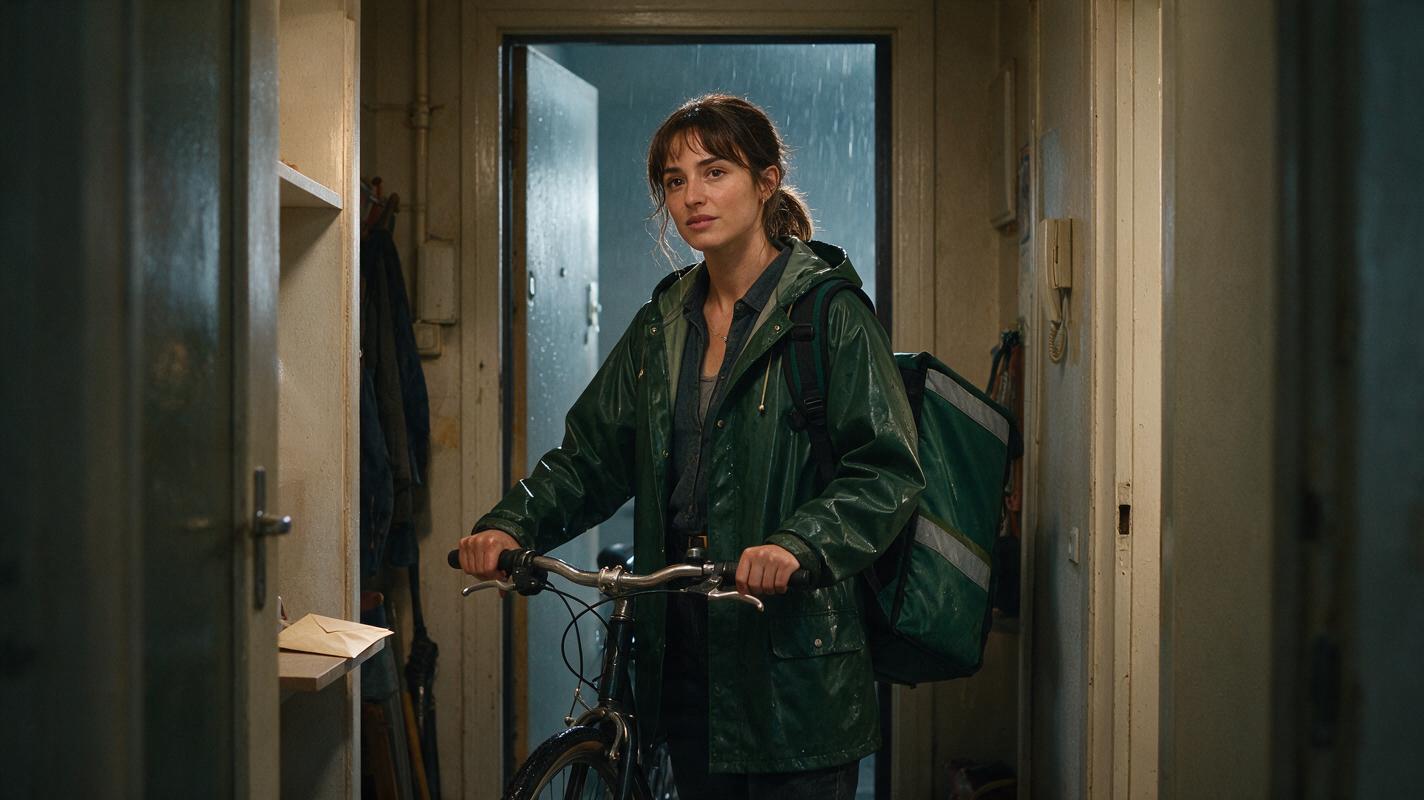
Table of contents
Build for 9:16 instead of cropping after generation
The reliable way to produce a vertical drama video is to place the face, story-critical prop, and direction of movement inside a narrow visual column before generating motion. Do not create a wide cinematic scene and hope that a center crop will preserve the performance.
This tutorial uses a simple scenario: a courier enters an apartment hallway, notices an unmarked envelope, and realizes someone is watching her. The scene has one recurring character, one important prop, and one reveal—enough to expose the framing problems that commonly affect an ai short drama.
The core rule: reserve the center of the vertical frame for story information, not merely for the character's body.
Step 1 — Lock the character before designing the frame
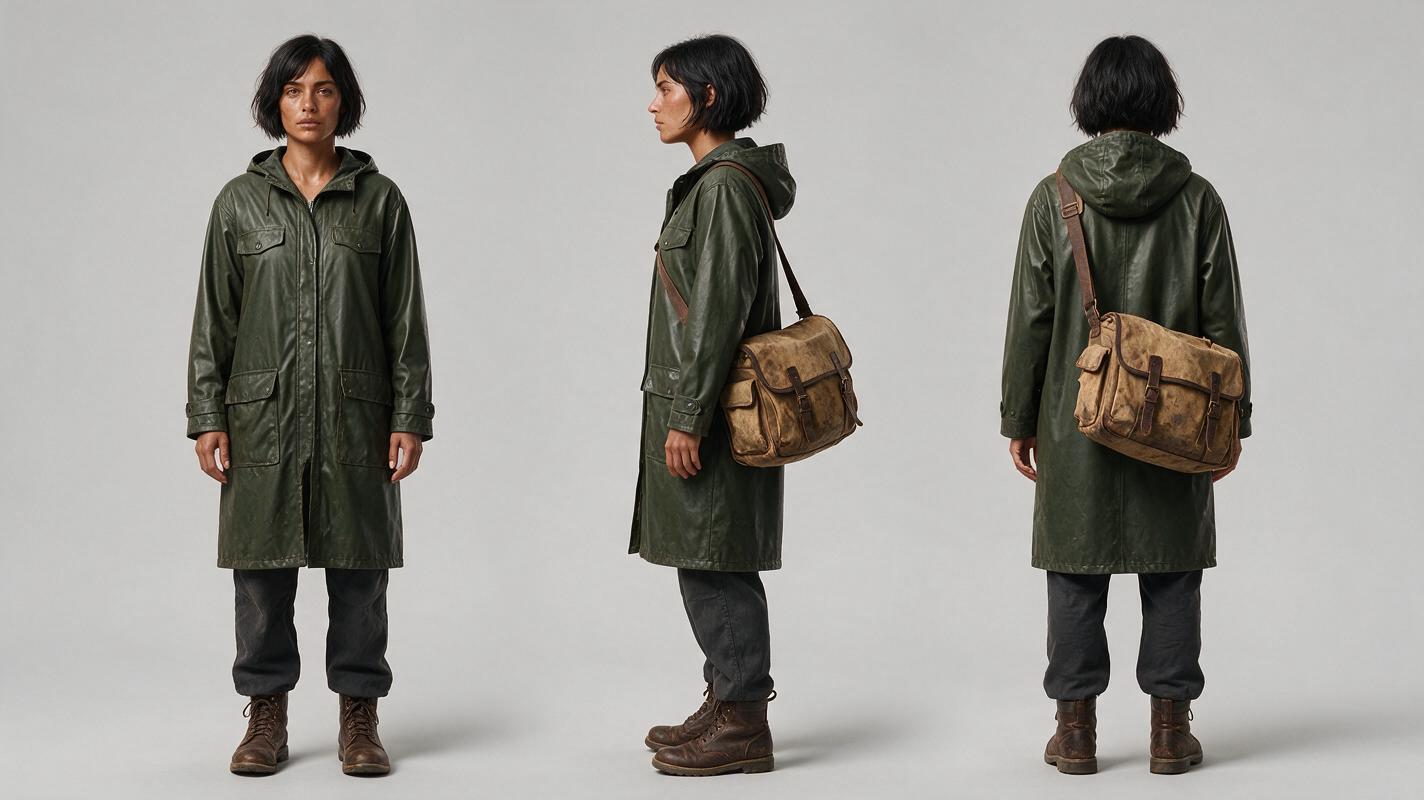
Generate a neutral character reference before making scene images. The reference should establish facial structure, hairstyle, wardrobe, footwear, and the silhouette of any item that must recur. A three-view sheet is especially useful because vertical shots often show more of the body than a conventional close-up.
For this example, the courier wears a dark green raincoat and carries a weathered canvas delivery bag. Those two elements create a recognizable silhouette even when the episode cuts between medium shots, close-ups, and over-the-shoulder angles.
Reusable character-sheet prompt:
Photorealistic three-panel character reference sheet of the same 28-year-old female bicycle courier, angular face, short black bob tucked behind one ear, dark green knee-length raincoat, charcoal trousers, worn brown boots, weathered tan canvas delivery bag across her body, calm neutral expression. MANDATORY LAYOUT: exactly three full-body views arranged left to right—front, true side, back—with equal scale and no overlap. MANDATORY CAMERA: eye-level orthographic-style reference photography, 70mm lens appearance, no perspective exaggeration. Neutral light-gray seamless studio background, soft even lighting, landscape 16:9, realistic fabric texture, no text, no labels, no logo, no interface elements.Approve identity and costume separately from acting. If the reference already contains a dramatic pose, later generations may reproduce that pose when the scene requires a different action.
Step 2 — Build a location with a vertical story corridor
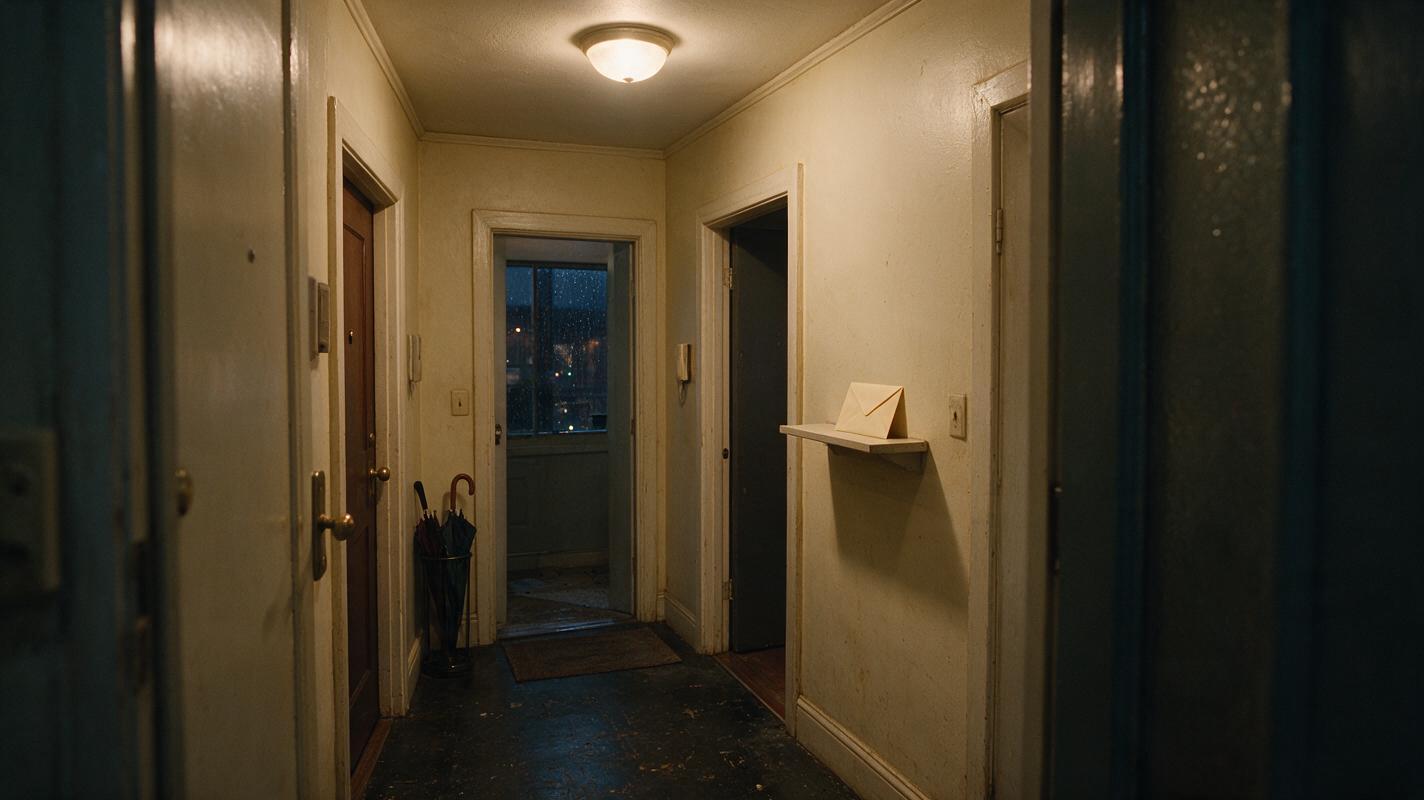
A useful location plate must support the narrow frame. In a hallway, place doors, ceiling lights, and wall edges so they guide attention toward the character rather than pulling the composition sideways. Leave visible space in front of the character's likely movement direction.
Keep the envelope away from the outer edges. If it sits on a wide console table at the far left, it may disappear when the frame becomes vertical. A shallow shelf near the center-right gives you room to show both the prop and the courier's reaction.
Reusable location prompt:
Cinematic editorial-realism image of a lived-in apartment hallway on a rainy evening, faded cream walls, scuffed dark floor, three apartment doors, warm practical ceiling lamps, damp umbrella stand, shallow wooden mail shelf positioned near the center-right, one unmarked cream envelope on the shelf, subtle depth toward a stairwell, believable wear and household detail. MANDATORY CAMERA: eye-level true three-quarter view from the hallway entrance, 35mm lens, camera centered on a narrow walkable corridor, strong foreground-middle-background separation. Landscape 16:9 master location plate designed so the essential shelf, envelope, nearest doorway, and walking path remain visible inside the central vertical third. No people, no text, no logos, no UI.This 16:9 master is not the final composition. It is a reusable location asset. The central third should already contain the dramatic route: entrance, envelope, reaction position, and watching doorway.
Step 3 — Convert the scene into vertical shot cards
Break the scene into shots based on information changes rather than arbitrary camera variety. Each card should identify what the viewer must notice and where it belongs in the 9:16 frame.
| Shot | Story information | Vertical placement | Motion limit |
|---|---|---|---|
| Entrance | The courier arrives alone | Face in upper center; bag in lower center | Two steps forward |
| Prop insert | The envelope has no sender mark | Envelope centered; hand enters from below | Hand stops before contact |
| Recognition | She knows the envelope matters | Eyes near upper third; envelope edge low in frame | Small gaze drop and breath |
| Threat reveal | A door behind her opens | Face foreground; door above one shoulder | Door opens slightly |
Write the card before writing the image prompt. A useful card is short enough to reject a frame immediately:
SHOT: threat reveal
FORMAT: 9:16 medium close-up
MUST SEE: courier's eyes, green raincoat collar, opening door behind her
SCREEN GEOGRAPHY: courier center-left, door upper-right
ACTION: she freezes; door opens ten centimeters
DO NOT SHOW: second full character, wide hallway, envelope close-up
For a short drama from script, this conversion prevents descriptive prose from turning into an overloaded single shot.
Step 4 — Generate the anchor frame before adding motion
Create one approved still for every shot. The anchor frame should resolve composition, identity, lighting, and prop placement. Only then should you use image to video to add a bounded performance.
Do not ask for several dramatic actions at once. A prompt such as “she walks in, finds the envelope, opens it, gasps, turns, and sees a stranger” creates too many opportunities for framing drift. Divide that chain at each change in story information.
Anchor-frame prompt for the threat reveal:
Vertical cinematic medium close-up of the established female courier in a dark green raincoat standing motionless in the established apartment hallway, tense eyes looking slightly downward, weathered canvas bag visible at the bottom of frame, apartment door behind her right shoulder open by a narrow gap, warm ceiling practicals with cool rainy spill from the stairwell, restrained suspense, natural skin texture. MANDATORY CAMERA: eye-level true three-quarter close-up, 50mm lens appearance, portrait 9:16, locked camera. MANDATORY COMPOSITION: both eyes unobstructed in the upper third, face center-left, door gap upper-right, hands outside the crop, no second visible person, no text, no logo, no interface.Motion prompt:
Locked camera. The courier remains almost still, takes one shallow breath, and shifts her eyes toward the door without turning her head. The door behind her opens only ten centimeters and stops. Preserve facial identity, raincoat design, bag strap, hallway lighting, and vertical composition. No walking, no camera orbit, no extra people, no hand movement, no wardrobe change.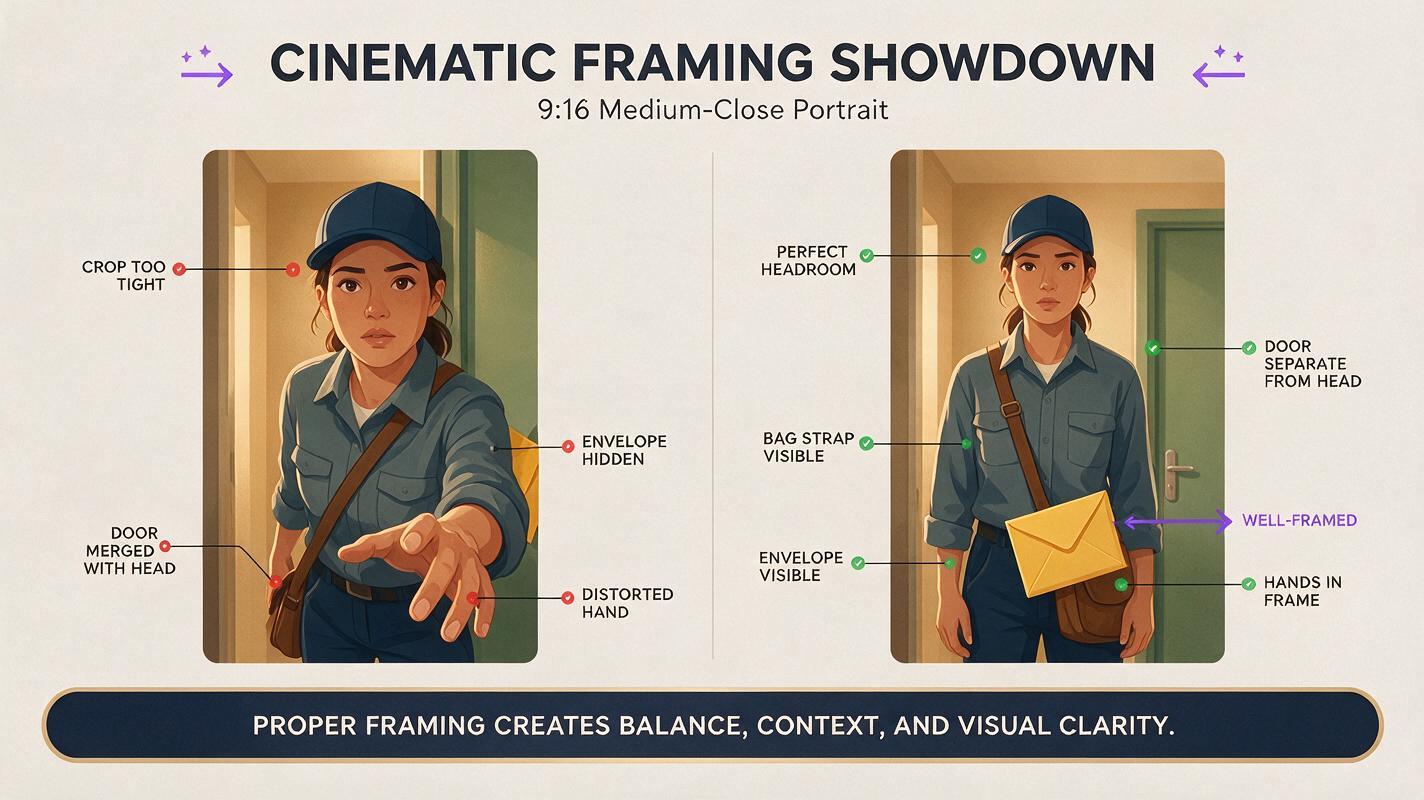
Step 5 — Diagnose the crop before repairing the motion
A framing failure is not always a motion failure. Compare the generated clip against the shot card and identify which layer actually broke.
- Face cut off: rebuild the anchor with more headroom; do not ask the motion model to zoom out.
- Prop missing: move the prop into the vertical story column or create a dedicated insert.
- Character duplicated: remove background figures and explicitly prohibit a second visible person.
- Hands distorted: end the first shot before contact, then cut to a clean prop insert.
- Background drifts: reduce camera movement and character travel rather than adding more location description.
Reusable failure-comparison prompt:
Side-by-side cinematic comparison containing two separate portrait 9:16 film frames within one clean landscape 16:9 presentation, no border text and no labels. Left frame: the female courier is poorly cropped at the forehead, delivery bag cut away, envelope hidden at the extreme edge, background door visually merged with her head, awkward distorted reaching hand. Right frame: the same courier and hallway corrected, full face with comfortable headroom, bag strap visible, envelope clearly framed near the lower center, door separated behind her shoulder, hands resting outside the frame. MANDATORY CAMERA: identical eye-level 50mm medium-close perspective in both frames. Photorealistic editorial realism, matching warm hallway lighting, no logos, no UI.Repair the smallest broken layer. If the performance works but the envelope is unreadable, keep the performance and add an insert rather than regenerating the entire scene.
Step 6 — Edit around vertical attention shifts
In an AI microdrama, a cut should redirect attention to a new fact. Move from the courier's entrance to the envelope, from the envelope to her eyes, and from her eyes to the opening door. This creates escalation without requiring large camera moves.
Check the sequence once with sound muted. The viewer should still understand what entered the story, who noticed it, and what changed. Then check at a small display size. Faces, props, and door movement should remain distinct without relying on tiny background detail.
For an AI series video, preserve the same screen geography in later episodes. If the suspicious door is established over the courier's right shoulder, avoid moving it to the opposite side unless the camera position clearly changes.
FAQ
Should every source image be generated in 9:16?
No. Character sheets and reusable location plates benefit from landscape 16:9 because they store more reference information. Generate the actual shot anchors in 9:16 after deciding which details belong in the vertical story column.
Can an AI drama generator convert a landscape shot directly to vertical?
It can create a new vertical version, but the composition still needs explicit instructions. State the required subject placement, headroom, visible prop, background reveal, and camera behavior rather than requesting a generic vertical conversion.
How much movement should a vertical shot contain?
Use only the movement needed to communicate one beat. Eye movement, a short step, a small turn, or a partially opening door is easier to preserve than a long walk crossing several depth planes.
What should be regenerated first when the crop fails?
Regenerate the still anchor first. Motion generation should begin only after the required face, prop, and reveal fit comfortably inside the approved frame.
Sources
Final checklist
- The face, critical prop, and reveal all fit inside the vertical story column.
- Character and location references are approved before motion generation.
- Each shot communicates one new piece of information.
- Motion prompts use a locked camera and bounded physical action.
- Failure repairs target the smallest broken visual layer.
- The final sequence remains understandable when muted and viewed small.
- When the shot cards and anchor prompts are ready, try these models for free.
Keywords
vertical drama video, ai short drama, ai microdrama, ai drama generator, ai series video, short drama from script