Why AI Hot Drink Photos Look Fake (And How to Fix Steam, Crema, Glow)
AI-generated hot drink photos often fall flat due to cartoonish steam, lifeless crema, and dull ceramic mugs, making them unsuitable for café menus, social media, and beverage brand campaigns. This troubleshooting guide breaks down the most common hot drink AI generation failures, provides reusable prompt templates for Flux and Seedream 4.5, and shares inpainting tricks to create realistic, appetizing hot drink visuals. Readers will walk away with actionable steps to build brand-aligned hot drink assets in minutes.
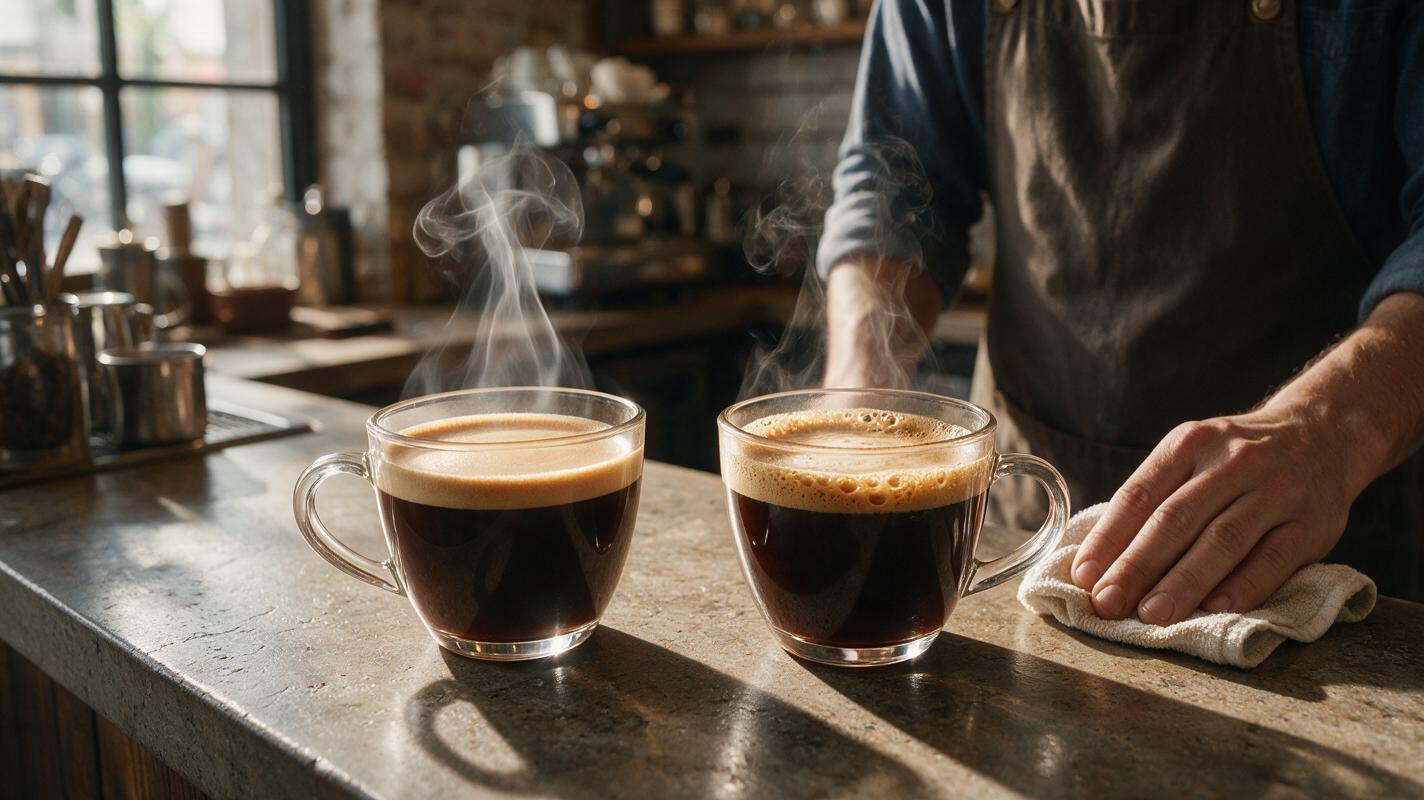
Table of contents
Why AI hot drink photos fail to look appetizing
Café owners, beverage brand marketers, and restaurant social media teams often turn to AI to generate fast, affordable hot drink visuals for menus, Instagram carousels, and seasonal campaign assets. But more often than not, the results look off: thick cartoonish steam, flat lifeless crema, dull plastic-looking mugs, and tea that reads like tinted water instead of a rich, comforting beverage. These small flaws don’t just look unprofessional — they make drinks feel cheap, reducing click-through rates on social posts and even in-store order volume.
The issue isn’t that AI can’t make great hot drink photos — it’s that most generic prompts miss the specific, tiny details that make hot beverages feel real and appealing: the way steam catches backlight, the microbubbles in espresso crema, the warm amber glow of hot coffee reflecting off a ceramic mug’s interior. With targeted prompting and the right ai image generator, you can fix these flaws and create appetizing, brand-aligned hot drink visuals in minutes.
We’ll use Flux as our primary generation tool for its strong texture and lighting control, with Seedream 4.5 for targeted inpainting touch-ups on small, stubborn flaws.
Fix cartoonish steam with layered prompting
The #1 giveaway of an AI hot drink photo is fake steam. Most models generate steam as a thick, opaque white cloud rising straight up from the mug — nothing like the wispy, translucent, layered steam you see in real life. Real steam is barely visible in some spots, thicker in others, and diffuses softly as it rises, catching light to create subtle golden or blue tints depending on the light source.
To get realistic steam, avoid generic phrases like “steaming mug” or “lots of steam.” Instead, describe the structure, transparency, and interaction with light. Here’s a reusable prompt template for Flux tuned for latte steam:
Photorealistic oat milk latte in a hand-thrown stoneware mug, wispy backlit steam rising gently from the surface, multiple translucent layers of steam, soft diffusion as it rises, subtle golden tint from warm overhead café light, shallow depth of field, wooden table background, natural morning light, 8k, food photography stylingPro tip: If your steam still looks too thick, add “10% opacity steam” or “barely visible wispy steam” to your prompt to dial back the intensity. For cold-weather campaigns, you can add “visible breath mixing with steam” for extra coziness, but only if the scene includes a person.
For darker drinks like espresso or hot chocolate, specify that steam catches the light to create faint highlights, rather than appearing white — dark drinks often produce thinner, less visible steam that’s easy to overdo.
Ready to see how this prompt performs? test this prompt yourself with your go-to drink and mug style.
Get rich, textured crema on lattes and espresso
The second most common failure is flat, lifeless crema — the golden, bubbly top layer of espresso and lattes that signals freshness and quality. AI often renders crema as a uniform matte brown layer with no texture, no bubbles, and no sheen, making drinks look like they’re topped with paint instead of freshly pulled espresso.
To fix this, describe crema’s specific visual traits: thickness, bubble size, marbling pattern, and light reflection. For a classic cortado with perfect crema, use this Flux prompt:
Close-up food photography of a cortado in a small clear glass cup, 2mm thick golden brown crema layer on top, tiny uniform microbubbles throughout crema, subtle tiger marbling pattern, slight glossy sheen from soft side lighting, dark wooden counter background, warm café tones, no steam, sharp focus on crema textureFor lattes with latte art, specify that the art sits on top of the crema, with slight blending at the edges — AI often draws latte art as a flat white sticker on top of the drink, with no texture integration. Add “latte art integrated into crema, slight texture variation between art and crema” to fix this.
If crema still looks flat after generation, use Seedream 4.5’s inpainting tool to brush over the flat area and add texture. Use a short inpainting prompt like “golden microbubble crema, marbled texture, match surrounding drink color and lighting” for seamless results.
Add warm ceramic glow and realistic mug texture
Even if your drink looks perfect, a cheap-looking mug can ruin the whole shot. AI often renders ceramic mugs as dull, plastic-y, or perfectly uniform, with none of the subtle glaze variations, warm interior reflections, or hand-thrown imperfections that make real mugs feel cozy and high-quality.
First, specify the mug material and finish clearly. For a glossy stoneware mug, add details like “glossy ceramic glaze, subtle hand-thrown imperfections on the rim, warm amber reflection from hot coffee on the interior walls, slight wear on the handle.” For a matte mug, swap “glossy glaze” for “matte stoneware finish, soft texture, no harsh reflections.”
Here’s a prompt snippet you can add to any hot drink prompt to improve mug quality:
mug: hand-thrown speckled stoneware, glossy clear glaze, warm amber interior reflection from hot drink, slight uneven rim, small ceramic imperfection on the side, soft shadow cast on the tableAvoid generic terms like “ceramic mug” — the more specific you are about texture, finish, and small flaws, the more real the mug will feel. For glass mugs, add “clear tempered glass, slight condensation on the outside (from hot drink), visible color gradient of the drink through the glass” to add depth.
Fix flat tea and hot chocolate depth
Coffee drinks get most of the AI generation attention, but tea and hot chocolate come with their own set of common failures. Tea often looks like flat colored water with no depth, while hot chocolate can look like thin brown milk instead of a rich, thick indulgence.
For tea, focus on color gradient and visible ingredients. For a classic black tea in a glass mug:
Photorealistic earl grey tea in a clear glass mug, dark amber brown at the bottom of the mug fading to lighter golden amber at the top, visible tea leaves settled at the bottom, a single wisp of steam rising, soft natural light from a window, white marble counter background, bright and airy food stylingFor hot chocolate, emphasize thickness, surface texture, and toppings. For a festive peppermint hot chocolate:
Thick peppermint hot chocolate in a red ceramic mug, glossy dark brown surface with slight ripples, tiny melted marshmallows half-submerged on top, dusting of cocoa powder and crushed candy cane, wispy steam, cozy winter cabin background, warm soft lighting, indulgent food photographyThe key for both is to avoid describing the drink as a single flat color — always mention a gradient, texture, or visible particles to give it depth.
Touch up small flaws with targeted inpainting
Even with perfect prompting, you’ll likely end up with one or two small flaws: a clump of steam that’s too thick, a patch of crema that’s flat, or a mug handle that looks slightly warped. Instead of regenerating the entire image (which can introduce new flaws), use targeted inpainting with Seedream 4.5 to fix only the problem area.
For best results, brush slightly outside the problem area to give the model context for lighting and texture. Use short, specific inpainting prompts that match the existing scene:
- For thick steam clumps: “wispy translucent steam, soft diffusion, match existing warm backlight, blend with surrounding steam”
- For flat crema patches: “golden microbubble crema, subtle marbling, glossy sheen, match surrounding crema color”
- For mug glaze flaws: “glossy stoneware glaze, warm reflection, subtle speckles, match existing mug texture”
Keep inpainting prompts short — 10 to 20 words is usually enough. Longer prompts can cause the model to change unrelated parts of the scene, like the drink’s color or the table background.
Final quality checklist for AI hot drink photos
Before you export your hot drink photo for menus or social media, run through this quick checklist to make sure it looks realistic and appetizing:
- Steam is wispy and translucent, not thick or opaque, and diffuses as it rises
- Crema (for coffee drinks) has visible microbubbles, subtle marbling, and a slight glossy sheen
- Mugs have appropriate texture and finish (glossy, matte, hand-thrown) with warm interior reflections from the hot drink
- Drinks have color depth (darker at the bottom, lighter at the top) instead of a flat uniform color
- Lighting is consistent across the entire scene — steam, crema, and mug all catch light from the same direction
- No weird artifacts: steam only rises from the drink surface (not the mug rim or table), mug handles are proportional, toppings look integrated (not stuck on)
- The overall vibe matches your brand: cozy and warm for winter campaigns, bright and airy for spring tea launches, etc.
Keywords
ai hot drink photography, hot drink photo generator, beverage marketing ai, coffee ai photo, ai food steam fix, crema ai image, restaurant menu visuals