GPT Image Prompts for Album Cover-Matched Merch Mockups
Independent music artists and MV creators can use GPT Image to turn existing album cover art into photorealistic merch mockups for t-shirts, vinyl, hoodies, and more, no Photoshop templates required. This guide shares reusable prompt structures, reference setup tips, product-specific variations, and troubleshooting fixes for common issues like stretched art and mismatched colors. Use these mockups for pre-order campaigns, social media promos, and online store listings without hiring a professional designer.
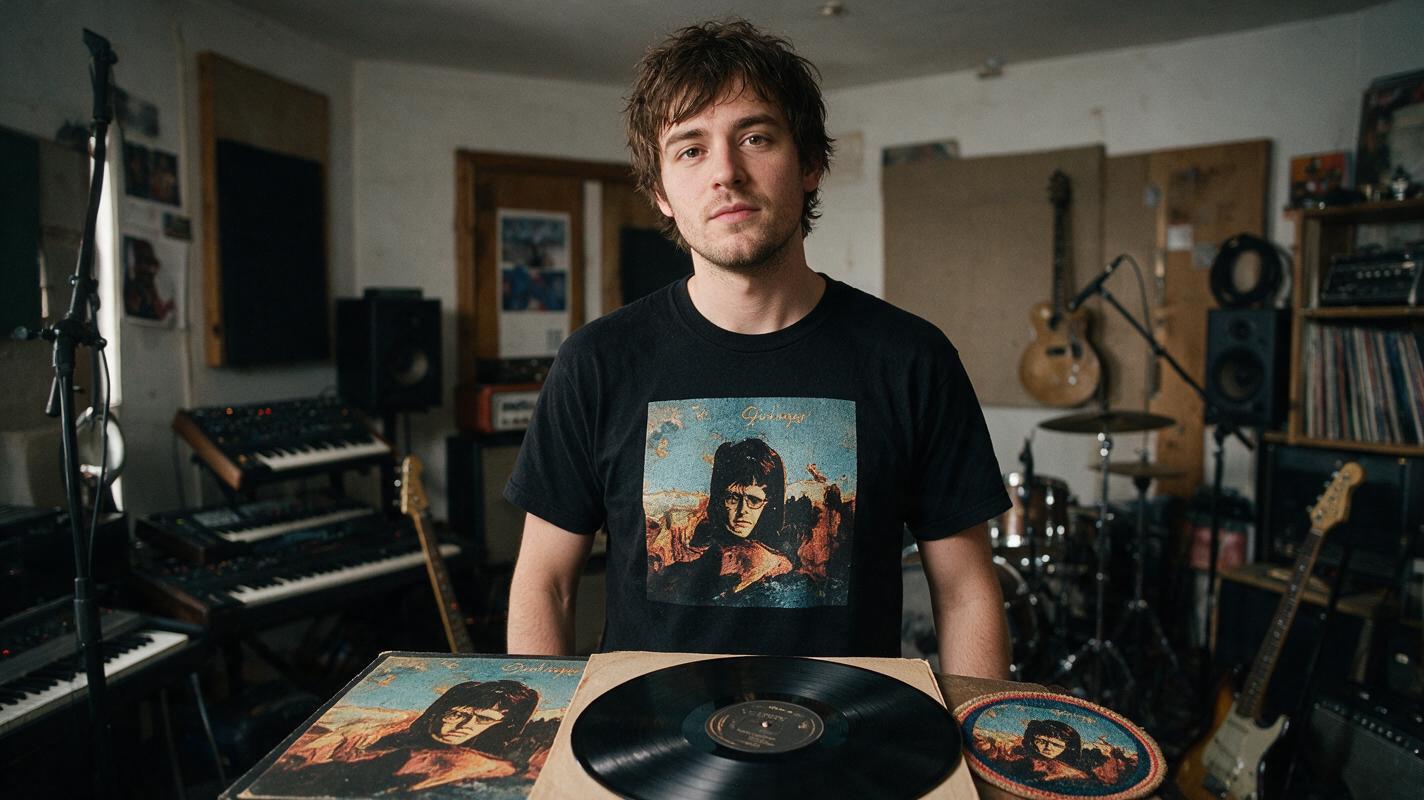
Table of contents
Why album cover-matched merch mockups matter for independent artists
You spent weeks refining your album cover art to capture your sound’s exact vibe — so why slap it on a generic, flat merch mockup that looks like every other artist’s store listing?
Independent musicians often skip high-quality merch mockups because they don’t have Photoshop, can’t afford a designer, or can’t find templates that fit their unique cover art style. Generic mockups stretch your art, wash out your color palette, and make your pre-order campaign feel unpolished.
GPT Image, a powerful ai image generator, solves this by letting you turn your existing album cover directly into photorealistic, style-matched merch mockups in minutes. You can generate t-shirts, vinyl records, hoodies, sticker packs, and more, all with your artwork applied naturally, correct proportions, and lighting that matches your cover’s mood. No templates, no manual editing, no design experience required.
Prep your album cover for accurate style transfer
Before you generate any mockups, take 2 minutes to prep your album cover file to get the most consistent results. Bad reference files lead to mismatched colors, distorted artwork, or lost details.
- Use a high-res source file: Export your cover at 2048x2048px or larger, 300 DPI, as a PNG or JPG. Low-res files will result in blurry artwork on your mockups.
- Isolate key art (optional): If you only want your cover’s central artwork (not the full cover with title/artist name) on apparel like t-shirts, crop out the text and export a transparent PNG of just the graphic.
- Keep full cover for physical media: For vinyl, CD, or cassette mockups, use the full square cover file including all text and logos, as these products display the entire cover design.
- Note your color palette: Jot down 2-3 core colors from your cover (e.g. "neon magenta, deep navy, cream") to add to your prompt for extra color accuracy.
Pro tip: If your cover has a lot of small text, remove it from apparel mockups — tiny text gets lost on fabric and will look messy in the final mockup.
Core GPT Image prompt structure for merch mockups
The key to getting a usable, realistic mockup is a prompt that balances product specificity, style reference, and photorealistic details. Use this base structure as your starting point, then swap in your product type and cover details.
Photorealistic [product type], [product color/material], [your album cover artwork] printed perfectly centered on the product, no stretching or distortion, exact color palette from reference image, [setting/context], soft natural lighting, shallow depth of field, product photography, 4K, high detail
--reference [your album cover file]
--style-reference-weight 0.7
Let’s break down what each part does:
[product type]: Be specific (e.g. "white cotton crew neck t-shirt, flat lay" vs just "t-shirt") to get the exact product you need.printed perfectly centered, no stretching or distortion: This line prevents the most common issue with AI merch mockups — warped or misaligned artwork.exact color palette from reference image: Locks in your cover’s specific hues so the mockup doesn’t shift to generic colors.--style-reference-weight 0.7: This setting balances product realism with cover style consistency. Turn it up to 0.8–0.9 for more stylized, artistic mockups, or down to 0.5–0.6 for more photorealistic product shots with lighter style influence.
Copy this base structure and swap in your own product and genre details, then try this prompt for free.
Prompt variations for 5 essential music merch items
Below are tailored prompts for the most popular music merch items, adjusted for each product’s unique shape and use case. Swap in your own cover details, genre, and color palette.
T-shirt mockups
T-shirts are the top-selling merch item for independent artists, so getting the mockup right directly impacts pre-order sales. Choose between flat lay (clean, product-focused) or model shots (more relatable, lifestyle-focused).
Photorealistic black cotton crew neck t-shirt, flat lay on a white marble surface, dark surrealist album cover artwork printed large on the chest, perfectly centered, no stretching, exact deep purple and burnt orange color palette from reference, soft studio lighting, sharp focus on the print, product photography, 4K
--reference [album cover file]
--style-reference-weight 0.7
Vinyl record mockups
Vinyl mockups are perfect for pre-order campaigns and social media announcements, as fans love seeing physical media renders. Include both the sleeve and the record itself for a complete look.
Photorealistic 12-inch vinyl record, black vinyl with custom label matching album cover art, outer sleeve with full album cover artwork, side A facing up, resting on a wooden record crate, warm natural window light, soft shadow, retro product photography, 4K, high detail
--reference [full album cover file]
--style-reference-weight 0.8
Hoodie mockups
Hoodies are a high-margin merch item, and a realistic mockup can help fans visualize wearing it. Opt for a relaxed fit and neutral product color to let your artwork stand out.
Photorealistic sand-colored heavyweight hoodie, front view, laid flat on a beige linen background, indie folk album cover artwork printed small on the chest pocket, perfectly proportioned, no distortion, exact sage green and terracotta color palette from reference, soft diffused lighting, product photography, 4K
--reference [cropped album art file]
--style-reference-weight 0.7
Sticker pack mockups
Sticker packs are a low-cost, high-volume merch item perfect for bundle deals. Generate a scattered pack mockup to show off multiple designs pulled from your album art.
Photorealistic sticker pack, 5 assorted vinyl stickers with artwork pulled from synthwave album cover, including neon logo, city skyline, and album title text, scattered on a dark blue desk surface, glossy finish, soft glare, top-down view, product photography, 4K
--reference [album cover file]
--style-reference-weight 0.8
Tote bag mockups
Tote bags are a versatile, eco-friendly merch option that fans use daily, giving you ongoing brand exposure. Use a canvas material and large print for maximum visibility.
Photorealistic natural canvas tote bag, hanging on a wooden hook against a white wall, psychedelic rock album cover artwork printed large on the front, perfectly centered, no wrinkling of the print, exact hot pink and electric blue color palette from reference, soft natural light, lifestyle product photography, 4K
--reference [album cover file]
--style-reference-weight 0.7
Troubleshoot common mockup flaws
Even with a good prompt, you might run into small issues with your mockups. Here are the most common problems and quick fixes to get perfect results.
- Stretched or distorted artwork: Add "artwork is perfectly proportioned, no stretching, warping, or skewing" to your prompt, and increase the style reference weight by 0.1–0.2. If the issue persists, use a cropped, high-res version of just your artwork as the reference instead of the full cover.
- Mismatched colors: Explicitly list your cover’s core colors in the prompt (e.g. "exact neon magenta, charcoal gray, and off-white color palette") and add "color-matched to reference image". Avoid vague terms like "vibrant colors" that can shift the palette.
- Blurry text on merch: If you’re including text (like your artist name or album title) on the merch, add "sharp, crisp text, legible, no blurring" to your prompt. For small text, use a higher style reference weight (0.8+) to preserve detail.
- Product looks fake or plastic: Add specific material details (e.g. "soft cotton fabric, natural wrinkles", "matte vinyl finish") and specify "soft natural lighting, realistic shadows" to make the product feel tangible. Avoid harsh studio lighting that can make items look artificial.
- Artwork is too small or too large: Specify the exact placement and size in your prompt, e.g. "artwork printed 10 inches wide, centered on the chest" or "artwork covers the entire front of the tote bag".
Final checklist
- Prep your album cover file at 2048px+ resolution, cropping or isolating art as needed for the product.
- Use the core prompt structure, adding specific product details, color references, and anti-distortion language.
- Adjust style reference weight between 0.5 and 0.9 to balance photorealism and cover style consistency.
- Test 2-3 variations of each mockup to find the best angle, lighting, and artwork placement.
- Use final mockups in pre-order campaigns, social media posts, and your online store to boost merch sales.
Keywords
gpt image, merch mockups, album cover, music merch, ai product mockups, album visuals, independent musicians