Amazon and Claude Agents: Approval Gates for Safer Creative Workflows
Amazon’s opening of seller tools to Claude agents raises a question for creative teams: what should an agent be allowed to turn into a published asset? This article offers an approval framework for briefs, AI-generated drafts, and video concepts without assuming that MagicBoat connects directly to Amazon.

Table of contents
Agent access makes creative approvals more important
Amazon is opening seller tools to Claude agents, bringing agent access closer to the information businesses use in everyday commerce. For creators and agencies, the useful takeaway is an approval model: let an AI agent help organize the work, but make a person accountable for every claim and asset that goes live.
The question is not whether an agent can produce another draft. It is whether a team can trace that draft back to approved information, spot unsupported claims, and decide who has authority to publish it. Those checks matter just as much for a short video as they do for a product page.
What the Amazon–Claude development changes
Opening seller tools to agents points toward a broader shift: an AI assistant may work nearer to operational context instead of relying entirely on text copied into a chat. That could make creative requests easier to prepare, but access to context is not the same as permission to publish conclusions drawn from it.
A seller-facing detail may be useful for planning while still being unsuitable for an advertisement. Availability can change; a customer comment is not automatically a substantiated product claim; and an internal note may not be intended for public use. Creative teams therefore need a boundary between information the agent can examine and statements the audience can see.
Use agent access to reduce manual handoffs—not to remove the review that makes a creative claim publishable.
The approval boundary in an AI agent workflow
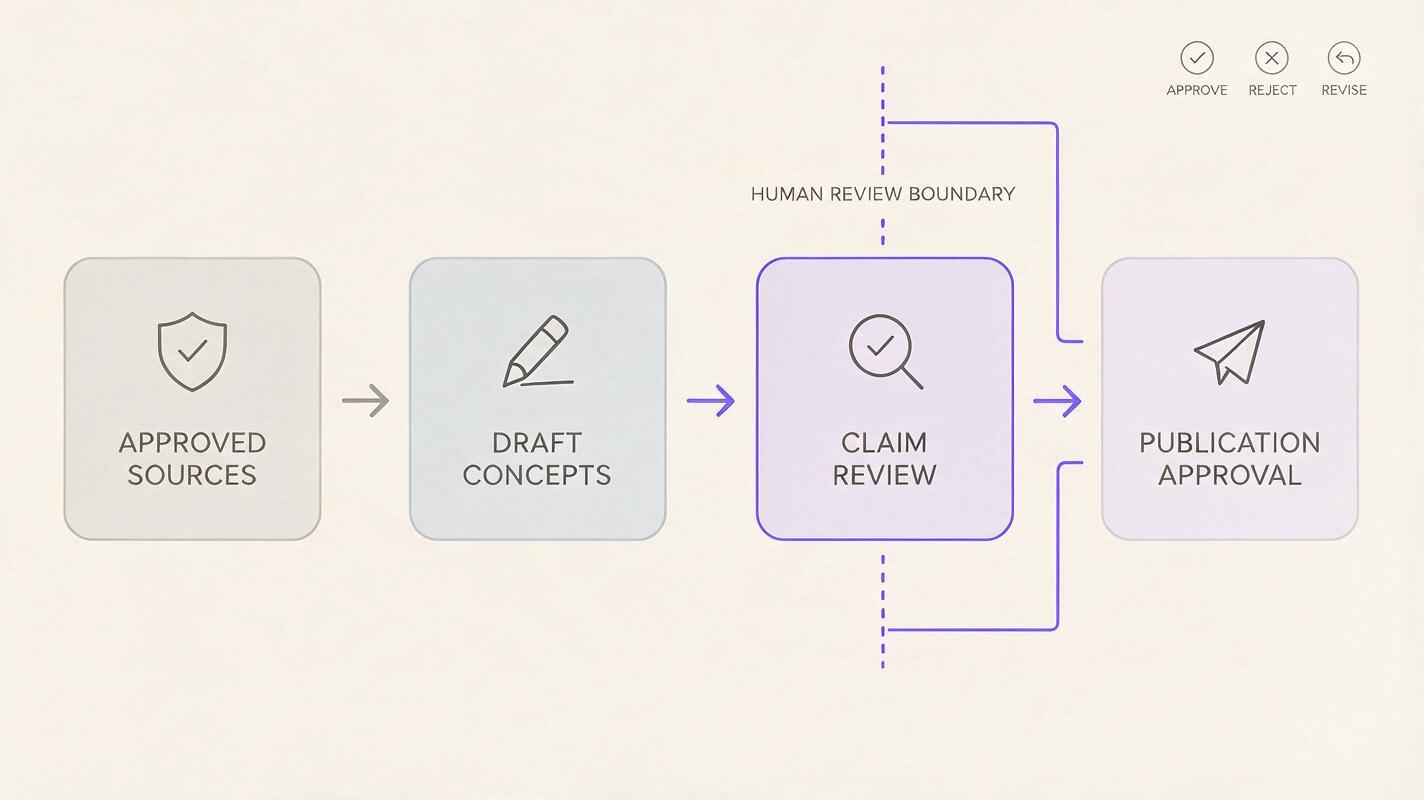
A reliable AI agent workflow can separate four decisions that are often collapsed into one prompt:
- Source selection: Which product facts, brand rules, and campaign instructions are approved for this assignment?
- Draft generation: Which headlines, scripts, or visual directions are proposals rather than verified statements?
- Claim review: Who checks that the language and imagery match the approved source material?
- Release: Who chooses the final asset and authorizes its use on a specific channel?
That separation gives an agency a practical way to use AI automation without treating every output as finished work. The agent can assemble options quickly; reviewers can spend their attention on evidence, tone, and channel fit.
A brief that carries its own boundaries
Imagine a team preparing a fifteen-second product video. Instead of asking for a finished ad from a loose product description, the creative lead supplies an approved brief with separate fields for verified facts, prohibited claims, audience, format, and review owner. A reusable instruction might look like this:
Creative task: Draft three concepts for a short product video.
Use only the approved product facts attached to this brief.
Treat missing specifications as unknown; do not infer them.
For each concept, list the source fact behind every product claim.
Flag lines that require legal, brand, or seller review.
Do not mark any concept as ready to publish.
The instruction does not guarantee accuracy. It makes uncertainty visible so a reviewer knows where to look. It also preserves a distinction that can disappear in fast-moving production: a compelling concept is not an approved claim.
Where multi-model creation fits
Once a brief is bounded, a team may want different kinds of creative exploration: alternative hooks, tighter script language, or visual directions for a video editor. That is a useful place for a one-account, multi-model workflow such as MagicBoat’s creative workflow. The team can explore options in one workspace while keeping its own approval brief and review decisions consistent.
This is a creative-production use case, not a claim that MagicBoat connects to Amazon seller tools or that a particular model has direct access to seller data. Bring only information your team is authorized to use, and treat generated material as a draft until it passes review.
| Production moment | Useful AI assistance | Human approval question |
|---|---|---|
| Brief preparation | Organize supplied facts and identify gaps | Is every source authorized and current? |
| Concept exploration | Propose hooks, scripts, and visual directions | Does each claim follow from an approved fact? |
| Video planning | Suggest a shot sequence and on-screen wording | Could the images imply something the product does not do? |
| Final selection | Compare draft variants against the brief | Who signs off for this channel and audience? |

An AI video workflow that leaves a review trail
For video, the final review should cover more than the spoken script. On-screen text, a suggested demonstration, and the order of shots can each make an implied promise. A useful review record pairs the chosen concept with its approved brief, the claims checked, requested edits, and the person who cleared the final version.
Consider a scene showing a product beside a travel bag. The image may communicate portability even if the voice-over never says the word. If portability is not an approved claim, the reviewer can change the shot rather than merely rewriting the script. That is why an AI video workflow needs visual review as well as text review.
Keep the handoff simple: a draft asset, a list of claims and visual implications, and a clear decision—approve, revise, or reject. If the underlying product information changes, the team can identify which creative decisions deserve another look.

Key takeaways
- Agent access can speed up preparation, but it does not turn operational information into approved advertising claims.
- Separate source facts, generated proposals, claim review, and publication authority.
- Review what video imagery implies, not only what its script explicitly says.
- Use one consistent approval brief when exploring creative options across models.
Start creating with MagicBoat for free and build a multi-model creative process around briefs your team can review.
Sources
The supplied topic material identifies the Amazon–Claude seller-tools development but provides no public third-party source URLs.
Keywords
ai agent workflow, claude, creative approvals, ai automation, ai assistant, ai video workflow, multi-model creation