Amazon and Claude Agents: A Practical AI Workflow for Seller Creatives
Amazon opening seller tools to Claude agents brings the agent conversation closer to everyday commerce work. For creators and agencies, the useful opportunity is an AI agent workflow that turns approved product information into draft creative assets while keeping review and publishing decisions with people.

Table of contents
Amazon’s Claude Agent News Meets the Creative Brief
Amazon is opening seller tools to Claude agents. For creators and agencies, the practical promise is a faster route from approved product information to campaign drafts—without handing an AI agent the final say over claims, creative quality, or publication.
The distinction matters because seller operations and creative production are connected, but they are not the same task. An agent may help organize work around a product; a usable ad still needs a clear audience, accurate language, suitable visuals, and a human decision about what goes live. The strongest AI agent workflow treats those as connected stages with explicit handoffs, rather than one request to “make the campaign.”

What the Amazon and Claude Development Changes
Amazon’s move places Claude agents closer to the tools sellers use for commerce work. It does not, by itself, establish that an agent can independently produce, approve, and publish a complete creative campaign. Those are separate questions, and sellers should evaluate any available access against its actual permissions and documentation.
For a creative team, the immediate significance is the direction of travel: an AI assistant becomes more useful when it can work from relevant context instead of relying on a brief repeatedly copied into a chat. Product facts, audience notes, existing copy, and review requirements can then inform a more coherent handoff to the people and tools producing creative assets.
The valuable unit of automation is not “one prompt, one finished ad.” It is a traceable path from product facts to drafts, checks, and approved assets.
The Agent-Era Workflow Is a Chain of Decisions
Imagine a small agency preparing a launch for a reusable water bottle. Its client provides an approved description, product photographs, a target audience, and a list of claims the team must not make. The agency needs marketplace copy, a short social video concept, and several captions. An agent can help turn that material into a structured creative brief, but the brief should remain distinct from the final deliverables.
| Workflow moment | Useful AI assistance | Human decision |
|---|---|---|
| Product intake | Organize supplied facts, images, audiences, and restrictions | Confirm that the source material is current and approved |
| Concept development | Draft angles, hooks, and a visual outline | Select concepts that fit the brand and product |
| Asset drafting | Generate copy variants and prompts for creative production | Review accuracy, visual details, and platform fit |
| Release | Prepare an approval-ready package | Authorize and publish the final assets |
This separation also makes rework less expensive. If the audience changes, the team can revise the brief and regenerate relevant drafts. If a product claim is rejected, reviewers can find where it entered the workflow instead of inspecting every asset from scratch.
Keep product facts separate from creative suggestions
A persuasive line is not evidence. Ask the AI assistant to preserve a clear boundary between facts supplied by the seller and proposed marketing language. If a draft mentions a material, certification, performance benefit, or customer result that the approved brief does not support, it should be removed or sent back for verification.
A short intake document can make that boundary visible:
Approved facts: [seller-provided product details]
Audience: [who the creative is for]
Available assets: [approved photos or footage]
Do not claim: [unsupported or prohibited statements]
Deliverables: [copy, captions, video concept]
Review owner: [person who approves each asset]
This is a working example, not a claim that a platform requires any particular template. Its purpose is to give both people and AI tools the same reference point.
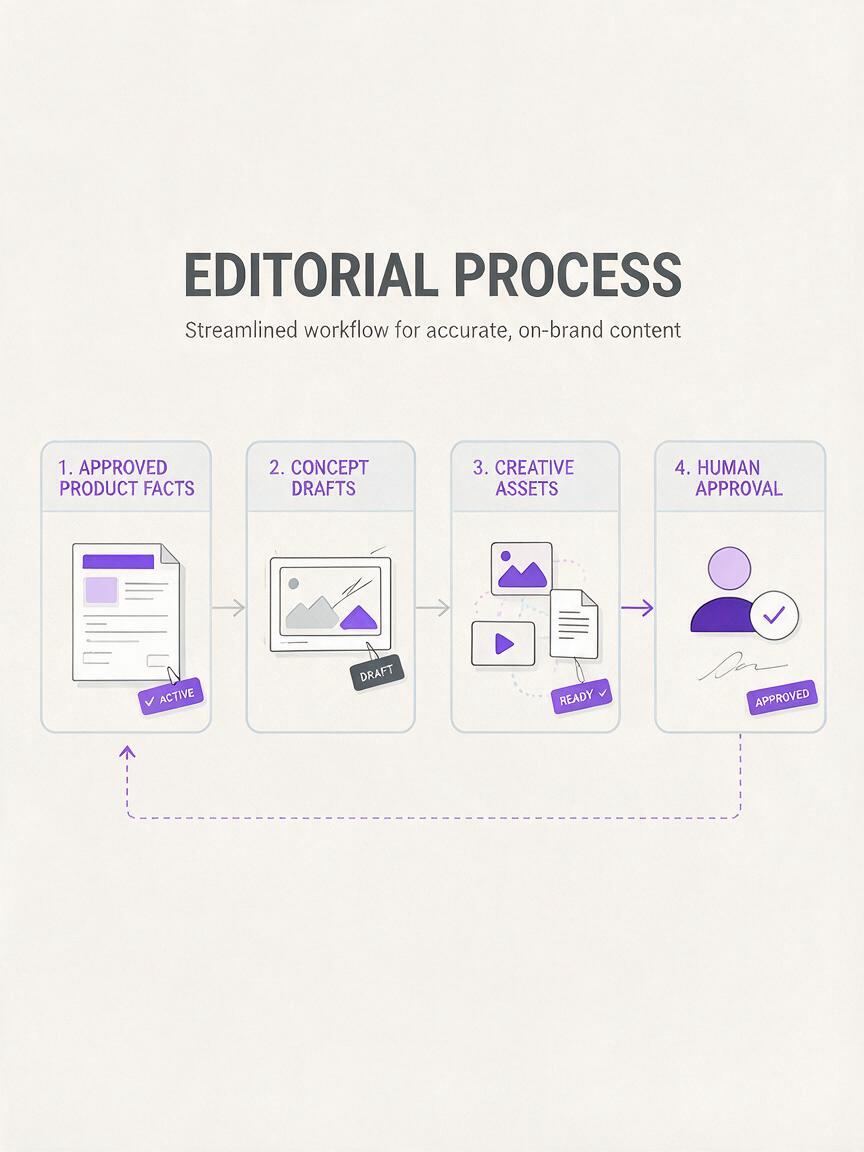
From Agent Context to Automated Creative Generation
Once the facts are organized, AI automation can help the team explore several creative directions without rewriting the brief each time. One direction might emphasize the bottle’s appearance in an everyday commute; another might focus on the experience of packing it for a day out. Each direction can produce a headline, a concise product description, social captions, and a shot list for review.
An AI workflow in MagicBoat provides a practical place to develop those drafts through a one-account, multi-model creation process. Instead of treating the first output as final, the team can compare alternative wording and visual ideas against the same approved brief. MagicBoat is the creative-workflow bridge here, not a substitute for checking what Amazon’s seller tools permit or for obtaining seller approval.
For video, keep the first pass modest. An AI video workflow can begin with a sequence of three scenes: a product close-up, a real use context, and an end frame with an approved call to action. Reviewers should check whether the proposed shots are feasible with the assets available and whether on-screen text repeats only verified information. If the concept needs a scene the team cannot substantiate or produce, change the concept before producing more variants.
A prompt that leaves room for review
Using only the approved product facts below, draft three
creative directions for this audience. For each direction,
provide a headline, two caption options, and a three-scene
video concept. Mark any proposed statement that needs
human verification. Do not invent product specifications,
customer results, or certifications.
The prompt encourages useful variation while making uncertainty visible. It also gives an editor smaller decisions to make: which angle works, which line is accurate, and which scene is worth producing.
Practical Guardrails for Creators and Agencies
As seller tools become more accessible to agents, creative teams should decide where automation stops before they expand its use. The safest handoff is an approval-ready package, not an assumption that generated copy or visuals are ready to publish.
- Use a controlled brief. Keep approved facts, prohibited claims, and source assets together.
- Define the output. Request specific deliverables rather than an undefined “campaign.”
- Review every claim. Check text in captions, images, and video frames against the same source material.
- Keep permissions narrow. Evaluate an agent’s access according to the task it actually needs to perform.
- Record the final choice. Preserve the approved version so later revisions do not quietly restore rejected language.
These habits are useful even when no seller tool is connected. They make the workflow easier to share across a copywriter, designer, account manager, and client—and they help AI-generated material stay grounded in the brief.

Key Takeaways
- Amazon’s opening of seller tools to Claude agents is relevant to creators because seller context can inform better-organized creative work.
- An effective AI agent workflow separates approved facts, draft generation, human review, and publication.
- Use AI automation to compare concepts and prepare assets, not to validate its own claims.
- A one-account, multi-model workflow can help teams develop variations while retaining a consistent brief.
Ready to turn an approved brief into creative options? Start free with MagicBoat and build a workflow your team can review before anything goes live.
Sources
No public third-party source links were included in the supplied hot-topic material.
Keywords
ai agent workflow, claude, ai agent, ai automation, ai assistant, ai video workflow, seller creatives