How to Make 90s Sitcom Videos with AI: A Step-by-Step Guide
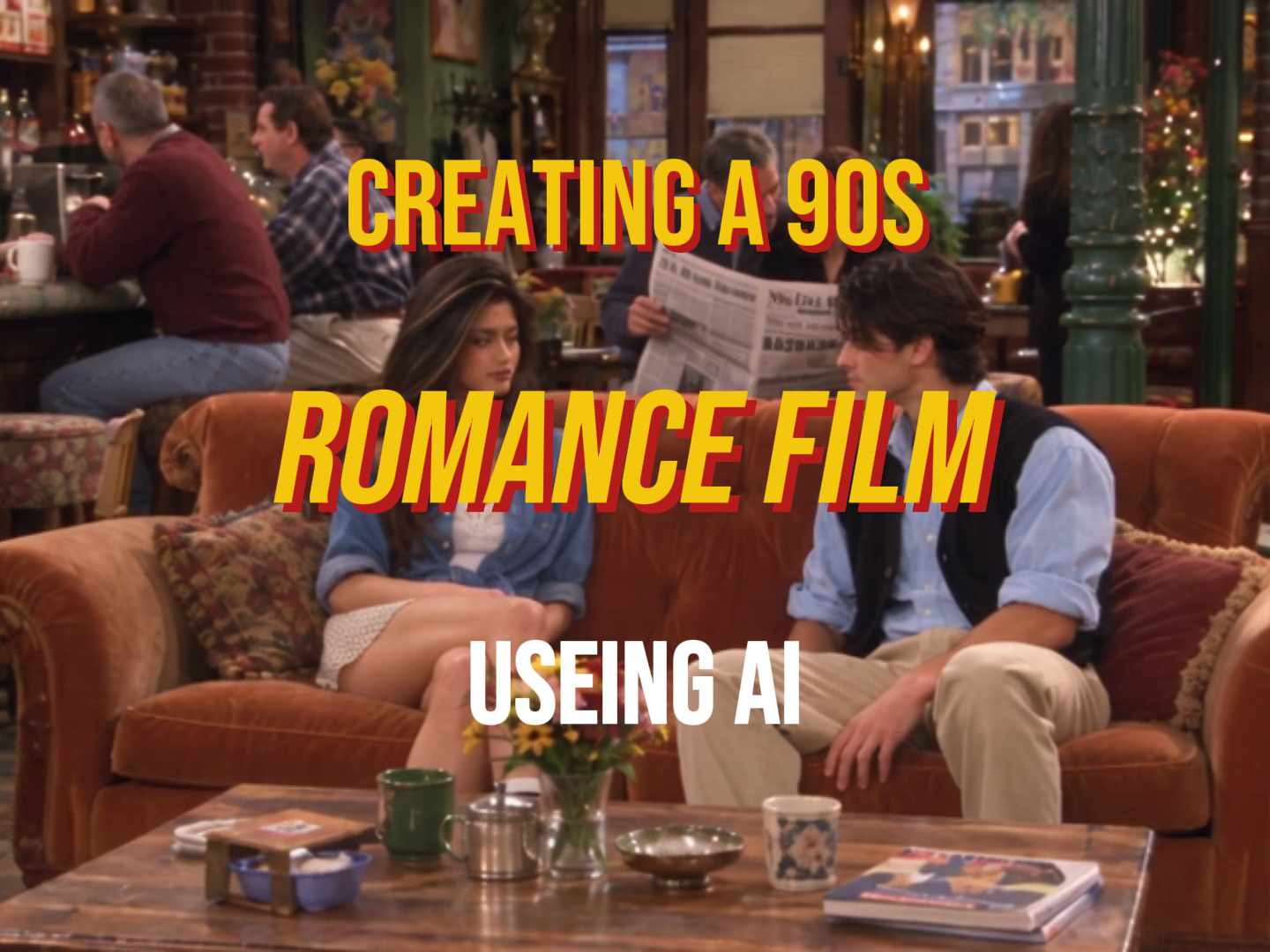
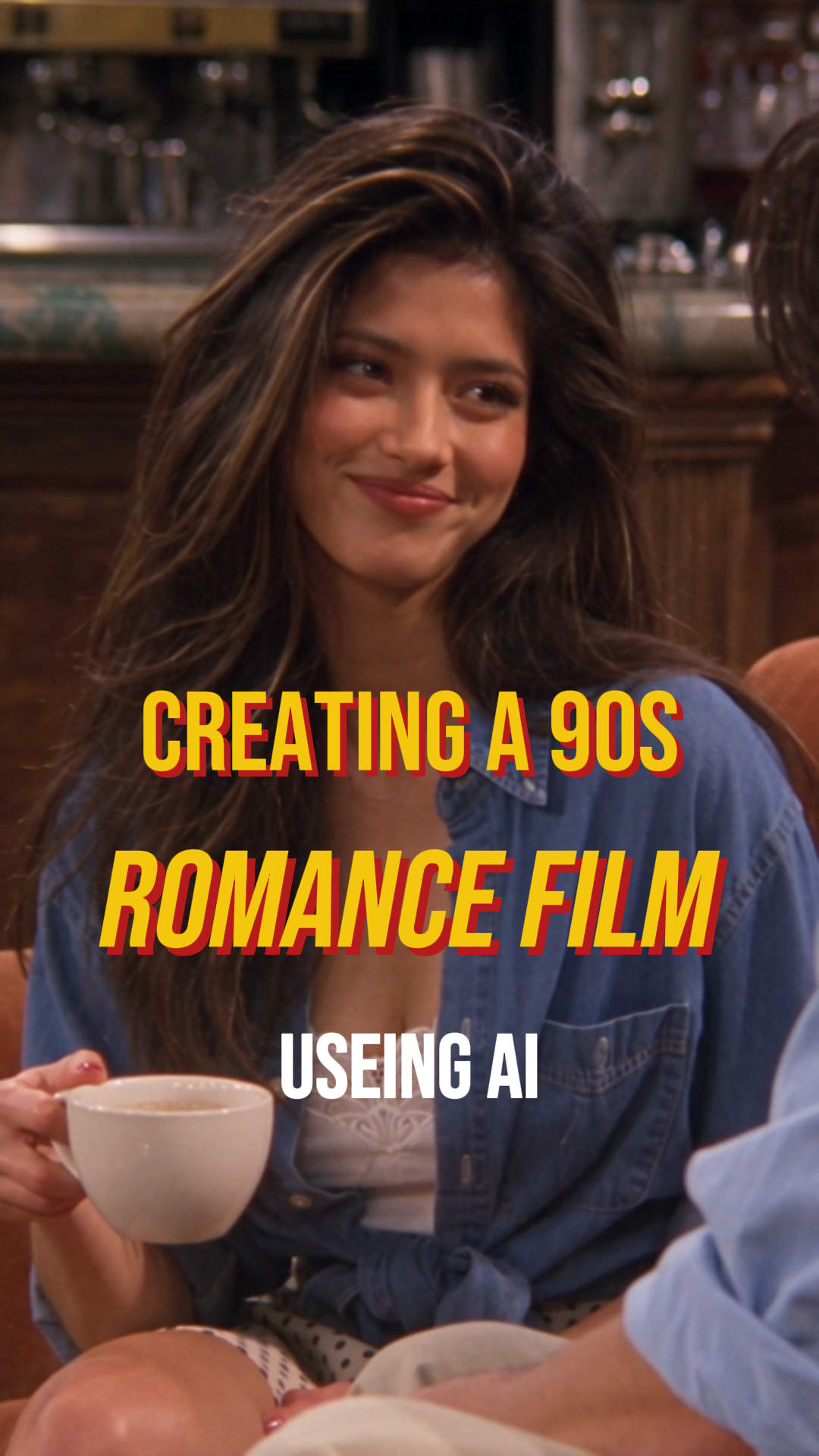
Want to create AI videos that look like real 1990s American sitcoms? Learn how to build consistent characters, design nostalgic locations, and generate natural dialogue scenes using Midjourney, GPT Image 2.5, and Seedance 2.5 on MagicBoat AI.
文章目录
How to Make 90s Sitcom Videos with AI: A Step-by-Step Guide
Ever wondered how creators make AI-generated videos look like scenes straight out of a 1990s American sitcom?
The secret isn't just adding a vintage filter. It's about combining the right character references, believable environments, natural performances, and period-accurate visual details.
In this tutorial, I'll walk you through my workflow using Midjourney, GPT Image 2.5, and Seedance 2.5 on MagicBoat AI.
Step 1: Create Your Character Inspiration
I usually start with Midjourney to explore the overall appearance and aesthetic of my characters.
At this stage, I'm looking for the right face, hairstyle, wardrobe, lighting, and overall 90s atmosphere.
Midjourney Prompt
Copy the following prompt to create your own 1990s-inspired character.
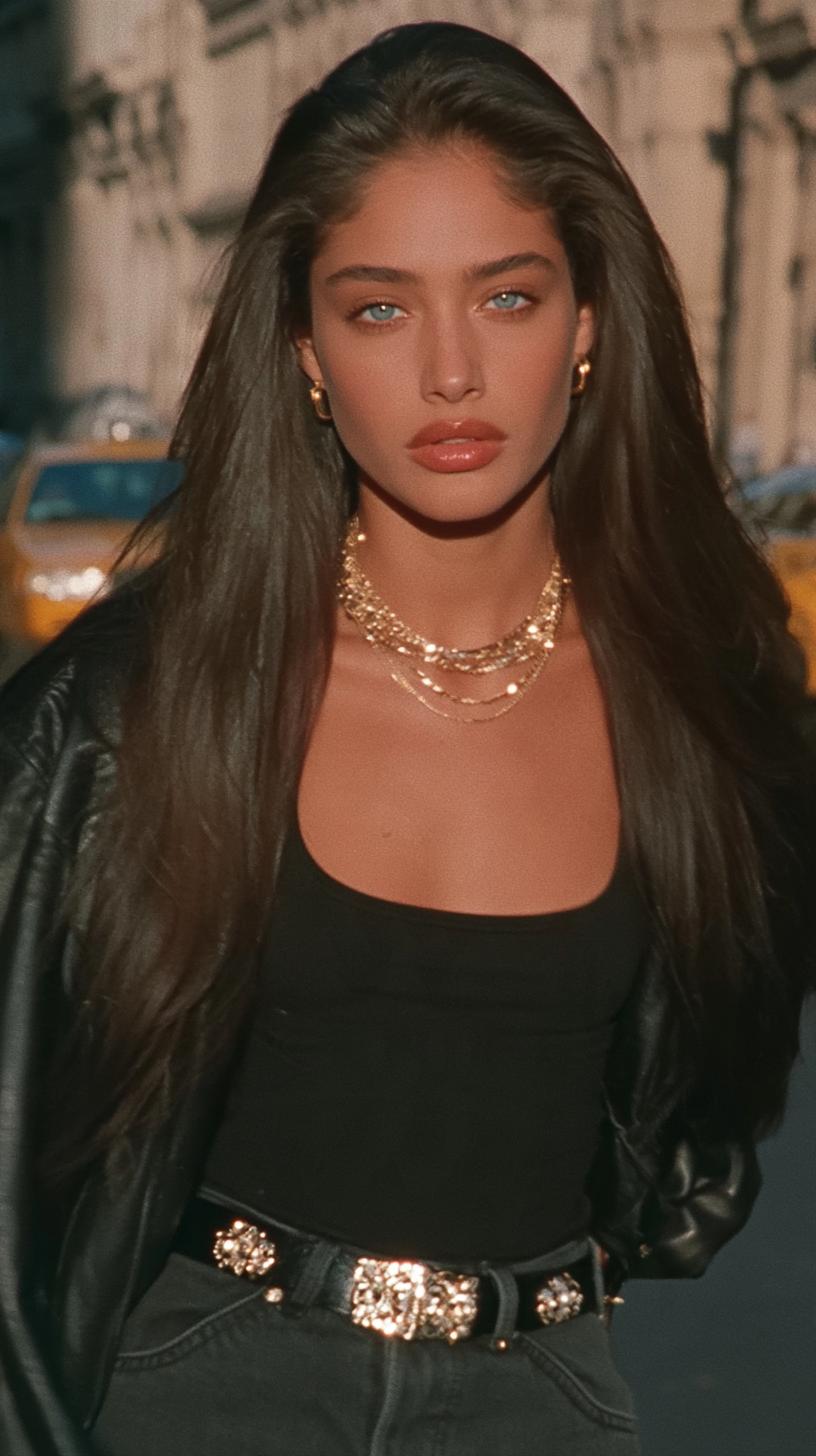
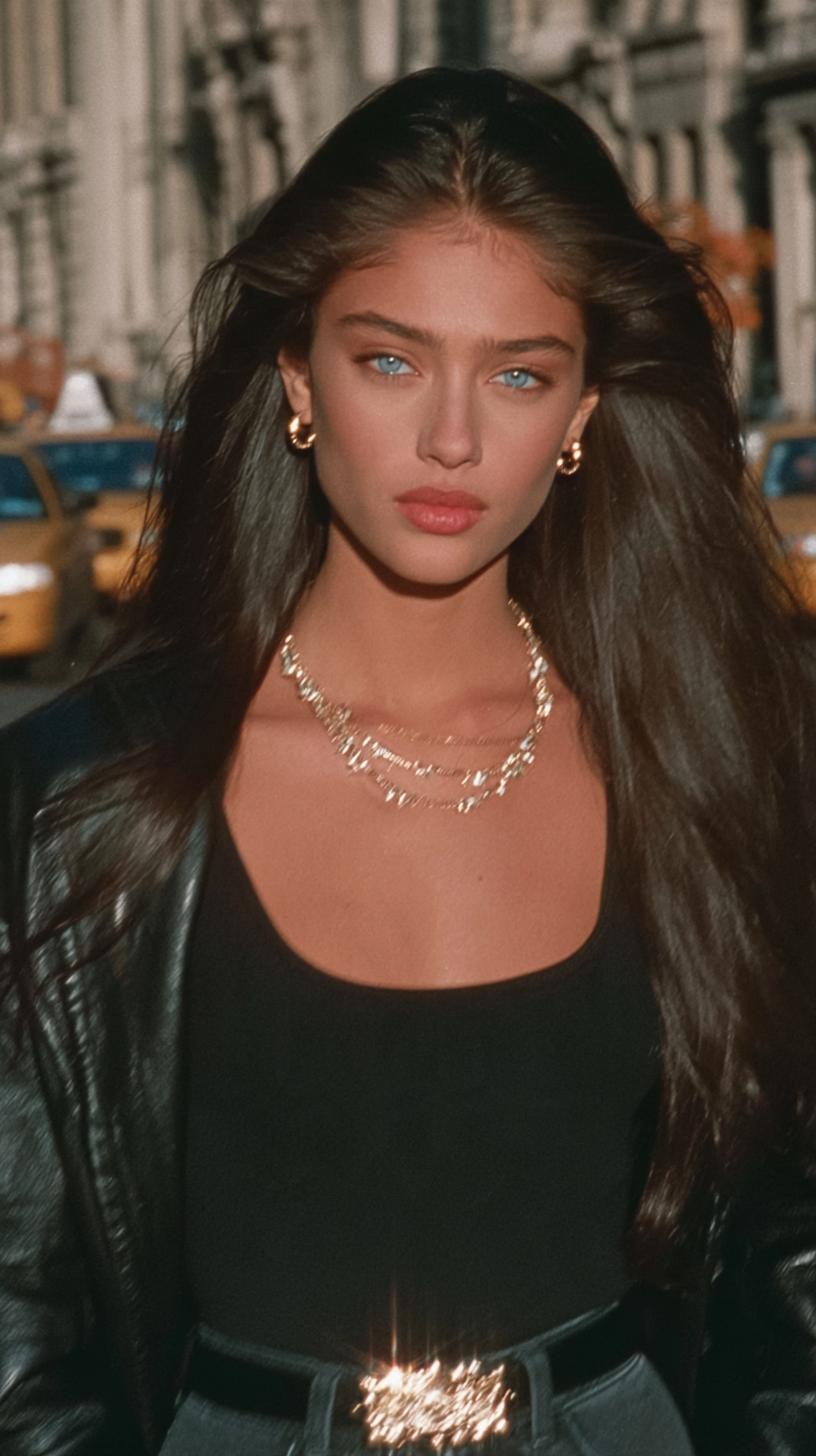
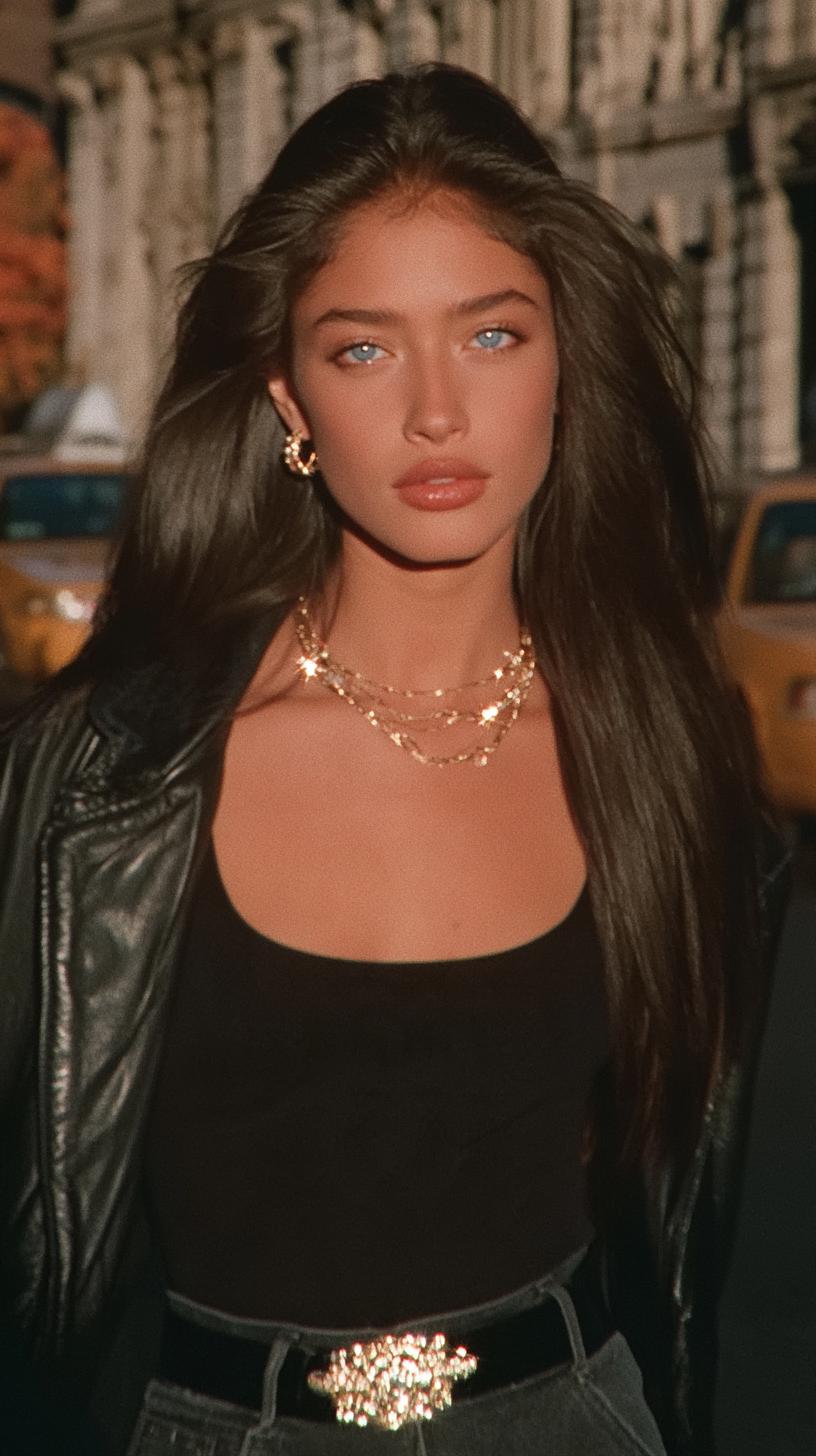
Authentic 1996 New York fashion editorial on 35mm film, exceptionally beautiful adult Latina woman in her mid twenties, long thick jet-black hair with natural 1990s volume, striking clear blue eyes, warm olive complexion, naturally defined eyebrows, elegant sculpted cheekbones, softly full lips, authentic skin pores and subtle facial asymmetry.

Wearing a fitted black scoop-neck top, slightly oversized vintage black leather jacket, dark straight-leg jeans, polished black leather belt with ornate gold hardware, layered delicate gold necklaces and small gold hoop earrings.

Walking through a Manhattan street in autumn, yellow taxis and aged stone buildings behind her. Warm low-angle afternoon sunlight catching her gold accessories, scattered sparkling metallic highlights, subtle halation, natural shadows, gently softened optical focus, authentic 1990s 35mm motion picture grain, warm faded analog colors, no beauty retouching, no plastic skin, no modern digital sharpness.
My Tip: Don't focus only on making the character beautiful. Think about whether the hairstyle, clothing, and lighting actually belong to the decade you're recreating.
The Workflow at a Glance
Creating authentic 90s sitcom videos with AI comes down to three essentials: images, video, and audio. Start with Midjourney for character inspiration, use GPT Image 2.5 to create consistent character sheets and nostalgic locations, then bring everything to life with Seedance 2.5. Finally, add era-appropriate music, ambience, and sound effects to complete the look.
- Midjourney inspiration
- GPT Image 2.5 character sheets
- 1990s location references
- Seedance 2.5 animation
- Natural expressions and gestures
- Camera framing and accents
- Era-inspired music
- Ambient sound effects
- Classic sitcom laughter
Step 1: Create Your Character Inspiration with Midjourney
Every great 90s-inspired AI video starts with the right character.
I usually begin with Midjourney to explore the overall appearance and aesthetic of my characters. At this stage, I'm not trying to create a perfectly consistent character sheet just yet. I'm looking for the right face, hairstyle, wardrobe, lighting, and authentic 1990s atmosphere.
For this example, I wanted a woman who looked like she belonged in a 1996 New York fashion editorial — with voluminous hair, natural skin texture, vintage styling, and that unmistakable analog film look.
Midjourney Prompt
Here's the exact prompt I used to create the initial character inspiration:
Authentic 1996 New York fashion editorial on 35mm film, exceptionally beautiful adult Latina woman in her mid twenties, long thick jet-black hair with natural 1990s volume, striking clear blue eyes, warm olive complexion, naturally defined eyebrows, elegant sculpted cheekbones, softly full lips, authentic skin pores and subtle facial asymmetry.
Wearing a fitted black scoop-neck top, slightly oversized vintage black leather jacket, dark straight-leg jeans, polished black leather belt with ornate gold hardware, layered delicate gold necklaces and small gold hoop earrings.
Walking through a Manhattan street in autumn, yellow taxis and aged stone buildings behind her. Warm low-angle afternoon sunlight catching her gold accessories, scattered sparkling metallic highlights, subtle halation, natural shadows, gently softened optical focus, authentic 1990s 35mm motion picture grain, warm faded analog colors, no beauty retouching, no plastic skin, no modern digital sharpness.
What Makes This Prompt Work?
- Authentic 1990s styling: Voluminous hair, vintage leather, gold accessories, and period-inspired clothing.
- Natural skin texture: Visible pores, subtle facial asymmetry, and no artificial beauty retouching.
- Analog film aesthetics: Soft optical focus, natural shadows, subtle halation, and 35mm film grain.
- Period-accurate surroundings: Manhattan architecture, yellow taxis, and autumn street lighting.
My Tip: Don't focus only on making the character beautiful. Think about whether the face, hairstyle, clothing, and lighting actually belong to the decade you're recreating. Avoid overly polished AI skin and modern fashion-editorial aesthetics.
Once I find an image I like, I use it as the starting reference for the next step: creating a consistent character reference sheet with GPT Image 2.5.
Step 2: Build Consistent Character Sheets with GPT Image 2.5
Now that we've created our character inspiration, it's time to turn it into a consistent character reference sheet.
One of the biggest challenges in AI filmmaking is character consistency. A character might look perfect in one shot, but their facial features, hairstyle, or outfit can change when the camera moves to a different angle.
That's why I use GPT Image 2.5 on MagicBoat AI to create a multi-angle character sheet before generating any video.
How to Create Your Character Sheet
- Open MagicBoat AI and select GPT Image 2.5.
- Upload your favorite character image from Step 1 as the reference.
- Use the prompt below to generate a five-panel character reference sheet.
- Review the results and make sure the facial identity, hairstyle, clothing, and body proportions remain consistent.
- Save the final character sheet for the video generation stage.
The Five Essential Character Views
For this workflow, I create a reference sheet with five different perspectives of the same character:
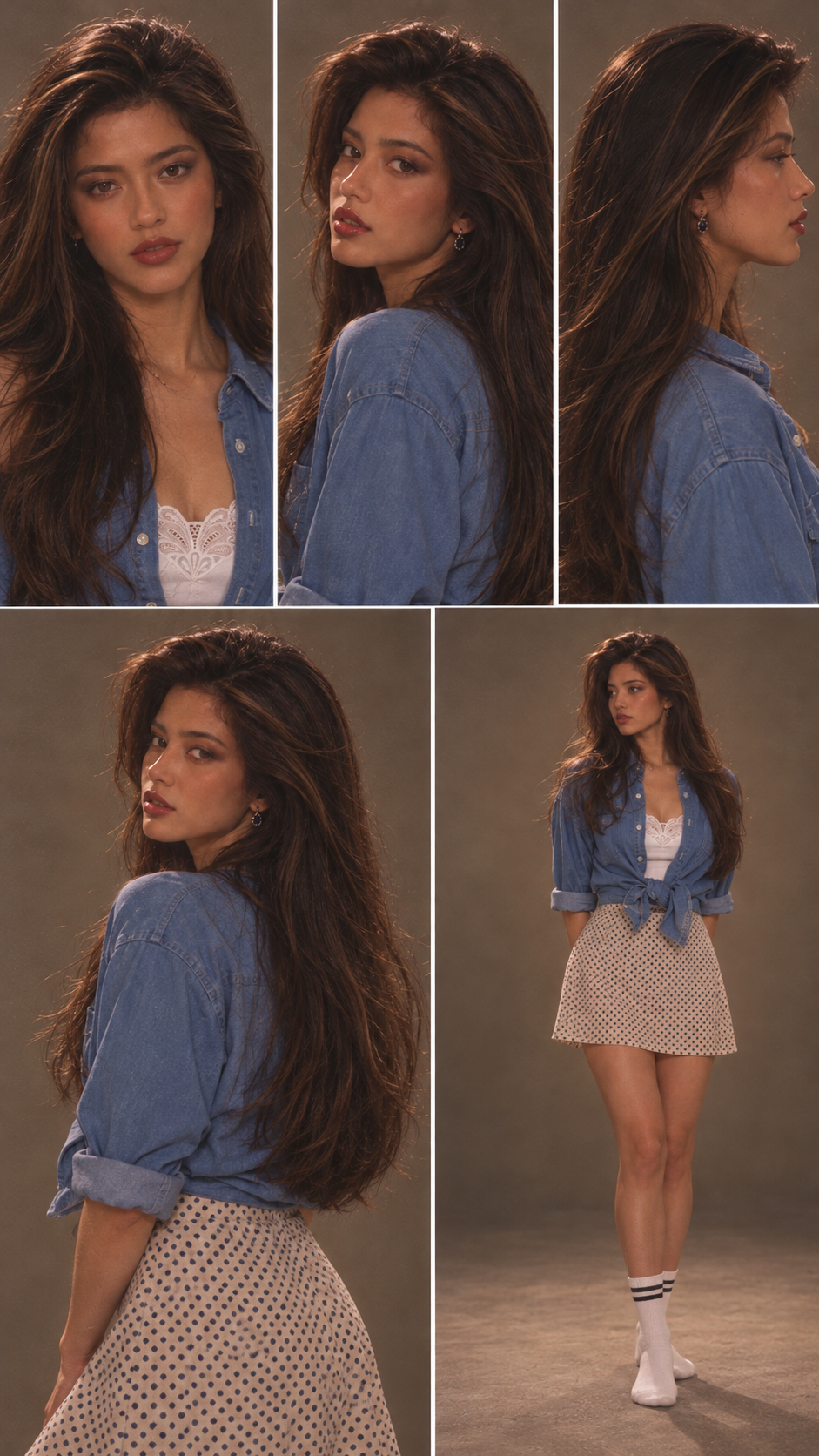
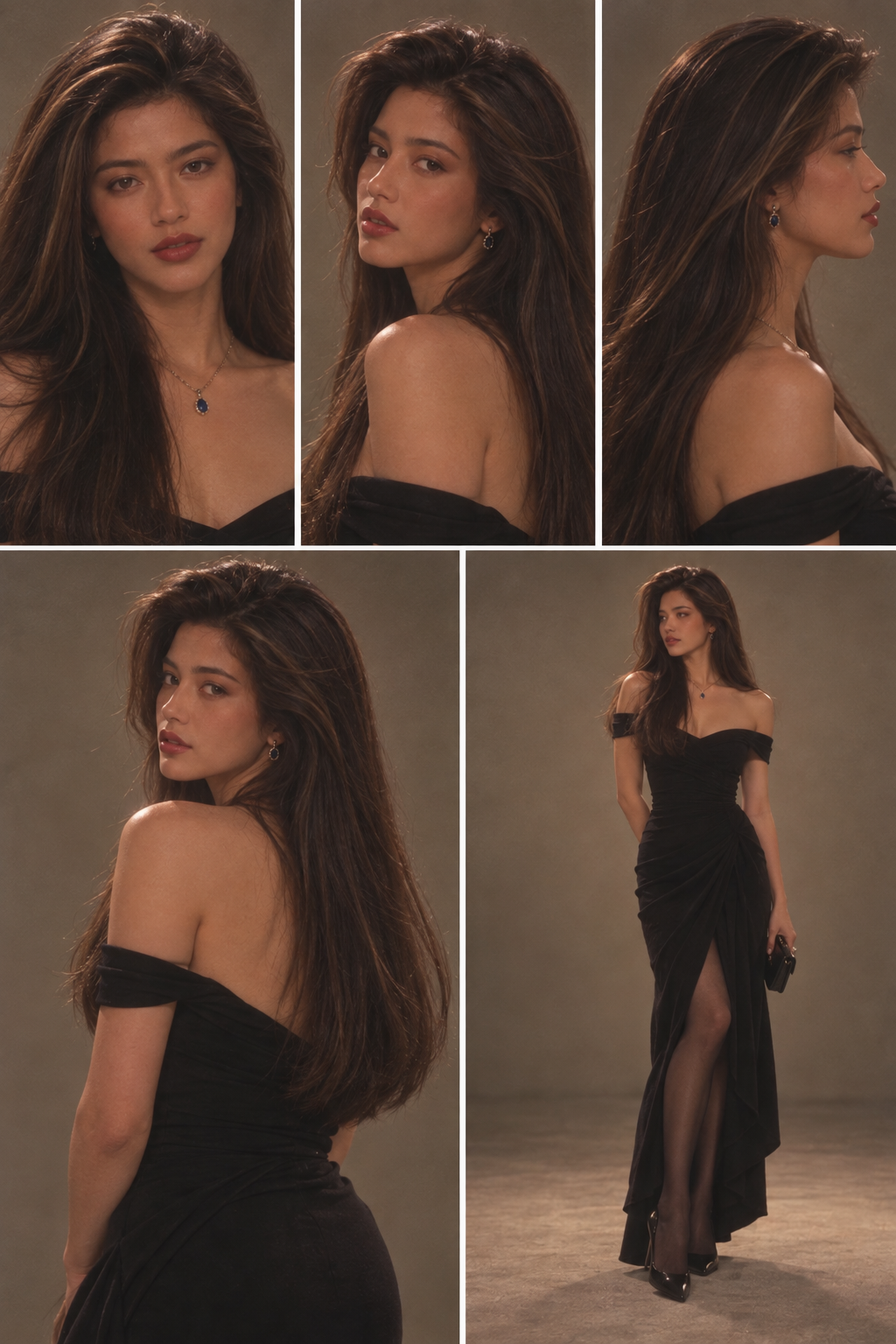
- Panel 1 — Front Portrait: A clear head-and-shoulders view showing the character's facial features.
- Panel 2 — Three-Quarter View: A 45-degree portrait revealing natural facial depth.
- Panel 3 — Side Profile: An exact 90-degree profile showing the nose, lips, jawline, and hairstyle.
- Panel 4 — Rear Three-Quarter View: A view showing the hairstyle's volume, length, and overall silhouette.
- Panel 5 — Full-Body Portrait: A standing view showing the character's complete outfit and body proportions.
GPT Image 2.5 Prompt
Upload your character image and copy the following prompt into GPT Image 2.5:
Create a character reference sheet based on the woman in this street snapshot.
Aspect ratio: Vertical 9:16.
Strictly retain her original facial features and appearance across all panels.
Use a gray studio background with a five-panel layout.
Panel 1: Front head-and-shoulders portrait with a neutral, relaxed expression.
Panel 2: 45-degree three-quarter profile portrait to show natural facial depth and a soft expression.
Panel 3: Exact 90-degree side profile portrait to clearly display the nose, lips, jawline and layered hairstyle.
Panel 4: Rear three-quarter portrait to show the natural volume and length of her dark brown long hair.
Panel 5: Full-body standing portrait showing the full satin slip dress, natural body proportions and bare feet.
The outfit follows the matching style from the street photo exactly.
All panels are shot against a clean warm-gray seamless background, with even soft studio key light plus fill light, faint shadows on the ground, and a slightly warm neutral color temperature.
An 85mm lens and eye-level camera position are used for the full-body shot; a 100mm lens is used for close-ups and material color swatches.
Fully preserve skin texture, pores, velvet fuzz and stray hair strands.
Add subtle 35mm film grain, no skin smoothing.
All panels feature the same person, the same outfit, consistent lighting and ultra-high detail.
Why Character Sheets Matter
A multi-angle reference sheet gives the AI video model a more complete understanding of your character.
Instead of relying on a single portrait, the model can reference the character's appearance from multiple perspectives.
This helps improve:
- Facial consistency: Maintaining recognizable facial features across shots.
- Hairstyle consistency: Preserving the same hair volume, length, and color.
- Outfit consistency: Reducing unwanted clothing changes.
- Body proportions: Keeping the character's overall silhouette believable.
- Camera flexibility: Making it easier to generate scenes from different angles.
My Tip: Don't just generate a beautiful portrait. Create a reference sheet that shows how your character looks from different angles. Pay special attention to natural skin pores, subtle facial asymmetry, realistic hair strands, and consistent clothing. These details help prevent the overly polished, plastic-looking AI aesthetic.
Once your character sheets are ready, the next step is to create the perfect 1990s sitcom environment using GPT Image 2.5.
Step 3: Design Your 1990s Sitcom Location
Now that our characters are ready, it's time to build the world around them.
One of the biggest secrets to creating an authentic 90s sitcom is getting the environment, lighting, furniture, and camera perspective right.
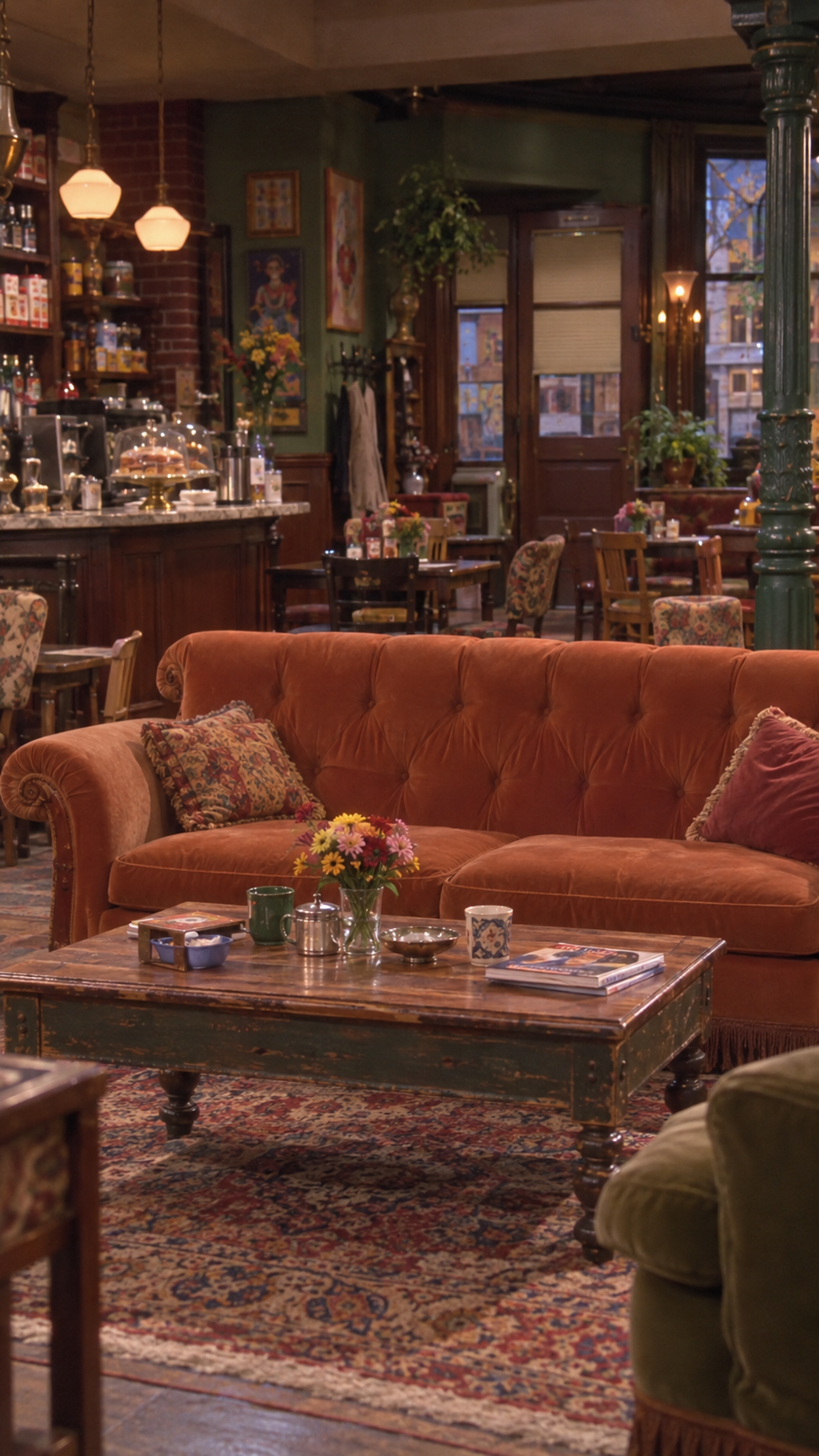
For this tutorial, I'm recreating a cozy 1997 Manhattan coffee shop inspired by the warm, lived-in studio sets of classic American romantic sitcoms.
Instead of generating the characters and background together, I use GPT Image 2.5 on MagicBoat AI to create the environment separately.
This gives me more control over the set design and helps maintain visual consistency across multiple scenes.
How to Create Your 90s Sitcom Environment
- Open MagicBoat AI and select GPT Image 2.5.
- Choose a 9:16 vertical aspect ratio for Instagram Reels or TikTok.
- Describe the location, furniture, lighting, and camera perspective.
- Generate an environment-only reference image without any people.
- Check that the layout leaves enough space for your characters and their movements.
- Save the final environment image for the video generation stage.
GPT Image 2.5 — Coffee Shop Environment Prompt
Here's the prompt I use to create a believable 1997 New York sitcom coffee shop:
1997 NEW YORK AMERICAN ROMANTIC SITCOM — COFFEE SHOP MASTER LOCATION REFERENCE
FORMAT: 9:16 vertical. Environment only. No people.
Create a realistic 1997 Manhattan coffee shop interior, inspired by the practical studio sets of mid-1990s American network television romantic sitcoms.
CAMERA:
Fixed frontal medium-wide shot from the audience side. Seated eye-level, natural perspective.
A three-seat burnt-orange velvet sofa at the center. Leave sufficient room for two seated adults. Clear waitress access from camera-left.
SET DESIGN:
- Muted forest-green walls.
- Aged dark walnut wooden coffee table.
- Mismatched vintage cushions.
- Warm brass lamps and cream lampshades.
- Framed wall art and dark timber trim.
- Layered café seating in the background.
- Worn upholstery, aged wood, and authentic materials.
SPATIAL LAYOUT:
The woman will sit camera-left. The man will sit camera-right. A female waitress will enter from camera-left.
Keep a clear service walkway. The coffee table must not block the waitress.
LIGHTING:
Bright, soft, evenly balanced 1990s studio television lighting. Warm tungsten practical lamps. Natural midtones and moderate contrast. Readable background detail.
VISUAL QUALITY:
Authentic 1994–1997 American broadcast sitcom. Soft analog video texture. Slightly reduced resolution. Natural colors and real material texture. Moderate depth of field.
AVOID:
Modern HDR, ultra-sharp 4K detail, heavy yellow filters, excessive blur, oily shine, plastic textures, and cinematic 35mm film styling.
No people, no text, no modern objects. One continuous vertical environment image.
Why Generate the Environment Separately?
Creating the location before generating the video helps establish a consistent visual foundation.
It allows me to control several important details:
- Set consistency: The sofa, coffee table, lamps, and background remain recognizable between shots.
- Character positioning: I can plan exactly where each character should sit or stand.
- Camera composition: The environment is designed around the intended shot rather than generated randomly.
- Lighting consistency: The characters can be directed to match the warm studio lighting of the location.
- Scene continuity: Using the same environment reference can help reduce unwanted background changes.
Getting the Authentic 90s TV Look
One important detail: 1990s television sitcoms and 1990s Hollywood movies don't look exactly the same.
For a classic American sitcom, I focus on bright studio lighting, soft analog broadcast texture, natural colors, and clearly visible background details.
I avoid dramatic cinematic lighting, extreme background blur, and overly polished digital sharpness.
The goal is to make the environment feel like a real television studio set from 1997, not a modern 3D render with a vintage filter.
My Tip: Always generate your main location without people first. Think about where your actors will sit, how they'll move, and where the camera will be positioned. A well-planned environment makes the video generation process much easier.
Now that we have our character reference sheets and coffee shop environment, we're ready to bring everything together with Seedance 2.5 on MagicBoat AI.
Step 4: Bring Your Scene to Life with Seedance 2.5
Now that we have our character reference sheets and 1997 New York coffee shop environment, it's time to bring everything to life.
For this step, I use Seedance 2.5 on MagicBoat AI to transform the reference images into a natural, dialogue-driven 90s sitcom scene.
Here's something useful: you don't always need to create a separate starting frame. Instead, you can upload your character and environment references and use detailed prompting to control the opening composition, character positioning, dialogue, and camera movement.
1. Prepare Your Reference Images
For this coffee shop scene, I use three main references:
- @image1 — Female Lead: The female character reference sheet created with GPT Image 2.5.
- @image2 — Male Lead: The male character reference sheet, preserving his facial features, hairstyle, outfit, and body proportions.
- @image3 — Coffee Shop: The environment-only reference image showing the burnt-orange sofa, vintage furniture, and warm 1990s studio lighting.
Each reference has a specific purpose. The character images help maintain visual identity, while the environment image establishes the set design and spatial layout.
2. Set Up Your Video on MagicBoat AI
- Open MagicBoat AI and choose Seedance 2.5.
- Upload the character and environment reference images.
- Use a 9:16 vertical aspect ratio for Instagram Reels and TikTok.
- Choose a duration suitable for your dialogue. For this example, we're creating a 12-second opening scene.
- Paste the video prompt below into the prompt field.
- Generate the video and review the acting, camera framing, dialogue, and scene continuity.
3. Plan the Character Blocking
Before writing the dialogue, I always establish where the characters are positioned and how they interact.
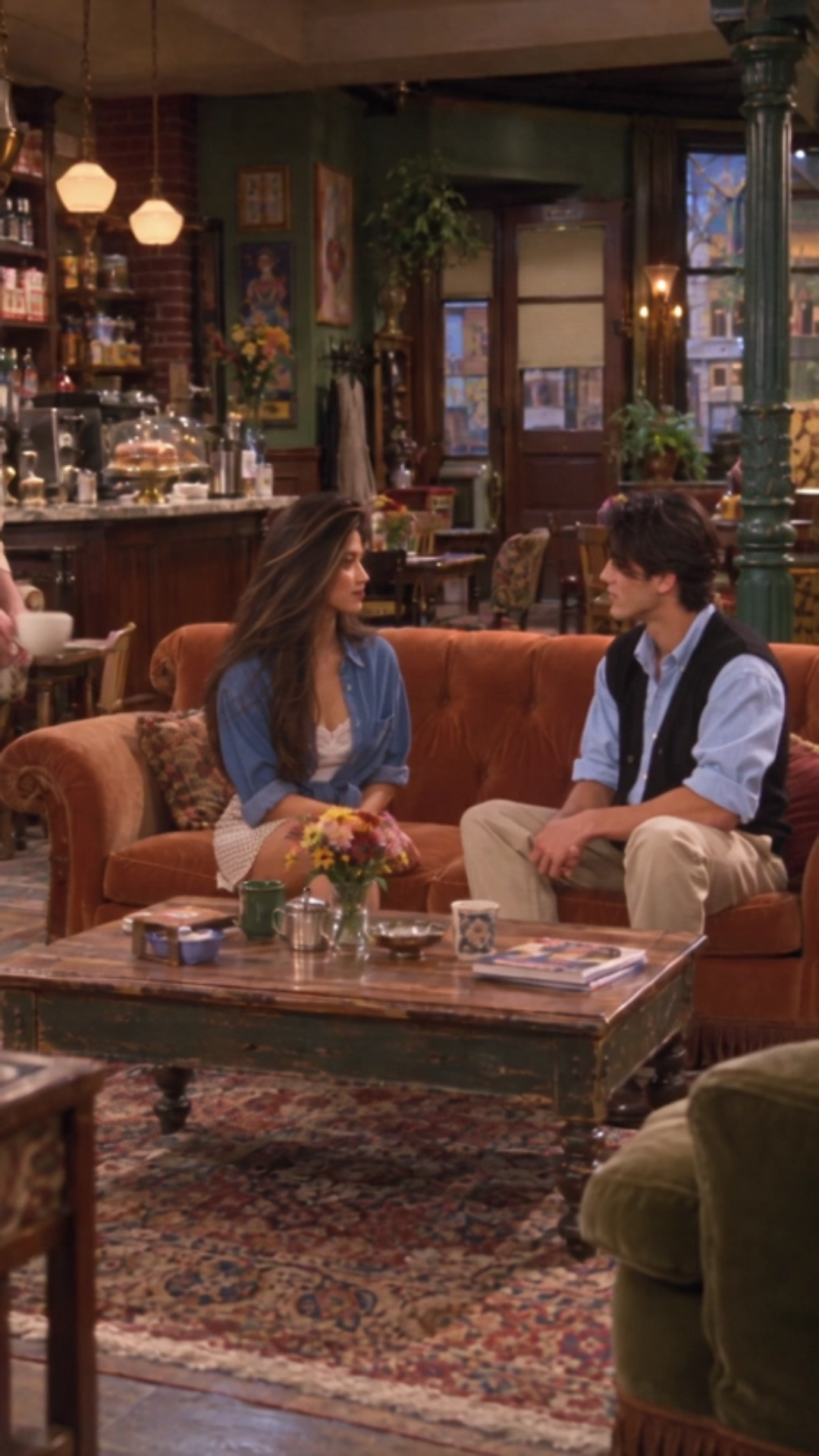
For this example, the woman sits on the left side of the orange sofa, while the man sits on the right. A café barista enters from the left to hand the woman a cup of coffee.
These details help the scene feel physically believable rather than randomly generated.
4. Seedance 2.5 Video Prompt
Here's an example of how I structure a dialogue-driven sitcom scene using character references, camera direction, and a timed performance sequence.
1997 NEW YORK ROMANTIC SITCOM — COFFEE SHOP OPENING SCENE
DURATION: 12 seconds.
ASPECT RATIO: 9:16 vertical.
STYLE: Authentic 1994–1997 American network television sitcom.
REFERENCE MAP
@image1 — FEMALE LEAD: Preserve the woman's exact facial identity, hairstyle, skin tone, natural skin texture, outfit, and body proportions. Long voluminous dark-brown 1990s hair, blue denim shirt over a white lace camisole, and cream polka-dot mini skirt.
@image2 — MALE LEAD: Preserve the man's exact facial identity, tousled dark-brown middle-part hairstyle, natural skin texture, pale blue collared shirt, black knit vest, and beige high-waisted trousers.
@image3 — COFFEE SHOP ENVIRONMENT: Preserve the 1997 Manhattan coffee shop layout, burnt-orange velvet sofa, wooden coffee table, warm practical lamps, vintage furniture, and soft studio lighting.
CHARACTER POSITIONING
The woman sits camera-left on the orange sofa. The man sits camera-right beside her.
Both characters maintain relaxed, natural seated postures. Their shoulders are slightly angled toward each other.
A café barista briefly enters from camera-left and hands a cup of coffee to the woman.
The woman receives the cup naturally, maintaining believable hand contact and realistic movement.
SHOT 01 — 00:00–00:03
Medium-wide sitcom shot showing both characters seated on the orange sofa.
The barista hands the woman her coffee and moves away.
The woman glances toward the man and begins speaking in a casual, slightly amused American accent.
WOMAN: "Everyone's gatekeeping how to make these 90s sitcoms with AI."
SHOT 02 — 00:03–00:07
Cut to a natural medium shot of the woman.
She holds the coffee comfortably and makes a small, expressive gesture with her free hand.
WOMAN: "The soft focus, the warm lighting, that old TV look."
Her expression is conversational and playful, never stiff or exaggerated.
SHOT 03 — 00:07–00:09
Cut to a medium shot of the man.
He turns slightly toward her, raises his eyebrows with genuine curiosity, and asks:
MAN: "So what's the trick?"
SHOT 04 — 00:09–00:12
Cut back to the woman.
She gives him a knowing smile, briefly glances toward the camera, and replies:
WOMAN: "I'll show you."
End on her relaxed, confident expression.
ACTING DIRECTION
Natural 1990s American sitcom acting. Spontaneous conversational delivery, subtle facial reactions, relaxed shoulders, realistic blinking, believable hand gestures, and natural pauses between dialogue.
Both characters should react to each other instead of staring blankly ahead.
CAMERA DIRECTION
Use traditional sitcom camera coverage: a medium-wide two-shot, conversational medium shots, and natural reaction shots.
Keep the sofa and surrounding café environment recognizable. Avoid extreme close-ups and dramatic cinematic camera movements.
VISUAL QUALITY
Authentic 1997 American television broadcast appearance. Soft analog image texture, balanced studio lighting, warm natural colors, moderate contrast, and visible skin pores.
Avoid modern HDR, excessive sharpness, artificial background blur, waxy skin, plastic facial expressions, and heavy yellow filters.
AUDIO
Natural General American English dialogue with accurate lip synchronization.
Subtle coffee shop ambience, natural cup handling sounds, and realistic conversational timing.
No background music, subtitles, watermarks, or on-screen text.
FINAL PRIORITY: Maintain consistent character identities, believable coffee handling, natural dialogue timing, authentic 1990s sitcom camera coverage, and relaxed performances throughout the entire scene.
5. What Makes This Prompt Work?
The key to better AI video generation is directing the scene instead of simply describing it.
- Reference Mapping: Each image has a clear role, helping the model distinguish characters from the environment.
- Character Blocking: Exact seating positions and movements make interactions more believable.
- Dialogue Timing: Each line is assigned to a specific character and shot.
- Camera Coverage: Traditional sitcom framing creates a more authentic television look.
- Natural Acting: Subtle gestures, eye contact, and reaction shots prevent stiff performances.
- Visual Consistency: Reusing the same references helps maintain the location, clothing, and character identities.
6. Review and Refine Your Results
After generating the video, I review the result carefully before moving to the next scene.
Here's what I usually check:
- Do both characters still look like their reference images?
- Are the characters seated in the correct positions?
- Does the barista hand over the coffee naturally?
- Do the dialogue and lip movements match?
- Are the expressions and gestures believable?
- Does the lighting match the original environment?
- Does the final video still feel like a 1990s American sitcom?
If something looks unnatural, I adjust the relevant part of the prompt rather than rewriting everything.
My Tip: Don't overload your first generation with too many complicated movements. Start with clear character positioning, simple interactions, and natural dialogue. Once the scene works, experiment with more dynamic camera angles and performances.
Now that our characters are moving and speaking, let's take things a step further by controlling facial expressions, camera movements, and even different English accents.
Step 5: Control Expressions, Camera Movement, and Accents
Here's where AI filmmaking gets really interesting.
Creating a convincing 90s sitcom isn't just about getting the visuals right. The smallest details in facial expressions, body language, camera movement, and dialogue delivery can completely change how authentic a scene feels.
With Seedance 2.5 on MagicBoat AI, I use detailed prompts to direct these elements together, rather than treating them as separate tasks.
1. Why Performance Details Matter
One of the most common problems with AI-generated dialogue scenes is that characters look too stiff. They might speak correctly, but their hands barely move, their facial expressions feel unnatural, or they stare at the camera without reacting.
To avoid this, I describe the performance just as carefully as the visual style.
- Facial Expressions: Natural eyebrow movements, subtle smiles, blinking, and small changes in expression.
- Body Language: Relaxed shoulders, asymmetrical posture, and spontaneous gestures.
- Camera Framing: Medium shots that leave enough room for the character's arms and upper-body movement.
- Camera Movement: Intentional changes in angle that support the dialogue.
- Voice Direction: Specific instructions for accent, pronunciation, speaking rhythm, and tone.
For this example, I wanted to demonstrate how the same character can pronounce the exact same phrase in two different English accents.
2. The Accent Experiment: American vs. London English
The phrase is simple:
"cup of coffee"
First, the actress says it in General American English.
Then, after a quick camera transition, she repeats the exact same words in a natural contemporary London English accent.
By keeping the wording identical, the audience can focus on the difference in pronunciation, vowel sounds, and speaking rhythm.
Instead of asking the character to exaggerate an accent, I describe the specific speaking style I want.
3. Prepare Your References
For this demonstration, I use two reference images:
- @image1 — Female Character: The established female character sheet, preserving her exact facial identity, hairstyle, outfit, and natural skin texture.
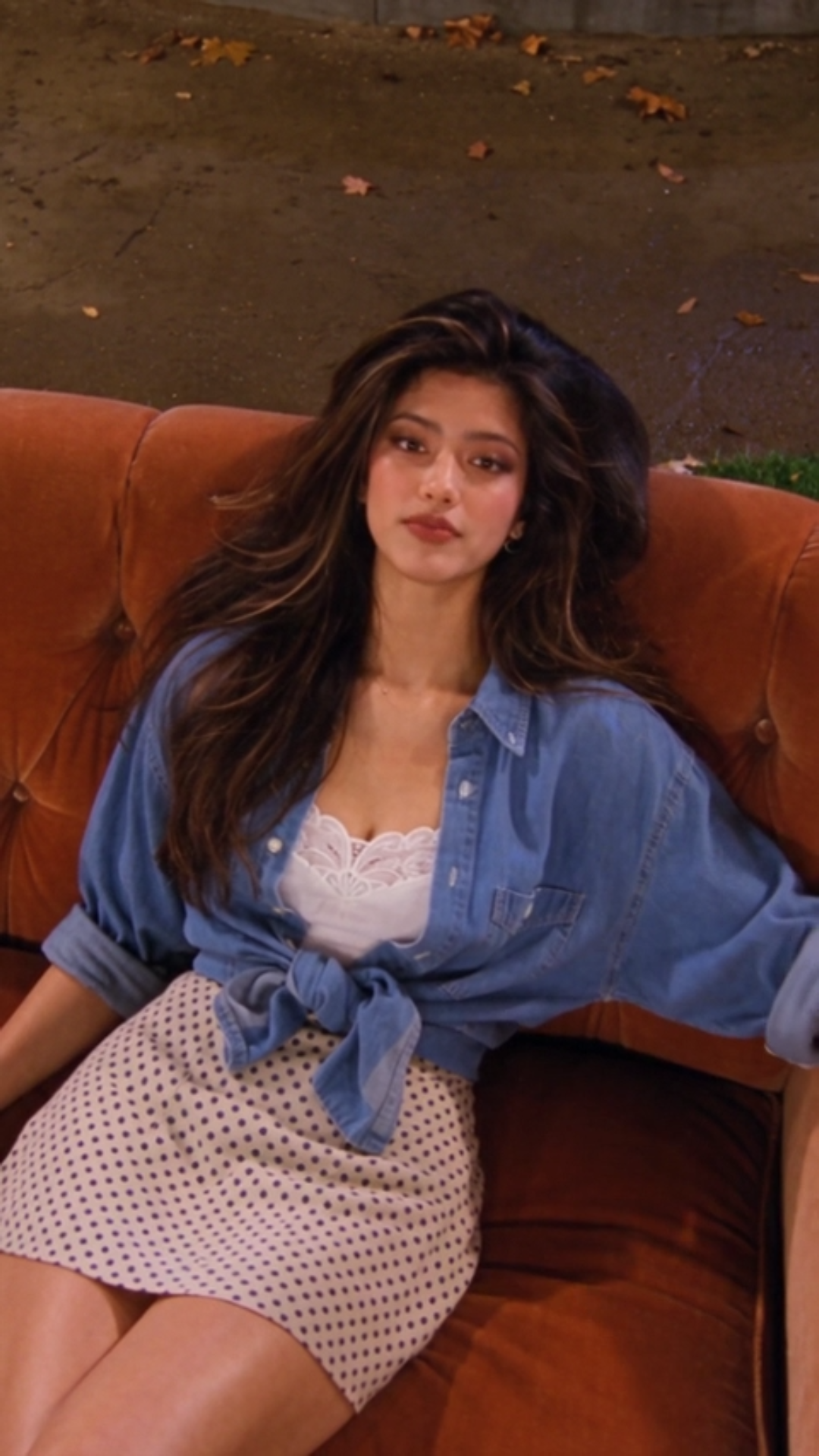
- @image2 — Fountain Courtyard: A nighttime New York courtyard featuring a stone fountain, burnt-orange velvet sofa, warm apartment lights, greenery, and a Tiffany-style lamp.
I also sometimes provide a separate audio reference recording to help communicate the intended accent and speaking rhythm. This is optional, but it can be useful for pronunciation-sensitive scenes.
4. Seedance 2.5 Prompt — Two Accents, One Phrase
Here's the prompt structure I use to combine accent switching, natural acting, and a fast camera-angle transition in a single scene.
1997 NEW YORK ROMANTIC SITCOM — TWO ACCENTS, ONE PHRASE
DURATION: 7 seconds.
ASPECT RATIO: 9:16 vertical.
STYLE: Authentic 1994–1997 American television sitcom.
REFERENCE MAP
@image1 — FEMALE LEAD
Preserve the exact same female identity, facial features, long voluminous dark-brown 1990s hairstyle, natural skin texture, and outfit.
Blue denim shirt, white lace camisole, and cream polka-dot mini skirt.
@image2 — FOUNTAIN COURTYARD
Use the uploaded empty nighttime fountain courtyard as the environment reference.
Preserve the burnt-orange velvet sofa, illuminated stone fountain, flowing water, greenery, warm streetlights, and Tiffany-style lamp.
Maintain the same environment throughout both camera angles.
CHARACTER BLOCKING
The woman sits comfortably in the center of the orange sofa.
Her body is angled slightly sideways, with one arm loosely resting along the sofa backrest.
She looks directly into the camera while speaking.
Her posture is relaxed, asymmetrical, and natural.
Allow expressive conversational hand gestures.
The woman occupies approximately 55–65% of the vertical frame height.
The orange sofa and fountain remain recognizable.
SHOT 01 — 00:00–00:02.3
CAMERA: HIGH-ANGLE MEDIUM SHOT
Camera looks downward at approximately 30 degrees.
The woman casually leans back on the sofa and looks upward toward the camera.
She lifts one hand in a small, natural palm-up gesture.
WOMAN — GENERAL AMERICAN ACCENT:
"She can say, 'cup of coffee'..."
Pronounce "cup of coffee" in a natural, everyday American accent.
Relaxed delivery, natural American vowel sounds, and conversational rhythm.
No exaggerated acting.
TRANSITION — 00:02.3–00:02.6
FAST CAMERA DROP
On the word "or," the camera quickly drops from the elevated angle to eye level.
Brief, natural motion blur.
The actress remains seated in the exact same location.
The movement ends immediately in a stable medium shot.
SHOT 02 — 00:02.6–00:05.2
CAMERA: EYE-LEVEL MEDIUM SHOT
The woman leans slightly forward, with a playful change in expression.
Her eyebrows lift naturally.
She makes a loose, expressive hand gesture, as if demonstrating a different way of speaking.
WOMAN — NATURAL LONDON ENGLISH ACCENT:
"...or, 'cup of coffee'!"
Pronounce the same phrase in a distinctly recognizable contemporary London English accent.
Use British vowel qualities and natural London conversational rhythm.
Keep the accent believable and spontaneous.
Do not use an exaggerated Cockney caricature.
The difference between the two accents must be immediately audible.
SHOT 03 — 00:05.2–00:07.0
CAMERA: CONTINUE EYE-LEVEL MEDIUM SHOT
The woman relaxes back into the sofa.
Her voice returns naturally to General American English.
WOMAN:
"It's all in the prompt."
She gives a small, knowing smile and a relaxed final hand gesture.
Finish the sentence naturally without a long pause.
ACTING STYLE
Authentic 1990s American sitcom acting.
Spontaneous, conversational delivery.
Relaxed shoulders and asymmetrical seated posture.
Natural hand gestures synchronized with speech.
Subtle changes in facial expression and upper-body position.
Realistic blinking, breathing, and facial asymmetry.
Avoid rigid posing, presenter-style delivery, and mechanical gestures.
VISUAL QUALITY
Authentic 1997 American network television broadcast.
Soft, balanced studio lighting.
Warm nighttime colors, moderate contrast, and slight analog softness.
Realistic skin pores and facial details.
Medium depth of field, with recognizable background architecture.
No modern 4K sharpness, HDR, heavy film grain, excessive bokeh, waxy skin, or artificial glow.
AUDIO
Same female voice throughout, with intentional accent switching.
First "cup of coffee": General American English.
Second "cup of coffee": Natural London English.
Final sentence: General American English.
Accurate lip synchronization.
Subtle fountain water ambience.
No additional dialogue or music overpowering speech.
CRITICAL RESTRICTIONS
Only one woman appears.
Maintain exact identity, hairstyle, and clothing.
Do not change the words "cup of coffee" between the two versions.
Do not change the sofa or fountain environment.
The woman remains seated throughout.
She maintains eye contact with the camera.
No wide establishing shot or extreme close-up.
No subtitles, logos, or watermarks.
FINAL PRIORITY: The same phrase spoken twice with clearly different American and London accents, synchronized with a fast overhead-to-eye-level camera transition, natural hand gestures, and relaxed 1990s sitcom performance.
5. How the Camera Transition Supports the Accent Change
For this scene, I wanted the accent change to feel like a visual transformation rather than just a change in dialogue.
That's why I use two distinct camera angles:
- First Angle — High-Angle Shot: The camera looks down at the actress as she speaks in General American English.
- Fast Camera Drop: The camera quickly moves from the elevated position to eye level as the accent changes.
- Second Angle — Eye-Level Shot: The actress leans forward and repeats the same phrase in London English.
This creates a clear connection between camera movement, acting, and vocal performance.
6. Tips for More Natural AI Performances
After testing different prompts, here are the details I pay the most attention to:
- Keep the hands visible: Avoid overly tight close-ups that hide natural gestures.
- Use relaxed body positions: Slightly angled shoulders and asymmetrical poses look more believable.
- Describe expressions precisely: Small smiles, eyebrow movements, and natural blinking work better than exaggerated emotions.
- Give each accent clear instructions: Specify the intended pronunciation and speaking rhythm instead of relying on vague descriptions.
- Match the camera to the performance: Camera movements should have a purpose rather than being added randomly.
- Check the audio carefully: Accent switching and lip synchronization may require additional generations or editing.
My Tip: When comparing two accents, keep the dialogue exactly the same. That way, viewers can hear the difference in pronunciation instead of being distracted by different wording. If the model struggles with accent accuracy, try providing a short audio reference for each pronunciation.
Once the visual performance and dialogue feel right, there's one final ingredient that brings everything together: music, ambience, and authentic 90s sound design.
Step 6: Edit Your Video and Add 90s-Style Audio
We've created our characters, designed the locations, and brought everything to life with Seedance 2.5 on MagicBoat AI.
But there's one final step that makes a huge difference: editing and sound design.
Even if your AI-generated visuals look exactly like a 1990s sitcom, the wrong music, sound effects, or editing rhythm can instantly break the illusion.
Here's how I put everything together to create that authentic 1990s American television atmosphere.
1. Assemble Your AI-Generated Clips
First, I import all my generated video clips into my editing software and arrange them in the correct order.
For this tutorial, I use CapCut to edit the final video.
My editing workflow is simple:
- Import the video clips generated with Seedance 2.5.
- Arrange the clips according to the planned storyline.
- Trim unnecessary pauses at the beginning and end of each clip.
- Check that the dialogue flows naturally between shots.
- Use reaction shots and natural cuts to create a believable sitcom rhythm.
- Keep the original 9:16 vertical format for Instagram Reels and TikTok.
The goal is to make the final sequence feel like a real television scene, not a collection of disconnected AI-generated clips.
2. Get the Editing Rhythm Right
One thing I love about classic American sitcoms is how natural the conversations feel.
The camera doesn't need to move constantly. Instead, the editing follows the characters' dialogue, reactions, and comedic timing.
For example, when one character asks a question, I often cut to the other character's reaction before the answer.
These small pauses and reaction shots help the scene feel more authentic.
- Dialogue Scenes: Use medium shots and natural cuts between speakers.
- Reaction Shots: Leave a brief moment for facial expressions and responses.
- Comedy Moments: Give the audience enough time to understand the joke before cutting away.
- Camera Transitions: Use dynamic movements only when they support the story or performance.
My rule: Don't over-edit. Sometimes a simple reaction shot is more effective than a complicated transition.
3. Choose Music That Fits the Era
Music is one of the easiest ways to make an AI-generated video feel nostalgic.
For a 1990s romantic sitcom, I look for music inspired by the sounds and moods of that era.
Depending on the scene, this might include:
- Light Acoustic Pop: Perfect for cozy coffee shop conversations and romantic moments.
- Warm Jazz Instrumentals: Great for relaxed New York café scenes.
- Soft Piano: Ideal for emotional dialogue and quieter moments.
- Playful Sitcom-Style Music: Useful for lighthearted transitions and comedic scenes.
I keep the music subtle so it supports the atmosphere without overpowering the characters' voices.
The goal isn't simply to use an old song. It's to choose music that feels appropriate for the setting, mood, and time period.
4. Add Realistic Environmental Sound
One detail that's easy to overlook is background ambience.
A convincing environment should sound as believable as it looks.
For my 1997 New York coffee shop scene, I might add:
- Soft background conversations.
- Coffee cups gently touching saucers.
- Subtle footsteps and café movement.
- Quiet indoor room tone.
- Occasional distant New York street noise.
For the nighttime fountain courtyard scene, I use a different sound environment:
- Gentle flowing fountain water.
- Subtle nighttime city ambience.
- Soft environmental background noise.
These small audio details make the generated locations feel more lived-in and believable.
5. Add Classic Sitcom Laughter
One of the most recognizable features of classic 1990s American sitcoms is the audience laughter.
For comedic scenes, I sometimes add subtle studio audience laughter to recreate that familiar television atmosphere.
However, timing is everything.
- Use laughter selectively: Add it after a joke or funny reaction, not after every line.
- Keep the volume natural: The laughter should feel like part of the scene.
- Leave room for dialogue: Avoid covering important lines with sound effects.
- Match the emotion: A romantic or emotional moment may work better without laughter.
For more cinematic 90s romance scenes, I usually skip audience laughter entirely and focus on music and environmental sound instead.
6. Balance Your Audio
Once the music, ambience, and sound effects are in place, I adjust the audio levels.
I want the dialogue to remain the clearest element in the mix.
My general audio priorities are:
- Dialogue: Clear, natural, and easy to understand.
- Music: Present enough to establish the mood without distracting from the scene.
- Ambience: Quiet but noticeable, adding realism to the location.
- Sound Effects: Timed precisely to the character's movements and actions.
- Audience Laughter: Used only where it supports the comedic timing.
I also check that the audio transitions smoothly between different generated clips.
A sudden change in background noise or voice volume can make the final video feel less natural.
7. Final Color and Visual Adjustments
After the audio is finished, I make a few small visual adjustments to keep the clips consistent.
For an authentic 1990s television look, I focus on:
- Soft image detail: Avoiding excessively sharp digital edges.
- Natural warm colors: Maintaining the comfortable studio lighting of classic sitcoms.
- Balanced contrast: Keeping faces and background details clearly visible.
- Consistent skin tones: Avoiding artificial orange lighting or overly smooth skin.
- Subtle analog texture: Preserving the original broadcast-inspired appearance.
I avoid applying heavy vintage filters, exaggerated VHS distortion, or excessive film grain.
The best retro effect is the one that doesn't look like an effect.
8. Export Your Final Video
Once everything looks and sounds right, I export the finished video for social media.
- Aspect Ratio: 9:16 vertical.
- Resolution: 1080 × 1920.
- Frame Rate: Match the project timeline and source footage.
- Format: MP4.
- Audio: Clear dialogue with balanced background sound.
Remember, you can export a high-quality file while still preserving the softer visual characteristics of a 1990s television broadcast.
Final Checklist
Before publishing, I always check the following:
- Are the characters visually consistent throughout the video?
- Do the facial expressions and hand gestures look natural?
- Does the dialogue match the characters' lip movements?
- Are the accents and speaking styles consistent with the prompts?
- Does the camera framing feel appropriate for a 90s sitcom?
- Do the music and environmental sounds match the scene?
- Is the dialogue clear and easy to hear?
- Does the finished video feel like authentic 1990s television?
My Tip: Don't try to create the entire nostalgic atmosphere with a single filter. The most convincing results come from combining consistent character references, believable environments, natural acting, thoughtful camera direction, and era-appropriate sound design.
And That's the Final Result!
That's my complete workflow for creating nostalgic 1990s sitcom videos with AI.
From character inspiration in Midjourney to reference images with GPT Image 2.5, video generation with Seedance 2.5, and final editing in CapCut, every step contributes to the finished look.
The most important thing I've learned is that authentic AI filmmaking is all about the details.
Now it's your turn to experiment and bring your own 90s-inspired stories to life with MagicBoat AI.