How to Make Consistent Character AI Videos
A practical five-scene workflow for keeping the same face, wardrobe, and visual identity from script and storyboard to final AI video.
Generating one beautiful AI clip is easy. Generating five shots that feel as if they feature the same actor is a production problem. The face may shift, the haircut changes, a signature coat disappears, or the character suddenly looks older when the camera moves.
The fix is not a longer prompt. A reliable consistent character AI video workflow treats the character as a reusable production asset, plans the sequence before animation, and generates each shot from an approved visual reference. That is the approach we use below.
Quick answer
- Lock the character’s identity before asking for motion.
- Create a reference sheet with multiple clear views.
- Storyboard the entire sequence before generating video.
- Use the same reference image and immutable traits for every shot.
- Generate shot by shot, then unify color, sound, and pacing in the edit.
What is a consistent character AI video?
A consistent character AI video keeps the audience convinced that the same person or fictional character is present across separate shots. The location, camera angle, action, lighting, emotion, and even wardrobe may change, but the character’s recognizable identity stays intact.
Consistency involves more than a matching face. For story-driven video, you should monitor five layers:
- Identity: facial structure, age, skin tone, body proportions, and defining features.
- Hair and styling: cut, color, texture, makeup, and grooming.
- Wardrobe and props: signature clothing, jewelry, glasses, tools, or story objects.
- World continuity: locations, time of day, art direction, and color palette.
- Performance continuity: emotion, eyeline, posture, and the direction of movement between cuts.
A face that matches while the coat, pendant, or emotional state changes without explanation still feels inconsistent. The goal is continuity, not simply similarity.
Why AI characters drift between scenes
Text prompts describe a character; they do not always define one. When each shot begins from text alone, the model reinterprets words such as “short black hair” or “woman in her thirties.” Small differences accumulate across a sequence.
| Cause of drift | What viewers notice | Better control |
|---|---|---|
| Prompt-only generation | A similar person, not the same person | Reuse an approved visual reference |
| Too many changes in one prompt | Face, costume, and setting all drift | Change one production variable at a time |
| No storyboard | Eyelines, positions, and shot order conflict | Approve the sequence as still frames first |
| Long uninterrupted generation | Identity degrades during complex motion | Use shorter, editable shots |
| Uncontrolled model switching | Texture and facial interpretation change | Carry the same references and visual rules across models |

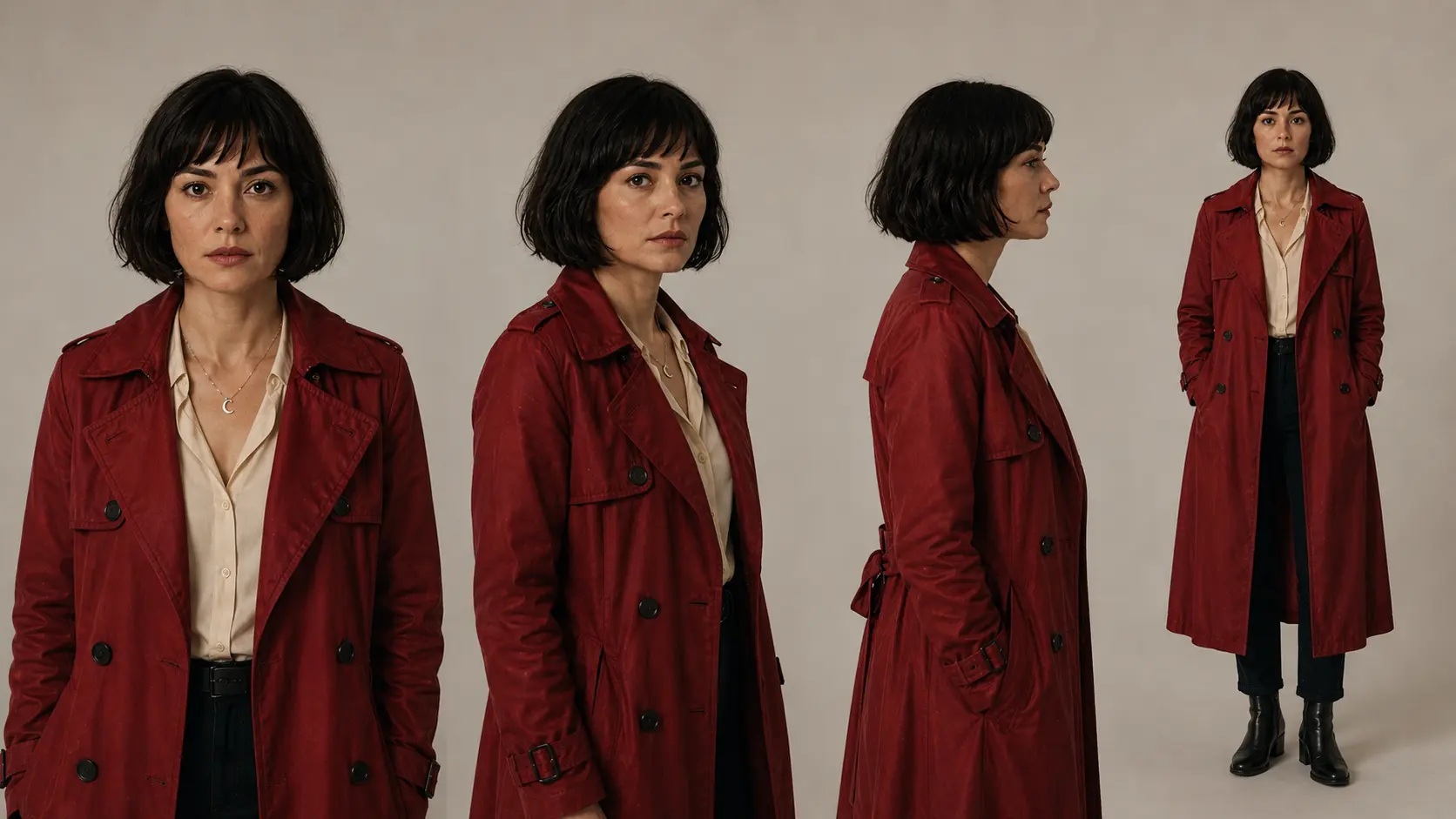
A useful character reference shows the same identity from more than one angle and preserves recognizable wardrobe details.
A five-step workflow for consistent AI characters
1Write a sequence, not one giant prompt
Start with a short script and break it into shots. Give each shot one story purpose and one primary action. A reaction close-up, a walk through a doorway, and a rooftop reveal should be separate shots rather than competing instructions inside one generation.
This structure makes script to video AI more controllable because you can decide what must stay fixed and what is allowed to change before generating anything.
2Build a reusable character reference
Create an approved reference sheet with a front view, three-quarter view, profile, and full-body view. Use clear lighting and keep the styling intentional. Then separate the character description into two groups:
- Immutable traits: identity, age range, facial structure, hairstyle, body proportions, and signature details.
- Scene variables: expression, pose, location, weather, camera, and any planned costume change.
Continuity tipA distinctive but simple cue—a crescent pendant, red coat, or unusual glasses—helps both the model and the audience recognize the character. Avoid stacking too many tiny accessories that can mutate between frames.
3Generate the storyboard before the video
An AI storyboard generator lets you test character identity, framing, camera direction, location, and shot order using still images. Still frames are faster to review than finished video and make continuity problems obvious before they become expensive rerolls.
Place all frames together as a contact sheet. Ask: Does this look like the same actor? Is the wardrobe intentional? Does the lighting progress logically? Can the character’s eyeline connect from one shot to the next?

Approve identity and composition at the storyboard stage, then animate each matching frame as a separate shot.
4Animate one approved shot at a time
For a multi-scene story, reference-led image to video AI usually gives you more control than starting every shot from text. Use the approved storyboard frame as the visual anchor, then describe only the motion, camera behavior, and performance needed for that shot.
Keep motion instructions concrete: “slow push-in,” “turns toward the train window,” or “coat moves lightly in the rooftop wind.” If the shot fails, change one variable and regenerate. Rewriting the character, action, camera, and lighting at once makes it difficult to identify what caused the drift.
5Unify the sequence in the edit
Character consistency can still feel broken when color, sound, or pacing changes sharply. Assemble the shots, normalize color temperature and contrast, keep voice characteristics stable, and use ambient sound to bridge locations. Add lip sync only where dialogue needs a visible close-up; reaction shots and cutaways can carry the rest of the scene.
AI film generator workflow is valuable here because the script, storyboard, character references, generated shots, voice, music, and edit remain part of the same production rather than scattered across unrelated tools.
Example: plan a five-shot consistent character sequence
Here is a simple sequence that tests identity under different framing and lighting without overloading any single shot.
| Shot | Story purpose | Camera and action | Continuity anchor |
|---|---|---|---|
| 1. Rainy street | Introduce tension | Close-up, subtle handheld motion, character looks off-screen | Face, black bob, red coat, crescent pendant |
| 2. Train | Show movement to a new location | Medium shot, slow push-in, turns toward window | Same outfit and emotional state |
| 3. Rooftop | Reveal scale and destination | Wide shot, locked camera, coat moves in wind | Silhouette, coat length, hair shape |
| 4. Apartment | Shift to a private decision | Warm profile, gentle dolly, small breath | Profile, pendant, restrained expression |
| 5. Doorway | End on a question | Night close-up, slow turn toward camera | Match shot 1 identity and styling |
This sequence is useful for an AI short film or micro-drama because it tests close-ups, a profile, a full-body wide shot, changing locations, and mixed lighting while keeping a clear visual anchor.
A prompt template for consistent character AI video
The reference image should carry identity. The prompt should direct the shot. Use a repeatable structure such as:
Use the attached approved character reference as the identity anchor.
[IMMUTABLE CHARACTER TRAITS]
[ONE ACTION] [LOCATION AND TIME]
[SHOT SIZE AND CAMERA MOVEMENT]
[PERFORMANCE OR EMOTION]
[LIGHTING AND COLOR DIRECTION]
Preserve the same facial identity, age, hairstyle, body proportions, signature wardrobe, and accessories. Change only the action, camera, and scene details specified above.
For the train shot, that becomes:
Use the attached approved character reference as the identity anchor.
The same fictional adult woman with a short black bob, deep red trench coat, ivory shirt, and small silver crescent pendant sits inside a quiet commuter train at night. Medium shot. She slowly turns toward the rain-streaked window as the camera makes a gentle push-in.
Restrained, alert expression.
Cool green-blue carriage light with soft warm skin tones. Preserve the same facial identity, age, hairstyle, body proportions, coat, shirt, and pendant.
Notice that the prompt does not redesign the person. It spends most of its words on what changes inside the shot.
Text-to-video vs. image-to-video for consistency
| Method | Best use | Consistency level | Main tradeoff |
|---|---|---|---|
| Text to video | Exploring concepts, environments, and unexpected motion | Lower without a character reference | Fast ideation, but more identity drift |
| Image to video | Animating an approved character keyframe | Usually stronger | Requires good still frames first |
| Reference to video | Carrying identity, wardrobe, or style across shots | Strong when references are clear | Conflicting references can reduce control |
| Script to storyboard to video | Short films, ads, and multi-scene narratives | Strongest at the workflow level | Needs planning before generation |
The best choice depends on the shot. You can use text to video for early visual exploration, then move to reference-led generation once the character and sequence are approved.
Seven mistakes that break AI character consistency
- Describing the character differently in every prompt. Reuse one canonical description and one approved reference.
- Using only a flattering front portrait. Add profile, three-quarter, and full-body views.
- Changing identity and wardrobe together. Approve a new costume keyframe before animation.
- Skipping the storyboard. Continuity is easier to fix while the sequence is still made of images.
- Generating a long scene in one attempt. Shorter shots provide more control and cleaner edits.
- Ignoring eyelines and screen direction. A matching face cannot rescue a confusing cut.
- Judging clips one by one. Review a contact sheet and the full timeline; inconsistency appears in comparison.
Why use MagicBoat AI for a consistent-character workflow?
Many AI video workflows begin as a chain of disconnected tools: one for the script, another for images, another for video, another for voice, and another for editing. Every handoff is a chance to lose the character definition, shot plan, or visual direction.
MagicBoat AI is designed around an end-to-end filmmaking process: idea and script, storyboard, characters and visuals, video generation, voice and audio, editing, and the finished video. That makes it easier to treat character consistency as a project-level decision instead of a prompt trick.
For a narrative project, begin with script to video, review the extracted sequence, approve the character and storyboard, then generate and refine shots inside the same creative flow. For an ad or social series, reuse the same character asset and visual rules across multiple deliverables.
Frequently asked questions
How do I keep the same AI character across multiple video scenes?
Create a reusable character reference, define immutable identity traits, storyboard the full sequence, and generate each shot from the same reference before editing the clips together.
Is image-to-video better than text-to-video for character consistency?
Image-to-video usually gives you a stronger identity anchor because each shot begins from an approved character frame. Text-to-video is useful for exploration; reference-led image-to-video is often better for controlled multi-scene work.
Can an AI character change clothes and still stay consistent?
Yes. Keep the same identity reference and facial traits, change the wardrobe as one deliberate variable, and approve a new keyframe before animation. A costume change should be part of the story, not accidental drift.
Do I need to use the same AI video model for every shot?
Not always. Different models may suit different motion or camera needs, but switching models increases continuity risk. Carry the same references, framing logic, and color direction into every shot, then compare the outputs together.
What should I check before exporting an AI short film?
Review face and body identity, hair, wardrobe, props, eyelines, screen direction, lighting progression, voice, lip sync, color, and audio transitions. Watch the full sequence rather than approving isolated clips.
Turn one character into a complete story
Plan the script, build the storyboard, keep your cast recognizable, generate each shot, and finish the edit in one connected AI filmmaking workflow.