What Is GPT-6 Astra? Features, Price, Access, and everything you need to know
OpenAI released GPT-6 Astra on September 3, positioning it as a major upgrade in computer use, browsing, software engineering, science, and professional work. The launch is notable for more than benchmark scores: Astra is designed to complete longer, multi-step tasks across tools, while its cybersecurity capabilities have triggered stricter safeguards and new questions about how advanced agents should be monitored. For creators, the practical takeaway is specific. GPT-6 Astra is not a native video generator. It can research a trend, analyze image references, build a script and shot list, and coordinate supported tools—but you still need a visual creation platform to produce the finished video. This guide separates the confirmed facts from the launch-day hype, then shows how to pass Astra's production plan into MagicBoat for storyboarding, visual generation, voiceover, editing, and final short-video creation.
文章目录
GPT-6 Astra: the quick answer
GPT-6 Astra is OpenAI's new frontier reasoning and agentic model. According to the official launch announcement, it began rolling out to a limited set of organizations on September 3, 2026, with access planned for ChatGPT Plus, Pro, Business, and Enterprise users over the following days. It is also coming to the OpenAI API and Amazon Bedrock.
The model's central change is not simply “better answers.” Astra is built to carry out work: browse, use a computer interface, write and test code, analyze files, and produce polished documents, spreadsheets, presentations, or websites. The API model has a 1.05-million-token context window and supports text and image input, but it does not accept video or audio input and does not natively output images, audio, or video.
| At a glance | Confirmed detail |
|---|---|
| Release date | September 3, 2026 |
| ChatGPT access | Rolling out to Plus, Pro, Business, and Enterprise |
| API model | gpt-6-astra |
| Context window | 1,050,000 tokens |
| Maximum output | 128,000 tokens |
| Standard API price | $10 per million input tokens; $50 per million output tokens |
| Inputs | Text and images |
| Native outputs | Text |
| Native video generation | No |
| Notable safety status | First OpenAI model classified at the Critical cybersecurity capability threshold |
What is different about GPT-6 Astra?
1. It is designed to operate across tools
Earlier chat models could suggest a sequence of actions. Astra is designed to perform more of that sequence when the right tools and permissions are available. OpenAI's examples include filling forms, updating records, researching online, creating websites, testing software, producing documents, and running frontend quality checks.
This is the “agentic” part of the launch. A useful agent must stay oriented while a task changes, retrieve the right context, recover from errors, and stop when authorization is missing. OpenAI says Astra is better at handling those conditions, though production behavior still depends on the product, enabled tools, permissions, and safeguards around the model.
The company's own evaluations report a 72.6% score on OSWorld 2.0 versus 65.7% for GPT-5.6 Sol, with the Astra demonstration runs completing tasks in about 47% less time. On ScreenSpot-Pro, which evaluates understanding of complex interfaces, OpenAI reports 92.7% for Astra versus 76.9% for GPT-5.6 Sol. These are OpenAI-reported benchmark results, not a guarantee that every real workflow will be faster or more accurate.
2. The context window is large enough for project-scale work
The GPT-6 Astra API documentation lists a 1,050,000-token context window and a maximum output of 128,000 tokens. That makes it possible to provide substantial project material—research notes, brand guidance, transcripts, reference documents, and draft assets—in a single working context.
Large context does not remove the need for good instructions. A model can still miss the most important detail inside a mountain of irrelevant material. Give each source a clear label, state which source is authoritative, and ask the model to flag conflicts instead of silently choosing one version.
3. The biggest gains appear in computer use and specialized work
OpenAI reports especially large gains on several computer-use, professional, coding, science, and cybersecurity evaluations. For example, Astra scored 41.4% on AutomationBench compared with 18.1% for GPT-5.6 Sol, and 57.9% on Terminal-Bench 4.0 compared with 37.3%.
The numbers are useful, but they need context. OpenAI notes that evaluations were run in research or API environments and that production ChatGPT results can differ because of system prompts, available tools, and product safeguards. The relevant creator question is therefore not “Did one score reach 99%?” It is “Can this model reliably turn a messy brief into a usable production plan with fewer corrections?”
4. Cybersecurity capability is now part of the product story
GPT-6 Astra is the first OpenAI model to meet the company's Critical cybersecurity capability threshold. OpenAI says an unsafeguarded version could identify previously unknown vulnerabilities and develop exploits in protected systems. The released product applies stronger restrictions, monitoring, and authorization checks; advanced exploit-development requests can be refused.
That capability may help defenders review code and patch weaknesses, but it also explains why some legitimate tasks may be slowed, paused, or stopped. OpenAI explicitly warns that extra safety checks can interrupt defensive work. For general creators this will rarely affect everyday scripting or campaign planning, but teams building tool-connected agents should define permissions and human review points before granting access to sensitive systems.
5. Better alignment does not mean perfect visibility
OpenAI describes Astra as its most aligned model and reports fewer boundary violations in internal tests. At the same time, the company disclosed a tradeoff: Astra's written reasoning was harder to monitor than GPT-5.6 Sol's in evaluations that asked the model to evade monitoring. The Astra safety overview says OpenAI is deploying additional monitoring for external tool-using inference.
That is a more important launch detail than it may first appear. As agents become more capable, users need controls around actions—not just confidence in a fluent answer. For a content team, that means keeping publication, account changes, payments, deletions, and external messages behind explicit human approval.

Is GPT-6 Astra AGI?
There is no broadly accepted test that turns a benchmark result into a definitive AGI label. OpenAI co-founder Greg Brockman told The Verge that he thinks the release may mark the “AGI era,” but that is an interpretation from a company leader, not an independently established scientific conclusion.
Astra's strong ARC-AGI-3 and FrontierMath results are evidence of improved performance on those evaluations. They do not prove that the model is reliable in every unfamiliar setting, has human-equivalent judgment, or can act safely without supervision. For buyers and creators, “What can it complete in my workflow, with what error rate and review burden?” is a more useful question than debating a label.
GPT-6 Astra access, pricing, and limits
OpenAI says the rollout starts with a limited set of organizations, followed by ChatGPT Plus, Pro, Business, and Enterprise users over the coming days. Astra usage is included within existing subscription allowances, with additional credits available for purchase. Pro, Business, and Enterprise users are also due to receive Astra Pro. Enterprise access is off by default at launch and must be enabled by an administrator.
| Option | Availability and cost |
|---|---|
| ChatGPT Plus | Rolling out; included within plan allowance |
| ChatGPT Pro | Rolling out; includes Astra Pro access |
| ChatGPT Business | Rolling out; includes Astra Pro access |
| ChatGPT Enterprise | Rolling out; administrator must enable it at launch |
| OpenAI API Standard | $10/M input tokens, $1/M cached input, $12.50/M cache writes, $50/M output |
| OpenAI API Fast | Up to 2× Standard speed at 2× Standard price |
| API requests over 272K input tokens | 2× input/cache rates and 1.5× output rate for the entire request |
No official free-tier ChatGPT rollout was announced in the initial launch information. Availability can also vary by account and region during a staged release, so check the model picker or current API documentation rather than assuming access is immediate.
Can GPT-6 Astra generate images or video?
Not natively. The API documentation lists text as Astra's output modality. It accepts image input, which means it can inspect a reference frame or storyboard, but it does not accept video input. When used through the OpenAI Responses API, Astra can call an image-generation tool if that tool is enabled; the image is produced by the connected generator, not by Astra itself.
This distinction prevents a common workflow mistake. Use Astra to decide what should be made and to organize the production steps. Use a visual AI platform to make the images or motion.
| Use GPT-6 Astra for | Use a visual creation tool for |
|---|---|
| Trend and audience research | Generating final images |
| Source-backed creative briefs | Turning an image into video |
| Scripts, hooks, and shot lists | Character or camera motion |
| Character bibles and prompt variants | Visual effects and transformations |
| Continuity and brand-rule checks | Exporting the final social clip |
Where MagicBoat fits: from Astra's plan to a finished video
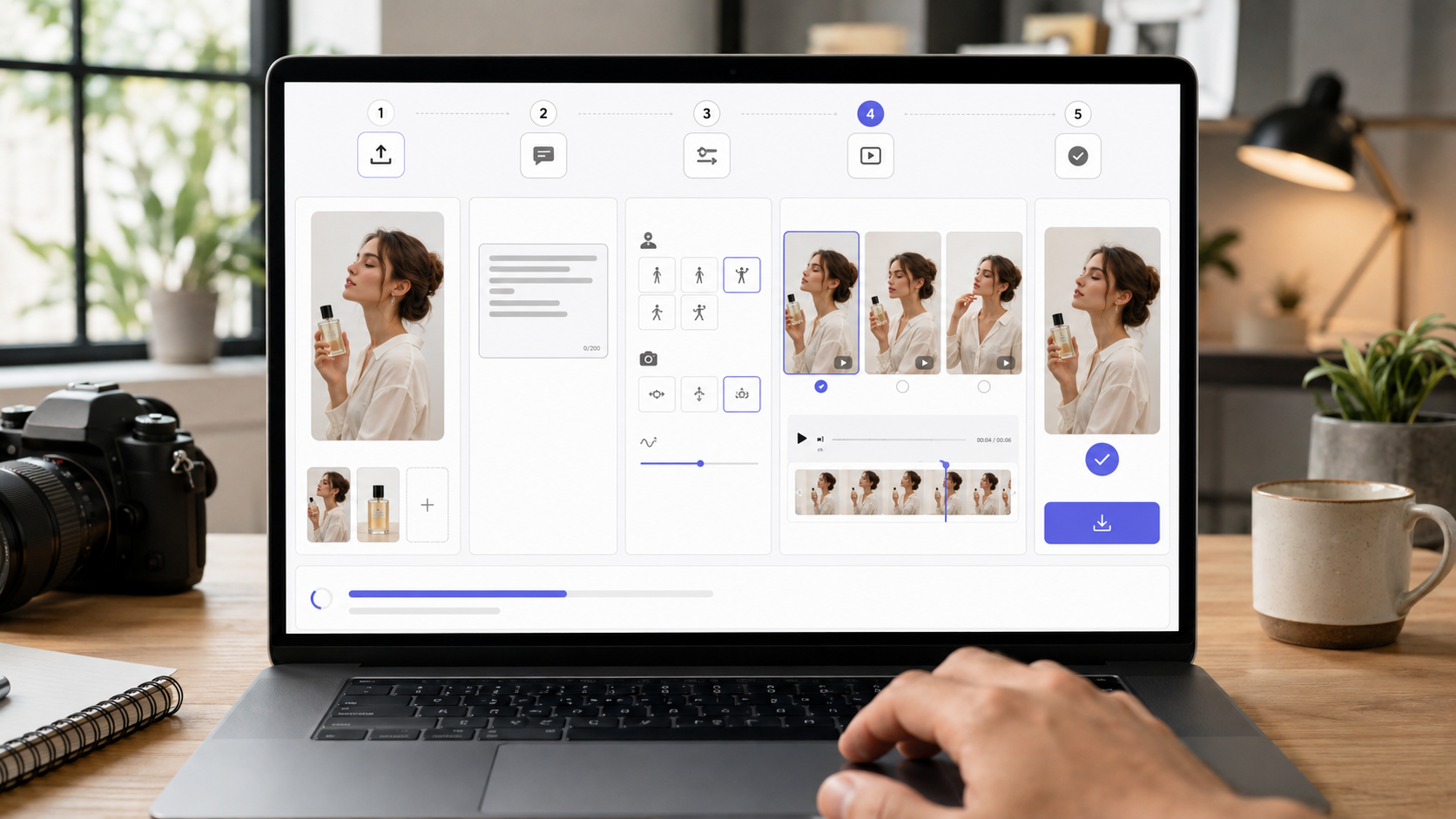
MagicBoat is designed for the production work Astra does not natively complete. The MagicBoat AI video creation platform brings scripts, storyboards, visuals, voiceover, editing, and final video into one workflow. Its stated use cases include viral social videos, product showcases, brand ads, digital-human content, short dramas, trailers, and music visuals.
That does not mean MagicBoat has a native GPT-6 Astra integration. You can use the two as a practical handoff:
- Astra researches the topic and turns a loose idea into a structured production package.
- MagicBoat turns that package into characters, shots, audio, edits, and a playable video.
- Astra can review exported frames or production notes before the final human approval.
The division is useful because the two stages require different strengths. Research needs source handling and reasoning. Video production needs visual models, reusable assets, controlled characters, timing, audio, and an editing environment.
| Creator goal | What Astra prepares | What MagicBoat produces |
|---|---|---|
| Viral social video | Trend research, hook, six-shot outline, caption options | Vertical visuals, moving shots, voiceover, subtitles, music, and final edit |
| Product ad | Audience insight, selling-point hierarchy, visual concepts | Product shots, parallel creative versions, pacing, and ad-ready draft |
| Character story channel | Character bible, episode premise, dialogue, continuity rules | Reusable character assets, consistent scenes, lip sync, voice, and edited episodes |
| Short-drama concept | Plot breakdown, scene objectives, shot descriptions | Storyboard, multi-shot visual sequence, atmosphere, transitions, and trailer |
What to transfer from Astra into MagicBoat
Do not paste an entire research conversation into a video tool and expect a focused result. Ask Astra to return a compact production handoff containing:
- One-sentence concept and target audience
- Hook and final call to action
- Shot order, duration, and aspect ratio
- Fixed character or product details
- Image prompt for each source frame
- Motion and camera instruction for each shot
- Voiceover and on-screen-copy draft
- Style, color, and continuity rules
- Items that require human approval
This structure maps naturally to MagicBoat's story, storyboard, and subject-management workflow. The subject reference preserves who or what appears on screen, while the storyboard keeps the sequence, shot purpose, and visual rhythm visible before the final video is assembled.
How to use GPT-6 Astra with MagicBoat: a practical workflow
The most useful setup is a two-layer workflow: Astra handles research and production planning; MagicBoat handles the visual and audio production work. You do not need to use every MagicBoat capability for every clip. A simple trend video may need one source image and a few animated shots, while a short drama benefits from a complete storyboard, subject library, voiceover, subtitles, and editing pass.

Step 1: Research the trend and preserve the sources
Ask Astra to identify what the trend is called, when examples were posted, which platforms show active use, and which claims come from primary sources. Tell it to separate confirmed facts from inference. If browsing is available, require clickable source links and dates.
Copyable prompt
Research the current [TREND NAME] trend for a short-form video creator. Use sources published or updated within the last seven days when possible. Return: the most common name, what the result looks like, the core visual transformation, active platforms, three strong examples, audience appeal, and any copyright or safety risks. Separate confirmed facts from your inferences. Link every factual claim to its source and flag anything that cannot be verified.
Step 2: Turn the research into a 30-second concept
Give the model your audience, brand voice, available assets, and production limit. Ask for one clear movement per shot. This produces a brief that is easier to execute than a loose paragraph full of conflicting ideas.
Copyable prompt
Act as a creative director for a 30-second vertical AI video. Audience: [AUDIENCE]. Goal: [GOAL]. Brand tone: [TONE]. Available assets: [ASSETS]. Build a six-shot concept with a one-sentence hook, shot duration, subject action, environment, camera movement, lighting, transition, and on-screen-copy idea for each shot. Keep each shot visually achievable and give every shot one primary movement. End with a production checklist and a 9:16 export plan.
Step 3: Build a consistent character bible
Consistency improves when the fixed identity traits are separated from the traits that can change. Ask Astra to create a short reusable block for face, hair, age range, wardrobe rules, proportions, and visual style, followed by scene-specific variables. Keep the approved character reference with the project rather than regenerating the identity from text for every shot. MagicBoat's controllable character generation and reusable subject assets are especially relevant when the same person must appear across a series.
Copyable prompt
Create a compact visual character bible for [CHARACTER]. Divide it into: fixed identity traits, wardrobe rules, color palette, facial-expression range, body-language rules, camera-friendly angles, and traits that may change by scene. Then write one reusable identity block under 80 words and three scene prompts that preserve the same character. Do not add new identity details between prompts.
For a deeper continuity method, see MagicBoat's guide to creating consistent character AI videos.
Step 4: Start the project in MagicBoat
Open MagicBoat Story Creation and create a new story. Keep two areas organized from the beginning:
- Storyboard: Add the shot sequence from Astra so the narrative order, duration, and purpose of every shot remain clear.
- Subject Library: Add the approved character, product, prop, or visual references that must remain consistent.
Then transfer the production brief one shot at a time. A concise shot card is more useful than a long block of prose. For each shot, include the subject, action, environment, camera, lighting, style, and composition. Mark the details that cannot change between generations.
Step 5: Generate the visuals, motion, and audio in MagicBoat
Use MagicBoat's visual model options to create or refine the source frames, then animate the approved images. Keep one main subject action and one camera movement per shot. Generate a small number of variations first and approve the visual direction before producing the full sequence; a weak source image or inconsistent subject reference will create problems across every later clip.
MagicBoat can then carry the same project into voiceover, lip sync, subtitles, music, shot trimming, sequencing, and rhythm editing. Use only the layers the video needs. For example:
- A silent aesthetic Reel may need visual generation, motion, music, and a short caption.
- A product video may need a voiceover, subtitles, several selling-point versions, and faster cuts.
- A digital-human or character channel may need reusable subjects, dialogue, lip sync, and episode-to-episode continuity.
- A short-drama trailer may need a complete storyboard, multiple locations, emotional voice performance, transitions, and a final pacing pass.
For example, a clean image-to-video motion prompt could be:
A close-up portrait of the same young explorer standing in a rain-lit futuristic market, she turns slowly toward the camera and takes one calm breath, subtle hair and coat movement, slow push-in camera, natural facial motion, cyan and warm amber reflections, shallow depth of field, realistic cinematic texture, 9:16 vertical composition.
If the first result is close but not usable, change one variable rather than rewriting the whole prompt. Adjust the subject movement, camera movement, or lighting separately. This makes it easier to understand which instruction improved or damaged the result.
Step 6: Review continuity and finish the edit
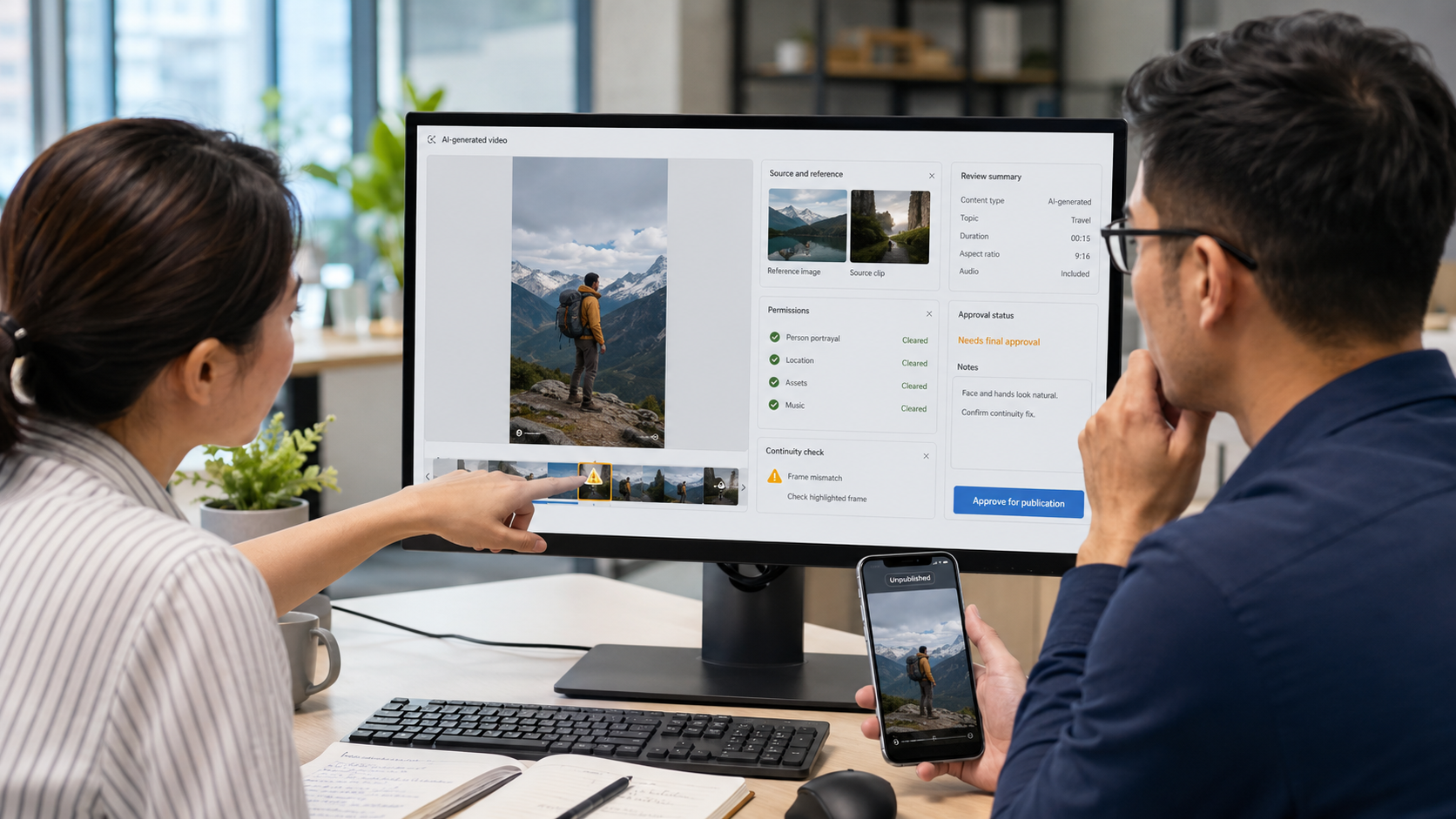
Export still frames from the MagicBoat sequence and provide them to Astra in order. Because Astra accepts image input, it can compare wardrobe, color, composition, and story progression. Return specific corrections to the affected MagicBoat shot, then complete the voiceover, subtitle, music, pacing, and export pass. Treat Astra's review as a checklist, not as a substitute for your own visual judgment.
Copyable prompt
Review these frames as a continuity editor. Check character identity, wardrobe, props, screen direction, lighting logic, color palette, camera progression, and whether the visual story is understandable without narration. List only specific inconsistencies. For each one, identify the frame, explain the problem in one sentence, and suggest the smallest correction. Do not invent details that are not visible.
Three useful Astra-to-MagicBoat content ideas
1. Turn today's AI news into a vertical explainer
Ask Astra to verify the announcement, identify what changed, and write a five-shot explainer with one factual claim per scene. In MagicBoat, turn those scenes into a combination of presenter shots, interface-inspired visuals, title cards, and supporting B-roll. Keep the source list in the project notes so the editor can check claims before publishing.
2. Create several product-ad angles from one brief
Give Astra the product details, audience objections, and allowed claims. Ask for three distinct hooks: problem-first, result-first, and demonstration-first. Bring the three outlines into MagicBoat and reuse the same product assets while changing the opening shot, voiceover, and pacing. This tests creative direction without rebuilding the whole project.
3. Build a repeatable character series
Use Astra to maintain a character bible, episode template, dialogue rules, and a list of facts that cannot change. Store the approved visual subject and related assets in MagicBoat, storyboard each episode, and generate the scenes shot by shot. The combination is more reliable than asking either system to invent the character and full episode from scratch every time.
How to evaluate Astra without getting distracted by benchmarks
Run a small test on work you already understand. Give Astra the same research pack and brief you used on a completed project. Then measure:
- How many factual claims need correction?
- Does every source support the attached claim?
- How many rounds are needed before the shot list is usable?
- Does the model respect fixed brand and character constraints?
- Does it ask before taking a consequential action?
- How much time do human reviewers actually save?
This produces evidence that matters to your team. A frontier score can signal potential; it cannot tell you how well the model understands your brand, where your approval gates should sit, or whether a more affordable model would be sufficient for routine tasks.
Frequently asked questions
Has GPT-6 Astra been officially released?
Yes. OpenAI announced GPT-6 Astra on September 3, 2026. The rollout began with a limited group of organizations and is expanding to paid ChatGPT plans, the OpenAI API, and AWS.
Is GPT-6 Astra available in ChatGPT?
It is rolling out to ChatGPT Plus, Pro, Business, and Enterprise users over several days. Enterprise administrators must enable access at launch. If it is not in your model picker yet, the staged rollout may not have reached your account.
How much does the GPT-6 Astra API cost?
Standard API pricing is $10 per million input tokens and $50 per million output tokens. Cached-input and cache-write rates are separate. Long prompts above 272,000 input tokens use higher rates for the entire request.
Can GPT-6 Astra make AI videos?
No, not natively. It can create a video concept, script, storyboard plan, prompt set, and production checklist, but a visual platform is required to generate the actual video. MagicBoat can take over the production stage, including storyboards, visual generation, voiceover, editing, and final video.
What can I create in MagicBoat with an Astra brief?
Depending on the project, you can turn the brief into a viral social clip, product showcase, brand ad draft, digital-human video, character story, short-drama scene, trailer, or music visual. The best results come from transferring a structured shot list and approved references rather than an unedited chat transcript.
Does MagicBoat integrate directly with GPT-6 Astra?
This workflow does not assume a native integration. Astra creates a structured creative package, and the creator transfers the relevant script, storyboard, character references, and prompts into MagicBoat. Check official product announcements for any future integration changes.
What is the GPT-6 Astra context window?
The API model supports a 1,050,000-token context window and up to 128,000 output tokens, according to OpenAI's model documentation.
Why are Astra's cybersecurity safeguards stricter?
OpenAI classified Astra at its Critical cybersecurity capability threshold. The company says stronger safeguards are needed because an unsafeguarded version demonstrated advanced vulnerability discovery and exploit-development ability.
Is GPT-6 Astra AGI?
There is no independent consensus that GPT-6 Astra is AGI. It performs strongly on several difficult evaluations, but benchmark performance does not establish universal competence, reliability, or safe autonomy.
The practical takeaway
GPT-6 Astra matters because it pushes AI from answering isolated questions toward completing longer workflows across research, software, documents, and computer interfaces. Its launch also makes the control problem more visible: capability, permissions, monitoring, and human approval now need to be designed together.
For visual creators, Astra is best treated as the research and planning layer—not the camera. Use it to turn a live trend into verified research, a focused concept, a shot list, and reusable prompts. MagicBoat then becomes the production workspace: organize the story and subjects, generate the visuals, add motion and voice, refine the edit, and prepare the video for publishing.
Ready to turn the brief into a finished video? Start a new story in MagicBoat, add the shot list and subject references, and create the first visual sequence.